1. Εισαγωγή
This manual provides essential information for setting up, operating, maintaining, and troubleshooting your Thunderobot Radiant 16S Gaming Laptop. Please read this guide thoroughly to ensure optimal performance and longevity of your device.
2. Ρύθμιση
2.1 Αποσυσκευασία και Αρχική Ενεργοποίηση
Carefully remove the laptop and all accessories from the packaging. Connect the power adapter to the laptop and a power outlet. Press the power button to start the laptop. Follow the on-screen instructions for initial Windows 11 Home setup.
2.2 Σύνδεση περιφερειακών
Utilize the various ports available to connect your external devices such as a mouse, keyboard, external display, or headset.
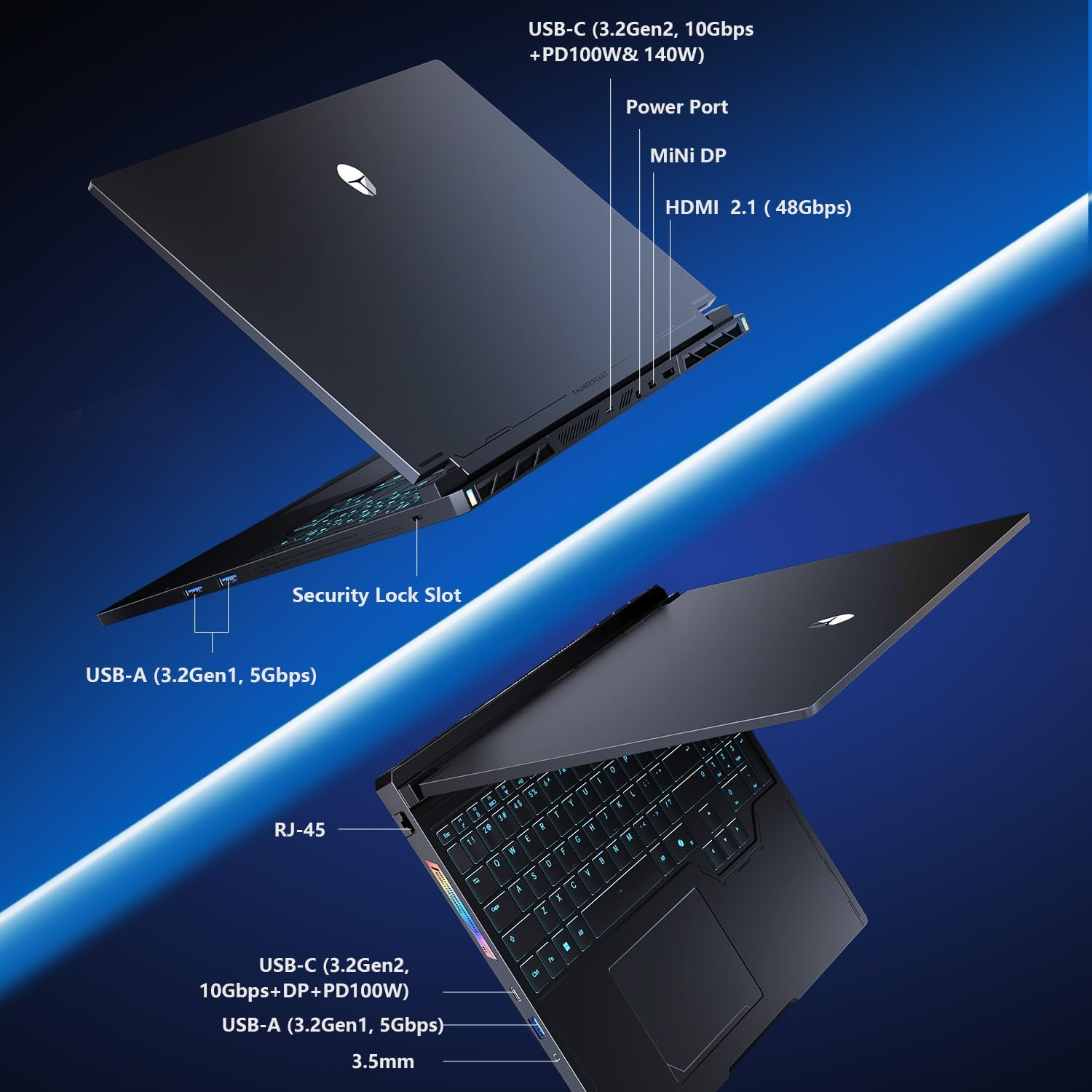
Figure 2.2: Connectivity options including USB-C, USB-A, HDMI, Mini DP, Ethernet, and audio jack.
3. Οδηγίες λειτουργίας
3.1 Πληκτρολόγιο και Touchpad
The laptop features an RGB backlit keyboard and a responsive glass-like touchpad. Customize keyboard backlighting through the system's control center software.
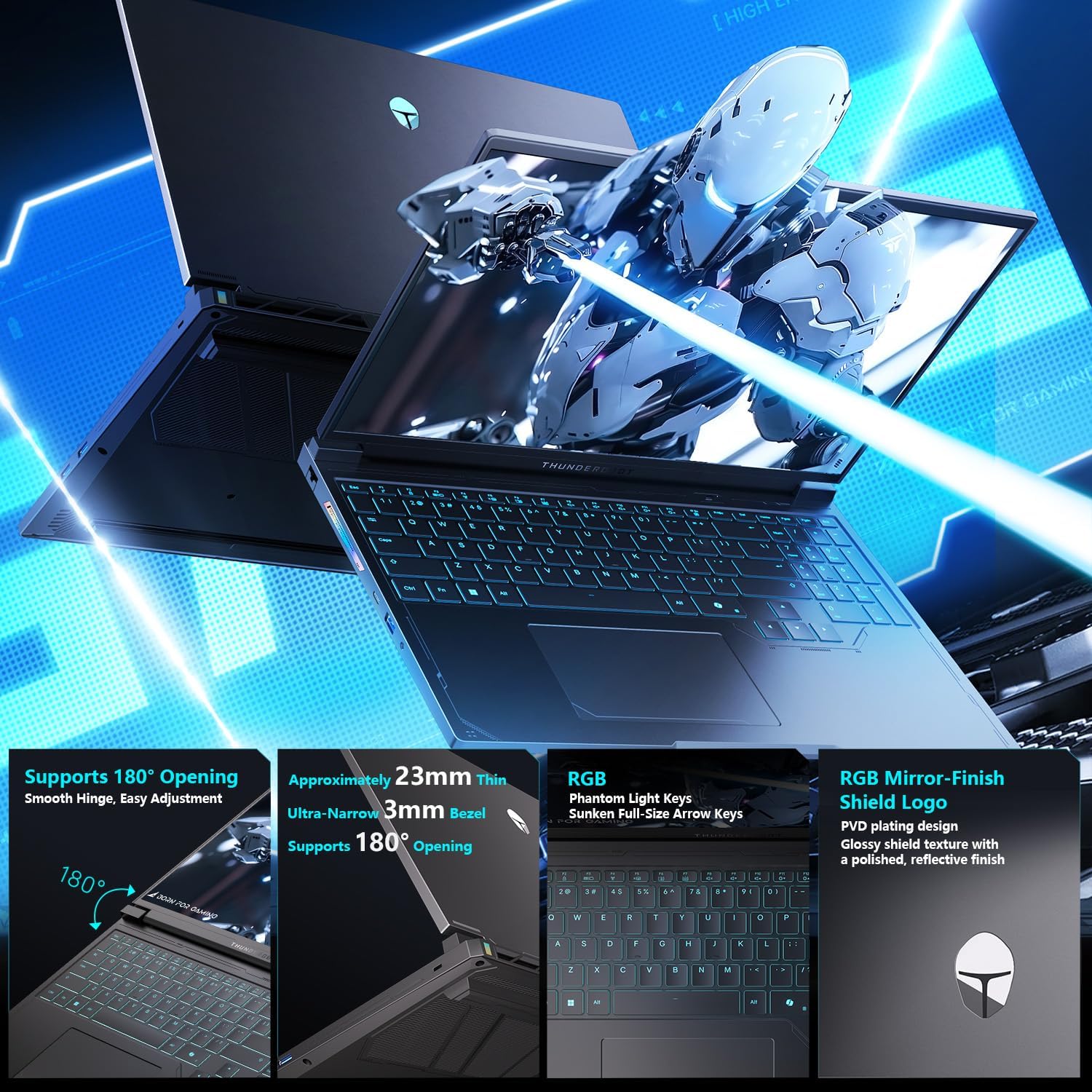
Figure 3.1: Keyboard layout with RGB backlighting and the integrated touchpad.
3.2 Control Center Modes
The integrated Control Center allows you to switch between different performance modes to optimize your laptop for various tasks. These modes include:
- Λειτουργία γραφείου: Optimized for power saving and quiet operation during productivity tasks.
- Λειτουργία παιχνιδιού: Balances performance and cooling for a smooth gaming experience.
- Λειτουργία Turbo: Unleashes maximum performance for demanding applications and intense gaming.
Ensure the device is connected to a power source to enable GPU direct-output mode and unlock the full refresh rate in the control center.

Figure 3.2: Control Center interface for managing performance modes.
4. Βασικά Χαρακτηριστικά
- Fast DDR5 Memory & NVMe Storage: Equipped with 32GB DDR5 RAM and a 1TB PCIe M.2 SSD for rapid multitasking and quick load times.
- Advanced Compute & Graphics Engine: Features an AMD Ryzen 9 7945HX processor and NVIDIA GeForce RTX 5060 Laptop GPU for high computational throughput and smooth graphics.
- 300Hz QHD+ High-Fidelity Display: A 16-inch 2560x1600 (2.5K) display with a 300Hz refresh rate, full DCI-P3 color reproduction, pro calibration, and 500-nit brightness for sharp visuals and reduced eye fatigue.
- Enhanced WindBlade Cooling Architecture: Dual ultra-thin low-noise fans, four heat pipes, and an improved 3D airflow structure deliver up to 200W of cooling performance while maintaining low noise levels (43dB).
- All-Around Connectivity Options: Includes dual USB-C, triple USB-A 3.X, HDMI, Ethernet, and an audio jack for comprehensive peripheral support.
- Wi-Fi 6: Εξασφαλίζει σταθερή και γρήγορη ασύρματη σύνδεση στο διαδίκτυο.

Εικόνα 4.1: Τέλοςview of the GPU and CPU capabilities.

Figure 4.2: Features of the Hummingbird Eye-Care Display.

Figure 4.3: Illustration of the advanced cooling system.
5. Προδιαγραφές
| Χαρακτηριστικό | Λεπτομέρεια |
|---|---|
| Μέγεθος οθόνης | 16 ίντσες |
| Μέγιστη ανάλυση οθόνης | 2560x1600 Pixels (QHD+ 2.5K) |
| Επεξεργαστής | AMD Ryzen 9 7945HX (5.4 GHz) |
| ΕΜΒΟΛΟ | 32 GB DDR5 (4800 MHz) |
| Σκληρός Δίσκος | 1 TB PCIe M.2 SSD |
| Συνεπεξεργαστής γραφικών | Κάρτα γραφικών NVIDIA GeForce RTX 5060 για φορητό υπολογιστή (8GB GDDR6) |
| Λειτουργικό σύστημα | Windows 11 Home |
| Ασύρματος τύπος | 802.11ax (Wi-Fi 6) |
| λιμάνια | Dual USB-C, Triple USB-A 3.X, HDMI 2.1, Ethernet, Audio Jack, Mini DP |
| Ειδικά Χαρακτηριστικά | RGB Backlit Keyboard, Numeric Keypad, Hummingbird Eye-Care Panel |
| Βάρος αντικειμένου | 12 λίρες |
| Διαστάσεις προϊόντος | 14.05 x 10.22 x 1.17 ίντσες |
6. Συντήρηση
6.1 Καθαρισμός
Regularly clean the screen with a soft, lint-free cloth and a screen-safe cleaning solution. Use compressed air to clear dust from the keyboard and cooling vents. Ensure the laptop is powered off before cleaning.
6.2 Cooling System Care
The WindBlade Cooling Architecture is designed for efficient heat dissipation. To maintain optimal cooling performance, ensure that the air vents are not obstructed. Avoid placing the laptop on soft surfaces that can block airflow. Periodically check for dust buildup in the vents and clean as described above.
6.3 Διάρκεια ζωής μπαταρίας
To maximize battery life, avoid fully discharging the battery frequently. For prolonged storage, charge the battery to about 50-60% and store the laptop in a cool, dry place.
7. Αντιμετώπιση Προβλημάτων
7.1 Προβλήματα τροφοδοσίας
- Ο φορητός υπολογιστής δεν ενεργοποιείται: Βεβαιωθείτε ότι ο προσαρμογέας ρεύματος είναι συνδεδεμένος με ασφάλεια τόσο στον φορητό υπολογιστή όσο και σε μια πρίζα που λειτουργεί. Ελέγξτε αν η πρίζα λειτουργεί.
- Η μπαταρία δεν φορτίζει: Βεβαιωθείτε ότι ο προσαρμογέας ρεύματος είναι σωστά συνδεδεμένος. Δοκιμάστε μια διαφορετική πρίζα.
7.2 Προβλήματα οθόνης
- Χωρίς εμφάνιση: Connect an external monitor to check if the issue is with the laptop's internal display. Ensure the display cable is properly connected if using an external monitor.
- Οθόνη που τρεμοπαίζει: Update your graphics drivers. Adjust display refresh rate settings in Windows.
7.3 Ζητήματα απόδοσης
- Αργή απόδοση: Close unnecessary applications. Check for background processes consuming high CPU/RAM. Ensure the cooling system is clean and functioning. Switch to a higher performance mode in the Control Center.
- Υπερθέρμανση: Ensure vents are clear. Use the laptop on a hard, flat surface. Consider using a cooling pad.
8. Εγγύηση και υποστήριξη
Κάθε φορητός υπολογιστής Thunderobot περιλαμβάνει ένα 12 μήνες εγγύηση, offering expert support and thorough diagnostics. We also provide a Εγγύηση 90 ημερών σε όλα τα ανταλλακτικά που καλύπτονται από την εγγύηση, εξασφαλίζοντας επισκευές χωρίς προβλήματα. Η απόλυτη ικανοποίησή σας είναι η δέσμευσή μας.
For technical assistance, please visit the official Thunderobot support website or contact our customer service team. Keep your purchase receipt and product serial number handy for faster service.


