1. Εισαγωγή
This manual provides detailed instructions for the LAUNCH Creader Elite V3.0 OBD2 Scanner, a professional diagnostic tool designed specifically for Land Rover and Jaguar vehicles. It covers device setup, operational procedures for various diagnostic and service functions, software updates, and troubleshooting tips. Please read this manual thoroughly before operating the device to ensure correct usage and optimal performance.
2. Το προϊόν τελείωσεview
2.1. Τι υπάρχει στο κουτί
- 1 * LAUNCH Creader Elite V3.0 OBD2 Scanner for JLR
- 1 * OBD2 Diagnostic Cable
- 1 * Οδηγός γρήγορης εκκίνησης
- 1 * Εγχειρίδιο χρήστη
2.2. Βασικά Χαρακτηριστικά
The LAUNCH Creader Elite V3.0 offers a comprehensive suite of features for vehicle diagnostics and maintenance:
- Βελτιωμένο Υλικό: Features Android 8.1 operating system, 32GB ROM, 3000mAh battery, and 2.4&5GHz dual-band Wi-Fi for improved performance.
- DoIP Protocol Support: Supports the new DoIP protocol for Land Rover & Jaguar models manufactured after 2017 (requires an adapter).
- Full Systems Diagnostics: Provides in-depth scanning for all available vehicle modules, including engine, transmission, ABS, SRS, and more.
- Αμφίδρομος έλεγχος (Ενεργή δοκιμή): Allows control of vehicle components and systems for active testing, such as windows, mirrors, wipers, and horn.
- Ολοκληρωμένες λειτουργίες εξυπηρέτησης: Includes Oil Reset, Electronic Parking Brake (EPB) Reset, Battery Management System (BMS) Reset, Steering Angle Sensor (SAS) Calibration, Injector Coding, Throttle Relearn, Height Calibration, Transmission Adaptation, Crankshaft/Camshaft Relearn, Sunroof Calibration, and more.
- Ροή δεδομένων 4 σε 1 σε πραγματικό χρόνο: Displays real-time data from multiple sensors simultaneously in a graphical format, with recording and playback capabilities.
- Smart Diagnostic Functions: Features Auto VIN for automatic vehicle identification, DTC Lookup for code explanations, and the ability to generate and share diagnostic reports.
- Πλήρεις λειτουργίες OBD2: Supports all 10 OBD2 test modes for universal vehicle compatibility (post-1996 models).
- Δωρεάν ενημερώσεις εφ' όρου ζωής: Provides lifetime free software updates specifically for Land Rover and Jaguar vehicle brands.
2.3. Device Comparison
The Creader Elite V3.0 offers significant upgrades over previous versions:

Image: Comparison of Creader Elite V3.0, V2.0, and V1.0, highlighting V3.0's superior features like DoIP, Android 8.1, 32GB memory, and 2.4&5GHz WiFi.
2.4. Φυσική περιγραφή
The device features a durable orange casing with a 4-inch touchscreen display. The back of the device includes product identification details such as the model number, FCC ID, and serial number.
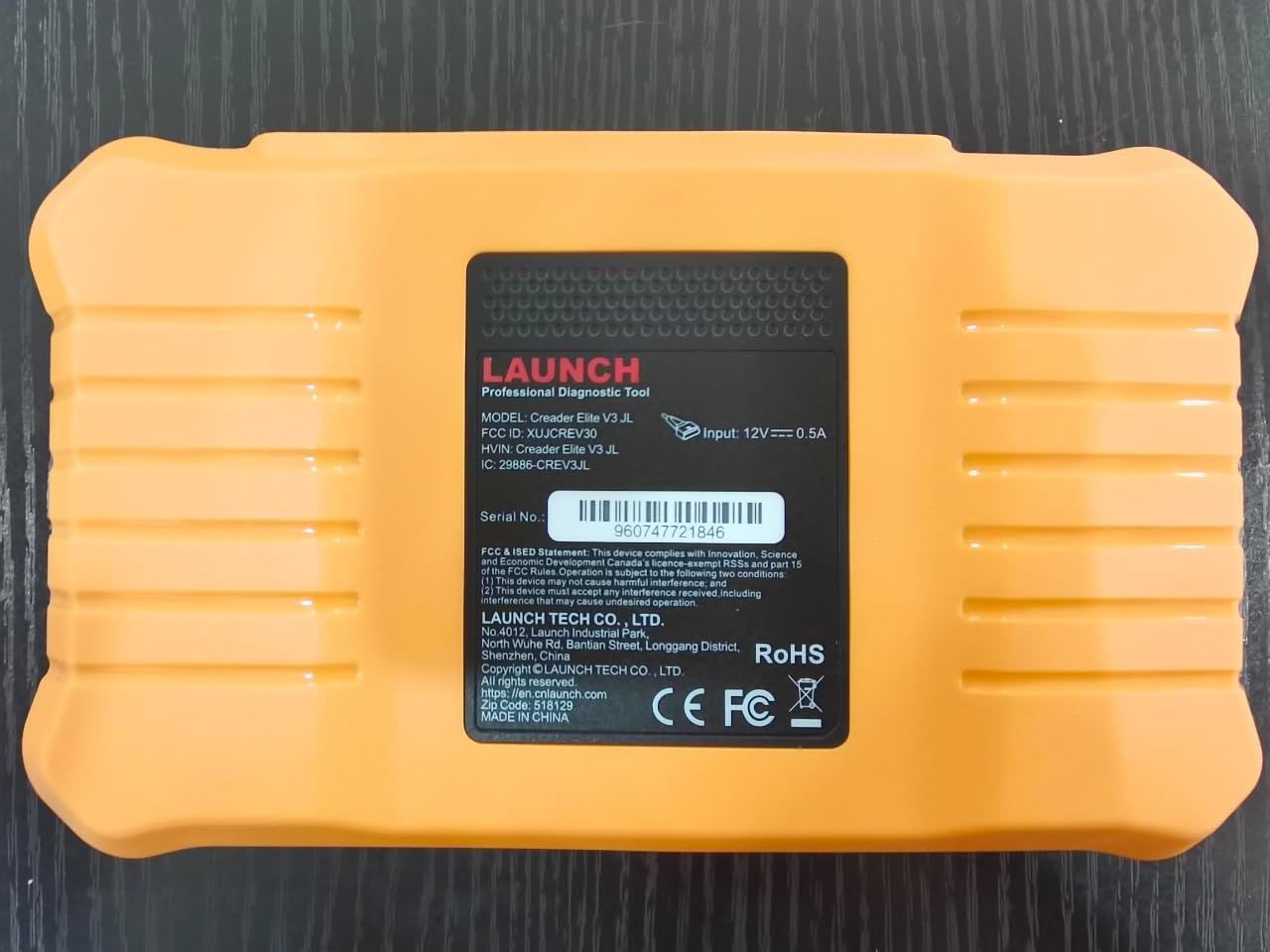
Εικόνα: Πίσω view of the LAUNCH Creader Elite V3.0, displaying the model number, FCC ID, and serial number (e.g., 960747721846).
3. Ρύθμιση
3.1. Αρχική ενεργοποίηση
- Βεβαιωθείτε ότι η συσκευή είναι πλήρως φορτισμένη ή συνδεδεμένη σε πηγή ρεύματος.
- Πατήστε παρατεταμένα το κουμπί λειτουργίας μέχρι να φωτιστεί η οθόνη.
- Ακολουθήστε τις οδηγίες στην οθόνη για να επιλέξετε την προτιμώμενη γλώσσα και περιοχή σας.
3.2. Σύνδεση Wi-Fi
- Από το κύριο μενού, μεταβείτε στο Ρυθμίσεις.
- Επιλέγω Wi-Fi και ενεργοποιήστε το.
- Επιλέξτε το δίκτυο Wi-Fi που επιθυμείτε από τη λίστα και εισαγάγετε τον κωδικό πρόσβασης, εάν σας ζητηθεί.
- Confirm the connection. A stable internet connection is required for software updates and online resources.
3.3. Εγγραφή και ενεργοποίηση
Upon first use or after a factory reset, you may be prompted to register your device. Follow the on-screen instructions to create an account or log in. This step is crucial for accessing software updates and technical support.
4. Οδηγίες λειτουργίας
4.1. Σύνδεση με το Όχημα
- Εντοπίστε τη θύρα διαγνωστικού OBD2 του οχήματος, συνήθως κάτω από το ταμπλό στην πλευρά του οδηγού.
- Βεβαιωθείτε ότι η μίζα του οχήματος είναι στη θέση ON θέση (κινητήρας σβηστός ή σε λειτουργία, ανάλογα με τη δοκιμή).
- Connect the OBD2 diagnostic cable to the vehicle's OBD2 port and to the LAUNCH Creader Elite V3.0 device.
- The device will automatically power on or prompt you to do so.
4.2. Full Systems Diagnostics
This function allows you to scan all available electronic control units (ECUs) in the vehicle.

Image: Display showing OE-level all system diagnostics, including Auto VIN, fault codes, 4-in-1 live data, and MIL reset.
- Από το κύριο μενού, επιλέξτε Τοπική διάγνωση.
- Choose the vehicle brand (Land Rover or Jaguar).
- Επιλέγω Αυτόματη αναζήτηση or Χειροκίνητη επιλογή. Auto Search (Auto VIN) will attempt to automatically identify the vehicle.
- Once the vehicle is identified, select Έκθεση Υγείας or Σάρωση συστήματος to perform a comprehensive scan of all modules.
- Review the diagnostic trouble codes (DTCs) and ECU information. You can then choose to clear codes if necessary.
4.3. Λειτουργίες Υπηρεσίας
The Creader Elite V3.0 provides numerous maintenance and reset services. Access these functions via Diagnose > Brand > System Selection > Special Function.

Εικόνα: Πάνωview of various service functions including Oil Reset, Brake Reset, SAS Calibration, Start-Stop Reset, TPMS Reset, Injector Coding, Battery Reset, ABS Bleeding, Seat Calibration, and Height Calibration.
Common services include:
- Επαναφορά λαδιού: Resets the engine oil life system.
- Επαναφορά EPB: Resets the electronic parking brake after replacement.
- Βαθμονόμηση SAS: Βαθμονομεί τον αισθητήρα γωνίας τιμονιού.
- Κωδικοποίηση εγχυτήρα: Κωδικοποιεί τους νέους αριθμούς μπεκ ψεκασμού στην ECU.
- Επαναμάθηση γκαζιού: Επαναμάθει τη θέση του σώματος του γκαζιού.
- Βαθμονόμηση ύψους: Calibrates the vehicle's suspension height.
- Επαναφορά μπαταρίας: Registers a new battery replacement.
- Αιμορραγία ABS: Performs ABS brake bleeding procedures.
Note: The availability of specific service functions may vary depending on the vehicle model and year. Always check compatibility before performing a service.
4.4. Αμφίδρομος έλεγχος (Ενεργές δοκιμές)
Active tests allow you to send commands to vehicle systems and components to verify their functionality.

Image: Depicts bi-directional active tests, showing the device sending commands to vehicle actuators like wipers, windows, clutch, and injectors to check their status.
- Navigate to the desired vehicle system within the diagnostic menu.
- Επιλέγω Ενεργό τεστ or Αμφίδρομος έλεγχος.
- Choose the specific component or system you wish to test (e.g., 'Wiper Test', 'Window Test', 'Horn Test').
- Follow the on-screen instructions to activate and observe the component's response.
4.5. Πλήρεις λειτουργίες OBD2
For universal vehicle diagnostics (all OBD2 compliant vehicles after 1996), use the OBD II επιλογή μενού.
- Διαβάστε τους κωδικούς: Retrieves generic (P0, P2, P3, U0) and manufacturer specific (P1, P3, U1) codes.
- Διαγραφή κωδικών: Clears diagnostic trouble codes and turns off the Malfunction Indicator Light (MIL).
- Ζωντανά δεδομένα: Εμφανίζει ροή δεδομένων σε πραγματικό χρόνο από τους αισθητήρες του οχήματος.
- I/M ετοιμότητα: Ελέγχει την ετοιμότητα των συσκευών παρακολούθησης που σχετίζονται με τις εκπομπές.
- Πάγωμα πλαισίου: Εμφανίζει ένα στιγμιότυπο των συνθηκών λειτουργίας κατά τη στιγμή ενός σφάλματος που σχετίζεται με τις εκπομπές.
- Δοκιμή αισθητήρα O2: Ανακτά τα αποτελέσματα των δοκιμών της οθόνης αισθητήρα O2.
- Δοκιμή ενσωματωμένης οθόνης (Λειτουργία 6): Ανακτά αποτελέσματα για εξαρτήματα και συστήματα κινητήρα που σχετίζονται με τις εκπομπές ρύπων.
- Δοκιμή συστήματος EVAP (Λειτουργία 8): Ξεκινά μια δοκιμή του συστήματος ελέγχου εκπομπών αναθυμιάσεων.
- Πληροφορίες οχήματος: Ανακτά τον αριθμό αναγνώρισης οχήματος (VIN), το αναγνωριστικό βαθμονόμησης (CALID) και τον αριθμό επαλήθευσης βαθμονόμησης (CVN).
4.6. Real-Time Monitoring and Data Stream
Monitor various vehicle parameters in real-time to diagnose intermittent issues or verify repairs.

Image: Real-time monitoring screen showing battery voltage, transmission oil temperature, coolant temperature, and vehicle speed, with a detailed 4-in-1 data stream graph below.
- From the diagnostic menu, select Ζωντανά δεδομένα.
- Επιλέξτε τις παραμέτρους που θέλετε να παρακολουθήσετε.
- The device can display up to four data streams simultaneously in a graphical format.
- Χρησιμοποιήστε το Ρεκόρ και Αναπαραγωγή functions to capture and review data for later analysis.
4.7. Smart Diagnostic Features
The device includes features to streamline the diagnostic process:
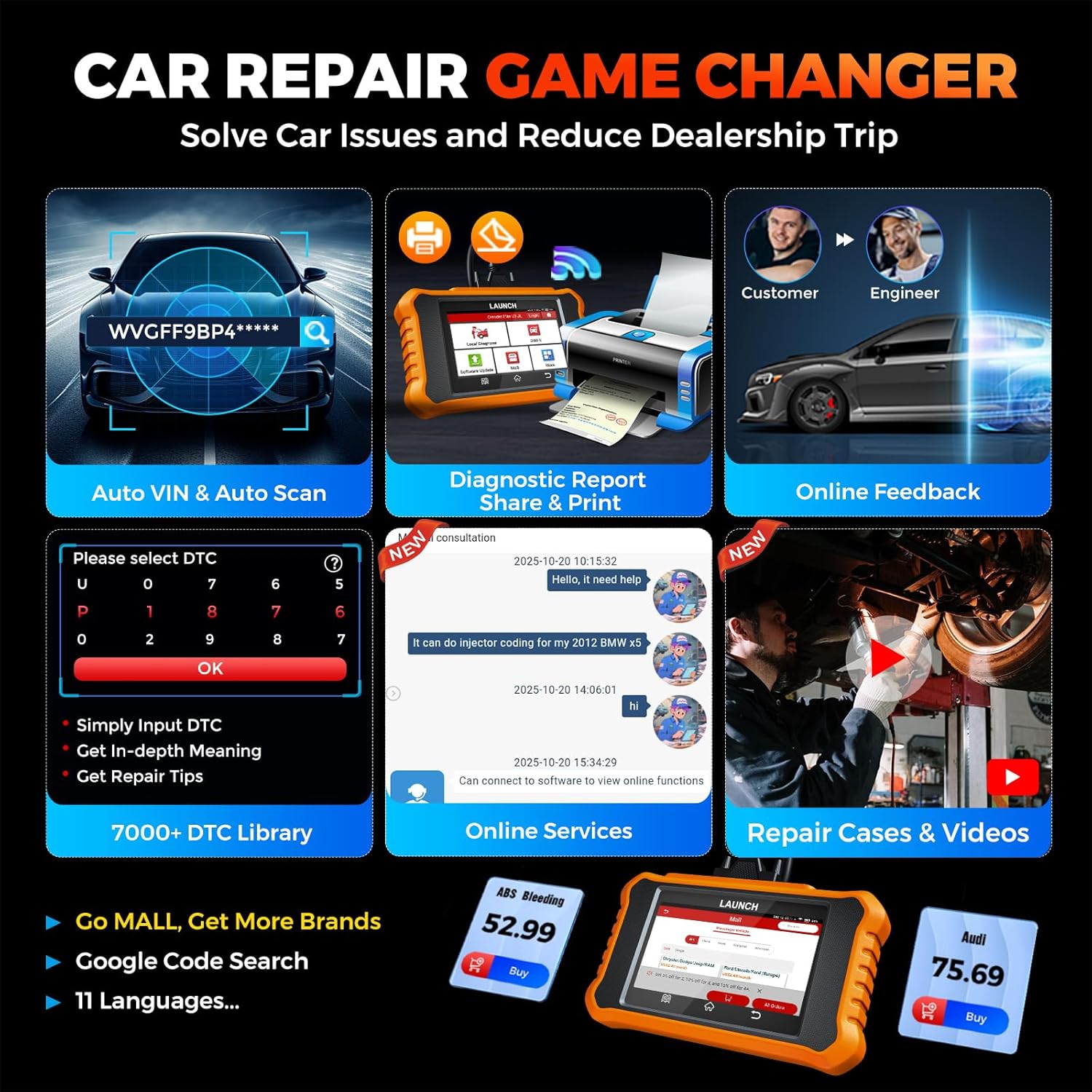
Image: Smart diagnostic features such as Auto VIN, diagnostic report generation and printing, online feedback, 7000+ DTC library, and access to online services.
- Αυτόματος αριθμός πλαισίου (VIN): Automatically identifies vehicle information (year, make, model) for quicker diagnostics.
- Αναζήτηση DTC: Παρέχει λεπτομερείς εξηγήσεις για τους κωδικούς βλάβης διαγνωστικού ελέγχου.
- Διαγνωστική Αναφορά: Generates a professional diagnostic report that can be shared or printed.
- Ηλεκτρονική ανατροφοδότηση: Allows users to submit feedback or issues directly to technical support.
5. Maintenance & Updates
5.1. Ενημερώσεις λογισμικού
The LAUNCH Creader Elite V3.0 offers lifetime free software updates for Land Rover and Jaguar brands.
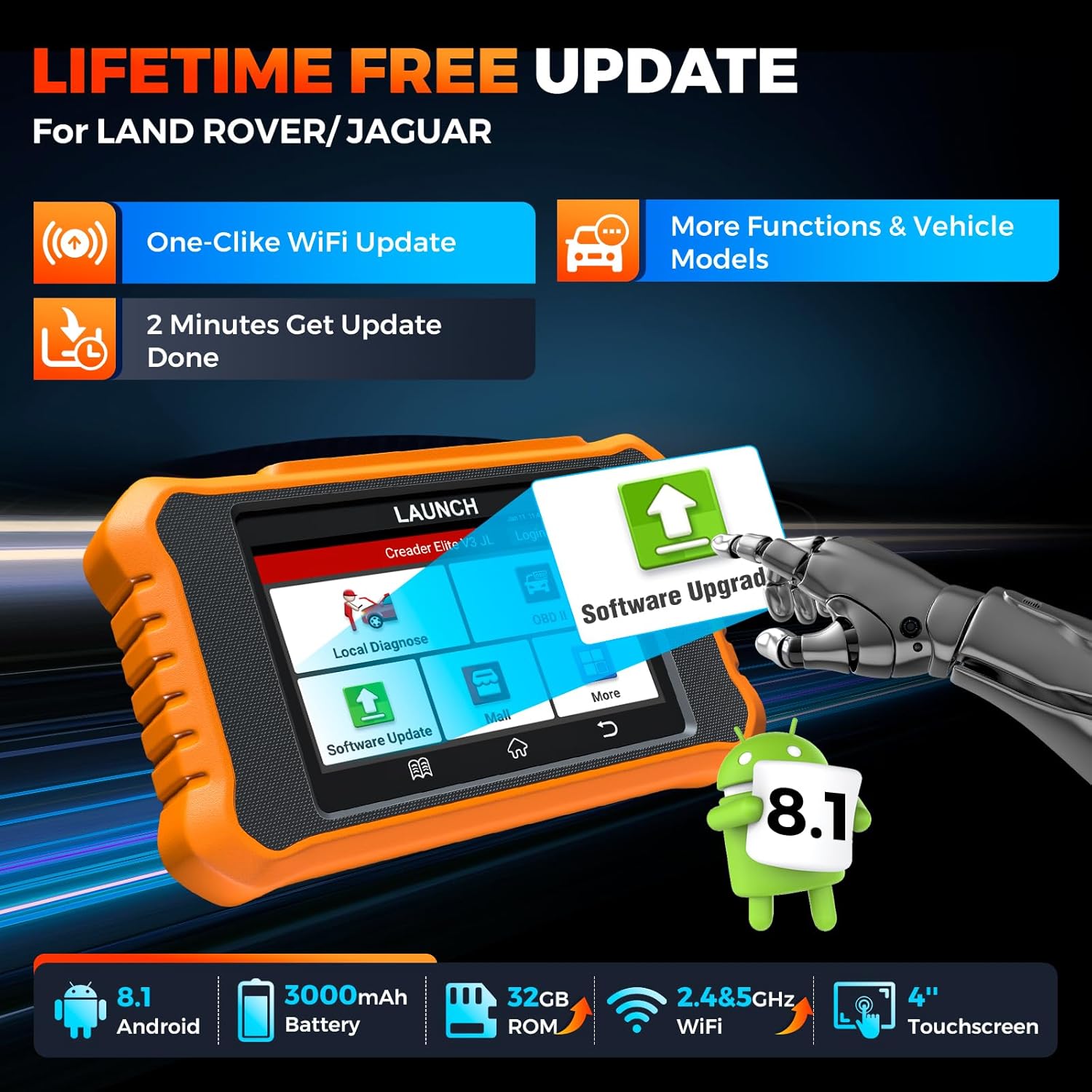
Image: Device screen illustrating the one-click Wi-Fi update process, emphasizing lifetime free updates for Land Rover/Jaguar and the ability to get more functions and vehicle models.
- Βεβαιωθείτε ότι η συσκευή είναι συνδεδεμένη σε ένα σταθερό δίκτυο Wi-Fi.
- Από το κύριο μενού, επιλέξτε Ενημέρωση λογισμικού.
- Η συσκευή θα ελέγξει για διαθέσιμες ενημερώσεις.
- Select the updates you wish to install and follow the on-screen prompts. Updates typically take a few minutes.
5.2. Expanding Vehicle Coverage (Mall)
If you require diagnostic capabilities for other vehicle brands beyond Land Rover and Jaguar, you can purchase additional software packages from the Εμπορικό κέντρο application on the device. Please note that software purchased from the Mall is typically valid for one year and may require re-purchase after expiry.
5.3. Φροντίδα συσκευής
- Διατηρείτε τη συσκευή καθαρή και απαλλαγμένη από σκόνη και υγρασία.
- Αποφύγετε να ρίξετε τη συσκευή ή να την εκθέσετε σε ισχυρές κρούσεις.
- Αποθηκεύστε τη συσκευή σε δροσερό, ξηρό μέρος όταν δεν τη χρησιμοποιείτε.
- Χρησιμοποιήστε μόνο το παρεχόμενο καλώδιο φόρτισης και τα αξεσουάρ.
6. Αρμονία
The LAUNCH Creader Elite V3.0 is primarily designed for:

Image: Device interface showing diagnostic options for Land Rover (Defender, Discovery, Range Rover, Evoque) and Jaguar (E-Pace, F-Pace, F-Type, S-Type, X-Type, XE, XF, XJ, XK) models, with a note on DoIP protocol for models after 2017.
- Landrover: Compatible with models such as Defender, Discovery, Discovery Sport, Range Rover, Range Rover Evoque, etc.
- Ιαγουάρος: Compatible with models such as E-Pace, F-Pace, F-Type, S-Type, X-Type, XE, XF, XJ, XK, etc.
- DoIP Protocol: Supports Land Rover & Jaguar models after 2017, requiring a separate DoIP adapter.
- Universal OBD2: Fully compatible with all OBD2 compliant vehicles manufactured after 1996 for basic OBD2 functions.
For specific vehicle compatibility, it is recommended to contact technical support via obdbox21@163.com.
7. Προδιαγραφές
| Μοντέλο | LAUNCH Creader Elite 3.0-JL |
| Λειτουργικό σύστημα | Android 8.1 |
| Μέγεθος οθόνης | 4 ίντσες |
| Εσωτερική αποθήκευση (ROM) | 32 GB |
| Χωρητικότητα μπαταρίας | 3000 mAh |
| Wi-Fi | Διπλή ζώνη 2.4 & 5GHz |
| Πηγή ισχύος | Τροφοδοτείται από μπαταρία |
| Βάρος αντικειμένου | 1.49 λίρες |
| Διαστάσεις συσκευασίας | 8 x 7.5 x 1.5 ίντσες |
| Τύπος προσαρμογής αυτοκινήτου | Universal Fit (for OBD2 functions) |
8. Αντιμετώπιση Προβλημάτων
8.1. Η συσκευή δεν ενεργοποιείται
- Check battery level. Connect the device to a charger and allow it to charge for at least 30 minutes.
- Βεβαιωθείτε ότι το κουμπί λειτουργίας είναι πατημένο και κρατημένο σωστά.
- If connected to the vehicle, ensure the vehicle's ignition is on and the OBD2 cable is securely connected.
8.2. Σφάλμα επικοινωνίας με το όχημα
- Verify the OBD2 cable is securely connected to both the device and the vehicle's port.
- Βεβαιωθείτε ότι η μίζα του οχήματος είναι στη θέση ON θέση.
- Confirm that the vehicle is OBD2 compliant (generally 1996 and newer for US vehicles).
- Try a different OBD2 compliant vehicle to rule out a vehicle-specific issue.
- Ensure the correct vehicle brand software is installed and up to date.
8.3. Αποτυχία ενημέρωσης λογισμικού
- Check your Wi-Fi connection for stability and signal strength.
- Ensure the device has sufficient battery charge or is connected to power during the update process.
- Verify that there is enough free storage space on the device.
- Επανεκκινήστε τη συσκευή και επιχειρήστε ξανά την ενημέρωση.
8.4. Inaccurate Readings or Functions Not Working
- Ensure the vehicle's make, model, and year are correctly identified by the device.
- Verify that the specific function is supported for your vehicle model and year. Refer to the compatibility section or contact support.
- Ensure the device software is fully updated.
9. Εγγύηση και υποστήριξη
9.1. Πληροφορίες εγγύησης
The LAUNCH Creader Elite V3.0 comes with an Extended 60-Day Return & Replacement policy and a 5-Year Quality Backup. Please retain your proof of purchase for warranty claims.
9.2. Τεχνική Υποστήριξη
For any technical assistance, questions, or compatibility inquiries, please contact our support team:
- E-mail: obdbox21@163.com
- Our support team is available 24/7/365.
Note: Please direct all support inquiries to the provided email address. Do not contact LAUNCH Tech USA for support related to this specific product.


