Εισαγωγή
This manual provides detailed instructions for the GuliKit TT MAX Bluetooth Controller. It covers product features, setup procedures, operational guidelines, and maintenance information. Please read this manual thoroughly before using your controller to ensure optimal performance and longevity.
Προϊόν Πάνωview
The GuliKit TT MAX is an advanced wireless gamepad designed for multi-platform compatibility, offering precise control and extensive customization options. Key components include tension-adjustable TMR joysticks, smart triggers, and magnetic levitation motors for enhanced haptic feedback.
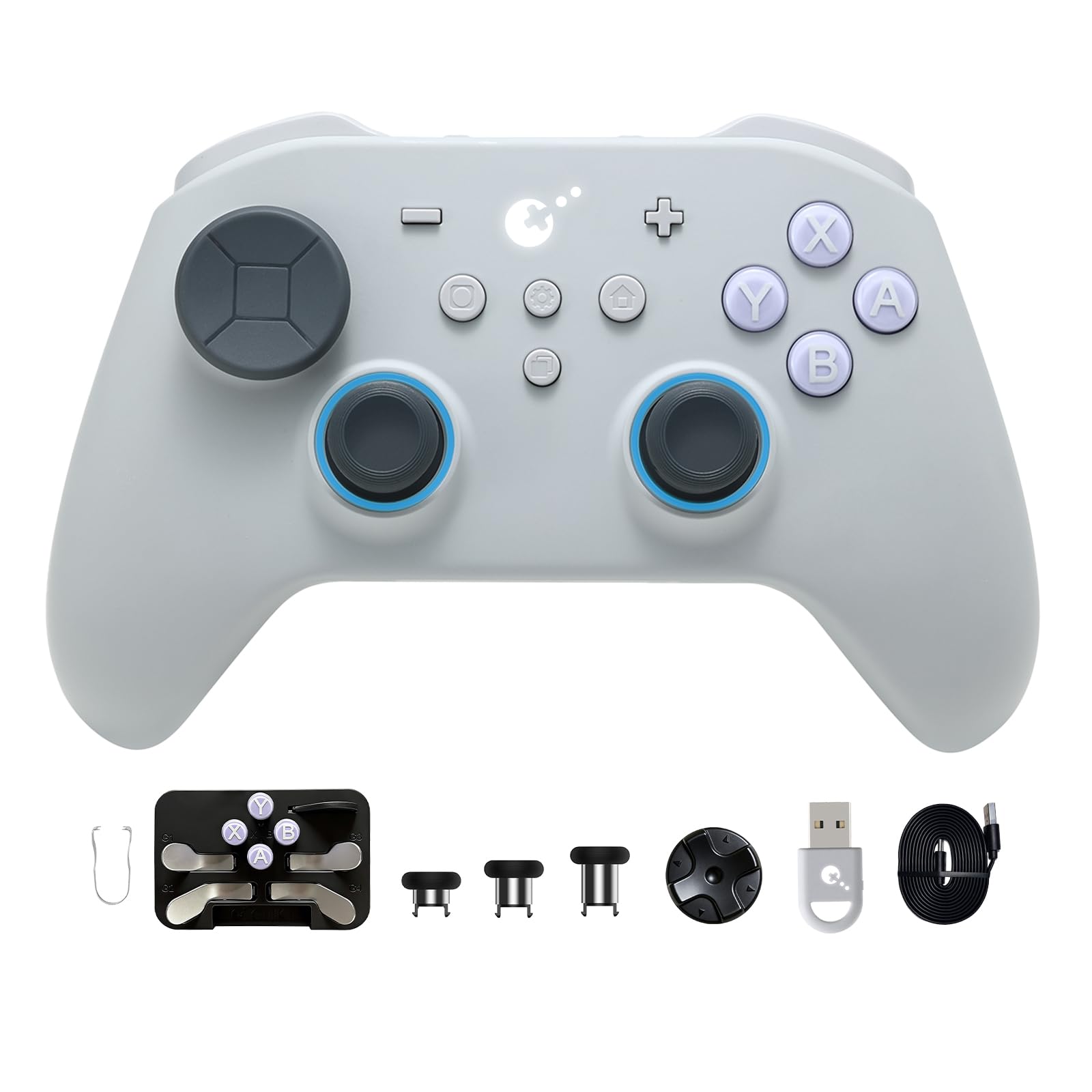
Εικόνα: Μπροστά view of the GuliKit TT MAX Bluetooth Controller, showcasinτον εργονομικό σχεδιασμό και τη διάταξη κουμπιών.
Ρύθμιση & Εγκατάσταση
1. Installing Back Buttons
The GuliKit TT MAX controller features four removable metal back paddles for customizable gameplay. Follow these steps to install or remove them:
- Place the back buttons into their corresponding slots on the rear of the controller.
- Press down on the button and simultaneously push it to the left until it clicks into place.
- To remove, apply force from the side upwards and to the left to disengage the button.
Video: Demonstrates the installation and removal of the back buttons on the GuliKit TT MAX controller.
2. Installing Joysticks
The controller allows for interchangeable joysticks. To install new joysticks:
- Gently remove the original joystick by pulling it upwards.
- Identify the slot position for the new joystick.
- Align the new joystick with the slot.
- Press down the joystick vertically with both hands until it is securely seated.
3. Installing D-Pad
The D-pad is also interchangeable, allowing for different tactile experiences:
- Remove the existing D-pad by gently prying it from the inside edge.
- Locate the D-pad slot on the controller.
- Check the slot position for the new D-pad.
- Install the new D-pad vertically along the slot, pressing it down until it is firm.
4. Pairing with Nintendo Switch 1/2 (Wake-Up Enabled)
To pair your GuliKit TT MAX controller with a Nintendo Switch and enable the wake-up function:
- Turn on the GuliKit TT MAX controller.
- Double-click the mode button on the controller to switch to Switch mode (indicated by specific LED lights).
- Press and hold the pairing button on the controller until the four indicator lights flash in sequence.
- Ensure your Switch console is in sleep mode. Press the HOME button on a Joy-Con to wake the screen.
- On the Switch, navigate to the controller pairing interface and complete the pairing process.
Video: Guide on special wake-up enabled pairing for Nintendo Switch 1 and 2.
Οδηγίες Λειτουργίας
Tension-Adjustable TMR Joysticks
The controller features 720° stepless force adjustable magnetic TMR joysticks. These joysticks offer 4000-level precision and are designed to prevent stick drift. The adjustment mechanism is hidden to avoid accidental changes during gameplay.

Εικόνα: Εξερράγη view of the 720° tension-adjustable TMR joysticks, highlighting their precision mechanism.
World's Fastest Wireless Speed (Hyperlink 2)
Utilizing GuliKit's "Hyperlink 2" Bluetooth technology, the controller achieves an ultra-low latency of 2.62ms on PC, providing a faster response compared to other 2.4G and Bluetooth controllers. Wired connectivity offers 2.16ms latency with a 1000Hz polling rate.

Image: Comparison chart illustrating the low latency of Hyperlink 2 wireless technology versus other controllers.
Smart Triggers
The 2-in-1 Hall effect and microswitch switchable triggers allow for optimal control across various gaming scenarios. Microswitch mode provides ultra-fast response, while Hall analog mode offers pressure-sensitive control.

Image: Visual representation of the 2-in-1 smart triggers, detailing microswitch and Hall analog modes.
Magnetic Levitation Motors
Experience enhanced immersion with exclusive magnetic levitation motors. Users can switch between HD, Super Haptic, and Rotor vibration modes, with adjustable intensity to suit different gaming platforms and preferences.

Image: Illustration of the magnetic levitation motors and the three available vibration modes: HD Rumble, Super Haptic, and Rotor Vibration.
Rich Accessories for Customization
The controller comes with a variety of accessories for personalized setup:
- 4 Removable Metal Back Paddles: Fully remappable for faster reactions.
- 2 Sets of Switch & PC Layout Keycaps: Allows swapping ABXY button layouts.
- 3 Sets of Different Height Stickcaps: For varied joystick feel and control.
- 2 Style Interchangeable D-Pads: Choose between different D-pad designs for optimal fit.
- Protection Case: Για ασφαλή αποθήκευση και μεταφορά.
- Καλώδιο δεδομένων: Για ενσύρματη σύνδεση και φόρτιση.
- Hyperlink 2 Multi-functional Bluetooth Adapter: Supports various controllers (Xbox Series S/X & Elite Series 2, PS4/PS5/Switch Pro/Xbox One Bluetooth controllers) across Switch 1/2, Windows, SteamOS/Android platforms.

Εικόνα: Πάνωview of the customizable components including detachable back paddles, swappable ABXY buttons, D-pads, and stickcaps.
Συμβατότητα πολλαπλών πλατφορμών
The GuliKit TT MAX controller offers wide compatibility, working seamlessly with:
- Nintendo Switch
- Nintendo Switch 2
- Υπολογιστής με Windows
- Συσκευές Android
- συσκευές iOS
It supports both wired and Bluetooth connectivity and includes a wake-up function for Switch 1/2.

Image: The GuliKit TT MAX controller connected to various devices, illustrating its multi-platform compatibility.
Additional Pro Features
The controller integrates several advanced features for an enhanced gaming experience:
- Gyro Motion: For Switch and motion aiming in PC gaming.
- APG Function: Auto-Pilot Gaming allows recording and auto-playback of up to 10 minutes of actions.
- Anti-Snapback Settings: Prevents unwanted turnaround in joystick input.
- Φωτισμός RGB: Adjustable lighting for joysticks and other indicators.
- Joystick Sensitivity & Deadzone Adjustment: Fine-tune control for precision.
- 4/8 Way D-pad Swap: Customize D-pad input response.
- Μπαταρία 950mAh: Provides extended gameplay on a single charge.

Image: Visuals demonstrating features such as APG Macro Function, Switch 1/2 Wake-Up, Star Ring RGB Lighting, and Anti-Snapback Mode.
Προδιαγραφές
| Χαρακτηριστικό | Λεπτομέρεια |
|---|---|
| Αριθμός μοντέλου | TT MAX |
| Κατασκευαστής | GuliKit |
| Βάρος αντικειμένου | 12.4 ουγγιές |
| Διαστάσεις συσκευασίας | 7.13 x 5.04 x 2.91 ίντσες |
| Μπαταρίες | Απαιτείται 1 μπαταρία 9V (περιλαμβάνεται) |
| Συνδεσιμότητα | Bluetooth, ενσύρματο |
| Wireless Latency (PC) | 2.62ms (Hyperlink 2) |
| Ενσύρματη καθυστέρηση | 2.16ms (1000Hz Polling Rate) |
| Τύπος χειριστηρίου | Tension-Adjustable TMR Joysticks |
| Τύπος σκανδάλης | 2-in-1 Hall effect & Microswitch |
| Κινητήρες κραδασμών | Magnetic Levitation Motors (HD, Super Haptic, Rotor) |
| Αρμονία | Switch, Switch 2, Windows PC, Android, iOS |
Αντιμετώπιση προβλημάτων
If you encounter issues with your GuliKit TT MAX controller, consider the following general troubleshooting steps:
- Ζητήματα σύνδεσης: Ensure the controller is fully charged. Re-attempt pairing with your device. For Bluetooth connections, ensure no other devices are interfering. Try a wired connection to rule out wireless issues.
- Καθυστέρηση εισόδου: For wireless connections, ensure you are within optimal range of your device. Avoid 2.4GHz Wi-Fi interference by using 5GHz Wi-Fi if possible. On Windows, disable "Show notifications to connect using 'Swift Pair'" in Bluetooth settings.
- Button/Joystick Malfunction: Verify that all customizable components (joysticks, D-pad, back paddles) are correctly installed and seated. If issues persist, consult the official GuliKit support resources.
- Λειτουργία αφύπνισης: Ensure the controller is in Switch mode and the Switch console is in sleep mode before attempting to wake it.
For more specific problems, refer to the official GuliKit webιστότοπο ή επικοινωνήστε με την υποστήριξη πελατών.
Συντήρηση
To maintain your GuliKit TT MAX controller in optimal condition:
- Καθάρισμα: Use a soft, dry cloth to wipe the controller. Avoid abrasive cleaners or solvents. For hard-to-reach areas, a cotton swab can be used.
- Αποθήκευση: Store the controller in a cool, dry place, away from direct sunlight and extreme temperatures. Use the provided protection case when not in use or during transport.
- Φροντίδα μπαταρίας: Charge the controller regularly, even if not in frequent use, to prolong battery life. Avoid fully discharging the battery for extended periods.
- Component Care: When swapping joysticks, D-pads, or back paddles, handle them gently to avoid damage to the components or the controller's internal mechanisms.
Εγγύηση & Υποστήριξη
For information regarding product warranty, returns, or technical support, please refer to the official GuliKit webιστότοπο ή επικοινωνήστε με τον πωλητή λιανικής από τον οποίο αγοράσατε το προϊόν. Κρατήστε την απόδειξη αγοράς για τυχόν αξιώσεις εγγύησης.


