1. Το προϊόν τελείωσεview
The YESIDO KM27 is a 2.4G wireless video intercom doorbell system designed for enhanced home security and convenient communication. It features a 4.3-inch indoor display screen, infrared night vision capabilities, two-way audio communication, and supports video recording to a TF card for monitoring purposes.
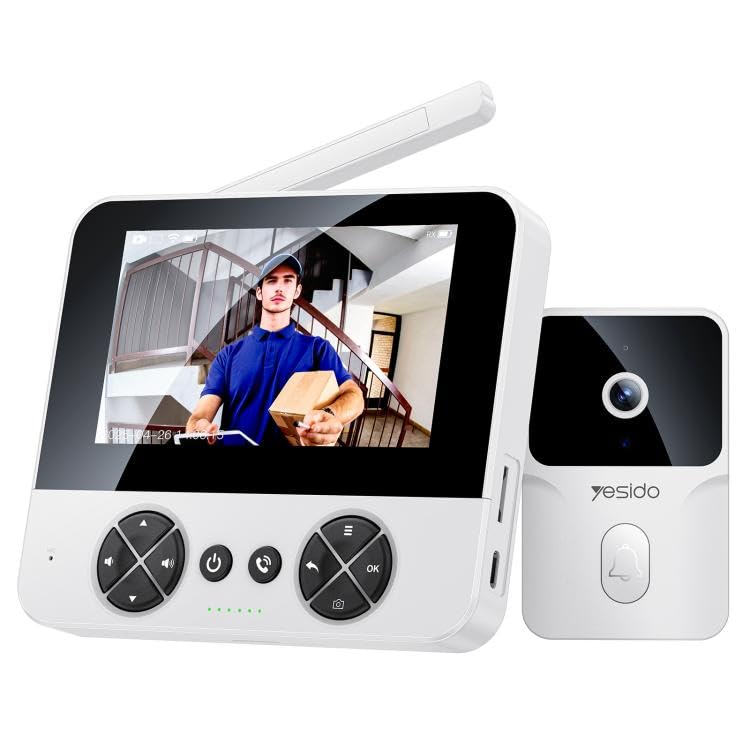
Image 1.1: The YESIDO KM27 wireless video intercom doorbell system, showing both the outdoor doorbell unit and the indoor display unit.
2. Περιεχόμενα συσκευασίας
Βεβαιωθείτε ότι όλα τα στοιχεία υπάρχουν στη συσκευασία:
- Εξωτερική μονάδα κουδουνιού
- Indoor Display Unit (4.3-inch screen)
- Καλώδιο φόρτισης τύπου C
- Εξαρτήματα Τοποθέτησης (Βίδες, Αγκύρια Τοίχου)
- Εγχειρίδιο χρήστη
3. Οδηγίες εγκατάστασης
3.1 Φόρτιση των μονάδων
Before initial use, fully charge both the outdoor doorbell unit and the indoor display unit using the provided Type-C charging cable and a DC5V/1A power adapter (not included). The outdoor unit's 1000mAh lithium battery provides approximately 6 months of standby time on a single charge.
3.2 Installing a TF Card (Optional)
To enable photo and video recording, insert a TF card (up to 256GB, not included) into the designated slot on the indoor display unit. Ensure the card is inserted correctly.
3.3 Τοποθέτηση της εξωτερικής μονάδας κουδουνιού
- Choose a suitable location near your door, ensuring clear visibility and within the wireless range of the indoor unit (up to 50 meters indoors, 300 meters in open air).
- Σημειώστε τα σημεία διάτρησης χρησιμοποιώντας τη βάση στήριξης ως πρότυπο.
- Ανοίξτε τρύπες και τοποθετήστε ούπα τοίχου, εάν είναι απαραίτητο.
- Στερεώστε τη βάση στήριξης στον τοίχο με βίδες.
- Attach the outdoor doorbell unit to the mounting bracket. The unit is IP65 waterproof, suitable for outdoor conditions.
3.4 Placing the Indoor Display Unit
Place the indoor display unit in a convenient location within your home where you can easily view the screen and hear notifications. Ensure it is within the effective wireless transmission range of the outdoor unit.
4. Οδηγίες λειτουργίας
4.1 Ενεργοποίηση/Απενεργοποίηση
Press and hold the power button on both units to power them on or off.
4.2 Απάντηση σε κλήση κουδουνιού
When a visitor presses the doorbell button on the outdoor unit, the indoor display unit will ring and show a real-time video feed. Press the 'Answer' button on the indoor unit to initiate two-way voice intercom with the visitor.
Image 4.1: The indoor display unit showing a visitor and enabling two-way communication.
4.3 Διπλή αμφίδρομη ενδοεπικοινωνία
After answering, you can speak to the visitor through the indoor unit's microphone and speaker, and hear their response through the outdoor unit's speaker and microphone. This allows for clear communication with low latency.
4.4 Υπέρυθρη Νυχτερινή Όραση
The outdoor unit is equipped with infrared night vision, allowing for clear visibility of visitors at the door both day and night. This feature automatically activates in low-light conditions.

Image 4.2: The outdoor unit utilizing intelligent infrared night vision for clear visibility in darkness.

Image 4.3: Comparison demonstrating clear night vision capability of the YESIDO KM27.
4.5 Photo/Video Recording
Κατά τη διάρκεια μιας κλήσης ή μιας ζωντανής μετάδοσης view, press the 'Record' button on the indoor unit to take a photo or start video recording. This function helps maintain a record of door activity.

Image 4.4: The outdoor unit automatically capturing photos or recording videos when the doorbell is pressed.
4.6 Προσαρμογή ρυθμίσεων
The indoor unit features shortcut keys for adjusting volume and screen brightness. There are four selectable ringtones with adjustable volume levels.
5. Συντήρηση
5.1 Φόρτιση
Regularly charge both units. The outdoor unit's battery life is approximately 6 months on standby. The indoor unit should be charged as needed.
5.2 Καθαρισμός
Wipe the units with a soft, dry cloth. Avoid using abrasive cleaners or solvents that could damage the surfaces.
5.3 Διαχείριση καρτών TF
Περιοδικά ρεview και να διαχειριστείτε ηχογραφημένο footage on the TF card. Format the card if necessary to free up space or resolve recording issues.
6. Αντιμετώπιση Προβλημάτων
- Χωρίς βίντεο/ήχο: Ensure both units are powered on and fully charged. Check that they are within wireless range. Restart both units.
- Κακή ασύρματη εμβέλεια: Reduce obstacles between the outdoor and indoor units. Ensure the indoor unit is not placed near sources of interference (e.g., microwaves, large metal objects). The external industrial-grade antenna provides a range of 300 meters in open air and 50 meters indoors (through walls).
- Η μπαταρία αδειάζει γρήγορα: Ensure units are fully charged. Excessive use of live view or recording can reduce battery life.
- Προβλήματα ηχογράφησης: Check if a TF card is properly inserted and has sufficient free space. Format the TF card if necessary.
- Η οθόνη δεν ανταποκρίνεται: Try restarting the indoor display unit. If the issue persists, ensure it is charged.
7. Προδιαγραφές
| Υλικό | PC+ABS+TPU |
| Κύριος ελεγκτής | V821 |
| Ισχύς ηχείου | 1W |
| Αισθητήρας εικόνας | GC0328C5 |
| Λειτουργία μετάδοσης | 2.4G Ασύρματο |
| Συμπίεση βίντεο | MJPEG, H.265 |
| Τροφοδοτικό | Τύπος-C, DC5V/1A |
| IPC Battery | 1000mAh (Μπαταρία λιθίου) |
| Οθόνη LCD | 4.3-inch TFT, 480x272 pixels |
| Ανάλυση κάμερας | 1MP |
| Ανάλυση λήψης βίντεο | 1080p |
| Αδιάβροχη Βαθμολογία | IP65 |
| Εύρος μετάδοσης | 300m (open air), 50m (indoors) |
| Υποστήριξη κάρτας TF | Έως 256GB (δεν περιλαμβάνεται) |
| Outdoor Unit Standby Time | Περίπου 6 μηνών |
| Ειδικά Χαρακτηριστικά | 2-Way Audio, Infrared Night Vision |
| Διαστάσεις προϊόντος | 20 x 10 x 8 εκ |
8. Πληροφορίες εγγύησης
Specific warranty details for the YESIDO KM27 are not provided in the product information. Please refer to the retailer or manufacturer's official website for warranty terms and conditions, or contact their customer service directly.
9. Υποστήριξη πελατών
For technical assistance, troubleshooting, or further inquiries regarding your YESIDO KM27 Wireless Video Intercom Doorbell, please contact the retailer where you purchased the product or visit the official YESIDO support channels.


