Εισαγωγή
Ευχαριστώ για την αγοράasing the Shark CleanSense iQ+ Cordless Stick Vacuum Cleaner. This high-performance model, IW3145JNC, is designed to provide efficient and convenient cleaning with its advanced sensing technology and automatic dust collection system. This manual contains important information regarding the assembly, operation, maintenance, and troubleshooting of your new vacuum cleaner. Please read it thoroughly before use and keep it for future reference.
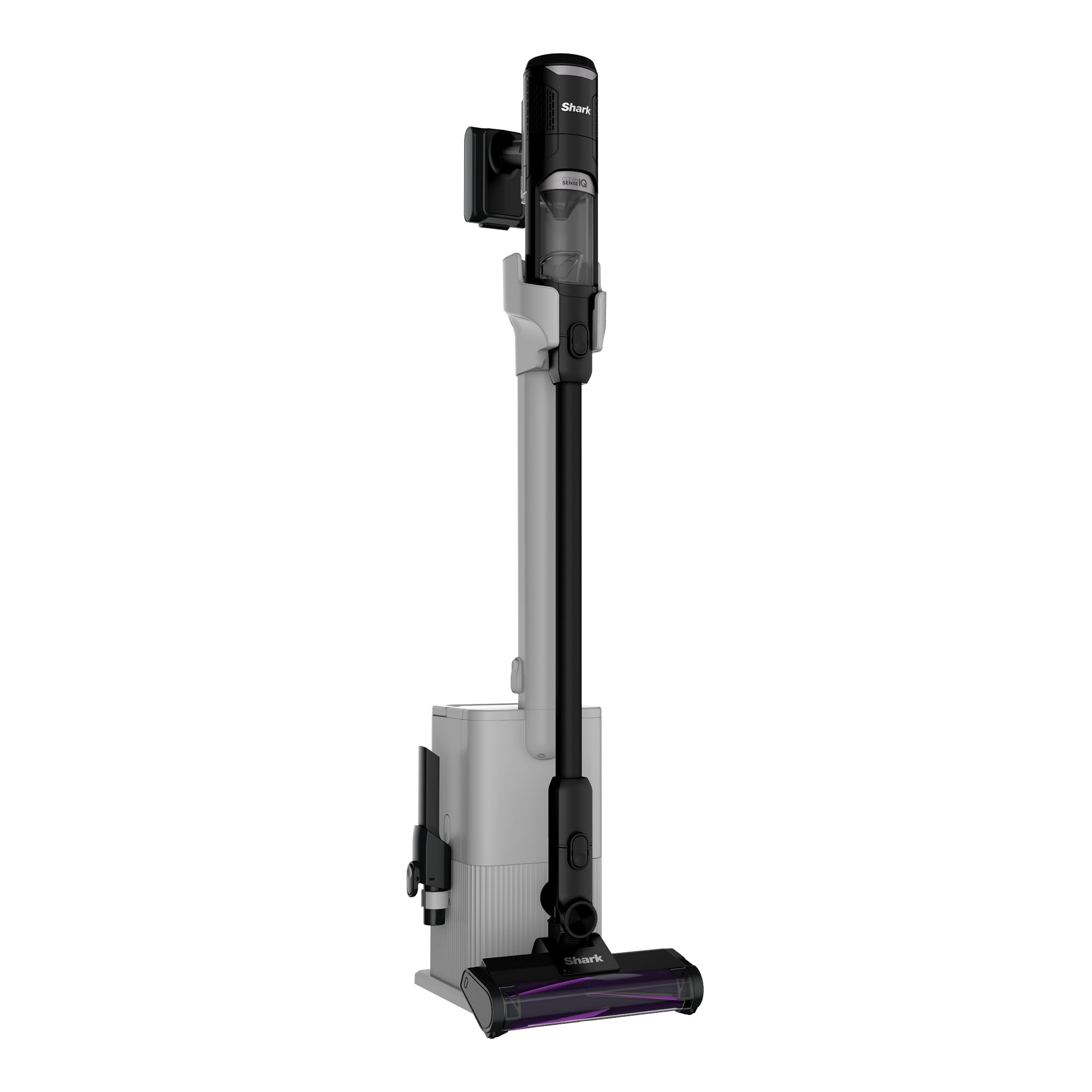
Figure 1: Shark CleanSense iQ+ Cordless Stick Vacuum Cleaner with Auto-Empty Dock.
Σημαντικές οδηγίες ασφαλείας
Όταν χρησιμοποιείτε ηλεκτρικές συσκευές, θα πρέπει πάντα να τηρούνται βασικές προφυλάξεις ασφαλείας, συμπεριλαμβανομένων των εξής:
- Διαβάστε όλες τις οδηγίες πριν χρησιμοποιήσετε την ηλεκτρική σκούπα σας.
- Μην το χρησιμοποιείτε σε εξωτερικούς χώρους ή σε υγρές επιφάνειες.
- Αποσυνδέστε την πρίζα από την πρίζα όταν δεν χρησιμοποιείται και πριν το σέρβις.
- Μην αφήνετε να χρησιμοποιηθεί ως παιχνίδι. Απαιτείται ιδιαίτερη προσοχή όταν χρησιμοποιείται από ή κοντά σε παιδιά.
- Χρησιμοποιήστε μόνο όπως περιγράφεται σε αυτό το εγχειρίδιο. Χρησιμοποιήστε μόνο τα συνημμένα που προτείνει ο κατασκευαστής.
- Μη χειρίζεστε την πρίζα ή την ηλεκτρική σκούπα με βρεγμένα χέρια.
- Μην βάζετε κανένα αντικείμενο στα ανοίγματα. Μην το χρησιμοποιείτε με φραγμένο άνοιγμα. μην έχετε σκόνη, χνούδια, τρίχες και οτιδήποτε μπορεί να μειώσει τη ροή του αέρα.
- Κρατήστε τα μαλλιά, τα φαρδιά ρούχα, τα δάχτυλα και όλα τα μέρη του σώματος μακριά από ανοίγματα και κινούμενα μέρη.
- Να είστε ιδιαίτερα προσεκτικοί όταν καθαρίζετε τις σκάλες.
- Μην το χρησιμοποιείτε για να συλλέγετε εύφλεκτα ή εύφλεκτα υγρά, όπως βενζίνη, ή να τα χρησιμοποιείτε σε χώρους όπου μπορεί να υπάρχουν.
Περιεχόμενα συσκευασίας
Βεβαιωθείτε ότι όλα τα εξαρτήματα περιλαμβάνονται στη συσκευασία σας:
- Κύρια φορητή μονάδα ηλεκτρικής σκούπας
- Ράβδος
- Hybrid Power Clean Floor Nozzle
- Αυτόματη άδεια βάση σύνδεσης
- Καλώδιο φόρτισης
- Multi-Cloth
- Εργαλείο ρωγμής
- Βούρτσα για ξεσκόνισμα

Figure 2: All components included with the Shark CleanSense iQ+ vacuum cleaner.
Ρύθμιση
Συνέλευση
- Τοποθετήστε τη ράβδο στο ακροφύσιο δαπέδου μέχρι να ασφαλίσει με ένα κλικ.
- Insert the handheld vacuum unit into the top of the wand until it clicks securely.
- Place the assembled vacuum cleaner onto the auto-empty dock.
Φόρτιση
Before first use, fully charge the vacuum cleaner. The battery indicator lights on the handheld unit will show charging status.
- Connect the charging cable to the auto-empty dock and plug it into a wall outlet.
- Ensure the vacuum is properly seated on the dock for charging. A full charge takes approximately 4 hours.

Figure 3: The vacuum cleaner is always ready for use when charged on its dock.
Auto-Empty Dock Setup
The auto-empty dock automatically empties the vacuum's dust cup into a larger capacity bin, reducing the frequency of manual emptying.
- Place the auto-empty dock on a flat, stable surface near a power outlet.
- Ensure there is enough space around the dock for the vacuum to be easily placed and removed.

Figure 4: The vacuum cleaner in its auto-empty dock, designed for convenient dust collection.
Οδηγίες Λειτουργίας
Powering On/Off and Cleaning Modes
Press the power button on the handheld unit to turn the vacuum on or off. Use the mode selection button to switch between cleaning modes:
- Eco Mode: For everyday cleaning and extended run time.
- Λειτουργία ενίσχυσης: Παρέχει μέγιστη αναρρόφηση για δύσκολες λεκέδες.

Figure 5: The vacuum cleaner operating in Boost mode for intense cleaning and Eco mode for general use.
Smart iQ Pro Sensing Technology
The CleanSense iQ+ features four intelligent sensors that optimize cleaning performance:

Εικόνα 6: Τέλοςview of the four smart sensing technologies integrated into the vacuum cleaner.
- Edge Sensor: Detects walls and corners, automatically increasing suction by up to 2.5 times in Eco mode for thorough edge cleaning.

Figure 7: The edge sensor identifies walls and corners, boosting suction for effective cleaning.
- iQ Sensor: Automatically adjusts suction power based on the amount of debris detected. The display changes color to visually indicate the debris level (low, medium, high suction).

Figure 8: The iQ sensor dynamically adjusts suction and provides visual feedback on debris levels.
- Αισθητήρας δαπέδου: Detects the floor type (hard floor or carpet) and automatically adjusts the brush roll speed for optimal cleaning on different surfaces.

Figure 9: The floor sensor automatically adapts brush roll speed for effective cleaning on various floor types.
- Αισθητήρας φωτός: In dark areas, the light sensor automatically brightens the headlights on the floor nozzle to illuminate hidden dust and debris.

Figure 10: The light sensor enhances visibility in dimly lit spaces, revealing hidden dirt.
Hybrid Power Clean Head
The unique Hybrid Power Clean head is designed to prevent hair tangles, making it ideal for homes with pets or long hair. It provides powerful suction for both flooring and carpets.

Figure 11: The Hybrid Power Clean brush roll effectively picks up hair without tangling.
Λειτουργία χειρός
For quick clean-ups or reaching tight spaces, the main unit can be easily detached and used as a handheld vacuum. Attach the crevice tool or dusting brush as needed.

Figure 12: Converting the stick vacuum into a convenient handheld unit for versatile cleaning.
Συντήρηση
Άδειασμα της κούπας σκόνης
The auto-empty dock significantly reduces the need for frequent manual dust cup emptying. The dock's capacity is designed for approximately one month of debris, depending on usage and room conditions.
- When the vacuum is placed on the dock, it will automatically transfer collected debris to the dock's larger bin.
- To manually empty the handheld unit's dust cup, press the release button and empty contents into a trash bin.

Figure 13: Simple manual emptying of the handheld vacuum's dust cup.
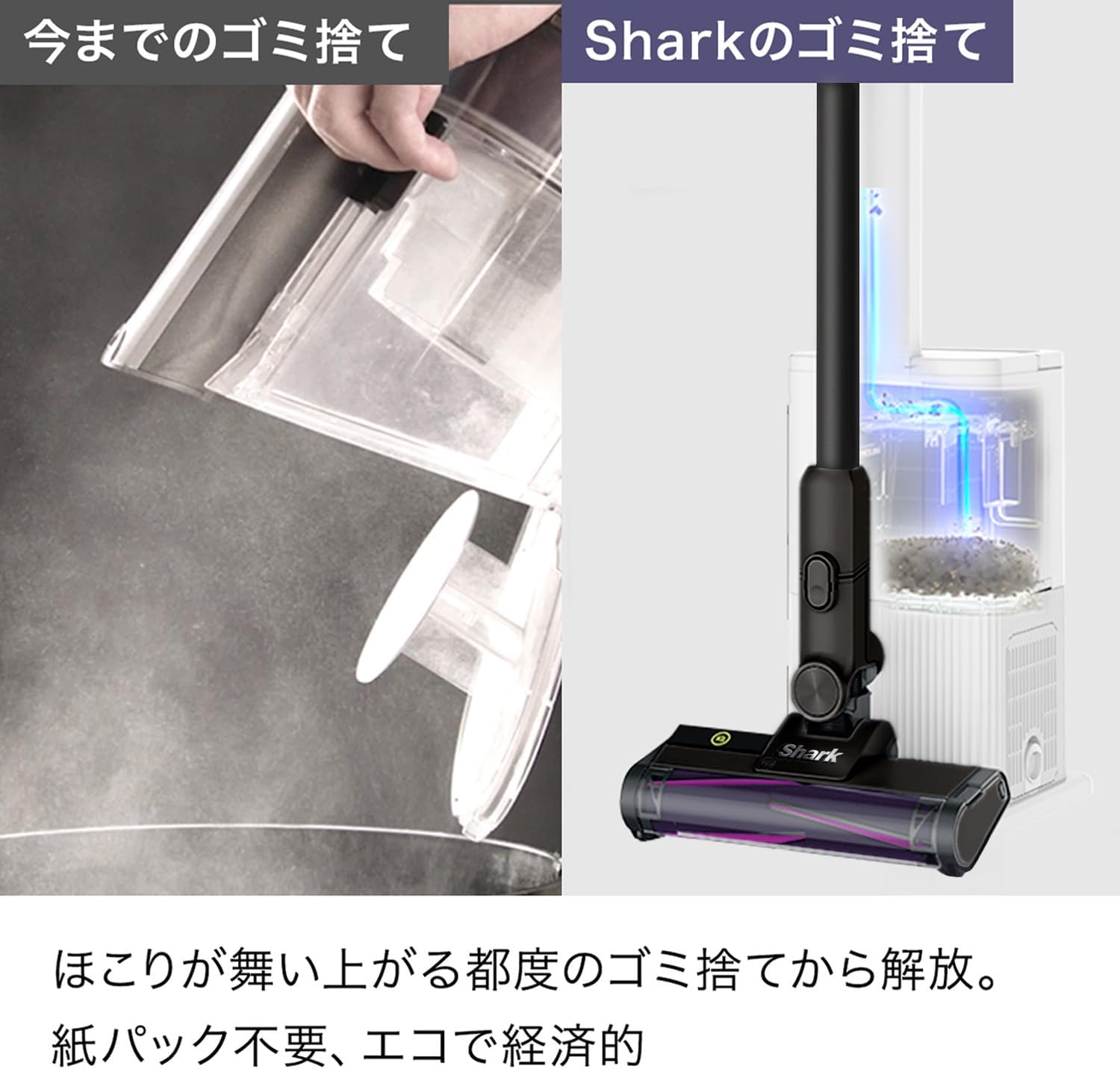
Figure 14: The auto-empty dock provides a cleaner and more convenient way to dispose of collected debris compared to traditional methods.
Cleaning Filters and Brush Roll
Regular cleaning of filters and the brush roll is essential for maintaining optimal suction and performance.
- Dust Cup and Filters: The dust cup and internal filters are washable. Rinse them with cold water and allow them to air dry completely for at least 24 hours before reassembling.
- Ρολό βούρτσας: Remove any hair or debris wrapped around the brush roll. The Hybrid Power Clean brush roll is designed to be anti-tangle, but occasional checks are recommended. The brush roll can also be rinsed with water if necessary.

Figure 15: Washable components, including the brush roll and dust cup, ensure easy maintenance and hygiene.
Αντιμετώπιση προβλημάτων
| Πρόβλημα | Πιθανή αιτία | Διάλυμα |
|---|---|---|
| Η ηλεκτρική σκούπα δεν ενεργοποιείται | Η μπαταρία δεν φορτίζεται. | Φορτίστε πλήρως την μπαταρία. |
| Χαμηλή ισχύς αναρρόφησης | Το δοχείο συλλογής σκόνης είναι γεμάτο. Τα φίλτρα είναι βρώμικα. Υπάρχει φράξιμο στο ακροφύσιο ή τη ράβδο. | Empty the dust cup. Clean the filters. Check for and remove any blockages. |
| Το ρολό βούρτσας δεν περιστρέφεται | Obstruction in brush roll. Floor nozzle is not properly connected. | Remove any obstructions from the brush roll. Ensure the floor nozzle is securely connected to the wand. |
| Auto-empty dock not emptying | Dock bin is full. Dock connection is not secure. | Empty the dock's debris bin. Ensure the vacuum is correctly seated on the dock. |
Προδιαγραφές
| Χαρακτηριστικό | Λεπτομέρεια |
|---|---|
| Κατασκευαστής | SharkNinja |
| Αριθμός μοντέλου | IW3145JNC |
| Χρώμα | Μεταλλικό Μαύρο |
| Form Factor | Ραβδί |
| Βάρος αντικειμένου | 2.1 κιλά |
| Βάρος συσκευασίας | 9 κιλά |
| Τύπος μπαταρίας | Ιόν λιθίου |
| Χρόνος Φόρτισης | 4 Ώρες |
| Διαστάσεις συσκευασίας | 79 x 36 x 29 εκ |
| Ημερομηνία πρώτης διαθεσιμότητας | 2025/11/9 |
Εγγύηση και υποστήριξη
For warranty information and customer support, please refer to the warranty card included in your product packaging or visit the official Shark webτοποθεσία. Κρατήστε την απόδειξη αγοράς σας ως απόδειξη αγοράς για τυχόν αξιώσεις εγγύησης.