Εισαγωγή
This manual provides detailed instructions for the setup, operation, maintenance, and troubleshooting of your Pisichen 24-inch Touchscreen Monitor with Built-in Webcam (Model 238TS-CMR). This monitor features a 2K QHD (2560x1440) resolution display with a 100Hz refresh rate, 10-point multi-touch functionality, and an integrated pop-up webcam, designed to enhance your productivity and interactive experience.
Πληροφορίες Ασφάλειας
- Always place the monitor on a stable, flat surface to prevent accidental falls.
- Μην εκθέτετε την οθόνη σε βροχή, υγρασία ή ακραίες θερμοκρασίες.
- Αποφύγετε το μπλοκάρισμα των ανοιγμάτων εξαερισμού για την αποφυγή υπερθέρμανσης.
- Χρησιμοποιήστε μόνο τον προσαρμογέα ρεύματος που παρέχεται με την οθόνη.
- Disconnect the power cable from the outlet before cleaning or if the monitor will be unused for an extended period.
- Μην επιχειρήσετε να αποσυναρμολογήσετε ή να επισκευάσετε την οθόνη μόνοι σας. Αναθέστε όλες τις εργασίες σέρβις σε εξειδικευμένο προσωπικό.
Περιεχόμενα συσκευασίας
Ελέγξτε ότι όλα τα είδη υπάρχουν στη συσκευασία σας:
- Pisichen 24-inch Touchscreen Monitor (Model 238TS-CMR)
- Βάση οθόνης (βάση και βραχίονας)
- Μετασχηματιστής ρεύματος και καλώδιο
- Καλώδιο HDMI
- Καλώδιο USB-C σε USB-C
- USB-A to USB-B Cable (for touch functionality with non-USB-C devices)
- Εγχειρίδιο χρήστη (αυτό το έγγραφο)
Ρύθμιση
1. Συναρμολόγηση βάσης
- Αφαιρέστε προσεκτικά την οθόνη από τη συσκευασία της και τοποθετήστε την με την όψη προς τα κάτω σε μια μαλακή, καθαρή επιφάνεια για να αποφύγετε γρατσουνιές.
- Attach the stand arm to the back of the monitor using the provided screws.
- Connect the stand base to the stand arm and secure it with the designated screw.
- Once assembled, carefully lift the monitor and place it upright on your desk.

Figure 1: Monitor stand assembly and adjustment capabilities.
2. Σύνδεση στη συσκευή σας
The monitor supports multiple connection types. Choose the appropriate cable for your device.
- Σύνδεση ρεύματος: Connect the power adapter to the monitor's DC power port and then plug it into a power outlet.
- USB-C Connection (Recommended for full functionality): If your device has a USB-C port that supports DisplayPort Alternate Mode, connect the monitor using the provided USB-C to USB-C cable. This single cable can transmit video, audio, and touch signals, and may also provide power delivery to your laptop.
- HDMI or DisplayPort Connection: Connect an HDMI or DisplayPort cable from your device to the corresponding port on the monitor for video and audio. For touch functionality, you must also connect the USB-A to USB-B cable from your device's USB port to the monitor's USB-B upstream port.
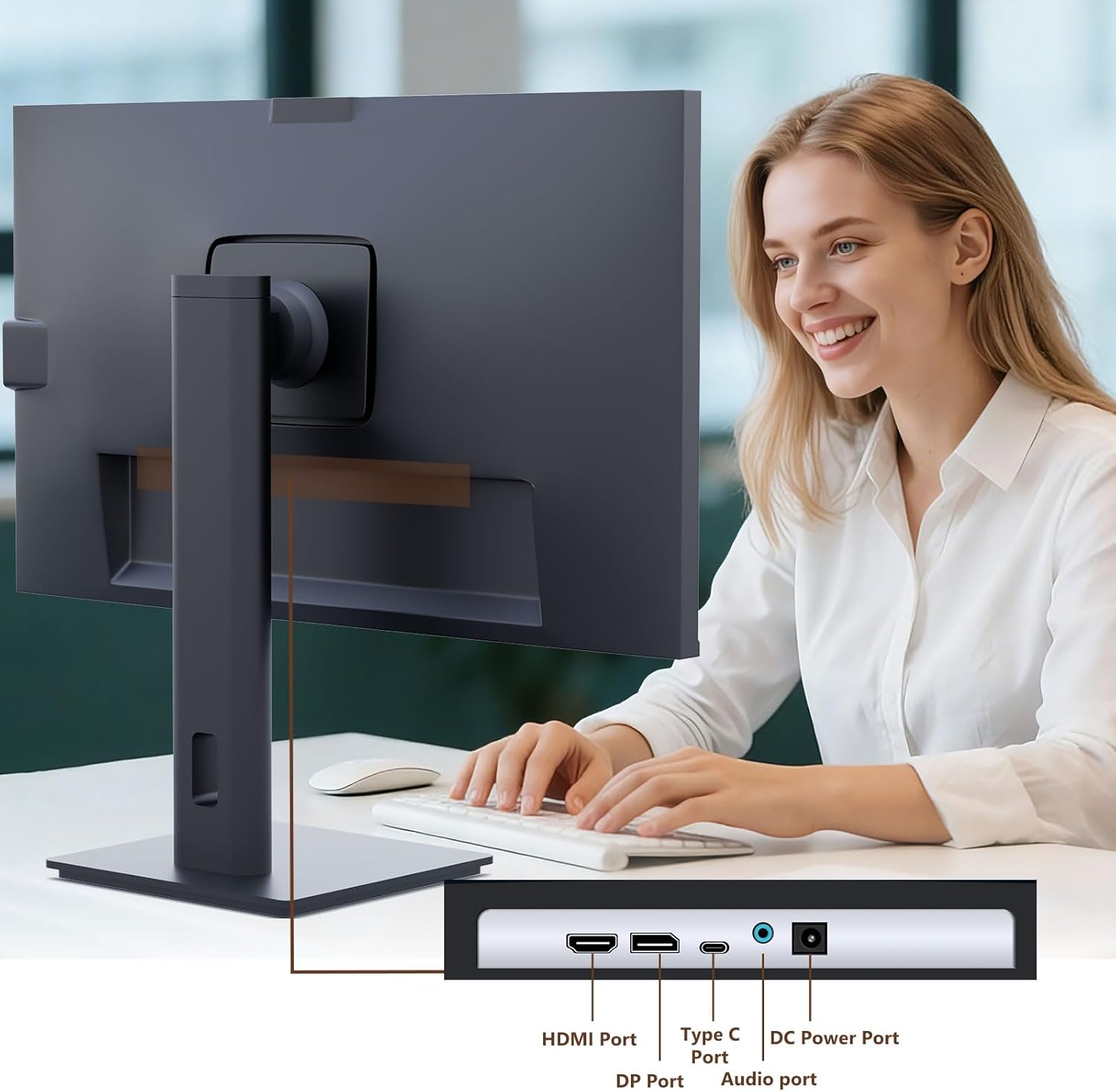
Figure 2: Available ports on the Pisichen monitor.

Figure 3: USB-C one-cable connection for simplified setup.

Figure 4: Connection options for desktop and laptop devices.
3. Αρχική ενεργοποίηση
Press the power button located on the monitor to turn it on. The monitor will automatically detect the active input source. If multiple sources are connected, you may need to select the correct input via the On-Screen Display (OSD) menu.
Οδηγίες Λειτουργίας
1. Λειτουργικότητα οθόνης αφής
The monitor supports 10-point multi-touch. Ensure the USB-C cable is connected (for full functionality) or the USB-A to USB-B cable is connected in addition to your video cable for touch input to work. Touch gestures are similar to those used on tablets or smartphones.
- Παρακέντηση: Single touch for selection or activation.
- Σέρνω: Touch and hold, then move your finger to move items.
- Τσίμπημα/Απλώστε: Χρησιμοποιήστε δύο δάχτυλα για μεγέθυνση ή σμίκρυνση.
- Σουφρώνω: Move your finger across the screen to scroll or navigate.

Figure 5: Demonstrating intuitive touch interaction.

Figure 6: Collaborative use of the multi-touch display.
2. Built-in WebΧρήση κάμερας
The monitor features a pop-up webcam for privacy and convenience. To use the webcam, gently press the top center of the monitor frame where the webcam is located. It will pop up. To retract it, gently press it down until it clicks into place.
Ensure your operating system and video conferencing software recognize the webcam. No additional drivers are typically required for basic functionality.

Figure 7: The monitor with its built-in pop-up webcam in use during a video conference.

Figure 8: High-definition video calls using the integrated webέκκεντρο.
3. Μενού επί της οθόνης (OSD).
Το μενού OSD σάς επιτρέπει να προσαρμόσετε διάφορες ρυθμίσεις οθόνης. Χρησιμοποιήστε τα κουμπιά στο πίσω ή στο κάτω μέρος της οθόνης για να πλοηγηθείτε και να επιλέξετε επιλογές.
- Αντίθεση φωτεινότητας: Προσαρμόστε τα επίπεδα φωτεινότητας και αντίθεσης της οθόνης.
- Ρυθμίσεις χρώματος: Modify color temperature, gamma, and other color-related parameters.
- Πηγή εισαγωγής: Manually select between HDMI, DisplayPort, or USB-C inputs.
- Ήχος: Ρύθμιση έντασης ήχου για ενσωματωμένα ηχεία ή συνδεδεμένα ακουστικά.
- Λειτουργία εικόνας: Επιλέξτε προκαθορισμένες λειτουργίες εμφάνισης (π.χ., Τυπική, Παιχνίδι, Ταινία).
- HDR: Enable or disable High Dynamic Range settings for improved dark detail optimization.

Figure 9: HDR feature for enhanced visual detail.
4. Εργονομικές Ρυθμίσεις
Η βάση οθόνης επιτρέπει διάφορες ρυθμίσεις για βελτιστοποίηση viewάνεση:
- Ρύθμιση ύψους: Πιέστε ή τραβήξτε απαλά την οθόνη προς τα πάνω ή προς τα κάτω.
- Κλίση: Tilt the screen forward or backward to find the ideal angle.
- Στροφέας: Περιστρέψτε την οθόνη αριστερά ή δεξιά στη βάση της.
- Αξονας περιστροφής: Περιστρέψτε την οθόνη κατά 90 μοίρες για κατακόρυφη λειτουργία viewing.
Σχήμα 10: Εργονομικές ρυθμίσεις για βέλτιστη viewing.
Συντήρηση
- Καθαρισμός της οθόνης: Σκουπίστε απαλά την οθόνη με ένα μαλακό πανί που δεν αφήνει χνούδι. Για επίμονα σημάδια,ampΣκουπίστε ελαφρά το πανί με νερό ή με ένα μη λειαντικό καθαριστικό οθόνης. Μην ψεκάζετε υγρό απευθείας στην οθόνη.
- Καθαρισμός του σώματος: Χρησιμοποιήστε ένα μαλακό, στεγνό πανί για να σκουπίσετε την επιφάνεια της οθόνης.asinζ. Αποφύγετε τη χρήση ισχυρών απορρυπαντικών ή λειαντικών καθαριστικών.
- Αποθήκευση: Εάν αποθηκεύετε την οθόνη για μεγάλο χρονικό διάστημα, αποσυνδέστε όλα τα καλώδια και φυλάξτε την σε δροσερό και ξηρό μέρος, κατά προτίμηση στην αρχική της συσκευασία.
Αντιμετώπιση προβλημάτων
Χωρίς Δύναμη
- Βεβαιωθείτε ότι το καλώδιο τροφοδοσίας είναι συνδεδεμένο σταθερά τόσο στην οθόνη όσο και στην πρίζα.
- Βεβαιωθείτε ότι η πρίζα λειτουργεί συνδέοντας μια άλλη συσκευή.
- Ελέγξτε αν ο προσαρμογέας ρεύματος είναι σωστά συνδεδεμένος στην οθόνη.
Δεν υπάρχει σήμα / Κενή οθόνη
- Confirm the video cable (HDMI, DP, or USB-C) is securely connected to both the monitor and your device.
- Βεβαιωθείτε ότι έχει επιλεγεί η σωστή πηγή εισόδου στο μενού OSD της οθόνης.
- Ελέγξτε τις ρυθμίσεις οθόνης του υπολογιστή σας για να βεβαιωθείτε ότι η οθόνη ανιχνεύεται και είναι ενεργοποιημένη.
- Δοκιμάστε διαφορετικό καλώδιο ή θύρα βίντεο, εάν υπάρχει.
Touch Functionality Not Working
- If using HDMI or DisplayPort, ensure the USB-A to USB-B cable is connected from your device to the monitor.
- If using USB-C, ensure your device's USB-C port supports DisplayPort Alternate Mode and touch data transmission.
- Check your operating system's touch settings.
- Note that some devices, such as game consoles (PS3/4/5, Xbox, Steam Deck, Fire TV Cube) and certain Apple products (iPhone, iPad, Switch), do not support touch functionality with this monitor.

Figure 11: Touch compatibility chart for various devices.
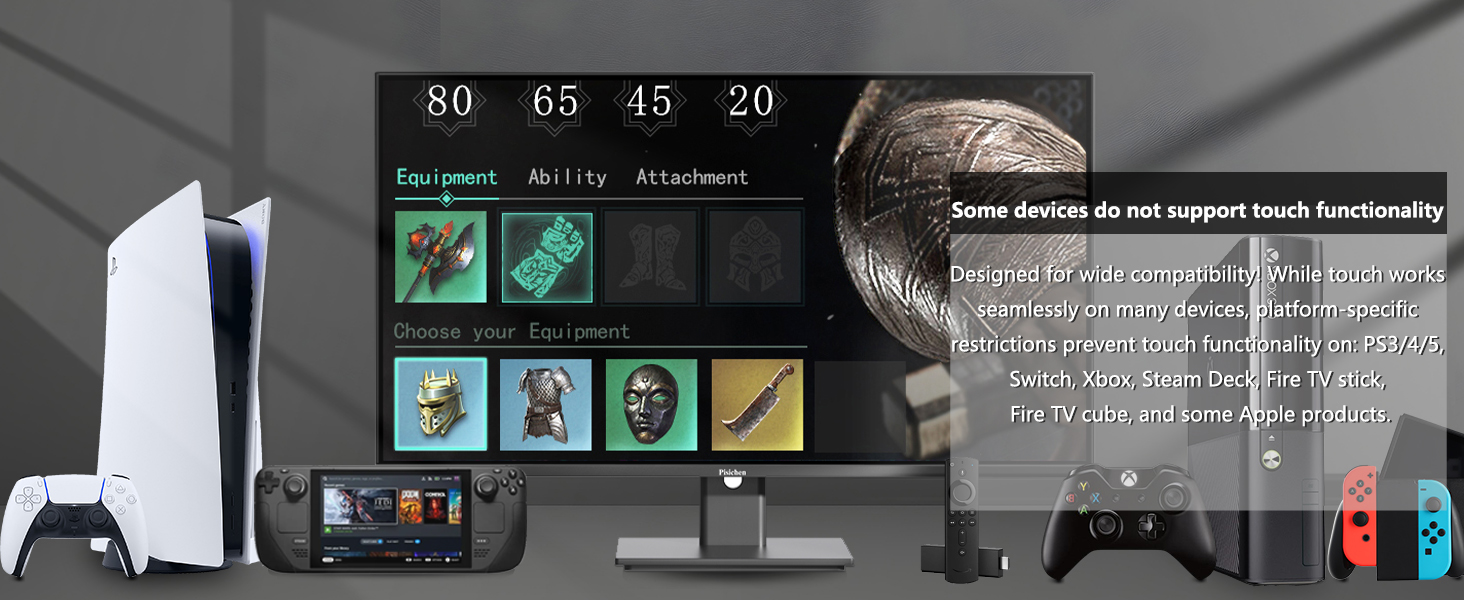
Figure 12: Devices that do not support touch functionality.
WebΔεν εντοπίστηκε κάμερα
- Εξασφαλίστε το webcam is fully popped up.
- Verify that the USB connection (either USB-C or USB-A to USB-B) is properly established.
- Ελέγξτε τις ρυθμίσεις απορρήτου του λειτουργικού σας συστήματος για να βεβαιωθείτε ότι οι εφαρμογές έχουν πρόσβαση στην κάμερα.
- Κάντε επανεκκίνηση του υπολογιστή σας.
Προδιαγραφές
| Χαρακτηριστικό | Περιγραφή |
|---|---|
| Αριθμός μοντέλου | 238TS-CMR |
| Μέγεθος οθόνης | 23.8 ίντσες |
| Ψήφισμα | 2560 x 1440 (QHD Wide 1440p) |
| Ρυθμός ανανέωσης | 100Hz |
| Λάμψη | 400 Candela (νιτς) |
| Αναλογία αντίθεσης | 3000:1 |
| Τεχνολογία αφής | Πολλαπλής αφής 10 σημείων |
| Webέκκεντρο | Built-in Pop-up Camera |
| Συνδεσιμότητα | HDMI, DisplayPort (DP), USB Type-C, USB-B (upstream), Audio Out, DC Power |
| Αναλογία διαστάσεων | 16:9 |
| Επιφάνεια οθόνης | Λείος |
| Διαστάσεις προϊόντος | 1.97 x 21.26 x 12.6 ίντσες |
| Βάρος αντικειμένου | 11.53 λίρες |
| Κατασκευαστής | Shenzhen Konowa Electronics Co., LTD |
Εγγύηση και υποστήριξη
Your Pisichen monitor is covered by a limited warranty. Please refer to the warranty card included in your package for specific terms and conditions, including the warranty period and coverage details.
For technical support, troubleshooting assistance, or warranty claims, please contact Pisichen customer service. Contact information can typically be found on the manufacturer's webστον ιστότοπο ή στην κάρτα εγγύησης.
When contacting support, please have your monitor's model number (238TS-CMR) and purchase information readily available.


