Εισαγωγή
This manual provides detailed instructions for setting up, operating, and maintaining your Gamrombo Wireless Gaming Controller, Model RH-102A. Please read this manual thoroughly before use to ensure proper functionality and to maximize your gaming experience. This controller is designed for use with Xbox One, Xbox Series X/S, PC, Android, and iOS devices.

Εικόνα: Μπροστά view of the Gamrombo Wireless Gaming Controller, showcasing its black design with vibrant RGB lighting on the joysticks, buttons, and grip areas.
Ρύθμιση
Περιεχόμενα συσκευασίας
- Gamrombo Wireless Gaming Controller (Model RH-102A)
- USB Charging/Data Cable (assumed)
- Εγχειρίδιο χρήστη (αυτό το έγγραφο)
Εγκατάσταση μπαταρίας
The controller requires δύο (2) μπαταρίες AA (not included) for wireless operation. Locate the battery compartment on the back of the controller, open the cover, insert the batteries according to the polarity indicators, and close the cover securely.
Σύνδεση του ελεγκτή
The Gamrombo controller supports multiple connection methods: Wireless (for Xbox), Bluetooth (for PC, Android, iOS), and Wired (for PC).

Εικόνα: Πάνωview of the controller highlighting its compatibility with various platforms including PC, Mac, Android, iOS, and Steam.
1. Wireless Connection (Xbox Consoles)
- Ensure your Xbox console (Xbox Series X, Xbox Series S, Xbox One S, Xbox One X) is powered on.
- Πατήστε και κρατήστε πατημένο το Κουμπί αρχικής οθόνης on the controller until the LED indicator begins to flash, indicating pairing mode.
- Στην κονσόλα Xbox, πατήστε το κουμπί Κουμπί ζεύξης (usually located on the front or side of the console).
- The controller's LED will become solid when successfully paired.
- Σημαντική Σημείωση: Due to Xbox system updates, third-party controllers may require a software update to maintain compatibility. If you experience pairing issues, please visit the Gamrombo support website for the latest software updates and instructions.
2. Bluetooth Connection (PC, Android, iOS)
- Ensure the controller has sufficient battery power.
- Activate Bluetooth on your device (PC, Android, iOS).
- Πατήστε και κρατήστε πατημένο το Κουμπί σύζευξης Bluetooth (refer to controller diagram for exact location, often a small button near the top) until the LED indicator flashes rapidly.
- On your device, search for new Bluetooth devices and select "Gamrombo Controller" (or similar name) from the list.
- The controller's LED will become solid when successfully paired.
3. Ενσύρματη σύνδεση (PC)
- Connect one end of the USB cable to the controller's USB port.
- Συνδέστε το άλλο άκρο του καλωδίου USB σε μια διαθέσιμη θύρα USB στον υπολογιστή σας.
- The controller should be automatically recognized by your PC. Drivers may install automatically.
Οδηγίες Λειτουργίας
Διάταξη κουμπιών
Εξοικειωθείτε με τη διάταξη των κουμπιών του χειριστηρίου για βέλτιστη χρήση.
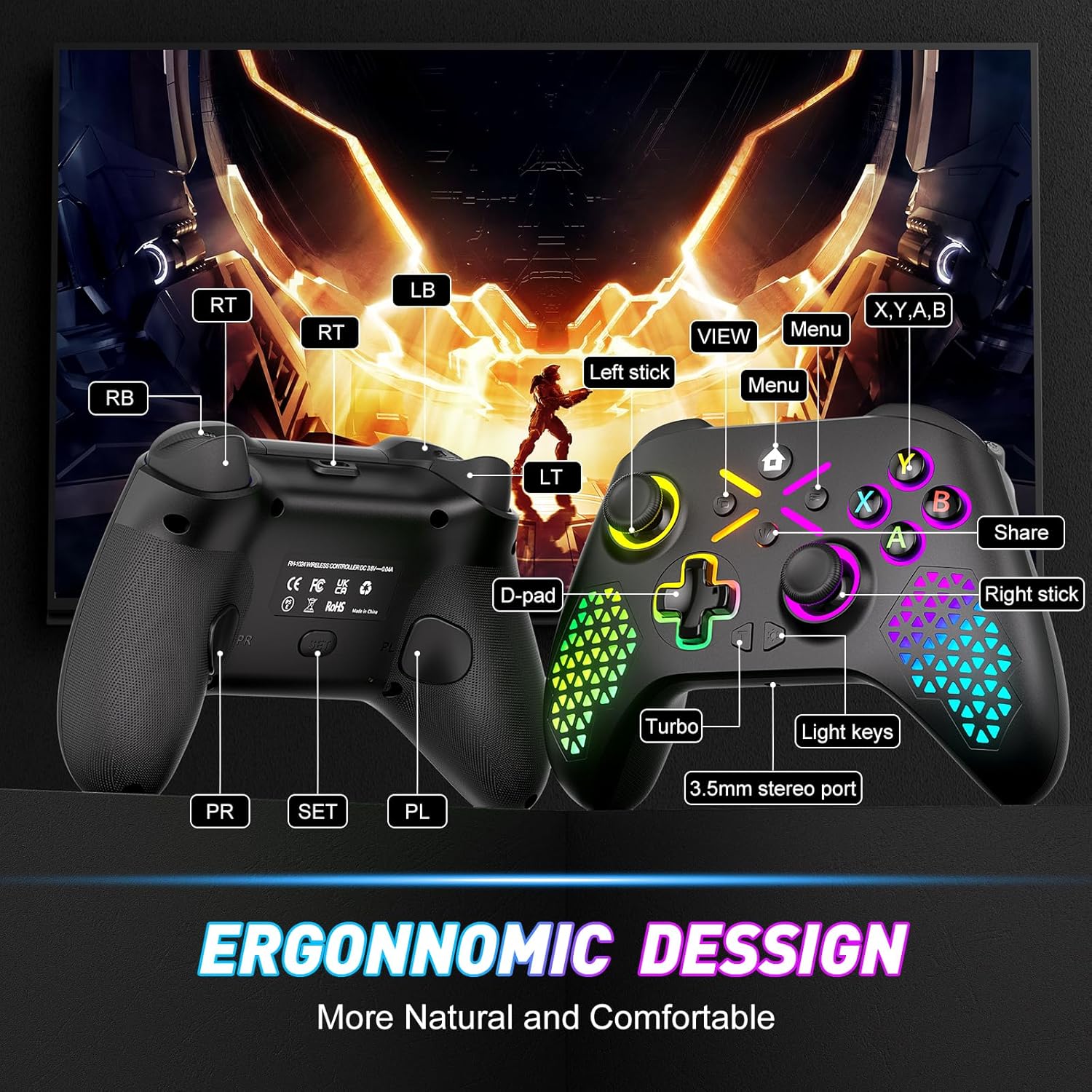
Image: Diagram illustrating the front and back button layout of the Gamrombo controller, labeling joysticks, D-pad, A/B/X/Y buttons, triggers, bumpers, Home, View, Menu, Share, Turbo, Light keys, 3.5mm stereo port, and programmable back paddles (PR/PL).
Ειδικές Λειτουργίες
1. TURBO Function
The TURBO function allows for rapid-fire action by repeatedly pressing a button as long as it is held down. This can provide a competitive edge in certain games.

Image: Close-up of the controller with an overlay explaining the TURBO function, showing different rapid-fire rates (5/s, 12/s, 20/s) and the 'T' button icon.
- Να ενεργοποιείς: Πατήστε και κρατήστε πατημένο το TURBO button (T), then press the desired action button (e.g., A, B, X, Y, LB, RB, LT, RT). The button will now have TURBO functionality.
- Για να ρυθμίσετε την ταχύτητα: While holding the TURBO button, move the Δεξιός αναλογικός μοχλός προς τα πάνω ή προς τα κάτω to cycle through different TURBO speeds (e.g., 5/s, 12/s, 20/s).
- Για απενεργοποίηση: Πατήστε και κρατήστε πατημένο το TURBO button (T)και, στη συνέχεια, πατήστε ξανά το ίδιο κουμπί ενέργειας.
2. Macro Programming (Back Paddles)
The controller features two back-mappable buttons (PR and PL) that can be programmed with up to 16 button inputs, allowing for complex actions with a single press.

Εικόνα: Πίσω view of the controller highlighting the PR and PL programmable back paddles and the 'SET' button, with an illustration of how multiple button presses can be mapped to a single paddle.
- Για να μπείτε στη λειτουργία προγραμματισμού: Πατήστε το Κουμπί SET (located on the back of the controller). The indicator light will flash.
- Να προγραμματίσω: Πατήστε είτε το PR or PL paddle you wish to program. Then, input the sequence of up to 16 buttons you want to map.
- Να σώσω: Πατήστε το Κουμπί SET again to exit programming mode. The indicator light will stop flashing.
- To Clear Macro: Enter programming mode, press the PR or PL paddle, then press the SET button again without inputting any sequence.
3. Προσαρμογή φωτισμού RGB
Customize the controller's RGB lighting with 7 colors and multiple lighting modes to match your preference.

Image: Visual representation of different RGB lighting modes including Breathing LED Mode, Fixed LED Mode, Flickering LED Mode, and Single Zone Mode, with color options.
- To Change Color/Mode: Πατήστε το Κλειδί φωτός (refer to button layout diagram) to cycle through 7 bright colors and various lighting modes (multi-zone, breathing, solid).
- Για να ρυθμίσετε τη φωτεινότητα: Κρατήστε το Κλειδί φωτός και χρησιμοποιήστε το Αριστερός αναλογικός μοχλός προς τα πάνω ή προς τα κάτω για να ρυθμίσετε το επίπεδο φωτεινότητας.
4. 6-Axis Gyro Sensor
The built-in 6-axis gyroscope provides more accurate somatosensory control, enhancing immersion in games that support motion sensing.
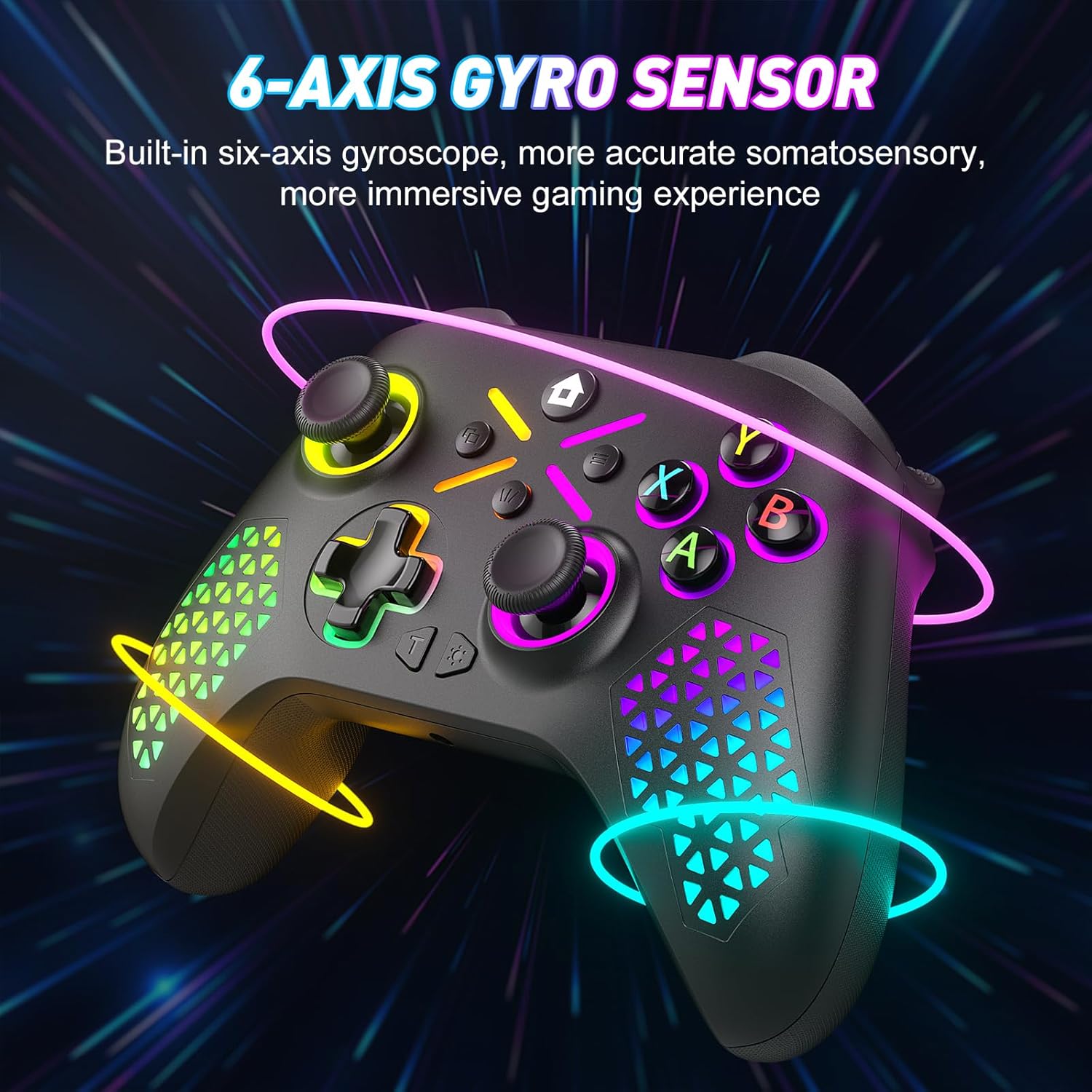
Image: The controller shown with glowing lines indicating motion, illustrating the 6-axis gyro sensor functionality for immersive gaming.
5. Υποδοχή ήχου 3.5 mm
Connect your compatible headset to the 3.5mm audio jack for in-game audio and communication.

Image: A split image showing the 6-axis gyro sensor on one side and the adjustable vibration feature with the 3.5mm audio jack on the other, emphasizing enhanced game immersion.
Συντήρηση
Καθάρισμα
- Χρησιμοποιήστε ένα μαλακό, στεγνό πανί για να σκουπίσετε την επιφάνεια του χειριστηρίου.
- Για επίμονη βρωμιά, ελαφρώςampΣκουπίστε το πανί με νερό ή ένα ήπιο καθαριστικό διάλυμα. Αποφύγετε τις σκληρές χημικές ουσίες.
- Μην επιτρέπετε την εισχώρηση υγρών στα ανοίγματα του χειριστηρίου.
Αποθήκευση
- Αποθηκεύστε το χειριστήριο σε δροσερό και ξηρό μέρος, μακριά από το άμεσο ηλιακό φως και τις ακραίες θερμοκρασίες.
- If storing for an extended period, remove the AA batteries to prevent leakage.
Αντιμετώπιση προβλημάτων
Κοινά Θέματα και Λύσεις
- Controller not pairing with Xbox:
Ensure the controller has fresh batteries. Verify that the controller's software is up-to-date. Xbox system updates can sometimes affect third-party controller compatibility. Visit the Gamrombo support website for the latest software updates and detailed pairing instructions. - Controller not connecting via Bluetooth/Wired:
Check battery levels. For wired connection, ensure the USB cable is securely connected to both the controller and the PC. For Bluetooth, ensure Bluetooth is enabled on your device and the controller is in pairing mode. Try restarting both the controller and the device. - Buttons or Joysticks not responding:
Check for any physical obstructions or debris around the buttons or joysticks. Ensure the controller has sufficient power. If the issue persists after a drop, internal damage may have occurred, which might not be repairable or covered under warranty. - RGB lights not working or incorrect:
Ensure the controller has power. Try cycling through the light modes and adjusting brightness using the Light Key. - Η σύνδεση διακόπτεται συχνά:
Ensure you are within the 10m (32.8ft) wireless range. Minimize interference from other wireless devices. Ensure the controller's software is updated.
Προδιαγραφές
Τεχνικές λεπτομέρειες
| Αριθμός μοντέλου | RH-102A |
| ASIN | B0FWCDB6F |
| Κατασκευαστής | Γαμρόμπο |
| Συνδεσιμότητα | Wireless (WiFi), Bluetooth, Wired (USB) |
| Wireless Σειρά | Έως 10 μέτρα (32.8 πόδια) |
| Τύπος μπαταρίας | 2 x μπαταρίες AA (δεν περιλαμβάνονται) |
| Βάρος αντικειμένου | 10.5 ουγγιές |
| Διαστάσεις συσκευασίας | 12.68 x 9.88 x 0.55 ίντσες |
| Ημερομηνία πρώτης διαθεσιμότητας | 15 Οκτωβρίου 2025 |
Εγγύηση και υποστήριξη
Πληροφορίες εγγύησης
Specific warranty details for the Gamrombo Wireless Gaming Controller are not provided within this manual. For information regarding warranty coverage, terms, and conditions, please refer to the product packaging or contact Gamrombo customer support directly.
Υποστήριξη Πελατών
If you encounter any issues or have questions not addressed in this manual, please contact Gamrombo customer support. Contact information can typically be found on the product packaging, the official Gamrombo webστον ιστότοπο ή μέσω του σημείου αγοράς σας.


