1. Το προϊόν τελείωσεview
The Baseus BS1 NC Semi-in-Ear Noise Cancelling Earbuds offer a blend of comfort and advanced audio technology. Featuring Adaptive Hybrid Active Noise Cancellation (ANC), Hi-Res Audio with LDAC support, and a lightweight design, these earbuds are engineered for extended listening and clear communication. They are also equipped with a 6-microphone AI system for clear calls and IP55 water and dust resistance.

Image: Baseus BS1 NC Semi-in-Ear Noise Cancelling Earbuds and their charging case in black.
2. Περιεχόμενα συσκευασίας
Βεβαιωθείτε ότι όλα τα στοιχεία υπάρχουν στη συσκευασία:
- Baseus Bass BS1 NC Semi-in-Ear Earbuds (Left and Right)
- Θήκη φόρτισης
- Καλώδιο φόρτισης USB-C
- Οδηγός γρήγορης εκκίνησης

Image: The complete retail package for the Baseus BS1 NC Earbuds, showing the earbuds, charging case, USB-C cable, and quick start guide.
3. Φόρτιση των ακουστικών και της θήκης
Για βέλτιστη απόδοση, φορτίστε πλήρως τα ακουστικά και τη θήκη φόρτισης πριν από την πρώτη χρήση.
3.1 Φόρτιση των ακουστικών
- Τοποθετήστε τα ακουστικά στη θήκη φόρτισης. Βεβαιωθείτε ότι έχουν τοποθετηθεί σωστά στις αντίστοιχες υποδοχές τους (L για αριστερά, R για δεξιά).
- Close the charging case. The earbuds will begin charging automatically.
3.2 Γόμωση της θήκης
- Συνδέστε το παρεχόμενο καλώδιο φόρτισης USB-C στη θύρα φόρτισης της θήκης.
- Συνδέστε το άλλο άκρο του καλωδίου σε έναν προσαρμογέα τροφοδοσίας USB (δεν περιλαμβάνεται) ή στη θύρα USB ενός υπολογιστή.
- The LED indicator on the case will show the charging status:
- Πράσινος: 75% - 100% χρεωμένο
- Κίτρινο: 25% - 75% χρεωμένο
- Κόκκινος: Below 25% charged
- A full charge for the case provides up to 40 hours of total playtime for the earbuds (with ANC off). A 10-minute charge can provide up to 2 hours of playback.

Image: The Baseus BS1 NC Earbuds resting in their open charging case, highlighting the 40-hour total playtime and rapid charging capabilities.
4. Σύζευξη και συνδεσιμότητα
4.1 Αρχική σύζευξη
- Ανοίξτε τη θήκη φόρτισης. Τα ακουστικά θα εισέλθουν αυτόματα σε λειτουργία σύζευξης.
- Στη συσκευή σας (smartphone, tablet, υπολογιστή), ενεργοποιήστε το Bluetooth.
- Αναζήτηση για "Baseus Bass BS1 NC" in the list of available Bluetooth devices.
- Select "Baseus Bass BS1 NC" to connect. A voice prompt will confirm successful pairing.
4.2 Αυτόματη επανασύνδεση
Once paired, the earbuds will automatically reconnect to the last connected device when removed from the charging case and within Bluetooth range.
4.3 Σύνδεση πολλαπλών σημείων
The Baseus BS1 NC supports Baseus Smart-Connect (BSC) technology, allowing simultaneous connection to two devices. This enables seamless switching between audio sources without manual re-pairing.
Για να χρησιμοποιήσετε σύνδεση πολλαπλών σημείων:
- Συνδέστε τα ακουστικά με την πρώτη σας συσκευή.
- Αποσυνδέστε τα ακουστικά από τις ρυθμίσεις Bluetooth της πρώτης συσκευής (μην διακόψετε τη σύζευξη).
- Συνδέστε τα ακουστικά με τη δεύτερη συσκευή σας.
- Επανασυνδέστε τα ακουστικά στην πρώτη συσκευή από τις ρυθμίσεις Bluetooth. Τα ακουστικά θα πρέπει τώρα να είναι συνδεδεμένα και στις δύο συσκευές.
Ο ήχος θα μεταβαίνει αυτόματα στη συσκευή που αναπαράγει περιεχόμενο ή λαμβάνει μια κλήση.
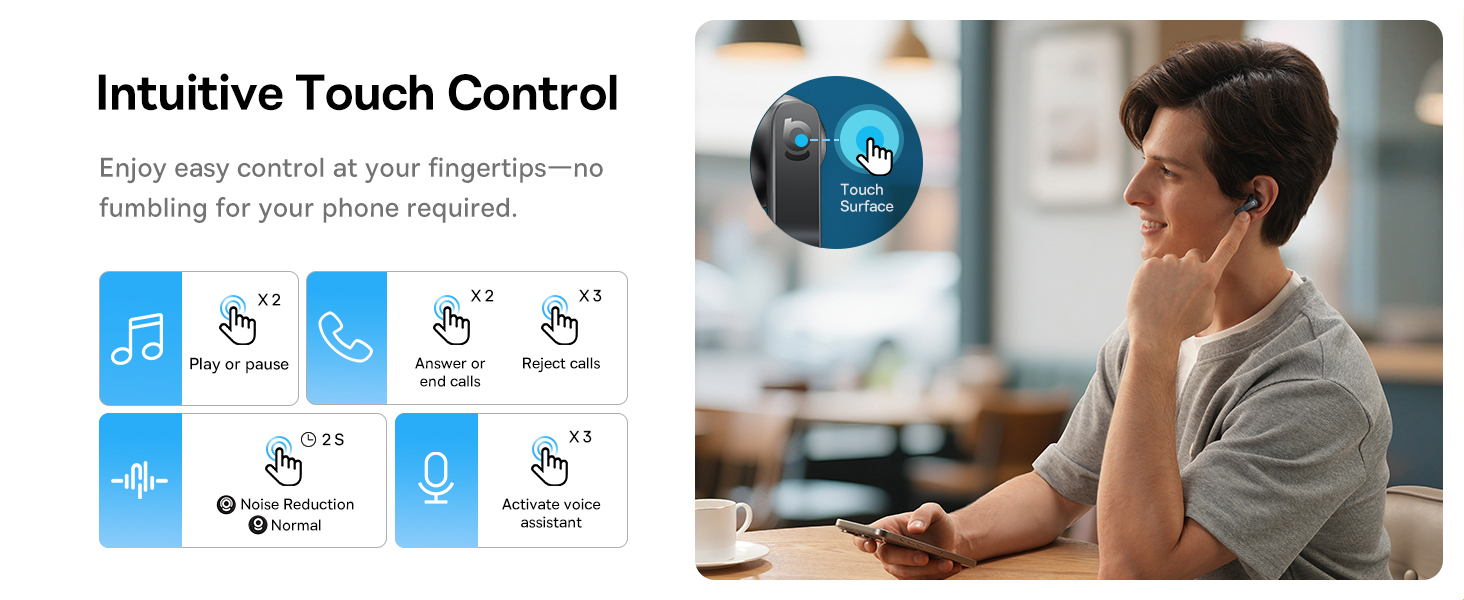
Image: A visual representation of the Baseus BS1 NC Earbuds connected to both a laptop and a smartphone, showcasing the instant multipoint connection feature.
5. Φορώντας τα ακουστικά
The Baseus BS1 NC earbuds feature a semi-in-ear design for comfortable, pressure-free wear. For optimal sound quality and noise cancellation, ensure a proper fit.
- Προσδιορίστε τα αριστερά (L) και τα δεξιά (R) ακουστικά.
- Εισάγετε απαλά κάθε ακουστικό-ψείρα στον ακουστικό πόρο σας.
- Adjust the earbud until it feels secure and comfortable. The stem should point slightly forward or downward.

Image: A person wearing the Baseus BS1 NC Earbuds, illustrating their ergonomic and lightweight design for all-day comfort.
6. Οδηγίες λειτουργίας
6.1 Αγγίξτε Στοιχεία ελέγχου
The earbuds feature intuitive touch controls on their stems. The following are default functions, which may be customizable via the Baseus app:
| Δράση | Λειτουργία |
|---|---|
| Double-tap (Left or Right Earbud) | Αναπαραγωγή/Παύση μουσικής, Απάντηση/Τερματισμός κλήσης |
| Triple-tap (Left or Right Earbud) | Reject call, Activate voice assistant |
| Πατήστε παρατεταμένα (2 δευτερόλεπτα) | Switch Noise Control Mode (ANC/Normal/Transparency) |

Image: An illustration detailing the intuitive touch controls on the Baseus BS1 NC Earbuds for various functions like play/pause, call management, noise reduction, and voice assistant activation.
6.2 Λειτουργίες ελέγχου θορύβου
The Baseus BS1 NC earbuds offer three noise control modes:
- Adaptive Hybrid ANC (Active Noise Cancellation): Reduces ambient noise for an immersive listening experience. Ideal for noisy environments.
- Λειτουργία διαφάνειας: Allows you to hear your surroundings while still enjoying your audio. Useful for awareness in urban settings or conversations.
- Κανονική λειτουργία: Standard audio playback without active noise cancellation or transparency features.
Switch between modes by pressing and holding the touch area on either earbud for 2 seconds.

Image: A cutaway diagram of a Baseus BS1 NC earbud in an ear, illustrating the semi-in-ear fit and the availability of Adaptive Noise Cancelling and Transparency Mode.
Ήχος υψηλής ανάλυσης 6.3 με LDAC
These earbuds support LDAC technology, enabling high-resolution audio transmission for a detailed and rich sound experience. Ensure your device supports LDAC and activate it in your device's Bluetooth settings for the best audio quality.

Image: The Baseus BS1 NC Earbuds surrounded by sound waves, emphasizing features like Hi-Res Audio, SuperBass 2.0, and 13mm dynamic drivers for powerful sound.
6.4 6-Mic AI Clear Calls
The earbuds are equipped with 6 microphones and AI noise isolation technology to ensure your voice is clear during calls, even in noisy environments. Wind noise reduction further enhances call clarity outdoors.
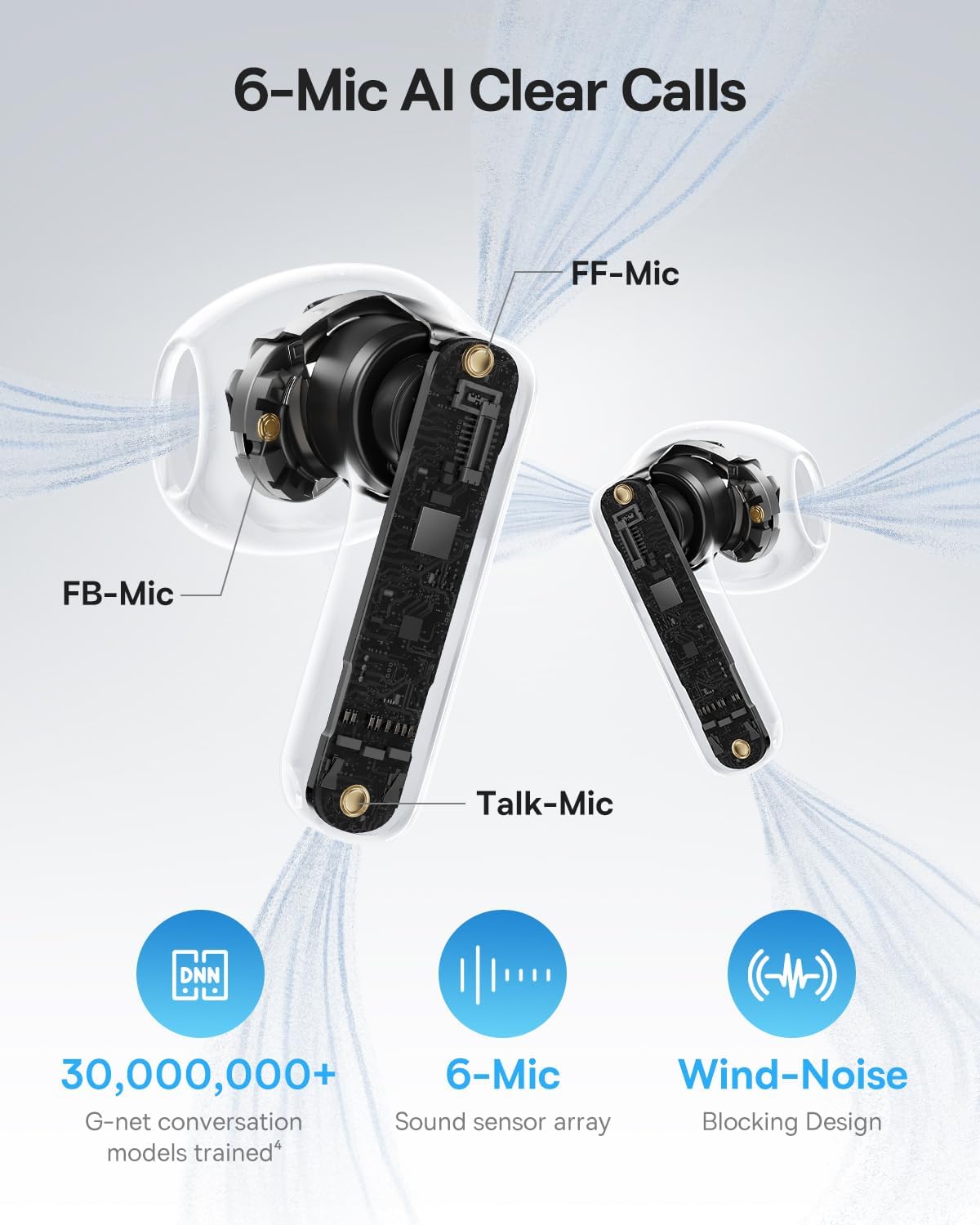
Image: A detailed diagram of the Baseus BS1 NC earbud, highlighting the placement of the FF-Mic, FB-Mic, and Talk-Mic, which contribute to the 6-Mic AI Clear Call technology and wind-noise blocking design.
6.5 Έλεγχος έξυπνης εφαρμογής
Download the dedicated Baseus app for enhanced control and customization options. The app allows you to:
- Προσαρμόστε τα επίπεδα ενίσχυσης μπάσων.
- Select from various EQ Modes.
- Ελέγξτε τις ρυθμίσεις της Χωρικής Ακουστικής.
- Χρησιμοποιήστε τη λειτουργία «Βρείτε τα ακουστικά σας».
Note: In guest mode, no account creation or permissions are required to customize features, but GPS access is needed to locate lost earbuds.

Image: A smartphone displaying the Baseus app interface, which offers various sound control options including Bass Boost, EQ Modes, Spatial Acoustics, and a "Find Your Earbuds" function.
7. Συντήρηση και Φροντίδα
7.1 Καθαρισμός
- Καθαρίζετε τακτικά τα ακουστικά και τη θήκη φόρτισης με ένα μαλακό, στεγνό πανί που δεν αφήνει χνούδι.
- Μη χρησιμοποιείτε σκληρά χημικά, διαλύτες καθαρισμού ή ισχυρά απορρυπαντικά.
- Gently remove any earwax or debris from the earbud mesh and charging contacts using a small, soft brush or cotton swab.
7.2 Αντοχή στο νερό και τη σκόνη (IP55)
The earbuds are rated IP55, meaning they are protected against limited dust ingress and low-pressure water jets from any direction. This makes them suitable for workouts and light rain exposure.
- Μην βυθίζετε τα ακουστικά σε νερό.
- Βεβαιωθείτε ότι τα ακουστικά είναι στεγνά πριν τα τοποθετήσετε ξανά στη θήκη φόρτισης, για να αποφύγετε ζημιά στις επαφές φόρτισης.
- Η θήκη φόρτισης δεν είναι αδιάβροχη.

Image: The Baseus BS1 NC Earbuds shown with water droplets, signifying their IP55 rating for dust and water resistance.
7.3 Αποθήκευση
Αποθηκεύστε τα ακουστικά στη θήκη φόρτισής τους όταν δεν τα χρησιμοποιείτε για να τα προστατεύσετε και να τα διατηρήσετε φορτισμένα.
8. Αντιμετώπιση Προβλημάτων
If you encounter issues with your Baseus BS1 NC earbuds, refer to the following common solutions:
- Δεν υπάρχουν προβλήματα ήχου/σύνδεσης:
- Βεβαιωθείτε ότι τα ακουστικά είναι φορτισμένα.
- Verify Bluetooth is enabled on your device and "Baseus Bass BS1 NC" is selected.
- Try placing earbuds back in the case, closing it, and then reopening to reset the connection.
- Ξεχάστε τη συσκευή στις ρυθμίσεις Bluetooth και πραγματοποιήστε εκ νέου σύζευξη.
- Ένα ακουστικό δεν λειτουργεί:
- Βεβαιωθείτε ότι και τα δύο ακουστικά είναι φορτισμένα.
- Place both earbuds back in the case, close, and reopen.
- Καθαρίστε τις επαφές φόρτισης και στα δύο ακουστικά και στο εσωτερικό της θήκης.
- Κακή ποιότητα ήχου:
- Βεβαιωθείτε ότι τα ακουστικά έχουν τοποθετηθεί σωστά στα αυτιά σας.
- Καθαρίστε το πλέγμα των ακουστικών για να αφαιρέσετε τυχόν εμπόδια.
- Check your device's audio settings and ensure LDAC is enabled if supported.
- Το ANC δεν είναι αποτελεσματικό:
- Ensure ANC mode is activated via touch control or the Baseus app.
- Adjust the earbuds for a better seal in your ears.
9. Προδιαγραφές
| Χαρακτηριστικό | Λεπτομέρεια |
|---|---|
| Όνομα μοντέλου | Baseus Bass BS1 NC |
| Έλεγχος θορύβου | Adaptive Noise Cancellation, Environmental Noise Cancellation, Hybrid Noise Cancellation |
| Τεχνολογία Συνδεσιμότητας | Bluetooth 6.0, Ασύρματο |
| Τεχνολογία ασύρματης επικοινωνίας | Bluetooth 6.0 |
| Εύρος Bluetooth | 10 μέτρα |
| Τύπος προγράμματος οδήγησης ήχου | Δυναμικός οδηγός |
| Μέγεθος προγράμματος οδήγησης ήχου | 13 χιλιοστά |
| Απόκριση συχνότητας | 40 KHz |
| Καθυστέρηση ήχου | 60 χιλιοστά του δευτερολέπτου |
| Διάρκεια ζωής μπαταρίας (ακουστικά) | 7 ώρες (ANC απενεργοποιημένο) |
| Συνολικός χρόνος παιχνιδιού (με θήκη) | 40 ώρες (ANC απενεργοποιημένο) |
| Χρόνος φόρτισης (ταχεία φόρτιση) | 10 λεπτά για αναπαραγωγή 2 ωρών |
| Επίπεδο αντοχής στο νερό | IP55 (Μόνο ακουστικά-ψείρες) |
| Τύπος ελέγχου | Αγγίξτε Έλεγχος |
| Υλικό | Ακρυλονιτρίλιο βουταδιένιο στυρένιο (ABS), πολυανθρακικό (PC) |
| Βάρος αντικειμένου (Ακουστικά) | 4 g ανά ακουστικό |
| Product Dimensions (Earbuds) | 1.2 x 0.7 x 0.7 ίντσες |
| Συμβατές Συσκευές | Devices with Bluetooth Audio Capability, including iOS, Android, Windows, Mac OS and Switch. |
10. Επίσημο βίντεο προϊόντος
Watch the official product video for a visual guide on the Baseus BS1 NC Earbuds:
Video: An official product video from Baseus showcasing the features and usage of the Baseus BS1 NC Semi-in-Ear True Wireless Earbuds.
11. Εγγύηση και υποστήριξη
For warranty information, technical support, FAQs, and further assistance, please visit the official Baseus support center.
Refer to the Quick Start Guide included in your package for a direct link or visit the Baseus webτοποθεσία.
Note: Protection plans may be available for purchase separately.


