Εγχειρίδιο χρήστη για ενσύρματο σταθερό τηλέφωνο Beetel B29
Μοντέλο: B29
1. Εισαγωγή
This manual provides comprehensive instructions for the setup, operation, and maintenance of your Beetel B29 Corded Landline Phone. Please read this manual carefully before using the product to ensure proper functionality and longevity.

Image: The Beetel B29 Corded Landline Phone in grey and white, showcasing τον κομψό σχεδιασμό του.
2. Περιεχόμενα συσκευασίας
Βεβαιωθείτε ότι όλα τα στοιχεία υπάρχουν στη συσκευασία:
- Beetel B29 Corded Landline Phone Unit
- Ακουστικό
- Κουλουριασμένο καλώδιο ακουστικού
- Καλώδιο γραμμής
- Εγχειρίδιο χρήστη
3. Ρύθμιση
Follow these steps to set up your Beetel B29 phone:
3.1 Σύνδεση του τηλεφώνου
- Συνδέστε το ακουστικό: Plug one end of the coiled handset cord into the handset and the other end into the jack labeled with a handset icon on the side of the phone base.
- Συνδέστε το καλώδιο τηλεφωνικής γραμμής: Plug one end of the line cord into the jack labeled with a telephone icon on the back of the phone base. Plug the other end into your telephone wall jack.

Εικόνα: Πίσω view of the Beetel B29 phone, illustrating the connection points for the handset and line cords.
3.2 Επιλογές τοποθέτησης
The Beetel B29 offers flexible placement:
- Βάση γραφείου: Place the phone on any flat surface. Ensure the cords are not tangled.
- Βάση τοίχου: The phone can be mounted on a wall. Use appropriate screws (not included) and the integrated wall-mount slots on the base.
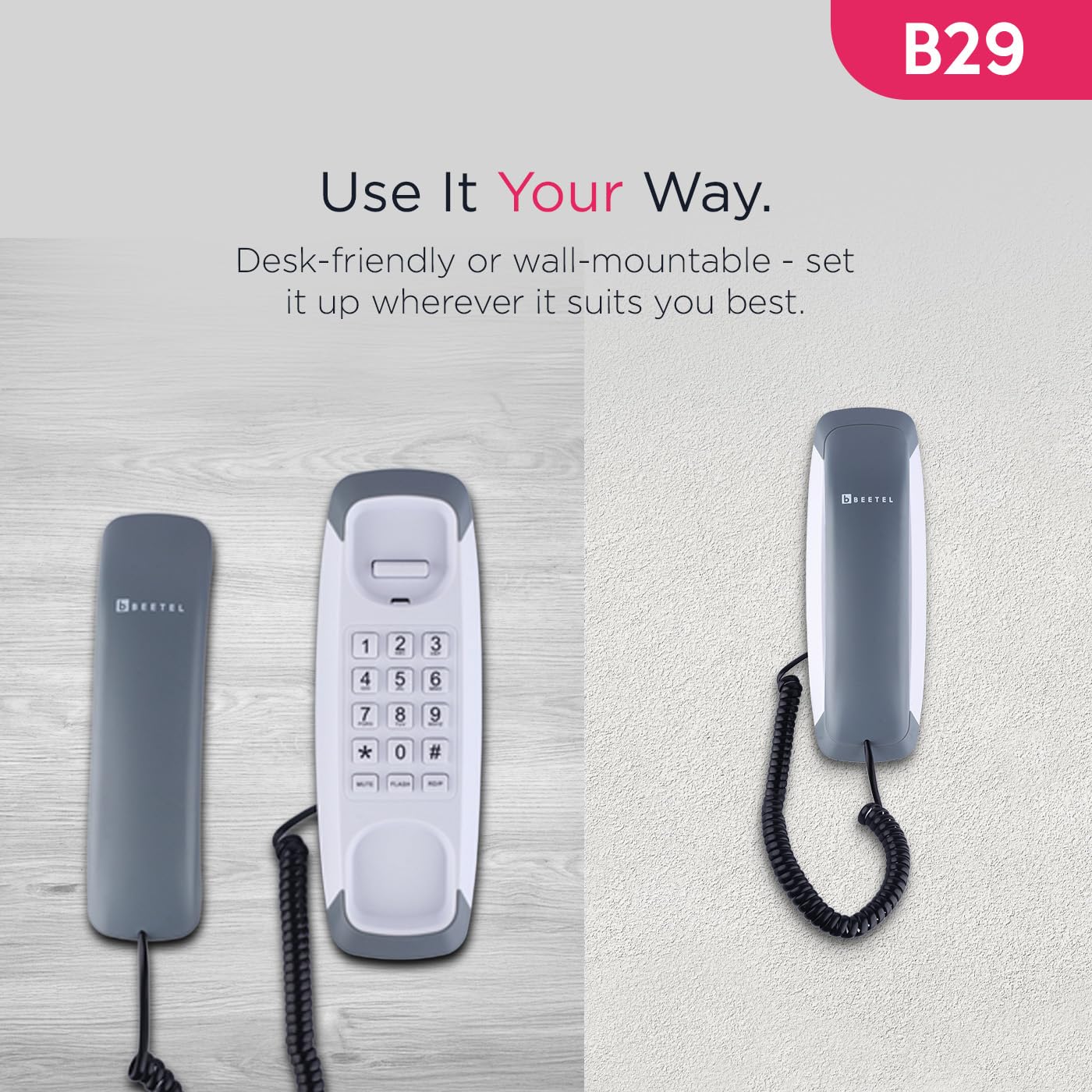
Image: The Beetel B29 phone shown in a wall-mounted configuration, demonstrating its versatility.
4. Οδηγίες λειτουργίας
4.1 Πραγματοποίηση κλήσης
- Σηκώστε το ακουστικό.
- Ακούστε έναν τόνο κλήσης.
- Καλέστε τον επιθυμητό αριθμό τηλεφώνου χρησιμοποιώντας το πληκτρολόγιο.
- Once the call is complete, replace the handset.
4.2 Λήψη κλήσης
- Όταν χτυπήσει το τηλέφωνο, σηκώστε το ακουστικό για να απαντήσετε στην κλήση.
- Once the call is complete, replace the handset.
4.3 Έλεγχος έντασης κουδουνίσματος
The ringer volume can be adjusted using the switch located on the side or bottom of the phone base. Select between high and low volume settings according to your preference.
4.4 Ειδικές λειτουργίες
The Beetel B29 includes several convenient features:
- Λειτουργία επανάκλησης: Πατήστε το ΔΙΑΔΙΚΑΣΙΑ κουμπί για αυτόματη κλήση του τελευταίου αριθμού που καλέσατε.
- Λειτουργία φλας: Πατήστε το ΛΑΜΨΗ button to switch between calls or access network services (e.g., call waiting) if supported by your telephone service provider.
- Λειτουργία σίγασης: Πατήστε το ΒΟΥΒΟΣ button during a call to temporarily disable your microphone, allowing you to speak privately without the other party hearing you. Press again to unmute.
- Tone/Pulse Dialing: The phone supports both Tone (DTMF) and Pulse dialing modes, ensuring compatibility with various telephone systems. This setting is usually configured automatically or via a switch on the phone base.

Image: Close-up of the Beetel B29 keypad, highlighting the Redial, Flash, and Mute function buttons.
5. Συντήρηση
To ensure the longevity and optimal performance of your Beetel B29 phone:
- Καθάρισμα: Σκουπίστε την επιφάνεια του τηλεφώνου με ένα μαλακό,amp πανί. Μην χρησιμοποιείτε λειαντικά καθαριστικά ή διαλύτες, καθώς αυτά μπορεί να προκαλέσουν ζημιά στο φινίρισμα.
- Αποφύγετε τα υγρά: Κρατήστε το τηλέφωνο μακριά από νερό και άλλα υγρά.
- Θερμοκρασία: Αποθηκεύστε και λειτουργήστε το τηλέφωνο σε περιβάλλον μέτριας θερμοκρασίας.
- Φροντίδα καλωδίου: Avoid stretching or tangling the handset and line cords excessively to prevent damage.
6. Αντιμετώπιση Προβλημάτων
If you encounter issues with your Beetel B29 phone, refer to the following common problems and solutions:
| Πρόβλημα | Πιθανή αιτία | Διάλυμα |
|---|---|---|
| Χωρίς τόνο κλήσης | Line cord not connected properly; service outage. | Ensure the line cord is securely plugged into both the phone and the wall jack. Check with your service provider for outages. |
| Δεν μπορώ να ακούσω τον καλούντα / Ο καλών δεν μπορεί να με ακούσει | Handset cord loose; Mute function activated. | Check that the handset cord is securely connected. If you cannot be heard, ensure the Mute function is not active. |
| Το τηλέφωνο δεν χτυπάει | Ringer volume set to low; service issue. | Adjust the ringer volume switch to a higher setting. Verify with your service provider if the issue persists. |
| Cannot dial out | No dial tone; incorrect dialing mode. | Check for a dial tone. Ensure the phone is set to the correct Tone/Pulse dialing mode for your telephone line. |
7. Προδιαγραφές
Key technical specifications for the Beetel B29 Corded Landline Phone:
| Χαρακτηριστικό | Λεπτομέρεια |
|---|---|
| Μοντέλο | Β29 |
| Διαστάσεις προϊόντος | 20 x 8 x 8 εκ |
| Βάρος αντικειμένου | 400 γρ |
| Επιλογές τοποθέτησης | Desk / Wall Mountable |
| Λειτουργία κλήσης | Τόνος / Παλμός |
| Λειτουργίες | Redial, Flash, Mute |
| Έλεγχος κουδουνίσματος | Ρυθμιζόμενη Ένταση |
| Κατασκευαστής | Beetel Teletech Limited |
| Χώρα προέλευσης | Ινδία |
8. Εγγύηση και υποστήριξη
For warranty information, please refer to the documentation included with your product packaging or visit the official Beetel website. For technical support or service inquiries, please contact Beetel customer service through their official channels.
Κατασκευαστής: Beetel Teletech Limited
Webτοποθεσία: www.beetel.in (Πρώηνampο σύνδεσμος, ο πραγματικός σύνδεσμος ενδέχεται να διαφέρει)


