1. Εισαγωγή
This manual provides essential instructions for the proper setup, operation, and maintenance of your KYOCERA DuraXV Extreme+ E4811 ultra-rugged flip phone. Designed for durability, this device features IP68 dust and waterproof rating, MIL-STD-810G protection, 4G LTE connectivity, and a 5MP camera. Please read this manual thoroughly before using your device to ensure optimal performance and longevity.
2. Περιεχόμενα συσκευασίας
Βεβαιωθείτε ότι το πακέτο σας περιέχει τα ακόλουθα στοιχεία:
- KYOCERA DuraXV Extreme+ E4811 Handset
- Μετασχηματιστής ρεύματος
- Καλώδιο USB
- Μπαταρία (προεγκατεστημένη ή ξεχωριστή)
3. Διάταξη συσκευής
Familiarize yourself with the physical components of your DuraXV Extreme+ E4811.
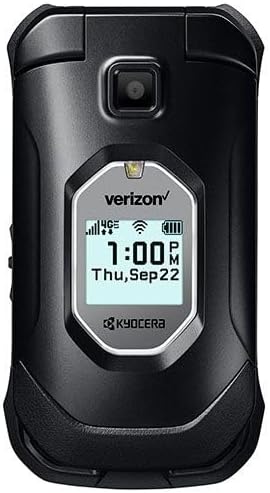
Εικόνα 3.1: Εμπρός view of the KYOCERA DuraXV Extreme+ E4811 in its closed position, displaying the external screen with time and network status.
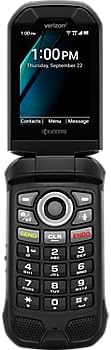
Εικόνα 3.2: Εμπρός view of the KYOCERA DuraXV Extreme+ E4811 in its open position, revealing the main display and the physical keypad with navigation buttons.

Εικόνα 3.3: Πίσω view of the KYOCERA DuraXV Extreme+ E4811 in its open position, showing the rear casing and charging contacts.
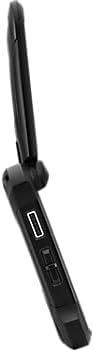
Εικόνα 3.4: Πλευρά view of the KYOCERA DuraXV Extreme+ E4811, highlighting the USB charging port and other side buttons.
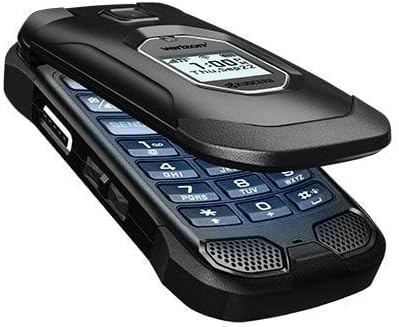
Εικόνα 3.5: Γωνία view of the KYOCERA DuraXV Extreme+ E4811 in its open state, providing a perspective of both the display and keypad.
4. Ρύθμιση
4.1. Εγκατάσταση και φόρτιση μπαταρίας
- If the battery is not pre-installed, remove the back cover of the phone.
- Align the battery (1770 mAh) contacts with the phone's terminals and gently press it into place.
- Επανατοποθετήστε το πίσω κάλυμμα, βεβαιώνοντας ότι έχει ασφαλίσει καλά για να διατηρείται η αντοχή στο νερό και τη σκόνη.
- Connect the USB cable to the phone's charging port and the power adapter. Plug the adapter into a wall outlet.
- Allow the phone to charge fully before initial use. The charging indicator will show progress.
4.2. Εγκατάσταση κάρτας SIM
Your DuraXV Extreme+ E4811 requires a Nano-SIM card for cellular service.
- Απενεργοποιήστε το τηλέφωνο και αφαιρέστε το πίσω κάλυμμα.
- Εντοπίστε την υποδοχή κάρτας SIM.
- Insert the Nano-SIM card with the gold contacts facing down and the notched corner aligned with the slot. Push until it clicks into place.
- Αντικαταστήστε το πίσω κάλυμμα.
4.3. Ενεργοποίηση/Απενεργοποίηση
- Για ενεργοποίηση: Πατήστε παρατεταμένα το κουμπί Ενεργοποίησης/Τερματισμού Κλήσης μέχρι να φωτιστεί η οθόνη.
- Για απενεργοποίηση: Press and hold the Power/End Call button, then select 'Power off' from the options on the screen.
5. Οδηγίες λειτουργίας
5.1. Βασική πλοήγηση
Use the directional pad and center select button to navigate menus and select options. The 'Send' button initiates calls, and the 'End' button terminates calls or returns to the home screen.
5.2. Πραγματοποίηση και λήψη κλήσεων
- Για να πραγματοποιήσετε μια κλήση: Enter the phone number using the keypad and press the 'Send' button.
- Για να απαντήσετε σε μια κλήση: When the phone rings, press the 'Send' button.
- Για να τερματίσετε μια κλήση: Press the 'End' button.
5.3. Αποστολή και λήψη μηνυμάτων
- Navigate to the 'Messages' application from the main menu.
- Select 'New Message' to compose a text message. Enter the recipient's number and your message.
- Press the 'Send' option to transmit the message.
- Received messages will appear as notifications on the screen and can be accessed through the 'Messages' application.
5.4. Χρήση της κάμερας
Your phone is equipped with a 5MP camera.
- Open the 'Camera' application from the main menu.
- Frame your subject using the display.
- Press the center select button or a dedicated camera button (if available) to capture a photo.
5.5. Connectivity (Bluetooth, Wi-Fi, 4G LTE)
- Bluetooth: Access Bluetooth settings from the main menu to pair with compatible devices like headsets or car kits.
- Wi-Fi: Connect to available Wi-Fi networks via the settings menu to access the internet without using cellular data.
- 4G LTE: The phone automatically connects to the 4G LTE network for high-speed data and calls, provided a valid SIM card and service plan are active.
6. Συντήρηση
- Καθάρισμα: Χρησιμοποιήστε ένα μαλακό, δamp πανί για να καθαρίσετε το εξωτερικό του τηλεφώνου. Αποφύγετε σκληρές χημικές ουσίες ή λειαντικά υλικά.
- Αντοχή σε νερό και σκόνη: The phone is IP68 rated. Ensure all port covers are securely closed to maintain water and dust resistance. Do not expose the phone to saltwater or other liquids. If exposed to water, rinse with fresh water and dry thoroughly.
- Φροντίδα μπαταρίας: Avoid extreme temperatures. Do not puncture or disassemble the battery. Use only approved chargers.
- Προστασία του Περιβάλλοντος: The phone is MIL-STD-810G compliant, offering protection against drops, shock, vibration, and extreme weather conditions. However, avoid unnecessary harsh treatment.
7. Αντιμετώπιση Προβλημάτων
If you encounter issues with your phone, refer to the following common solutions:
- Το τηλέφωνο δεν ενεργοποιείται: Ensure the battery is charged. Connect the phone to the charger and attempt to power on after a few minutes.
- Δεν υπάρχει σήμα δικτύου: Check that the SIM card is correctly inserted. Move to an area with better network coverage. Contact your service provider if the issue persists.
- Δεν είναι δυνατή η πραγματοποίηση/λήψη κλήσεων: Verify that you have active cellular service. Check call barring settings. Ensure the phone is not in Airplane Mode.
- Screen is Unresponsive: If the screen is frozen, try performing a soft reset by removing and reinserting the battery (if accessible) or holding the Power button for an extended period.
- Κακή ποιότητα ήχου: Check the volume settings. Ensure the speaker or earpiece is not obstructed.
8. Προδιαγραφές
| Χαρακτηριστικό | Προσδιορισμός |
|---|---|
| Αριθμός μοντέλου | Ε4811 |
| Λειτουργικό σύστημα | Android 11.0 |
| Μοντέλο CPU | MediaTek Helio |
| Ταχύτητα CPU | 2 GHz |
| ΕΜΒΟΛΟ | 2 GB |
| Εσωτερική αποθήκευση | 16 GB |
| Ανάλυση οθόνης | 480 x 800 |
| Πίσω κάμερα | 5 MP |
| Χωρητικότητα μπαταρίας | 1770 mAh |
| Συνδεσιμότητα | 4G LTE, Wi-Fi, Bluetooth |
| Βαθμολογίες ανθεκτικότητας | IP68 Dust & Waterproof, MIL-STD-810G |
| Form Factor | Αναρρίπτω |
| Jack ήχου | 3.5 χλστ |
| Βάρος αντικειμένου | 8 ουγγιές |
9. Εγγύηση και υποστήριξη
Your KYOCERA DuraXV Extreme+ E4811 is covered by a manufacturer's warranty. For specific warranty terms and conditions, please refer to the warranty card included with your product or visit the official KYOCERA website. For technical support, product registration, or further assistance, please visit the KYOCERA support page or contact their customer service directly.
Διαδικτυακή υποστήριξη: www.kyoceramobile.com/support/


