1. Εισαγωγή
This manual provides detailed instructions for the setup, operation, and maintenance of your Cillso IDW26 Smart Watch. Please read this manual thoroughly before using your device to ensure proper functionality and to maximize your user experience.

Image: The Cillso IDW26 Smart Watch, showcasing its main display with various metrics and a separate screen illustrating an incoming call.
2. Τι υπάρχει στο κουτί
- 1x Cillso IDW26 Smart Watch
- 1x Type-C Magnetic Charging Cable
- 1x Εγχειρίδιο χρήστη
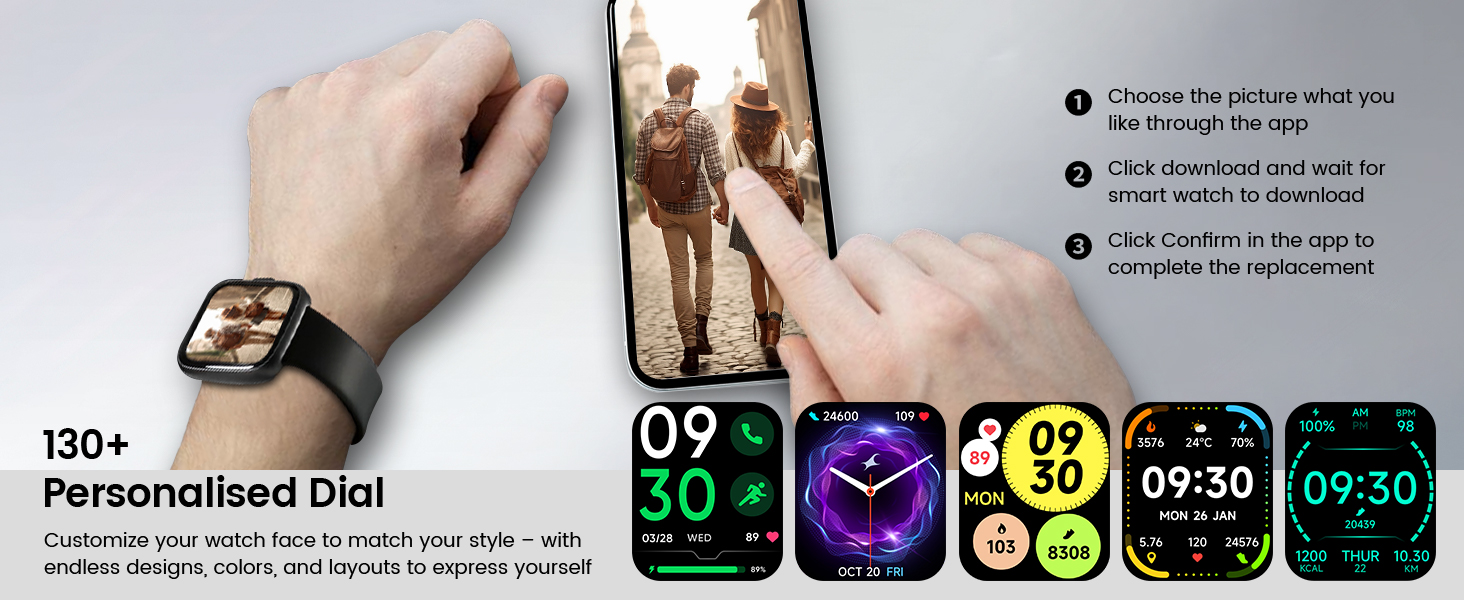
Image: A visual representation of the Cillso IDW26 Smart Watch packaging contents, showing the watch, its magnetic charging cable, and the included user manual.
3. Ρύθμιση και Αρχική Χρήση
3.1 Φόρτιση της συσκευής
Before first use, fully charge your Cillso IDW26 Smart Watch. Connect the magnetic charging cable to the charging points on the back of the watch and plug the USB end into a power adapter (not included) or a computer's USB port. A full charge typically takes approximately 1.5 to 2 hours.

Εικόνα: Το πίσω μέρος view of the Cillso IDW26 Smart Watch, highlighting the optical sensor for health monitoring and the two metallic contacts for magnetic charging.
3.2 Εγκατάσταση και σύζευξη εφαρμογής
To unlock the full functionality of your Cillso IDW26 Smart Watch, you need to install the companion application on your smartphone. The watch is compatible with smartphones running iOS 9.0+ and Android 5.0+ (or later versions).
- Κατεβάστε την εφαρμογή: Scan the QR code provided in the watch's packaging or search for "VeryFit" in your smartphone's app store (App Store for iOS, Google Play Store for Android).
- Ενεργοποίηση Bluetooth: Βεβαιωθείτε ότι το Bluetooth είναι ενεργοποιημένο στο smartphone σας.
- Ανοίξτε την εφαρμογή: Launch the "VeryFit" app and follow the on-screen instructions to create an account or log in.
- Προσθήκη συσκευής: Within the app, navigate to the "Add Device" section. The app will search for nearby devices.
- Επιλέξτε το ρολόι σας: Select "IDW26" from the list of found devices.
- Επιβεβαίωση ζεύξης: A pairing request will appear on your phone and watch. Confirm the pairing on both devices.
- Να επιτρέπονται οι ειδοποιήσεις: Grant the app necessary permissions, especially for notifications, to ensure messages and calls are displayed on your smartwatch.
For certain message notifications, the "GloryFit" app may also be mentioned in some contexts. If you encounter issues with specific message types, verify settings within both "VeryFit" and "GloryFit" if both are installed, or consult the app's help section.

Image: A visual guide demonstrating the pairing process for the Cillso IDW26 Smart Watch, from enabling Bluetooth to confirming the connection and allowing notifications.
For further assistance with app installation and pairing, you can visit the official support page: https://t.ido.ink/eAriqu
4. Λειτουργία του Έξυπνου Ρολογιού
4.1 Πλοήγηση με οθόνη αφής
- Σύρετε πάνω/κάτω: Κάντε κύλιση στα μενού και τις ειδοποιήσεις.
- Σύρετε αριστερά/δεξιά: Αποκτήστε πρόσβαση σε γρήγορα γραφικά στοιχεία ή σε διαφορετικές οθόνες λειτουργιών.
- Παρακέντηση: Επιλέξτε ένα στοιχείο ή επιβεβαιώστε μια ενέργεια.
- Πατήστε και κρατήστε πατημένο: Προσαρμόστε τις προσόψεις ρολογιού (στην αρχική οθόνη).
4.2 Side Button Functionality
The physical button on the side of the watch typically serves the following functions:
- Σύντομος Τύπος: Wake up the screen, return to the previous screen, or go back to the home screen.
- Παρατεταμένο πάτημα: Power on/off the device, or access a quick menu (e.g., restart, power off).
5. Βασικά Χαρακτηριστικά
5.1 Ειδοποιήσεις κλήσεων και μηνυμάτων μέσω Bluetooth
The Cillso IDW26 Smart Watch features Bluetooth 5.3 for stable connectivity, allowing you to make and answer calls directly from your wrist. It includes a sensitive microphone and speaker for clear communication. Once paired with the "GloryFit" or "VeryFit" app, you will receive notifications for incoming calls, SMS messages, and alerts from various social media applications (e.g., Facebook, Twitter, WhatsApp, Instagram). Notifications are delivered via intuitive customizable vibrations.

Image: The Cillso IDW26 Smart Watch showing a message notification from WeChat and an incoming call interface with options to answer or decline.
5.2 Built-in Alexa Voice Control
Access Amazon Alexa's intelligent voice assistant directly from your wrist. Speak commands to check news, weather, calendar updates, set reminders, control smart home devices, and manage music playback. This feature enhances hands-free operation and daily efficiency.

Image: A user interacting with the Cillso IDW26 Smart Watch's built-in AI voice assistant, asking questions like "What time is it?" and "Weather today?".
5.3 1.83" HD Display and Customization
The smartwatch features a 1.83-inch HD display with 3D tempered glass, offering a resolution of 320x385 pixels for clear visuals and high touch sensitivity. The 4-level adjustable brightness ensures readability in various lighting conditions. Through the "VeryFit" app, you can choose from over 130 watch faces or create custom designs using your own photos.

Εικόνα: Μια λεπτομερής view of the Cillso IDW26 Smart Watch's 1.83-inch HD screen, emphasizing its clarity and display technology.

Image: A demonstration of the Cillso IDW26 Smart Watch's customization options, showing multiple watch face designs and the process of selecting or creating a personalized dial through the app.
5.4 24/7 Health Monitoring
Equipped with a high-precision optical sensor, the IDW26 Smart Watch provides continuous health monitoring:
- Παρακολούθηση καρδιακών παλμών: Tracks your heart rate in real-time, providing insights into your cardiovascular health.
- Παρακολούθηση ύπνου: Analyzes sleep quality by identifying deep sleep, light sleep, and awake phases, offering suggestions for improved sleep habits.
- Παρακολούθηση οξυγόνου στο αίμα (SpO2): Monitors your blood oxygen levels for essential wellness insights.
- Εκπαίδευση αναπνοής: Guides you through breathing exercises with gentle vibrations and visual cues to help calm your mind and body.

Image: A composite image illustrating the 24/7 health monitoring capabilities of the Cillso IDW26 Smart Watch, including heart rate, sleep tracking, blood oxygen measurement, and guided breath training.
5.5 120+ Λειτουργίες Αθλητισμού
The fitness tracker supports over 120 professional sport modes, covering a wide range of indoor and outdoor activities such as running, cycling, soccer, and more. High-precision sensors accurately track steps, distance, calories burned, and workout duration, assisting in performance analysis and training plan optimization.

Image: A person hiking with the Cillso IDW26 Smart Watch, alongside graphics illustrating the watch's 24-hour activity tracking and icons representing over 120 sports modes.
5.6 Βαθμός αδιαβροχοποίησης IP68
With an IP68 rating, the smartwatch is resistant to sweat, rain, and can be worn during handwashing. It is not suitable for swimming or hot showers.

Image: The Cillso IDW26 Smart Watch shown with water droplets, visually representing its IP68 waterproof capabilities for daily activities like hand washing, exposure to rain, and perspiration.
5.7 Πρόσθετες Λειτουργίες
The Cillso IDW26 Smart Watch includes several practical features to enhance daily convenience:
- Ξυπνητηρι: Ορίστε πολλαπλά ξυπνητήρια.
- Χρονόμετρο & Χρονοδιακόπτης: Για ακριβή χρονομέτρηση κατά τη διάρκεια των δραστηριοτήτων.
- Εντοπιστής τηλεφώνου: Helps find your paired smartphone.
- Έλεγχος κάμερας: Ελέγξτε την κάμερα του τηλεφώνου σας από απόσταση.
- Έλεγχος μουσικής: Διαχειριστείτε την αναπαραγωγή μουσικής στο smartphone σας.
- Δελτίο καιρού: Λάβετε ενημερώσεις καιρού σε πραγματικό χρόνο.
- Καθιστική υπενθύμιση: Σας ζητά να μετακινηθείτε μετά από περιόδους αδράνειας.

Image: A collage of images depicting various practical functions of the Cillso IDW26 Smart Watch, including stopwatch, alarm clock, camera control, music control, weather forecast, and sedentary reminder.
6. Διάρκεια ζωής μπαταρίας και φόρτιση
The Cillso IDW26 Smart Watch is powered by a 300mAh battery designed for low power consumption.
- Χρόνος χρήσης: Up to 5-7 days with typical use.
- Χρόνος αναμονής: Έως 30 ημέρες.
- Χρόνος φόρτισης: Περίπου 1.5 ώρες για πλήρη φόρτιση.
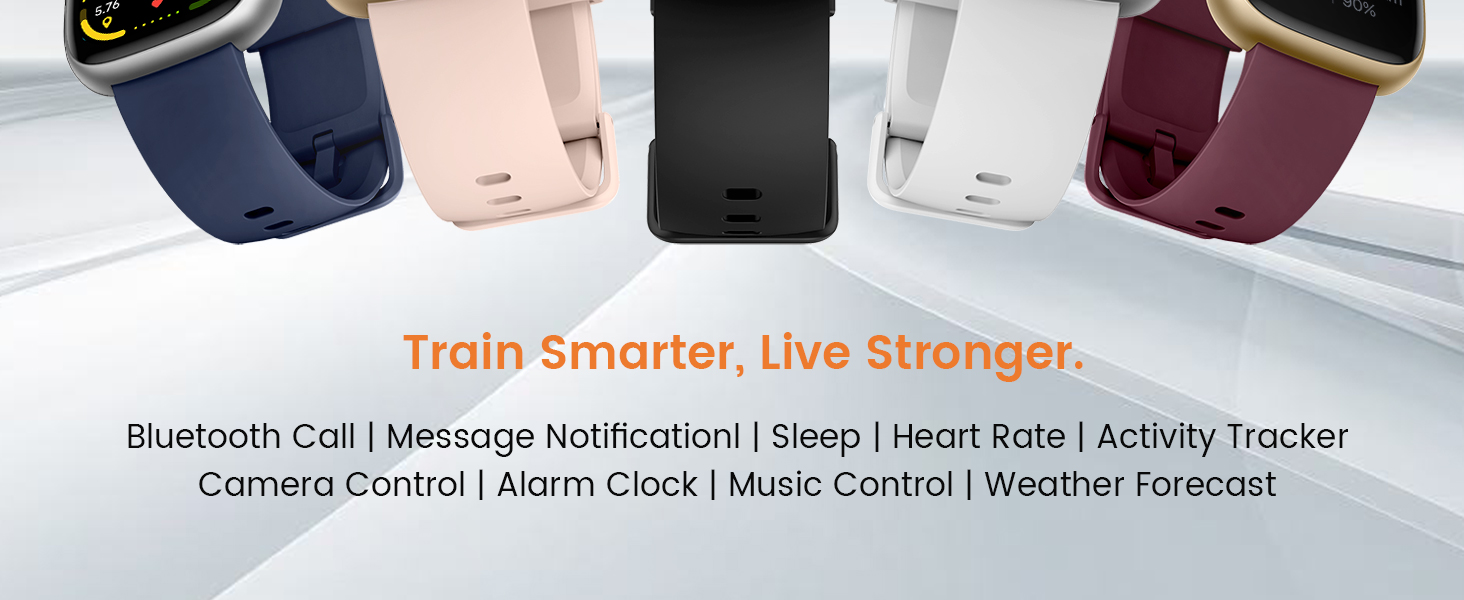
Image: A graphic illustrating the battery performance of the Cillso IDW26 Smart Watch, detailing its 2-hour charging time, 7 days of normal use, and 30 days of standby time.
7. Συντήρηση και Φροντίδα
- Καθάρισμα: Σκουπίστε το ρολόι και το λουράκι τακτικά με ένα μαλακό, στεγνό πανί. Εάν είναι απαραίτητο, χρησιμοποιήστε ένα ελαφρώςamp πανί και στη συνέχεια στεγνώστε καλά.
- Αποφύγετε τα χημικά: Μην χρησιμοποιείτε σκληρές χημικές ουσίες, διαλύτες καθαρισμού ή ισχυρά απορρυπαντικά, καθώς αυτά μπορεί να προκαλέσουν ζημιά στο φινίρισμα και τις στεγανοποιήσεις του ρολογιού.
- Έκθεση στο νερό: While IP68 rated, avoid prolonged submersion, hot water, or steam. Dry the watch thoroughly if it gets wet.
- Θερμοκρασία: Αποφύγετε την έκθεση του ρολογιού σε ακραίες θερμοκρασίες (πολύ ζέστη ή πολύ κρύο) ή σε άμεσο ηλιακό φως για μεγάλα χρονικά διαστήματα.
- Σύγκρουση: Προστατέψτε το ρολόι από ισχυρές κρούσεις ή πτώσεις.
8. Αντιμετώπιση Προβλημάτων
If you encounter issues with your Cillso IDW26 Smart Watch, please refer to the following common solutions:
- Το ρολόι δεν ενεργοποιείται: Βεβαιωθείτε ότι το ρολόι είναι πλήρως φορτισμένο. Συνδέστε το στον φορτιστή για τουλάχιστον 10 λεπτά.
- Δεν είναι δυνατή η σύζευξη με τηλέφωνο:
- Βεβαιωθείτε ότι το Bluetooth είναι ενεργοποιημένο στο τηλέφωνο και το ρολόι σας.
- Βεβαιωθείτε ότι το ρολόι βρίσκεται εντός της εμβέλειας του τηλεφώνου σας.
- Επανεκκινήστε τόσο το τηλέφωνο όσο και το ρολόι σας.
- Try unpairing and re-pairing the device through the "VeryFit" app.
- Check if the "VeryFit" app has all necessary permissions enabled on your phone.
- Δεν εμφανίζονται ειδοποιήσεις:
- Βεβαιωθείτε ότι το ρολόι έχει αντιστοιχιστεί και συνδεθεί με επιτυχία στην εφαρμογή.
- Verify that notification permissions are granted to the "VeryFit" app in your phone's settings.
- Check the notification settings within the "VeryFit" app to ensure specific app notifications are enabled.
- Ensure your phone's notification bar displays the messages; if not, the watch cannot receive them.
- Ανακριβή δεδομένα υγείας:
- Βεβαιωθείτε ότι το ρολόι φοράτε σφιχτά στον καρπό σας, ούτε πολύ σφιχτά ούτε πολύ χαλαρά.
- Καθαρίστε τον αισθητήρα στο πίσω μέρος του ρολογιού.
- Αποφύγετε την υπερβολική κίνηση κατά τη διάρκεια των μετρήσεων.
- Μικρή διάρκεια μπαταρίας:
- Μειώστε τη φωτεινότητα της οθόνης.
- Απενεργοποιήστε τη συνεχή παρακολούθηση καρδιακών παλμών εάν δεν είναι απαραίτητη.
- Περιορίστε τον αριθμό των εφαρμογών που στέλνουν ειδοποιήσεις στο ρολόι.
- Βεβαιωθείτε ότι το ρολόι είναι πλήρως φορτισμένο κάθε φορά.
If these steps do not resolve your issue, please contact Cillso customer support.
9. Προδιαγραφές
| Χαρακτηριστικό | Λεπτομέρεια |
|---|---|
| Όνομα μοντέλου | IDW26 |
| Μάρκα | Cillso |
| Μέγεθος οθόνης | 1.83 ίντσες |
| Ανάλυση οθόνης | 320x385 εικονοστοιχεία |
| Σχήμα | Πλατεία |
| GPS | GPS μέσω Smartphone |
| Σύνθεση κυψέλης μπαταρίας | Πολυμερές Λιθίου |
| Τεχνολογία Συνδεσιμότητας | Bluetooth 5.3 |
| Χωρητικότητα μπαταρίας | 300 εκατamp Ώρες |
| Ειδικά Χαρακτηριστικά | Activity Tracker, Alarm Clock, Camera Control, Touchscreen, Weather Forecast, Alexa Built-in, Bluetooth Calling, Heart Rate/Sleep Monitor, 120+ Sports Modes, IP68 Waterproof |
| Συμβατότητα λειτουργικού συστήματος | iOS 9.0+, Android 5.0+ |
| Βάρος αντικειμένου | 10 γραμμάρια (0.353 ουγκιές) |
| Αντοχή στο νερό | IP68 (Resistant to sweat, rain, handwashing) |
10. Εγγύηση και υποστήριξη
Cillso is committed to providing quality products and customer service.
10.1 Υποστήριξη πελατών
If you have any questions about the product, encounter problems, or require assistance, please contact Cillso customer service through the platform where you purchased the product (e.g., Amazon). Cillso offers 24-hour customer service to help resolve any issues promptly.

Image: A graphic indicating customer support availability, prompting users to contact for assistance with product issues.


