Εισαγωγή
This manual provides detailed instructions for the CYCPLUS AS2 Bike Pump and the CYCPLUS M3 GPS Bike Computer. It covers setup, operation, maintenance, and troubleshooting to ensure optimal performance and longevity of your devices.

Image: The CYCPLUS AS2 Bike Pump and M3 GPS Bike Computer displayed side-by-side.
Περιεχόμενα συσκευασίας
Το πακέτο σας πρέπει να περιέχει τα ακόλουθα στοιχεία:
- CYCPLUS AS2 Bike Pump x 1
- CYCPLUS M3 GPS Bike Computer x 1
- Extension Hose (for AS2 Pump)
- Charging Cable (typically USB, for both devices)
- Mounting Accessories (for M3 Computer)
- Εγχειρίδιο χρήστη (αυτό το έγγραφο)
Προϊόν Πάνωview
CYCPLUS AS2 Bike Pump Overview
The CYCPLUS AS2 is a compact and portable electric bike pump designed for quick and efficient tire inflation.
- Pocket Size & Portable: Weighs 3.42 oz (97g) with dimensions of 1.81 x 1.1 x 2.52 inches. Designed for easy carrying and storage.
- Ισχυρός πληθωρισμός: Achieves a maximum air pressure of 100 PSI with a 5L/min wind speed, capable of inflating a bicycle tire to 80 PSI in approximately 80 seconds.
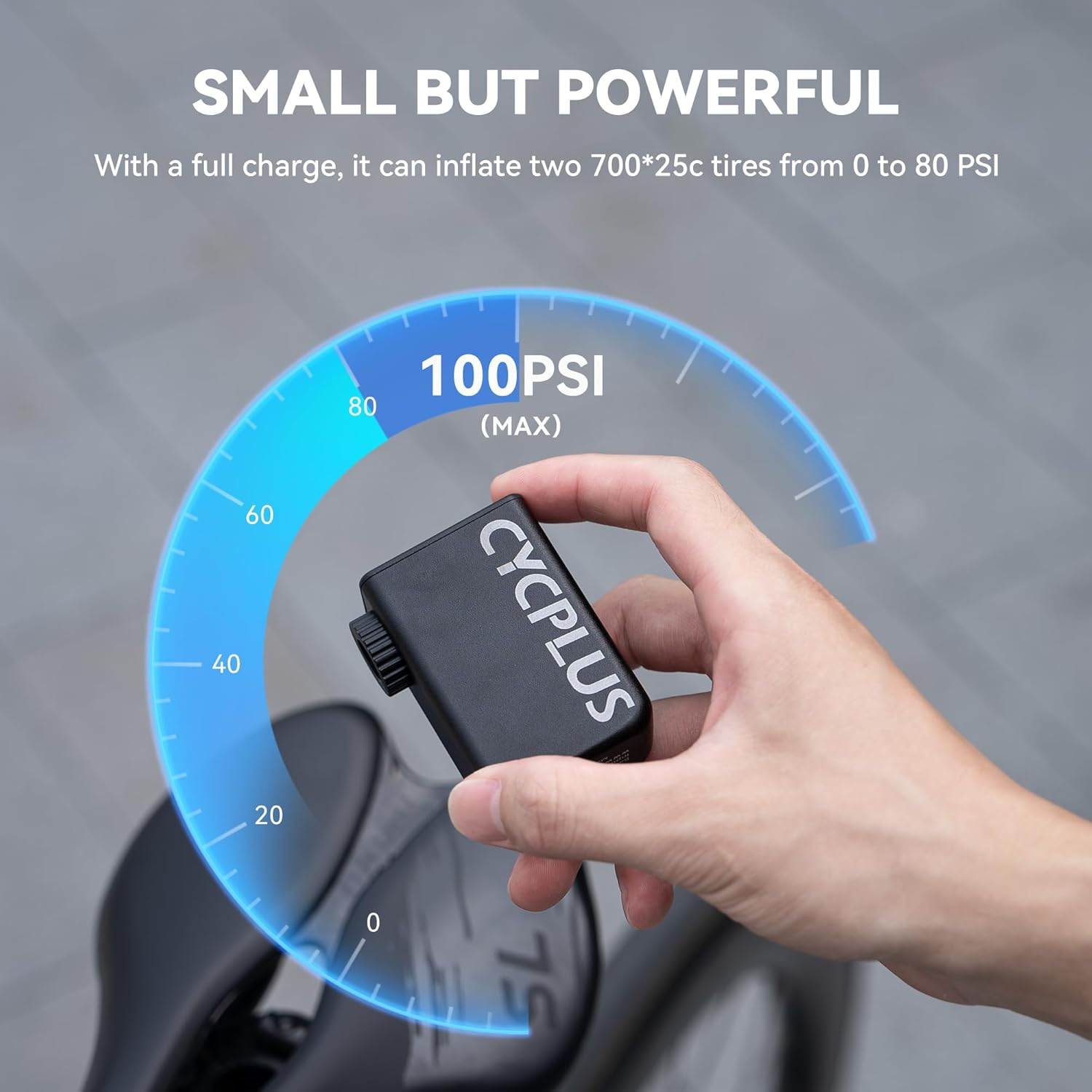
Image: A hand holding the compact CYCPLUS AS2 bike pump, with an overlay indicating its 100 PSI maximum inflation capacity.

Image: The CYCPLUS AS2 bike pump inflating a bicycle tire, with text highlighting its ability to reach 80 PSI in just 80 seconds.
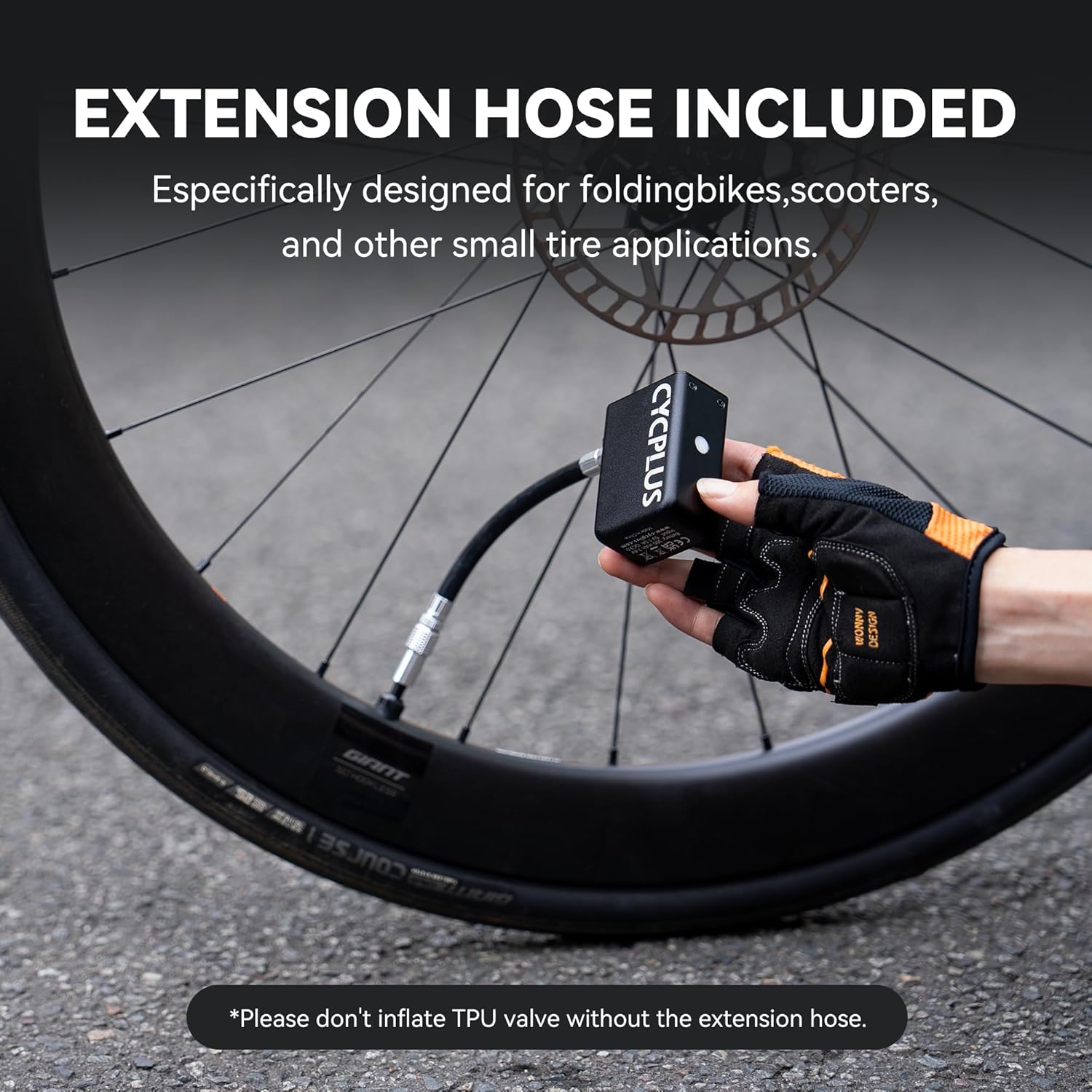
Image: The CYCPLUS AS2 bike pump connected to a bicycle tire valve via its included extension hose, demonstrating its use for various tire applications.
CYCPLUS M3 GPS Bike Computer Overview
The CYCPLUS M3 is a GPS-enabled bike computer offering accurate tracking and customizable data display for your cycling activities.
- Ακριβής εντοπισμός θέσης GPS: Utilizes 5 major satellite systems (GPS, GLONASS, Galileo, QZSS, and BeiDou) for fast and precise positioning, typically within 10 seconds after initial setup.
- 2.8" Screen with Auto Backlight: Features a 2.8-inch FSTN glass screen for clear visibility in various lighting conditions, with automatic backlight activation.
- Custom Display Support: Customize data fields via the CYCPLUS FIT APP, prioritizing up to 8 key metrics per page.

Image: A diagram illustrating the various data metrics displayed on the CYCPLUS M3 GPS Bike Computer, including speed, time, distance, altitude, and more.

Image: A visual representation of the CYCPLUS M3 GPS Bike Computer surrounded by icons representing the five major satellite systems (GPS, GLONASS, Galileo, QZSS, BeiDou) it uses for accurate positioning.

Image: The CYCPLUS M3 GPS Bike Computer mounted on bicycle handlebars, emphasizing its 2.8-inch large screen and slim 20mm profile.

Image: A smartphone screen displaying the CYCPLUS FIT APP interface, showing options for customizing the data display on the M3 GPS Bike Computer.

Image: A smartphone displaying the CYCPLUS FIT APP, showcasing features like sports data view, customizable data fields, firmware updates, data analysis, and offline ephemeris download.
Ρύθμιση
CYCPLUS AS2 Bike Pump Setup
- Φόρτιση: Before first use, fully charge the pump using the provided USB cable.
- Attaching Extension Hose: For most tire valves, attach the extension hose to the pump's inflation port. Ensure it is securely fastened. Note: Do not inflate TPU valves without the extension hose.
CYCPLUS M3 GPS Bike Computer Setup
- Φόρτιση: Fully charge the M3 computer using the provided USB cable.
- Βάση: Securely attach the M3 computer to your bicycle handlebars using the included mounting accessories.
- Initial GPS Positioning: For the first use, power on the M3 computer outdoors. Initial GPS positioning may take 3-5 minutes. Ensure a clear view του ουρανού.
- CYCPLUS FIT APP: Download the "CYCPLUS FIT" app from the Google Play Store or Apple App Store. Connect your M3 computer to the app via Bluetooth to customize display settings and download offline ephemeris for faster future GPS acquisition.
Οδηγίες Λειτουργίας
CYCPLUS AS2 Bike Pump Operation
- Ενεργοποίηση/Απενεργοποίηση: Double-click the power button to turn the pump on or off.
- Connecting to Tire: Attach the extension hose to the tire valve. Ensure a tight seal to prevent air leakage.
- Πληθωρισμός: Once connected and powered on, the pump will begin inflating. Monitor the tire pressure manually or using a separate gauge if precise pressure is required. The pump has a maximum pressure of 100 PSI.
- Σταματώντας τον πληθωρισμό: Double-click the power button to stop inflation.
CYCPLUS M3 GPS Bike Computer Operation
- Ενεργοποίηση/Απενεργοποίηση: Press and hold the power button to turn the computer on or off.
- Starting a Ride: Once powered on and GPS signal is acquired, press the start button (refer to device specific button layout) to begin recording your ride data.
- Εμφάνιση πλοήγησης: Use the navigation buttons (refer to device specific button layout) to cycle through different data screens.
- Οπίσθιος φωτισμός: The screen automatically senses the environment to turn on the backlight for improved visibility.
- Συγχρονισμός δεδομένων: After your ride, connect the M3 computer to the CYCPLUS FIT APP to sync your ride data, analyze performance, and update firmware.
Συντήρηση
Γενική Συντήρηση
- Καθάρισμα: Σκουπίστε και τις δύο συσκευές με ένα μαλακό, στεγνό πανί. Αποφύγετε τη χρήση σκληρών χημικών ουσιών ή λειαντικών υλικών.
- Αποθήκευση: Store devices in a cool, dry place away from direct sunlight and extreme temperatures.
- Φόρτιση: Recharge batteries regularly, even if not in frequent use, to maintain battery health.
CYCPLUS AS2 Bike Pump Maintenance
- Επιθεώρηση σωλήνα: Regularly check the extension hose for any signs of wear, cracks, or damage. Replace if necessary.
- Nozzle Cleanliness: Keep the inflation nozzle free from dirt and debris.
Αντιμετώπιση προβλημάτων
CYCPLUS AS2 Bike Pump Troubleshooting
- Η αντλία δεν ενεργοποιείται: Ensure the battery is charged. Double-click the power button firmly.
- Slow inflation/No inflation: Check if the extension hose is securely attached to both the pump and the tire valve. Ensure the tire valve is not blocked.
CYCPLUS M3 GPS Bike Computer Troubleshooting
- Χωρίς σήμα GPS: Βεβαιωθείτε ότι βρίσκεστε σε εξωτερικό χώρο με καθαρό view of the sky. Allow sufficient time (3-5 minutes for first use, less for subsequent uses) for signal acquisition. Download offline ephemeris via the CYCPLUS FIT APP.
- Η οθόνη δεν ανταποκρίνεται: Try restarting the device. Ensure the battery is charged.
- Τα δεδομένα δεν συγχρονίζονται με την εφαρμογή: Ensure Bluetooth is enabled on your smartphone and the M3 computer is paired with the CYCPLUS FIT APP. Check for app updates.
Προδιαγραφές
CYCPLUS AS2 Bike Pump Specifications
- Βάρος: 3.42 oz (97g)
- Διαστάσεις: 1.81 x 1.1 x 2.52 ίντσες
- Μέγιστη πίεση αέρα: 100 PSI
- Ταχύτητα ανέμου: 5 L/min
- Inflation Time (80 PSI): Περίπου 80 δευτερόλεπτα
CYCPLUS M3 GPS Bike Computer Specifications
- Μέγεθος οθόνης: 2.8 inches (FSTN glass screen)
- GPS Systems: GPS, GLONASS, Galileo, QZSS, BeiDou
- Συνδεσιμότητα: Bluetooth (για σύνδεση με εφαρμογές)
- Χαρακτηριστικά: Auto backlight, customizable data display via app, offline ephemeris support.
Εγγύηση και υποστήριξη
For product support, firmware updates, and detailed data analysis, please refer to the CYCPLUS FIT APP. You can download the app from the Google Play Store or Apple App Store.
For warranty information and further assistance, please contact CYCPLUS customer service through their official webτον ιστότοπο ή τον πωλητή λιανικής από τον οποίο αγοράστηκε το προϊόν.