Εισαγωγή
Σας ευχαριστούμε που επιλέξατε το Μαύροview W50PRO Smartwatch. This manual provides essential information for setting up, operating, and maintaining your device. Please read it carefully to ensure optimal performance and a safe user experience. Keep this manual for future reference.
Περιεχόμενα συσκευασίας
Βεβαιωθείτε ότι όλα τα αντικείμενα υπάρχουν στη συσκευασία σας:
- Μαύροςview W50PRO Smartwatch
- Λουράκι σιλικόνης
- Replacement Nylon Braided Strap
- Μαγνητικό καλώδιο φόρτισης
- Εγχειρίδιο χρήστη (αυτό το έγγραφο)

Image: Package contents and product dimensions.
Προϊόν Πάνωview
Ο Μαύροςview W50PRO Smartwatch features a 1.45-inch HD touchscreen display, function buttons, a powerful flashlight, and a comfortable silicone strap. Its robust design is suitable for various activities.

Εικόνα: Μαύροview W50PRO Smartwatch with its key features labeled.
Ρύθμιση
1. Φόρτιση της Συσκευής
Πριν από την πρώτη χρήση, φορτίστε πλήρως το smartwatch σας. Συνδέστε το μαγνητικό καλώδιο φόρτισης στις υποδοχές φόρτισης στο πίσω μέρος του ρολογιού και συνδέστε το άκρο USB σε έναν προσαρμογέα ρεύματος (δεν περιλαμβάνεται) ή σε μια θύρα USB υπολογιστή. Το ρολόι θα εμφανίσει μια ένδειξη φόρτισης.
- Μια πλήρης φόρτιση διαρκεί συνήθως περίπου 3 ώρες.
- The 960mAh battery provides up to 30 days of typical use and 100 days of standby time.

Εικόνα: Χωρητικότητα μπαταρίας και πληροφορίες φόρτισης.
2. Εγκατάσταση εφαρμογής
Κατεβάστε και εγκαταστήστε το "Ντα Φιτ" application on your smartphone. You can find it in the App Store (iOS) or Google Play Store (Android).
3. Device Pairing and Bluetooth Calls
To connect your smartwatch and enable Bluetooth calling:
- Download the Da Fit app from your phone's app store.
- Ενεργοποιήστε το Bluetooth στο smartphone σας.
- Open the Da Fit app and add your device.
- Confirm the pairing request on your phone and watch.
- Grant necessary notification permissions within the Da Fit app for calls and messages.
- Μόλις γίνει η σύζευξη, μπορείτε να πραγματοποιείτε και να λαμβάνετε κλήσεις απευθείας από το ρολόι σας.

Image: Connection and calling setup guide.
Οδηγίες Λειτουργίας
1. Βασική πλοήγηση
- Οθόνη αφής: Swipe left/right, up/down to navigate menus and access features. Tap to select.
- Κουμπιά λειτουργιών: Use the physical buttons on the side of the watch for quick access to specific functions or to return to the home screen.
2. Flashlight and Compass
The W50PRO includes a built-in flashlight and compass for outdoor activities.
- Φακός: Activate the flashlight feature from the watch's menu. It offers fixed and intermittent modes for various situations.
- Πυξίδα: Access the compass feature from the watch's menu for accurate directional guidance.
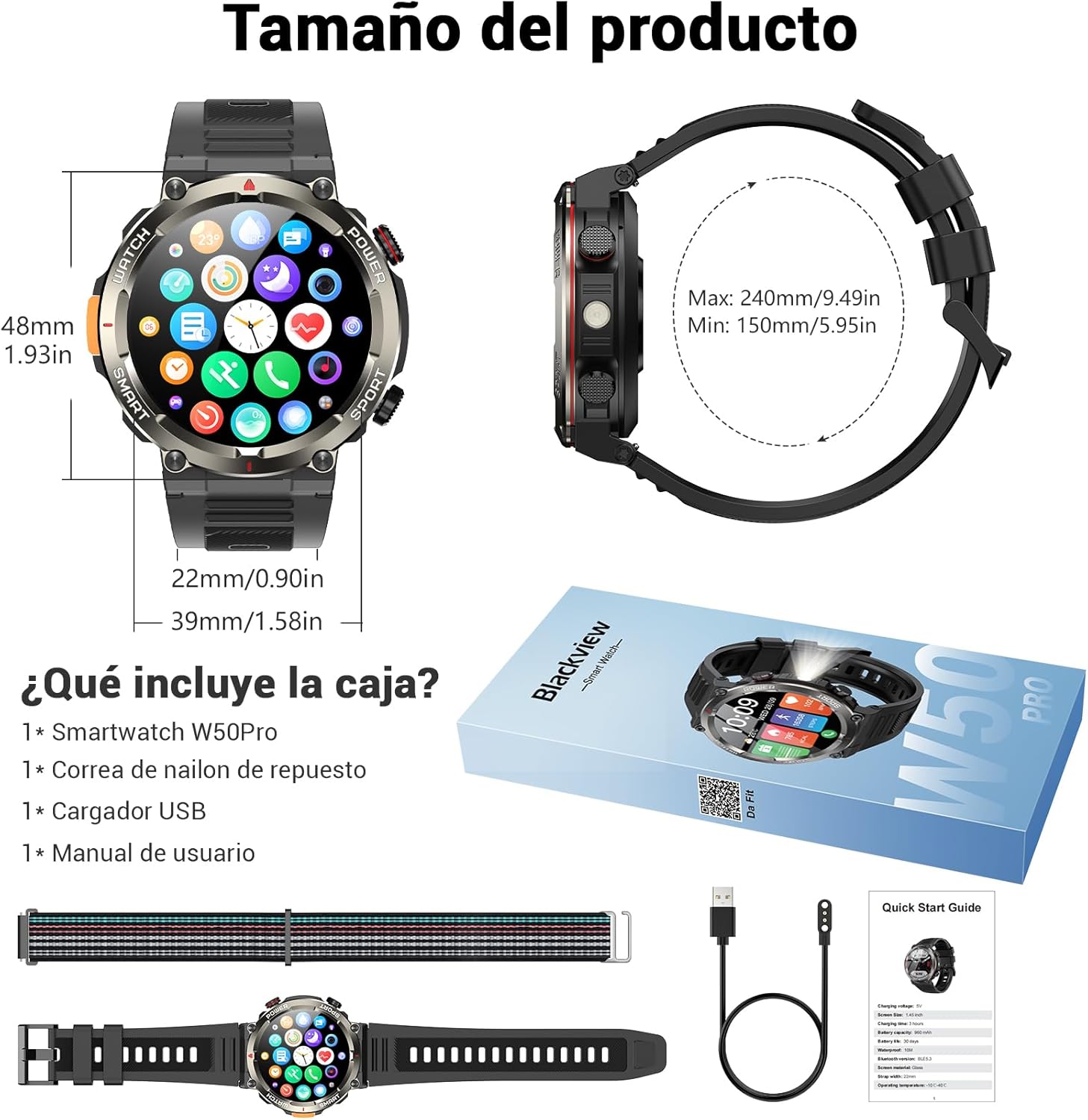
Image: Compass feature for outdoor navigation.

Image: Powerful LED flashlight in action.
3. Κλήσεις και ειδοποιήσεις Bluetooth
Once paired with your smartphone, the W50PRO allows you to manage calls and notifications directly from your wrist.
- Πραγματοποίηση/Λήψη κλήσεων: Use the integrated speaker and microphone to make or answer calls.
- Ειδοποιήσεις: Receive real-time alerts for text messages, emails, and social media apps.
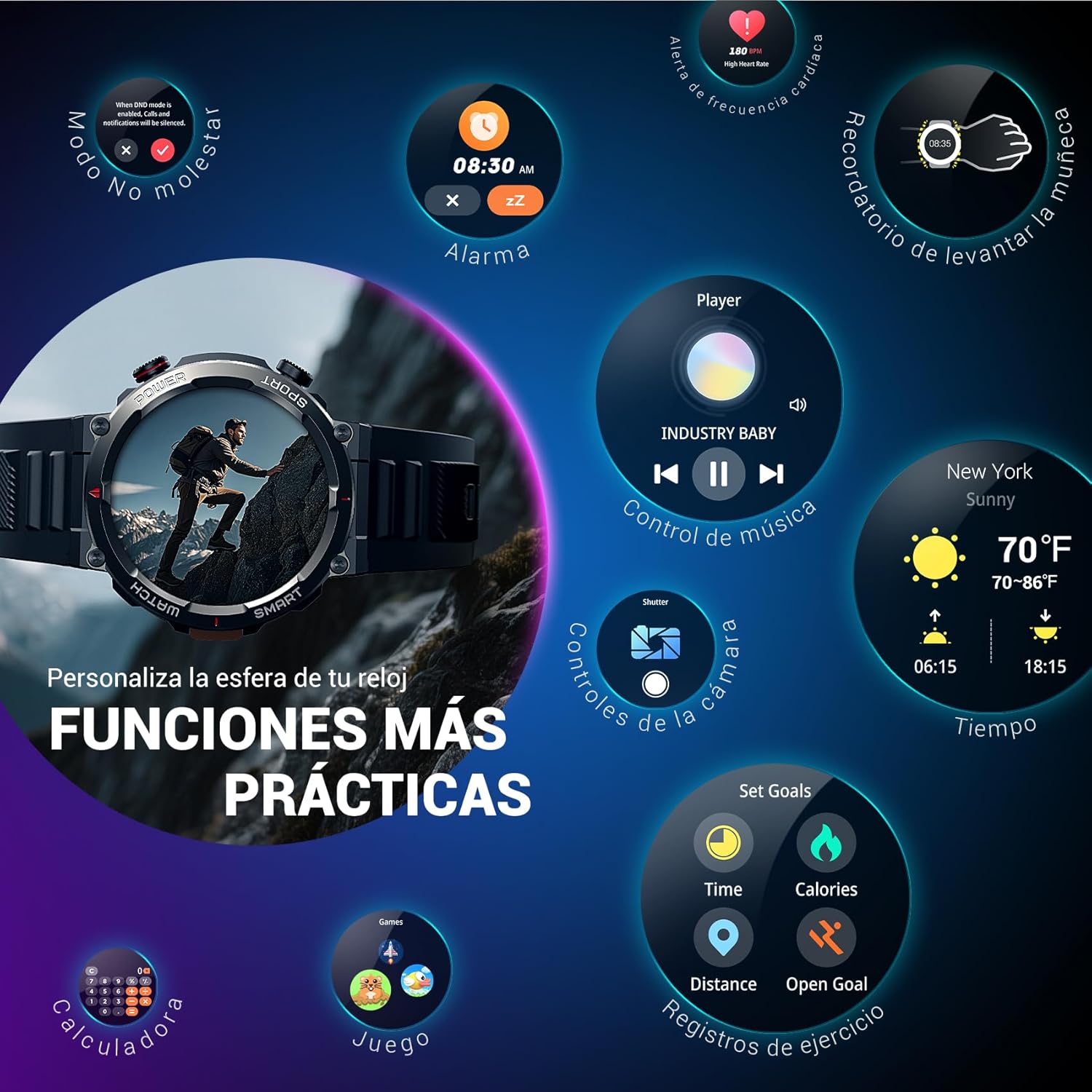
Image: Bluetooth calling and notification features.
4. Παρακολούθηση της υγείας
The smartwatch is equipped with high-precision sensors to monitor various health indicators:
- Καρδιακός ρυθμός: Παρακολούθηση καρδιακού ρυθμού σε πραγματικό χρόνο.
- Οξυγόνο αίματος (SpO2): Παρακολουθήστε τα επίπεδα οξυγόνου στο αίμα σας.
- Παρακολούθηση ύπνου: Tracks sleep quality and patterns.
- Επίπεδα άγχους: Παρέχει πληροφορίες για τα επίπεδα άγχους σας.
All health data synchronizes with the Da Fit app for detailed analysis and trend tracking.

Image: Real-time health monitoring features.
5. Λειτουργίες άθλησης
The W50PRO offers over 100 integrated sports modes, including running, cycling, climbing, rope skipping, football, and basketball. It accurately records exercise time, distance, steps, calorie consumption, and heart rate changes, providing clear and intuitive performance data. Detailed data can be viewστην εφαρμογή Da Fit.

Εικόνα: Πάνωview of 100+ sports modes.
6. Προσαρμογή προσόψεων ρολογιού
The Da Fit app provides a wide selection of watch faces to suit various styles. You can also upload personal photos as wallpaper and adjust text color and widget layout to create a unique watch interface.

Image: Customizable watch faces.
7. Άλλες πρακτικές λειτουργίες
Ο Μαύροςview W50PRO includes additional features for daily convenience:
- Πρόγνωση καιρού
- Έλεγχος μουσικής
- Τηλεχειριστήριο κάμερας
- Συναγερμός
- Καθιστική Υπενθύμιση
- Υπενθύμιση πόσιμου νερού
- Χρονόμετρο
- Χρονόμετρο αντίστροφης μέτρησης
- βρείτε Τηλέφωνο
- Αριθμομηχανή
- Παιχνίδια
- Ρύθμιση φωτεινότητας

Image: Multiple smart functions available on the smartwatch.
Συντήρηση
1. Καθάρισμα
Καθαρίζετε τακτικά το smartwatch και το λουράκι σας για να αποτρέψετε τον ερεθισμό του δέρματος και να διατηρήσετε τη λειτουργικότητα της συσκευής. Χρησιμοποιήστε ένα μαλακό,amp πανί για να σκουπίσετε την οθόνη και τοasing. For the strap, follow the manufacturer's cleaning recommendations based on the material (silicone or nylon).
2. Ανθεκτικότητα στο νερό
Ο Μαύροςview W50PRO Smartwatch features an IP68 water resistance rating. This means it is protected against dust ingress and can withstand immersion in water up to 1.5 meters for up to 30 minutes. It is suitable for daily use, such as hand washing or light rain. Avoid using it in hot water, saunas, or during diving, as steam and high pressure can compromise the seals.

Image: Durability features including IP68 water resistance.
3. Φροντίδα μπαταρίας
Για να παρατείνετε τη διάρκεια ζωής της μπαταρίας:
- Αποφύγετε τις ακραίες θερμοκρασίες.
- Μην αφήνετε την μπαταρία να αδειάζει εντελώς συχνά.
- Charge the device using the provided magnetic charging cable.
Αντιμετώπιση προβλημάτων
Εάν αντιμετωπίσετε προβλήματα με το μαύρο σαςview W50PRO Smartwatch, try the following:
- Η συσκευή δεν ενεργοποιείται: Βεβαιωθείτε ότι το ρολόι είναι πλήρως φορτισμένο.
- Δεν είναι δυνατή η σύζευξη με τηλέφωνο: Check if Bluetooth is enabled on both devices. Restart both the watch and phone. Ensure the Da Fit app has necessary permissions.
- Ανακριβή δεδομένα υγείας: Βεβαιωθείτε ότι το ρολόι εφαρμόζει άνετα στον καρπό σας. Καθαρίζετε τους αισθητήρες τακτικά.
- Δεν ελήφθησαν ειδοποιήσεις: Verify that notification permissions are granted in the Da Fit app and your phone's settings. Ensure the app is running in the background.
- Μικρή διάρκεια μπαταρίας: Reduce screen brightness, disable unnecessary features, and limit frequent heart rate monitoring.
For persistent issues, refer to the Da Fit app's help section or contact customer support.
Προδιαγραφές
| Χαρακτηριστικό | Προσδιορισμός |
|---|---|
| Μάρκα | Μαύροςview |
| Μοντέλο | W50 PRO |
| Μέγεθος οθόνης | 1.45 ίντσες |
| Τύπος οθόνης | οθόνη υγρού κρυστάλλου |
| Ψήφισμα | 360 x 360 pixel |
| Χωρητικότητα μπαταρίας | 960 mAh |
| Τυπική διάρκεια ζωής μπαταρίας | Έως 30 ημέρες |
| Χρόνος αναμονής | Έως 100 ημέρες |
| Χρόνος Φόρτισης | Περίπου 3 ώρα |
| Συνδεσιμότητα | Bluetooth |
| Είσοδος ανθρώπινης διεπαφής | Buttons, Microphone |
| Αντοχή στο νερό | IP68 |
| Συμβατά μοντέλα τηλεφώνων | iOS και Android |
| Διαστάσεις προϊόντος | 8.8 x 2.2 x 18.1 εκ |
| Βάρος προϊόντος | 136 γρ |
Εγγύηση και υποστήριξη
For warranty information and technical support, please refer to the documentation included with your purchase or visit the official Blackview webτοποθεσία. Κρατήστε την απόδειξη αγοράς για τυχόν αξιώσεις εγγύησης.