1. Εισαγωγή
This manual provides essential instructions for the installation, operation, and maintenance of your Lockly Smart Lock Secure Pro with Knob. Please read this manual thoroughly before installation and retain it for future reference. This smart lock offers multiple access methods including fingerprint, PIN Genie keypad, smartphone app, and traditional physical keys, along with built-in Wi-Fi connectivity.
2. Πληροφορίες Ασφάλειας
- Μην επιχειρήσετε να αποσυναρμολογήσετε ή να επισκευάσετε μόνοι σας την κλειδαριά. Αυτό μπορεί να ακυρώσει την εγγύηση και να προκαλέσει ζημιά.
- Use only the specified battery type (AA alkaline batteries). Do not mix old and new batteries or different types of batteries.
- Βεβαιωθείτε ότι όλα τα εξαρτήματα είναι ασφαλώς στερεωμένα κατά την εγκατάσταση για να αποφύγετε δυσλειτουργίες.
- Φυλάξτε τα φυσικά κλειδιά σε ασφαλές μέρος, μακριά από την κλειδαριά.
- Protect the keypad from direct sunlight and extreme weather conditions to prolong its lifespan.
3. Το προϊόν τελείωσεview
The Lockly Smart Lock Secure Pro with Knob integrates advanced security features into a convenient door locking solution. It features a biometric fingerprint sensor, a patented PIN Genie keypad, and Wi-Fi for remote access.

Image: Lockly Smart Lock Secure Pro with Knob illustrating its various unlocking methods: fingerprint, PIN Genie keypad, physical key, and smartphone app control.
4. Door Preparation & Compatibility
Before installation, verify your door's dimensions meet the requirements for the Lockly Smart Lock Secure Pro with Knob. Proper door preparation is crucial for correct functionality.

Image: Diagram showing required door measurements for Lockly Smart Lock installation, including door thickness (1 3/8" - 2") and backset (2 3/8" or 2 3/4").

Εικόνα: Μπροστά view diagram detailing standard door bore hole (2 inch / 50mm) and backset (2.8 inch / 71mm) dimensions for knob installation.
Ensure your door thickness is between 1 3/8 inches and 2 inches. The backset should be either 2 3/8 inches or 2 3/4 inches. The bore hole diameter for the knob should be 2 inches (50mm).
5. Οδηγός εγκατάστασης
Αυτή η ενότητα παρέχει ένα γενικό overview of the installation process. For detailed step-by-step instructions, refer to the dedicated installation guide included with your product packaging.
5.1 Μηχανολογική εγκατάσταση
- Προετοιμάστε την πόρτα: Ensure the door is properly drilled according to the compatibility requirements.
- Εγκαταστήστε το μάνταλο: Insert the latch into the door edge and secure it with screws.
- Εγκαταστήστε το εξωτερικό συγκρότημα: Place the exterior lock assembly onto the door, ensuring the spindle passes through the latch.
- Εγκαταστήστε την εσωτερική πλάκα στήριξης: Στερεώστε την εσωτερική πλάκα στήριξης στο εξωτερικό συγκρότημα χρησιμοποιώντας τις παρεχόμενες βίδες.
5.2 Electronic Installation
- Σύνδεση καλωδίων: Carefully connect the cable from the exterior assembly to the interior assembly.
- Εγκαταστήστε την εσωτερική διάταξη: Mount the interior assembly onto the mounting plate and secure it.
- Τοποθετήστε μπαταρίες: Open the battery cover on the interior assembly and insert four (4) AA alkaline batteries.
- Perform Handing Process: Follow the on-screen or app instructions to calibrate the lock for your door's handing (left or right).
6. Αρχική εγκατάσταση και σύζευξη εφαρμογών
After physical installation, download the Lockly App from your device's app store to complete the setup and connect your smart lock to Wi-Fi.
- Download Lockly App: Αναζήτηση για "Lockly" in the App Store or Google Play Store.
- Δημιουργία λογαριασμού: Open the app and follow the prompts to create a new user account.
- Προσθήκη νέας συσκευής: Select "Add New Device" and choose your Lockly Smart Lock model.
- Pair Lock: Follow the in-app instructions to pair your lock via Bluetooth and connect it to your home Wi-Fi network. This enables remote control and monitoring.
7. Operating Your Lockly Smart Lock
7.1 Ξεκλείδωμα με δακτυλικό αποτύπωμα
The Lockly Smart Lock features AI Biometric Fingerprint Technology for quick access.

Image: A finger placed on the Lockly Smart Lock's biometric sensor, demonstrating its 0.2-second recognition speed and capacity for up to 99 unique fingerprints.
- Καταχώρηση δακτυλικών αποτυπωμάτων: Use the Lockly App to register up to 99 unique fingerprints.
- Place Finger: Gently place your registered finger on the fingerprint sensor.
- Ξεκλειδώνω: The lock will unlock in approximately 0.2 seconds if the fingerprint is recognized.
7.2 Unlocking with PIN Genie Keypad
The patented PIN Genie keypad prevents code guessing by dynamically shuffling numbers.

Εικόνα: Κοντινό πλάνο view of the Lockly Smart Lock's PIN Genie keypad, illustrating how the digit locations dynamically shuffle after each use to prevent password guessing.
- Ενεργοποίηση πληκτρολογίου: Αγγίξτε την οθόνη για να ενεργοποιήσετε το πληκτρολόγιο.
- Εισαγάγετε το PIN: Enter your 6-8 digit PIN code. The numbers will shuffle after each digit entry.
- Επιβεβαιώνω: Press the Lockly button (bottom center) to confirm.
7.3 Unlocking with Lockly App
Control your lock remotely using the Lockly App via built-in Wi-Fi.
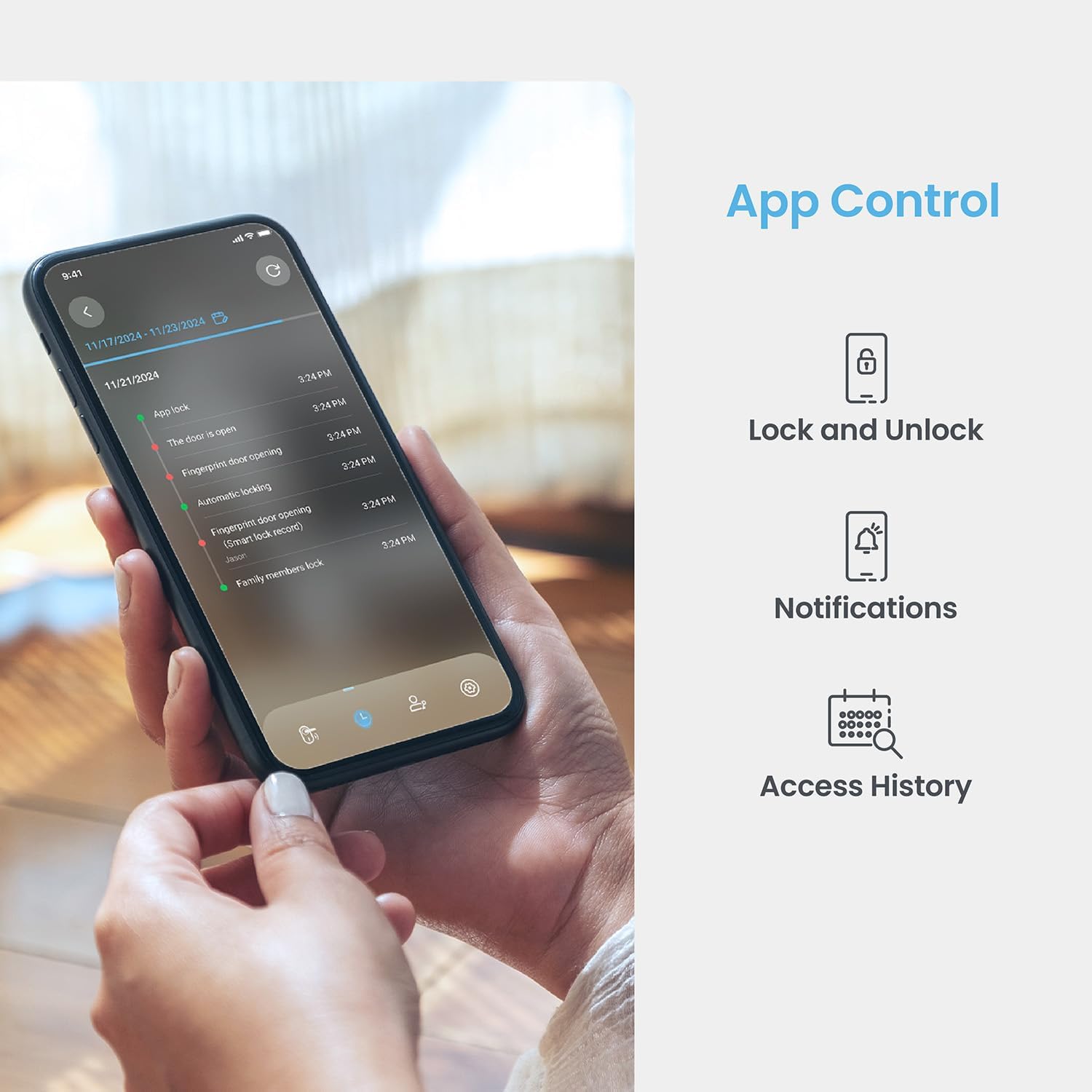
Image: A smartphone displaying the Lockly App, showing options for remote lock/unlock, notifications, and access history logs.
- Άνοιγμα εφαρμογής: Launch the Lockly App on your smartphone.
- Select Lock: Choose the desired lock from your device list.
- Κλείδωμα/Ξεκλείδωμα: Tap the lock/unlock icon to control the deadbolt.
7.4 Ξεκλείδωμα με φυσικό κλειδί
Two physical backup keys are provided for manual unlocking.
- Εισαγωγή κλειδιού: Insert the physical key into the keyhole located on the exterior assembly.
- Κλειδί στροφής: Turn the key to unlock the deadbolt.
7.5 Λειτουργία αυτόματου κλειδώματος
The programmable auto-lock feature ensures your door is always secured.
- Ενεργοποίηση/απενεργοποίηση: Configure auto-lock settings via the Lockly App.
- Set Delay: Customize the delay time before the lock automatically engages after being closed.
7.6 Ενσωμάτωση φωνητικού ελέγχου
Integrate your Lockly Smart Lock with smart home assistants.
- Connect to Alexa/Google Assistant: Follow the instructions in the Lockly App to link your lock with Amazon Alexa or Google Assistant.
- Φωνητικές εντολές: Use voice commands to lock or unlock your door (e.g., "Alexa, lock the front door").
8. Διαχείριση χρηστών
Manage access for multiple users through the Lockly App.
- Προσθήκη/Αφαίρεση Χρηστών: Create or delete user profiles, assigning unique fingerprints or PIN codes.
- eKeys/eBadges: Grant temporary or permanent access to guests via eKeys or eBadges, which can be sent directly from your smartphone.
- Offline Access Codes: Generate time-sensitive or single-use access codes that do not require internet connectivity for the recipient.
- Αρχεία καταγραφής δραστηριοτήτων: Review a detailed history of lock activity, including who accessed the door and when.
9. Συντήρηση
9.1 Αντικατάσταση μπαταρίας
The lock operates on 4 AA alkaline batteries, providing approximately 8 months of battery life. Replace batteries when the low battery indicator appears on the lock or in the app.
- Πρόσβαση στο διαμέρισμα μπαταριών: Αφαιρέστε το κάλυμμα της μπαταρίας από το εσωτερικό συγκρότημα.
- Αντικατάσταση μπαταριών: Remove old batteries and insert four new AA alkaline batteries, ensuring correct polarity.
- Κλείσιμο εξωφύλλου: Επανατοποθετήστε το κάλυμμα της μπαταρίας.
9.2 Καθαρισμός
Καθαρίστε το εξωτερικό της κλειδαριάς με ένα μαλακό,amp πανί. Αποφύγετε τα λειαντικά καθαριστικά ή τους διαλύτες που θα μπορούσαν να προκαλέσουν ζημιά στο φινίρισμα ή στα ηλεκτρονικά εξαρτήματα.
10. Αντιμετώπιση Προβλημάτων
- Η κλειδαριά δεν αποκρίνεται: Check battery levels. Replace batteries if low. Ensure cables are securely connected.
- Keypad Not Activating: Ensure the screen is clean and free of debris. Try touching different areas of the screen.
- Δεν αναγνωρίζεται δακτυλικό αποτύπωμα: Βεβαιωθείτε ότι το δάχτυλό σας είναι καθαρό και στεγνό. Καταχωρίστε ξανά το δακτυλικό σας αποτύπωμα εάν τα προβλήματα επιμένουν.
- Ζητήματα συνδεσιμότητας εφαρμογών: Verify your home Wi-Fi network is active and the lock is within range. Restart the lock and your router if necessary.
- Δυσλειτουργία αυτόματου κλειδώματος: Check auto-lock settings in the Lockly App. Ensure the door sensor is not obstructed.
11. Προδιαγραφές
| Χαρακτηριστικό | Λεπτομέρεια |
|---|---|
| Μοντέλο | Secure Pro with Knob |
| ASIN | B0DZXB86LZ |
| Μέθοδοι ξεκλειδώματος | Fingerprint, PIN Genie Keypad, Lockly App, Physical Key |
| Αναγνώριση δακτυλικών αποτυπωμάτων | 0.2 seconds, up to 99 fingerprints |
| Keypad Technology | Patented PIN Genie (dynamic number shuffling) |
| Συνδεσιμότητα | Ενσωματωμένο Wi-Fi, Bluetooth |
| Πηγή ισχύος | 4 x αλκαλικές μπαταρίες AA |
| Διάρκεια ζωής μπαταρίας | Περίπου 8 μήνες |
| Συμβατότητα πάχους πόρτας | 1 3/8" - 2" |
| Συμβατότητα με το Backset | 2 3/8" ή 2 3/4" |
| Φωνητικός έλεγχος | Alexa, Google Assistant compatible |
| Πρότυπο | Built-to ANSI Standard |
12. Εγγύηση και υποστήριξη
For warranty information, technical support, or to register your product, please visit the official Lockly website or contact Lockly customer service. Keep your purchase receipt as proof of purchase.
Διαδικτυακή υποστήριξη: www.lockly.com/support


