1. Εισαγωγή
This manual provides comprehensive instructions for the installation, operation, maintenance, and troubleshooting of your NIVIAN Professional WiFi SuperHD Surveillance Camera Kit. This system is designed to provide reliable and efficient security monitoring for your home or business.
Please read this manual carefully before using the product to ensure proper setup and optimal performance. Keep this manual for future reference.
2. Το προϊόν τελείωσεview
The NIVIAN CCTV Kit is a professional 2K SuperHD WiFi surveillance system featuring 6 IP cameras and a 10-channel Network Video Recorder (NVR) with a pre-installed 1TB hard drive. Key features include:
- 2K SuperHD Image Resolution: Παρέχει σαφείς και λεπτομερείς πληροφορίες βίντεοtage (3MP).
- Ανίχνευση ανθρώπου AI: Intelligent motion detection to reduce false alarms.
- Αμφίδρομος ήχος: Ενσωματωμένο μικρόφωνο και ηχείο για επικοινωνία σε πραγματικό χρόνο.
- Διπλή νυχτερινή όραση: Infrared mode for discreet monitoring and white LED mode for full-color night vision activated by motion.
- WiFi-6 Long Range Connectivity: Stable wireless connection up to 250 meters with repeater function.
- Κάμερες IP66 ανθεκτικές στις καιρικές συνθήκες: Ανθεκτικό μεταλλικό casing suitable for outdoor use.
- Επαγγελματική ηχογράφηση: Continuous or event-based recording to the included 1TB hard drive.
- Έξοδος HDMI: Connect to a monitor or TV for live viewing.
- EseeCloud App: Remote access and control from mobile devices.
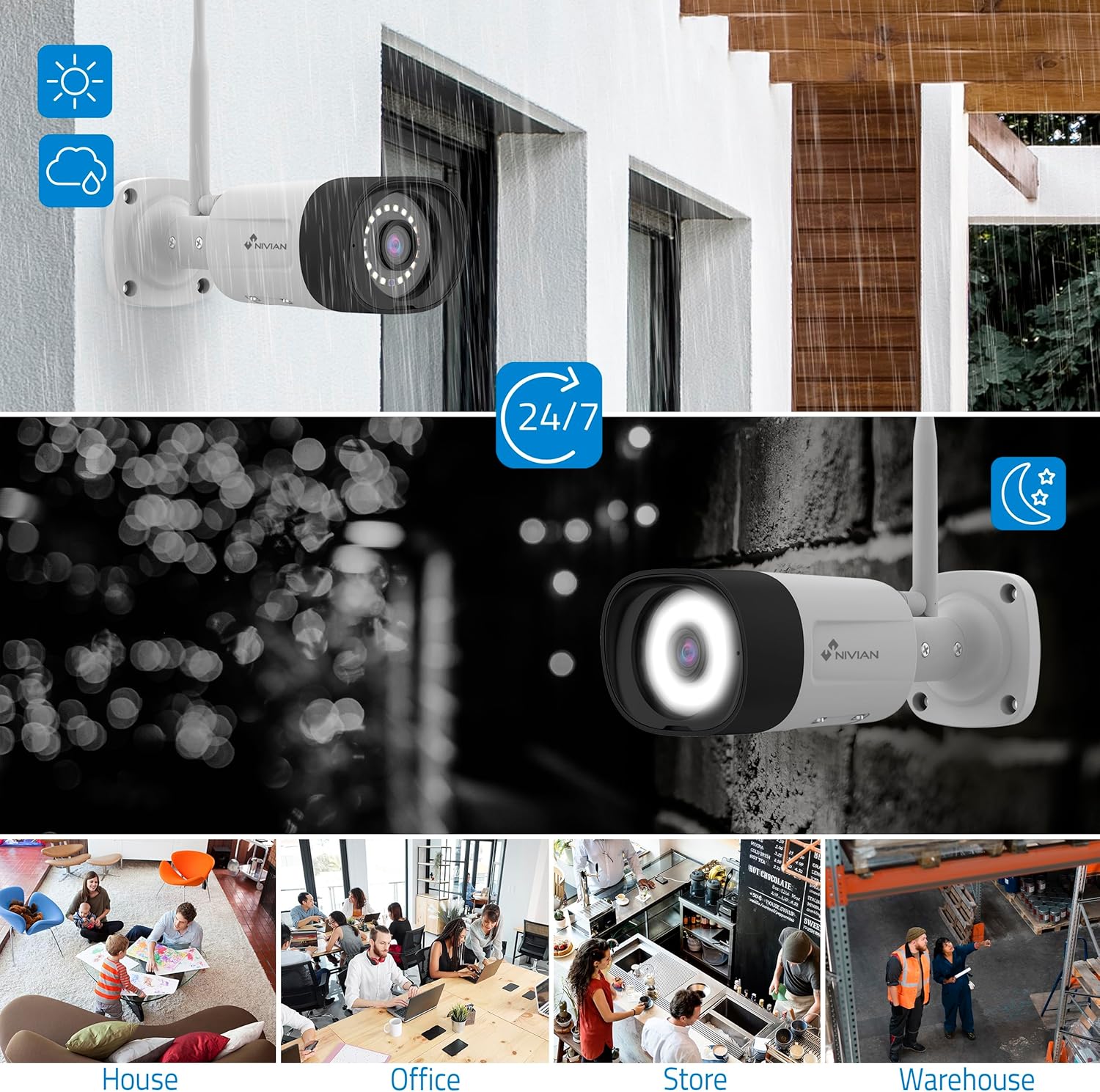
Image: NIVIAN CCTV Camera with day and night vision capabilities, showing weatherproof design and application in various environments like house, office, store, and warehouse.

Image: Comparison of 1080p Full HD video quality versus 2K Super HD video quality, demonstrating enhanced detail with 2K resolution.
3. Περιεχόμενα συσκευασίας
Βεβαιωθείτε ότι όλα τα αντικείμενα υπάρχουν στη συσκευασία σας:
- 1x 10-Channel NVR (Network Video Recorder) with 1TB Hard Drive
- 6x NIVIAN 2K SuperHD WiFi IP Cameras
- Power Adapters for NVR and Cameras
- USB Ποντίκι
- Καλώδιο Ethernet
- Βίδες και βύσματα στερέωσης
- Οδηγός γρήγορης εκκίνησης (ανατρέξτε σε αυτό το εγχειρίδιο για λεπτομερείς οδηγίες)
4. Ρύθμιση
4.1. NVR Installation
- Συνδέστε το NVR:
- Συνδέστε το NVR σε μια πρίζα χρησιμοποιώντας τον παρεχόμενο προσαρμογέα ρεύματος.
- Connect the NVR to a monitor or TV via the HDMI port for local viewing.
- Συνδέστε το ποντίκι USB στη θύρα USB του NVR.
- For internet access, connect the NVR to your router using the Ethernet cable.
- Ενεργοποίηση: Turn on the NVR. Follow the on-screen prompts for initial setup, including language selection and network configuration.
4.2. Εγκατάσταση κάμερας
- Θέση τοποθέτησης: Choose suitable locations for your cameras, ensuring they have a clear field of view and are within range of the NVR's WiFi signal. The IP66 rating allows for outdoor installation.
- Τροφοδοτήστε τις κάμερες: Connect each camera to a power outlet using its dedicated power adapter.
- Σύζευξη (Αυτόματη): The cameras are pre-paired with the NVR. Once powered on, they should automatically connect to the NVR's WiFi network. You will see the camera feeds appear on the connected monitor.
- Signal Repetition Function: If a camera is too far from the NVR, you can use another camera as a repeater to extend the WiFi range up to 250m. Refer to the NVR's on-screen menu for configuring this feature.

Image: Diagram illustrating various connection options for the NIVIAN CCTV system, including direct WiFi-6 connection to NVR, HDMI output to a monitor, and NVR connection to a router via LAN for remote access via Eseecloud app. Also shows signal repetition function.
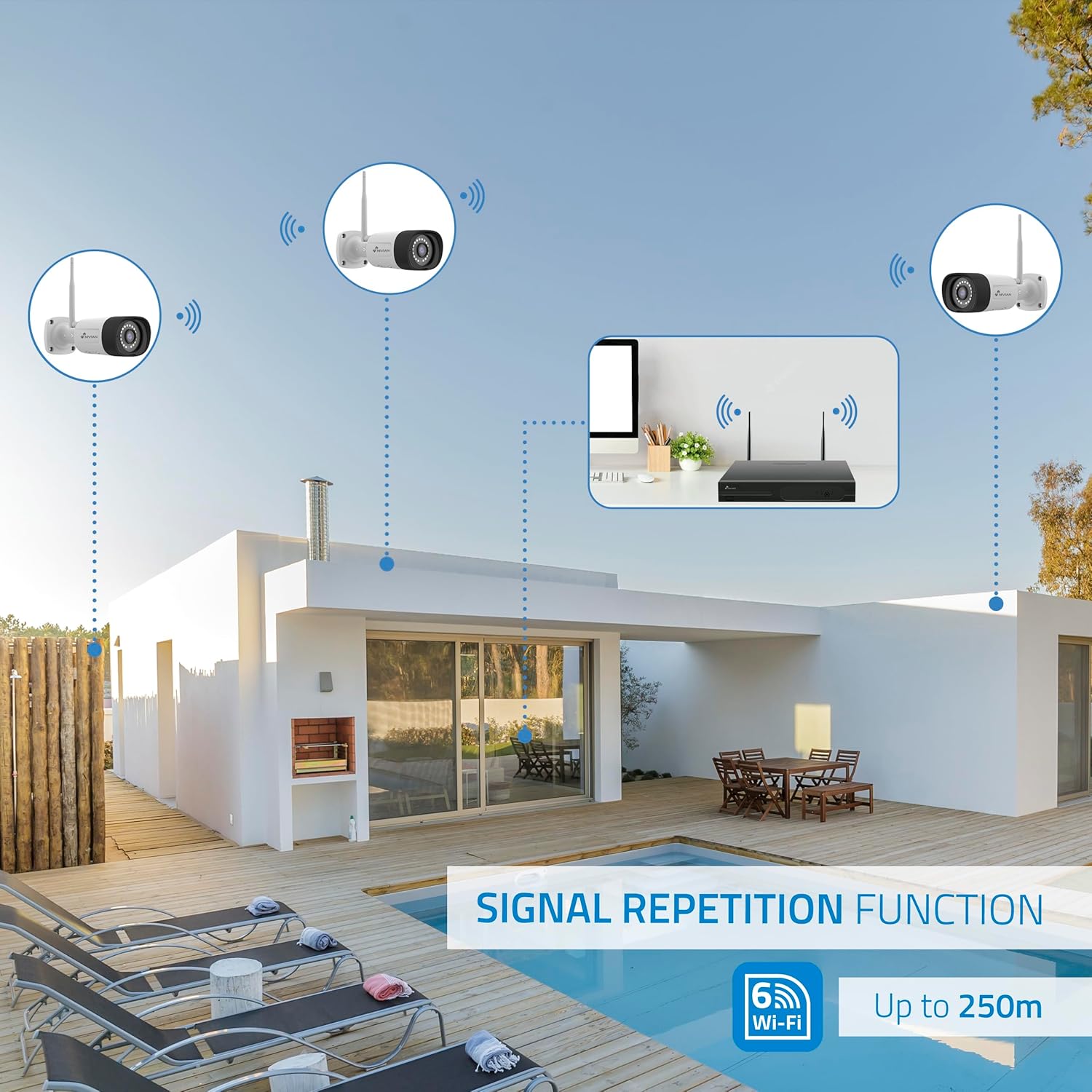
Image: Diagram showing the signal repetition function of the NIVIAN WiFi CCTV system, where cameras can extend the WiFi range up to 250 meters from the NVR.
4.3. EseeCloud App Setup
- Λήψη εφαρμογής: Download the "EseeCloud" app from your mobile device's app store (available for iOS, Android).
- Εγγραφή λογαριασμού: Ανοίξτε την εφαρμογή και δημιουργήστε έναν νέο λογαριασμό ή συνδεθείτε αν έχετε ήδη έναν.
- Προσθήκη συσκευής: Follow the in-app instructions to add your NVR system. This typically involves scanning a QR code displayed on the NVR's monitor or entering the device ID manually.
- Μακρινός Viewing: Μόλις προστεθεί, μπορείτε view live feeds, access recordings, and configure settings remotely.

Image: Smartphone screen displaying the EseeCloud app interface for managing the security system, showing live camera feeds and control options, with NIVIAN cameras and a laptop in the background.
5. Οδηγίες λειτουργίας
5.1. Ζωντανά View
Access live camera feeds through the NVR connected to a monitor or via the EseeCloud mobile app. The NVR interface allows you to switch between single-camera view και πλέγμα πολλαπλών καμερών view.
5.2. Εγγραφή
- Συνεχής ηχογράφηση: The system is configured for continuous recording by default to the 1TB hard drive.
- Εγγραφή ανίχνευσης κίνησης: Configure cameras to record only when motion is detected. This can be scheduled via the NVR settings or EseeCloud app.
- H.265+ Codec: The system uses H.265+ video compression to optimize storage space while maintaining video quality.
5.3. Αναπαραγωγή
Πρόσβαση σε καταγεγραμμένο footage through the NVR's playback menu or the EseeCloud app. You can search recordings by date, time, and event type (e.g., motion detection).
5.4. Ανίχνευση Ανθρώπου με Τεχνητή Νοημοσύνη
The cameras feature advanced AI human detection to differentiate human movement from other objects, significantly reducing false alarms. When human motion is detected, the system can trigger recordings, send notifications, and activate the white LED night vision for color footage.

Image: NIVIAN camera detecting a person at night, with the white LED light activated for color night vision, and a mobile notification indicating motion detection.
5.5. Αμφίδρομος ήχος
Use the EseeCloud app to utilize the two-way audio feature. This allows you to listen to audio from the camera's location and speak through the camera's built-in speaker.
5.6. Λειτουργίες νυχτερινής όρασης
- Λειτουργία υπερύθρων (IR): Provides black and white video in low-light conditions for discreet surveillance.
- Λειτουργία λευκής λυχνίας LED: When motion is detected in low light, the camera's white LEDs activate, providing full-color video and acting as a deterrent.
6. Συντήρηση
- Καθαρισμός κάμερας: Regularly clean the camera lenses with a soft, damp πανί για να εξασφαλίσετε καθαρή ποιότητα εικόνας. Μην χρησιμοποιείτε σκληρές χημικές ουσίες.
- Ενημερώσεις υλικολογισμικού: Check for firmware updates for the NVR and cameras through the EseeCloud app or NVR settings. Keep your system updated for optimal performance and security.
- Διαχείριση σκληρού δίσκου: The 1TB hard drive will automatically overwrite the oldest recordings when full. If you need to preserve specific footage, back it up to an external device.
- Έλεγχος τροφοδοσίας: Βεβαιωθείτε ότι όλοι οι προσαρμογείς ρεύματος είναι συνδεδεμένοι με ασφάλεια και δεν έχουν υποστεί ζημιά.
7. Αντιμετώπιση Προβλημάτων
7.1. No Camera Feed
- Ελέγξτε την ισχύ: Ensure the camera is powered on and its adapter is working.
- Σήμα WiFi: Verify the camera is within the NVR's WiFi range. Use the signal repetition function if necessary.
- Re-pair Camera: If issues persist, try re-pairing the camera with the NVR through the NVR's menu.
7.2. Κακή ποιότητα εικόνας
- Καθαρός φακός: Καθαρίστε τον φακό της κάμερας για τυχόν βρωμιά ή λεκέδες.
- Φωτισμός: Εξασφαλίστε επαρκή φωτισμό για βέλτιστη ποιότητα εικόνας, ειδικά τη νύχτα.
- Παρεμβολές WiFi: Reduce potential WiFi interference by moving the camera or NVR, or by using the signal repetition function.
7.3. Remote Access Issues (EseeCloud App)
- Σύνδεση στο Διαδίκτυο: Ensure both your NVR and mobile device have a stable internet connection.
- Ρυθμίσεις δικτύου NVR: Verify the NVR is correctly connected to your router and has internet access.
- Έκδοση εφαρμογής: Ensure your EseeCloud app is updated to the latest version.
7.4. Hard Drive Full / Recording Issues
- Ελέγξτε την αποθήκευση: Verify the hard drive status in the NVR settings.
- Πρόγραμμα ηχογράφησης: Βεβαιωθείτε ότι τα προγράμματα ηχογράφησης έχουν διαμορφωθεί σωστά.
- Κατάσταση σκληρού δίσκου: If issues persist, the hard drive may need to be checked or replaced.
8. Προδιαγραφές
| Μάρκα | ΝΙΒΙΑΝΟΣ |
| Αριθμός μοντέλου | NV-KIT830W-8CAM |
| Διαστάσεις προϊόντος (Μ x Π x Υ) | 23 x 12 x 8 cm; 6.2 κιλά |
| Τεχνολογία Συνδεσιμότητας | Wireless (WiFi-6) |
| Ανάλυση εγγραφής βίντεο | 2K (3MP) |
| Αριθμός καναλιών | 10 (NVR) |
| Αριθμός καμερών | 6 |
| Χωρητικότητα αποθήκευσης | 1 TB Hard Drive (included) |
| Χαρακτηριστικά κάμερας | IP Cameras SuperHD with PTZ, Night Vision, AI Human Detection, Two-Way Audio |
| Ρυθμός καρέ | 15 fps, 24 fps, 30 fps |
| Συμβατές Συσκευές | Television (via HDMI) |
| Τύπος βύσματος ρεύματος | Βάση τοίχου |
| Χώρα προέλευσης | Κίνα |
9. Εγγύηση και υποστήριξη
NIVIAN offers technical support to all customers. If you have any questions, suggestions, or encounter any issues with your WiFi surveillance camera kit, please do not hesitate to contact us.
You can reach us through Amazon messages or via any official NIVIAN brand channel. Please refer to your purchase documentation for specific warranty terms and contact details.


