1. Εισαγωγή
Thank you for choosing the AVMATRIX PKC4000-NDI PTZ Camera Controller. This device is designed for professional live streaming, church, and conference applications, offering intuitive control over PTZ cameras. Featuring a 5-inch touch screen and a 4D joystick, it provides precise control over camera functions such as pan, tilt, zoom, focus, and iris. This manual will guide you through the setup, operation, maintenance, and troubleshooting of your controller.
2. Πληροφορίες Ασφάλειας
Please read and understand all safety instructions before operating the device. Keep this manual for future reference.
- Μην εκθέτετε τη συσκευή σε βροχή, υγρασία ή ακραίες θερμοκρασίες.
- Εξασφαλίστε τον κατάλληλο αερισμό για να αποφύγετε την υπερθέρμανση.
- Use only the provided power adapter or a compatible PoE source.
- Avoid placing heavy objects on the controller.
- Μην επιχειρήσετε να αποσυναρμολογήσετε ή να τροποποιήσετε τη συσκευή. Αναθέστε όλες τις εργασίες σέρβις σε εξειδικευμένο προσωπικό.
- Clean the device with a soft, dry cloth. Avoid liquid cleaners.
3. Περιεχόμενα συσκευασίας
Βεβαιωθείτε ότι όλα τα είδη που αναφέρονται παρακάτω περιλαμβάνονται στη συσκευασία σας:
- AVMATRIX PKC4000-NDI PTZ Camera Controller x1
- Μετασχηματιστής DC 12V x1
- Tally Connector x1
- Εγχειρίδιο χρήστη (αυτό το έγγραφο)
4. Το προϊόν τελείωσεview
The PKC4000-NDI controller features a robust design with a clear 5-inch touch screen and a precise 4D joystick for comprehensive camera control.
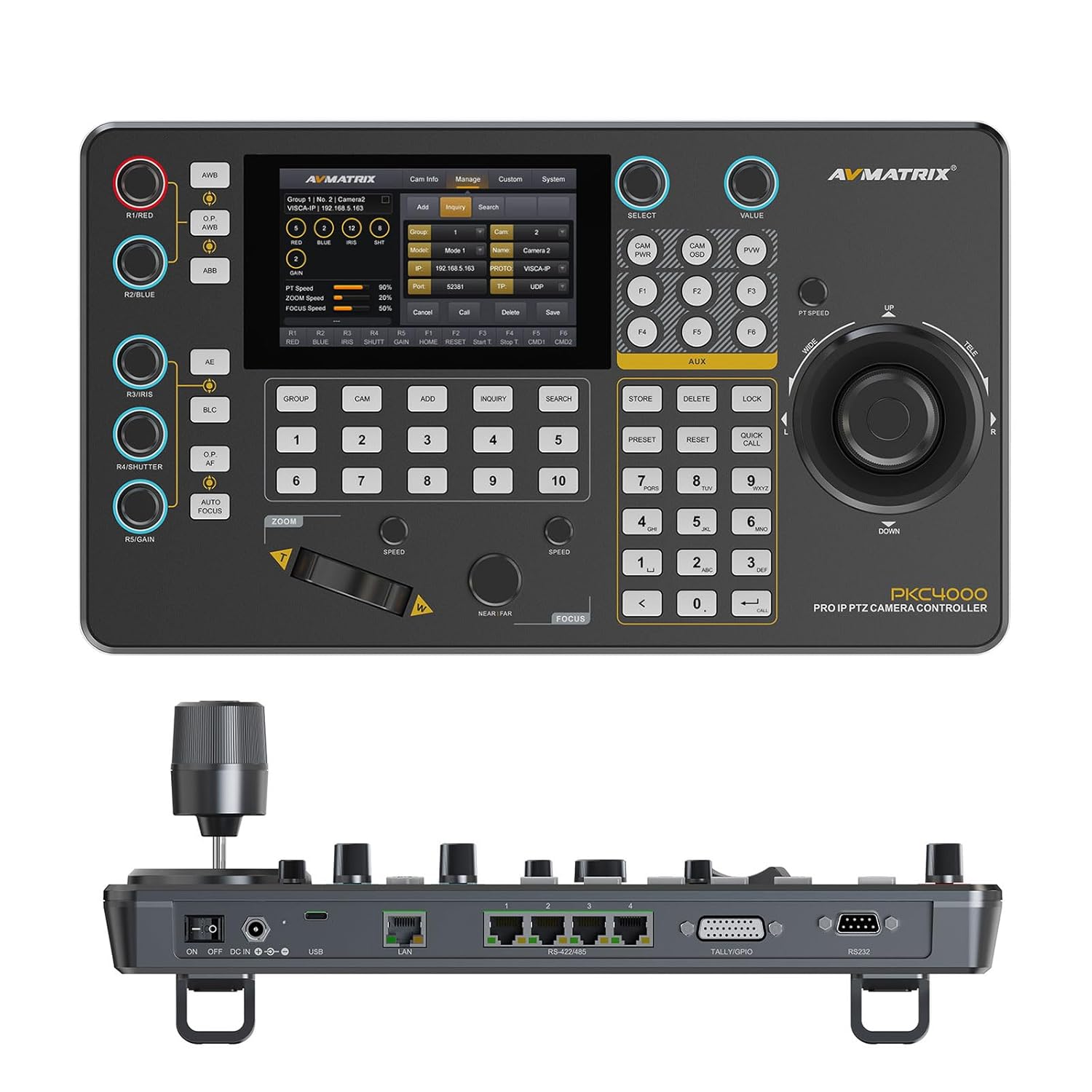
Εικόνα 4.1: Εμπρός view of the PKC4000-NDI Controller
Βασικά Χαρακτηριστικά:
- Universal Compatibility & Protocol Support: Supports IP and serial control protocols including VISCA, VISCA-IP, ONVIF, PELCO P&D, and NDI (NDI for Optional). Works with AVMATRIX PTZ cameras and most major PTZ brands.
- Fast Setup with Intuitive Touchscreen: Equipped with a 5-inch full-color touchscreen and menu knob for quick setup and operation.
- Smooth, Professional PTZ Control: Precise control over pan, tilt, zoom, focus, iris, shutter, and more. Supports up to 100 camera shortcuts (10 groups x 10 cameras).
- PoE & Flexible Power Options: Supports both Power over Ethernet (PoE) and traditional DC power for simplified cabling.

Figure 4.2: PKC4000-NDI Key Features Overview
5. Ρύθμιση
5.1 Αρχική σύνδεση
Follow these steps to set up your PKC4000-NDI controller:
- Σύνδεση ρεύματος: Connect the 12V DC power adapter to the 'DC IN' port on the rear of the controller, or connect an Ethernet cable from a PoE-enabled switch to the 'LAN (PoE)' port.
- Σύνδεση δικτύου: For IP control, connect an Ethernet cable from your network switch to the 'LAN (PoE)' port.
- Serial Connection (Optional): For RS-232, RS-422, or RS-485 control, connect the appropriate serial cables from your PTZ cameras to the corresponding ports on the controller.
- Tally/GPIO (Optional): Connect Tally lights or GPIO devices to the Tally/GPIO port as needed.
- Ενεργοποίηση: Flip the 'ON/OFF' switch to the 'ON' position. The controller will boot up and display the main interface on the 5-inch touch screen.

Figure 5.1: Rear Panel Control Interfaces
5.2 Διαμόρφωση κάμερας
After initial power-up, you will need to configure your PTZ cameras. The controller supports automatic IP address assignment for quick setup.
- Navigate to the 'CAM' or 'System' menu on the touch screen.
- Select 'Add Camera' and follow the on-screen prompts to discover and add your cameras via IP or serial connection.
- Assign each camera to a group and address for easy recall. The controller can manage up to 100 IP cameras (10 groups x 10 cameras).
6. Οδηγίες λειτουργίας
6.1 Βασική λειτουργία
The PKC4000-NDI provides intuitive control through its touch screen and physical controls.
- Επιλογή κάμερας: Use the numeric keypad or the 'CAM' menu on the touch screen to select the camera you wish to control.
- Έλεγχος Joystick: The 4D joystick allows for smooth and precise control of Pan, Tilt, and Zoom. Rotate the joystick for zoom control.
- Exposure Controls: Dedicated knobs and buttons allow quick adjustment of Exposure, Iris, Focus, and Gain.
- Προκαθορισμένη ανάκληση: Store and recall up to 255 camera presets using the 'PRESET' and numeric buttons.
6.2 Διεπαφή οθόνης αφής
The 5-inch touch screen provides access to advanced settings and real-time monitoring.
- Πλοήγηση μενού: Tap on menu icons to access camera settings, network configurations, system preferences, and more.
- Παρακολούθηση σε πραγματικό χρόνο: The NDI version supports video decoding for real-time monitoring of camera feeds directly on the 5-inch screen. This allows for visual confirmation of camera movements and adjustments.

Figure 6.1: Real-time Video Preview on Touch Screen
6.3 Track Recording and Playback
The controller supports track loop function, allowing you to record camera pan, tilt, and zoom movements and replay them whenever needed without manual control.
- Access the 'Track' function from the touch screen menu.
- Initiate recording of your desired camera movements.
- Save the recorded track for future playback.

Figure 6.2: Track Recording and Playback Feature
7. Συντήρηση
7.1 Καθαρισμός και φροντίδα
To ensure the longevity and optimal performance of your PKC4000-NDI controller, follow these maintenance guidelines:
- Καθάρισμα: Use a soft, dry, lint-free cloth to clean the exterior of the controller, including the touch screen. Do not use liquid cleaners, aerosols, or solvents.
- Αποθήκευση: When not in use for extended periods, store the controller in a cool, dry place away from direct sunlight and extreme temperatures.
- Χειριζόμενος: Handle the joystick and buttons with care to prevent mechanical damage.
8. Αντιμετώπιση Προβλημάτων
8.1 Κοινά ζητήματα και λύσεις
If you encounter problems with your controller, refer to the table below for possible solutions.
| Πρόβλημα | Πιθανή αιτία | Διάλυμα |
|---|---|---|
| Ο ελεγκτής δεν ανάβει. | No power supply; Power adapter faulty; PoE not active. | Check power adapter connection; Ensure PoE switch is active; Try a different power outlet. |
| Cannot control camera. | Incorrect camera IP/serial settings; Network issue; Camera not powered on. | Verify camera IP address and protocol settings; Check network cables; Ensure camera is powered on and accessible. |
| Δεν υπάρχει προεγγραφή βίντεοview στην οθόνη. | NDI stream not active; Network congestion; Camera not sending video. | Ensure camera is configured for NDI output; Check network bandwidth; Verify camera video output settings. |
| Joystick/buttons unresponsive. | Firmware issue; Hardware malfunction. | Restart the controller; Check for firmware updates; Contact technical support if problem persists. |
9. Προδιαγραφές
9.1 Τεχνικές προδιαγραφές
Detailed technical specifications for the AVMATRIX PKC4000-NDI PTZ Camera Controller:
| Κατηγορία | Παράμετρος | PKC4000-NDI |
|---|---|---|
| Συνδέσεις | Διεπαφές | IP(RJ45)x1, RS-232x1, RS-485/RS-422x4, TALLYx1, USB2.0 (For upgrade) |
| Πρωτόκολλο IP | ONVIF, VISCA-IP, NDI | |
| Σειριακό Πρωτόκολλο | PELCO-D, PELCO-P, VISCA | |
| Serial Baud Rate | 2400, 4800, 9600, 19200, 38400, 115200 bps | |
| Λιμάνι LAN | 100M×1 (PoE/PoE+: IEEE802.3 af/at) | |
| Διεπαφές | Επίδειξη | Οθόνη αφής 5 ιντσών |
| Λαβή | Quickly control iris, shutter speed, gain, auto exposure, white balance, etc. | |
| Χειριστήριο | Pan/Tilt/Zoom | |
| Ομάδα φωτογραφικών μηχανών | 10 (Each group connect up to 10 cameras) | |
| Διεύθυνση κάμερας | Έως 100 | |
| Προεπιλογή κάμερας | Έως 255 | |
| Εξουσία | Εξουσία | PoE/DC 7~24V |
| Κατανάλωση ρεύματος | PoE: <8W, DC: <8W | |
| Περιβάλλο | Θερμοκρασία εργασίας | -20℃~60℃ |
| Θερμοκρασία αποθήκευσης | -20℃~70℃ | |
| Διάσταση | Διάσταση (LWD) | 340mm×195mm×49.5mm/ 340mm×195mm×110mm(With joystick) |
| Βάρος | Net:1730g, Gross:2360g | |
| Γενικός | Αριθμός μοντέλου | NW-PKC4000-NDI |
| Κατασκευαστής | NW-AVMATRIX | |
| Ημερομηνία κυκλοφορίας | 1 Μαρτίου 2025 |

Σχήμα 9.1: Λεπτομερείς προδιαγραφές και διαστάσεις
10. Εγγύηση και υποστήριξη
10.1 Πληροφορίες εγγύησης
The AVMATRIX PKC4000-NDI PTZ Camera Controller is backed by a 1 χρόνια περιορισμένη εγγύηση from the date of purchase. This warranty covers defects in materials and workmanship under normal use. It does not cover damage caused by misuse, accident, unauthorized modification, or external causes.
10.2 Τεχνική Υποστήριξη
For technical assistance, troubleshooting, or warranty claims, please contact AVMATRIX customer support. We offer δια βίου τεχνική υποστήριξη για τα προϊόντα μας.
Please have your product model number (PKC4000-NDI) and purchase information ready when contacting support.


