Σημαντικές πληροφορίες συμβατότητας
This ESR Rebound Magnetic Keyboard Case is designed for specific iPad models. Please verify your iPad model number to ensure compatibility before use.
- Συμβατό με: iPad Air 13-inch (M3/M2 2025/2024), iPad Pro 12.9-inch (6th/5th/4th/3rd Gen).
- Συμβατοί αριθμοί μοντέλων: A2764, A2437, A2436, A2378, A2379, A2461, A2462, A2229, A2069, A2232, A2233, A1876, A2014, A1895, A1983.
- NOT Compatible with: iPad Pro 13-inch (M4) 2024 (Models: A2925, A2926, A3007) and iPad Pro 13-inch (M5) 2025 (Models: A3360, A3361, A3362).
To verify your iPad model, go to Ρυθμίσεις > Γενικά > Πληροφορίες on your device, or find the model number on the back of your iPad.

Figure 1: Compatibility warning indicating the keyboard case is not for iPad Pro 13-inch (M4) 2024.

Figure 2: Visual guide for compatible iPad models and how to locate your iPad's model number for verification.
Περιεχόμενα συσκευασίας
Βεβαιωθείτε ότι όλα τα στοιχεία υπάρχουν στη συσκευασία:
- Θήκη μαγνητικού πληκτρολογίου ESR Rebound
- Καλώδιο φόρτισης USB-A σε C
- Εγχειρίδιο χρήστη
Βίντεο 1: Άνοιγμα συσκευασίας και άνωview of the ESR Rebound Magnetic Keyboard Case for iPad Air 13 & iPad Pro 12.9. This video demonstrates the contents of the package and initial setup.
Οδηγίες εγκατάστασης
1. Σύνδεση του iPad σας
- Ανοίξτε τη θήκη του πληκτρολογίου.
- Align your iPad with the magnetic back of the case. The iPad will securely snap into place.
- Adjust the floating cantilever stand to your desired viewγωνία

Figure 3: Quick-set magnetic stand in use, showing an iPad securely attached and adjusted to an optimal angle.

Figure 4: Demonstration of the strong magnetic hold, securing the iPad to the case with 1,500g of holding force.
2. Ενεργοποίηση και σύζευξη Bluetooth
- Long press the power button on the keyboard for 2 seconds to turn it on. The Bluetooth status indicator will flash.
- Στο iPad σας, μεταβείτε στο Ρυθμίσεις > Bluetooth και βεβαιωθείτε ότι το Bluetooth είναι ενεργοποιημένο.
- Select "ESR Keyboard" from the list of available devices.
- Confirm the pairing request on your iPad. The Bluetooth indicator on the keyboard will turn solid blue once connected.
Video 2: Detailed instructions on how to power on the keyboard and pair it via Bluetooth with your iPad.
Οδηγίες Λειτουργίας
Χρήση πληκτρολογίου
The keyboard features well-spaced, responsive keys for comfortable and accurate typing. It includes a dedicated function row for quick access to common iPad functions.
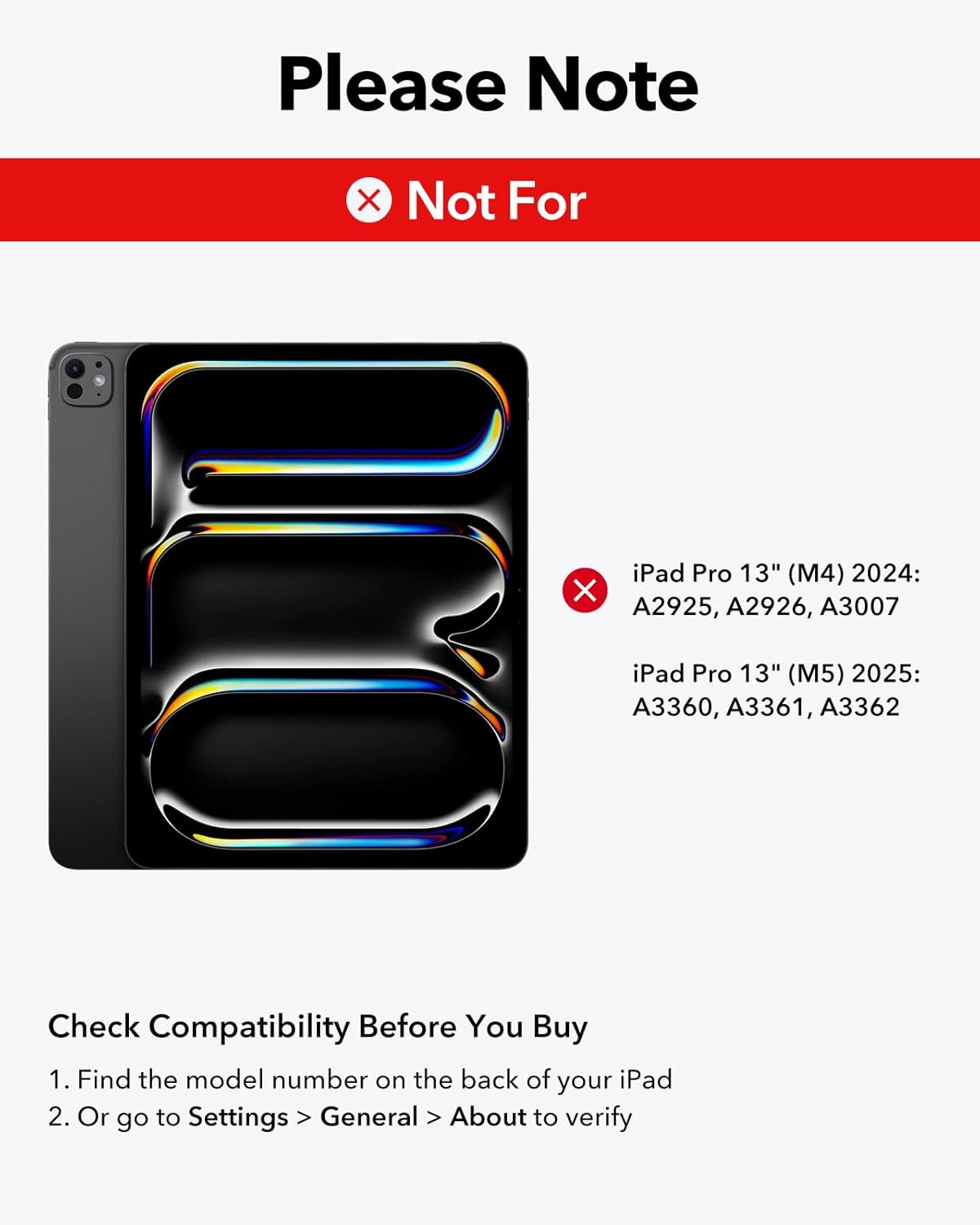
Figure 5: Close-up of hands typing on the keyboard, highlighting the laptop-style keys and their comfortable feel.
Πλήκτρα με οπίσθιο φωτισμό
The keyboard features adjustable 7-color backlighting with 3 brightness levels. Use the dedicated backlight key (often represented by a sun icon) to cycle through colors and adjust brightness.

Figure 6: The keyboard's backlit keys, demonstrating 12 color modes and 3 brightness levels for enhanced visibility in various lighting conditions.
Χρήση trackpad
The precision multi-touch trackpad supports full iPadOS gestures, allowing for efficient navigation and interaction with your iPad. Multi-touch gestures require iPadOS 14.5 or higher.
- Κλικ: Πατήστε ένα μόνο άγγιγμα ή πατήστε προς τα κάτω στο trackpad.
- Πάπυρος: Χρησιμοποιήστε δύο δάχτυλα για κύλιση προς τα πάνω ή προς τα κάτω.
- Ανίπταμαι διαγωνίως: Τσιμπήστε με δύο δάχτυλα για μεγέθυνση ή σμίκρυνση.
- Μετάβαση στην Αρχική Σελίδα: Swipe up with three fingers to return to the home screen.

Figure 7: A hand demonstrating multi-touch gestures on the precision trackpad, enabling responsive navigation.

Figure 8: Visual guide to common multi-touch trackpad gestures, including click, scroll, zoom, and returning to the home screen.
Πλωτή βάση με πρόβολο
The floating cantilever design allows your iPad to be positioned at various angles for optimal viewing and typing comfort. Simply open the case and adjust the iPad's position to achieve the perfect angle.

Figure 9: The floating cantilever stand in action, providing an adjustable and stable platform for the iPad.
Magnetic Clasp and Pencil Holder
The case features a secure magnetic clasp that not only keeps the case closed but also provides a dedicated holder for your Apple Pencil or other styluses, ensuring they are safely stored and charged (if compatible).

Figure 10: The secure magnetic clasp with an integrated pencil holder, designed to keep your Apple Pencil or other styluses safely attached.
Συντήρηση
- Καθάρισμα: Χρησιμοποιήστε ένα μαλακό, δamp cloth to wipe down the exterior of the case and keyboard. Avoid harsh chemicals.
- Αποθήκευση: When not in use, keep the keyboard case closed to protect both the iPad and the keyboard.
- Φόρτιση: Charge the keyboard using the provided USB-A to C charging cable. The iPad cannot be charged through the keyboard case.
Αντιμετώπιση προβλημάτων
Keyboard Not Responding / Touchscreen Unresponsive
If the keyboard is not responding or the iPad touchscreen becomes unresponsive after double-clicking the trackpad, follow these steps:
- Μεταβείτε στο Settings > Accessibility > Touch.
- Turn off "AssistiveTouch".
- Ensure the keyboard is sufficiently charged. Low battery can affect performance.
Video 3: Troubleshooting guide for issues related to incorrect size, fit, or wrong purchase. This video also addresses touchscreen unresponsiveness after trackpad use.
Θέματα συνδεσιμότητας
- Βεβαιωθείτε ότι το πληκτρολόγιο είναι πλήρως φορτισμένο.
- Re-pair the keyboard with your iPad by following the "Powering On and Bluetooth Pairing" steps.
- Επανεκκινήστε τόσο το iPad όσο και το πληκτρολόγιο.
Προδιαγραφές
| Μάρκα | ΕΣΡ |
| Συμβατές Συσκευές | iPad Air 13-inch (M3/M2 2025/2024), iPad Pro 12.9-inch (6th/5th/4th/3rd Gen) |
| Τεχνολογία Συνδεσιμότητας | Bluetooth |
| Περιγραφή πληκτρολογίου | Μαγνητικός |
| Διάταξη πληκτρολογίου | QWERTY |
| Ειδικό χαρακτηριστικό | Ergonomic, Floating Cantilever Stand, Multi-Touch Trackpad, Backlit Keys |
| Υλικό | Πλαστική ύλη |
| Χρώμα | Μωβ |
| Πηγή ισχύος | Τροφοδοτείται από μπαταρία |
| Βάρος αντικειμένου | 2.64 λίρες |
| Διαστάσεις συσκευασίας | 12.91 x 9.53 x 1.06 ίντσες |
Εγγύηση και υποστήριξη
Η ESR παρέχει ολοκληρωμένη υποστήριξη πελατών για αυτό το προϊόν:
- Εγγύηση: This product includes a comprehensive 12-month warranty.
- Υποστήριξη: Διατίθεται υποστήριξη εφ' όρου ζωής και εξατομικευμένη βοήθεια.
- Πόροι: Detailed setup videos and FAQs can be found on the ESR support webτοποθεσία.
Για περαιτέρω βοήθεια, επισκεφθείτε την επίσημη υποστήριξη του ESR webιστότοπο ή επικοινωνήστε με την εξυπηρέτηση πελατών μέσω της πλατφόρμας αγορών σας.


