Εισαγωγή
This manual provides essential information for the setup, operation, maintenance, and troubleshooting of your Onn 22 inch 1080P 100 Hz FHD LED Monitor. Please read this guide thoroughly before using the product to ensure optimal performance and safety.
The Onn 22 inch FHD LED Monitor is designed for a variety of applications, offering a vivid 1920x1080 resolution, a 100Hz refresh rate, and a 6.5ms response time for efficient performance. Its slim profile and T-shaped base are ideal for saving desk space.
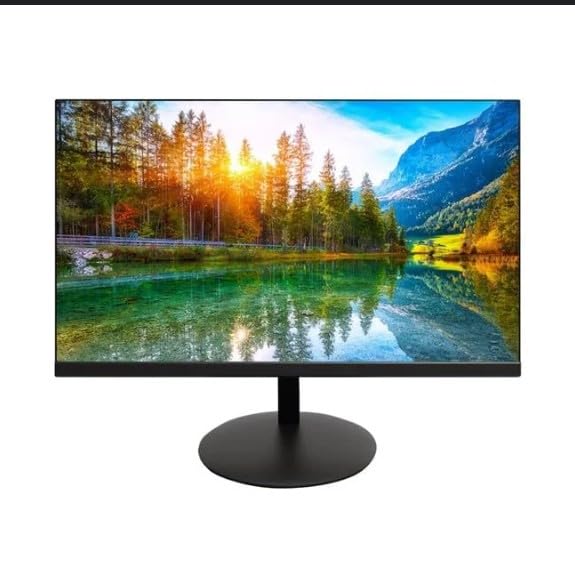
The image shows the Onn 22 inch FHD LED Monitor, highlighting its 100Hz refresh rate and 1080p resolution. The monitor features a slim design and a T-shaped base.
Οδηγίες εγκατάστασης
- Αποσυσκευασία: Carefully remove the monitor and all accessories from the packaging. Ensure all components are present: monitor, T-shaped base, HDMI cable, and power adapter.
- Συναρμολόγηση του περιπτέρου: Attach the T-shaped base to the monitor. The design is screw-less for easy assembly. Ensure it is securely fastened.
- Σύνδεση σε συσκευή:
The monitor supports both HDMI and VGA inputs. Connect the provided HDMI cable from your computer's HDMI output to the HDMI IN port on the monitor. Alternatively, use a VGA cable for VGA input.

This image displays the rear panel of the Onn monitor, illustrating the available input ports: HDMI IN, VGA IN, and the DC 12V power input. These ports are essential for connecting the monitor to a computer or other devices.
- Σύνδεση ρεύματος: Connect the power adapter to the DC 12V input port on the monitor, then plug the adapter into a power outlet.
- Ρύθμιση της οθόνης: The monitor is capable of swivel, tilt, rotation, and height adjustment. Adjust the screen to your preferred viewγωνία κλίσης για εργονομική άνεση.
- Ρύθμιση διπλής οθόνης: This monitor is suitable for a fully functioning dual monitor setup. Connect a second monitor using the appropriate cables and configure your operating system's display settings.
Οδηγίες Λειτουργίας
- Ενεργοποίηση/Απενεργοποίηση: Press the power button, usually located on the bottom or back of the monitor, to turn it on or off.
- Επιλογή εισαγωγής: If the monitor does not automatically detect the input source, use the On-Screen Display (OSD) menu buttons to manually select between HDMI and VGA inputs.
- Πλοήγηση στο μενού OSD: Use the physical buttons on the monitor (typically on the back or bottom edge) to navigate the OSD menu. This allows you to adjust settings such as brightness, contrast, color temperature, and input source.
- Ανάλυση και ρυθμός ανανέωσης: The monitor supports a native resolution of 1920x1080 at a 100Hz refresh rate. Ensure your computer's display settings are configured to these specifications for the best visual experience.
- Προσαρμοστικός συγχρονισμός: The monitor features Adaptive Sync for gaming, which helps to reduce screen tearing and stuttering. Ensure this feature is enabled in your graphics card settings if supported.
Συντήρηση
- Καθαρισμός της οθόνης: Σκουπίστε απαλά την οθόνη με ένα μαλακό πανί που δεν αφήνει χνούδι. Για επίμονα σημάδια, τρίψτε ελαφρά.ampen the cloth with water or a non-abrasive, monitor-specific cleaning solution. Avoid spraying liquids directly onto the screen.
- Καθαρισμός του Casing: Χρησιμοποιήστε ένα μαλακό, στεγνό πανί για να καθαρίσετε την οθόνη casing. Do not use strong detergents or solvents, as they may damage the finish.
- Αερισμός: Βεβαιωθείτε ότι τα ανοίγματα εξαερισμού της οθόνης δεν είναι φραγμένα για να αποτρέψετε την υπερθέρμανση.
- Αποθήκευση: Όταν δεν χρησιμοποιείτε την οθόνη για μεγάλα χρονικά διαστήματα, αποθηκεύστε την σε δροσερό και ξηρό μέρος, μακριά από το άμεσο ηλιακό φως και τις ακραίες θερμοκρασίες.
Αντιμετώπιση προβλημάτων
- Χωρίς ισχύ:
- Ελέγξτε εάν το καλώδιο τροφοδοσίας είναι καλά συνδεδεμένο τόσο στην οθόνη όσο και στην πρίζα.
- Βεβαιωθείτε ότι η πρίζα λειτουργεί σωστά.
- Χωρίς σήμα:
- Ensure the video cable (HDMI or VGA) is firmly connected to both the monitor and the computer.
- Επιλέξτε τη σωστή πηγή εισόδου χρησιμοποιώντας το μενού OSD της οθόνης.
- Ελέγξτε αν ο υπολογιστής σας είναι ενεργοποιημένος και δεν βρίσκεται σε κατάσταση αναστολής λειτουργίας.
- Flickering Screen or Poor Image Quality:
- Ελέγξτε το καλώδιο βίντεο για τυχόν ζημιές ή χαλαρές συνδέσεις.
- Adjust the resolution and refresh rate settings on your computer to match the monitor's specifications (1920x1080, 100Hz).
- Επαναφέρετε τις ρυθμίσεις της οθόνης στις εργοστασιακές προεπιλογές μέσω του μενού OSD.
- Κουμπιά που δεν ανταποκρίνονται:
- Unplug the monitor from the power outlet, wait for 30 seconds, and then plug it back in.
If problems persist, please refer to the support information provided in the "Support and Warranty" section.
Προδιαγραφές
| Μάρκα | Onn |
| Αριθμός μοντέλου | 100140681 |
| Όνομα μοντέλου | ΟΘΩΝ |
| Μέγεθος οθόνης | 21.5 ίντσες |
| Τύπος οθόνης | LED, LCD |
| Ψήφισμα | 1920 x 1080 (FHD 1080p) |
| Ρυθμός ανανέωσης | 100 Hz |
| Χρόνος απόκρισης | 6.5 χιλιοστά του δευτερολέπτου |
| Διασύνδεση υλικού | hdmi, vga |
| Ειδικά Χαρακτηριστικά | Ρύθμιση ύψους |
| Viewγωνιά | 160 Μοίρες |
| Αναλογία διαστάσεων | 16:9 |
| Διαστάσεις προϊόντος | 49.2 x 20 x 37.2 cm; 3.24 κιλά |
Υποστήριξη και Εγγύηση
For technical support, product inquiries, or warranty information, please visit the official Onn support webιστοσελίδα ή επικοινωνήστε με την εξυπηρέτηση πελατών τους.
- Επίσημη Υποστήριξη Webτοποθεσία: onnsupport.ca
- Εγγύηση: Specific warranty details may vary by region and purchase date. Please refer to the documentation included with your product or visit the support webιστότοπος για τις πιο πρόσφατες πληροφορίες εγγύησης.