1. Γενικές πληροφορίες ασφάλειας
Διαβάστε και κατανοήστε όλες τις οδηγίες πριν από τη συναρμολόγηση και τη χρήση. Φυλάξτε αυτό το εγχειρίδιο για μελλοντική αναφορά.
- Συσκευή κατά της ανατροπής: Always secure the desk to the wall using the provided anti-tipping device to prevent tipping and potential injury. This is crucial for safety, especially in households with children or pets.
- Χωρητικότητα βάρους: Do not exceed the recommended weight capacity of the desk. Overloading can compromise stability and cause damage.
- Τοποθέτηση: Place the desk on a level, stable surface. Avoid placing it near heat sources, direct sunlight, or in damp περιβάλλοντα.
- Ηλεκτρική ασφάλεια: The built-in power outlets and USB ports are for indoor use only. Ensure the power cord is not pinched or damaged. Do not overload the outlets.
- Συνέλευση: Follow the assembly instructions carefully. Do not use power tools unless explicitly stated, as overtightening screws can damage the wood.
2. Περιεχόμενα συσκευασίας
Before beginning assembly, ensure all parts and hardware are present. Refer to the parts list in your physical instruction manual. If any parts are missing or damaged, please contact customer support.

Εικόνα 1: Τέλοςview of the EnHomee 40-Inch Computer Desk with Power Outlets, highlighting its functional design and storage capabilities.
3. Οδηγίες εγκατάστασης και συναρμολόγησης
Assembly typically takes approximately 30 minutes. It is recommended to have a second person assist with certain steps for ease and safety.
3.1 Οδηγός βίντεο συναρμολόγησης
Video 1: Official installation guide for the EnHomee Computer Desk with 2 Drawers. This video provides a visual step-by-step walkthrough of the assembly process.
3.2 Συναρμολόγηση βήμα προς βήμα
- Προετοιμασία εξαρτημάτων: Unpack all components and lay them out on a clean, soft surface to prevent scratches. Identify each part using the labels provided.
- Συναρμολόγηση πλευρικών πλαισίων: Attach the horizontal support bars to the vertical leg pieces using the designated screws and dowels. Ensure all connections are secure.
- Εγκατάσταση συρταριών: Secure the drawer slides to the inner sides of the desk frame using the appropriate screws. Pay attention to the left (CL) and right (CR) markings.
- Attach Desk Top: Carefully align the assembled side frames with the desk top. Secure the desk top to the frame using the provided hardware.
- Συναρμολόγηση συρταριών: Construct the two wood drawers by attaching the front, back, and side panels, then inserting the bottom panel. Install the drawer knobs.
- Εισαγωγή συρταριών: Slide the assembled drawers into the installed drawer slides on the desk frame.
- Install Side Pocket: Attach the fabric side pocket to the designated area on the desk using the provided screws.
- Integrate Power Outlets: Place the power outlet unit into the pre-cut slot on the desk top and secure it with screws. Plug the power cord into a wall outlet.
- Εγκατάσταση συσκευής κατά της ανατροπής: Secure the anti-tipping device to the back of the desk and to a wall stud as per the instructions to prevent accidental tipping.
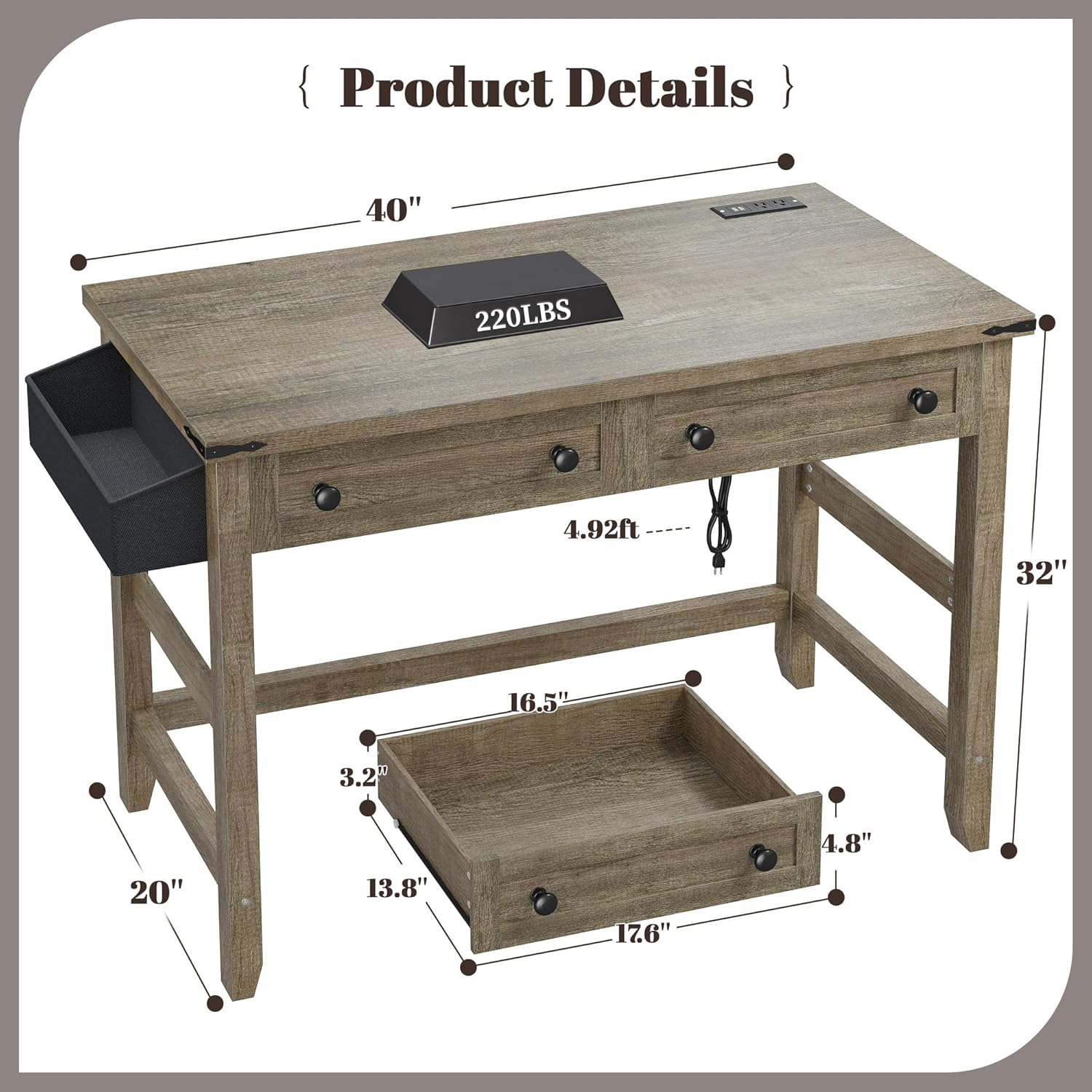
Figure 2: Product dimensions for the EnHomee 40-Inch Computer Desk, including overall size and individual drawer measurements.
4. Οδηγίες λειτουργίας
4.1 Using the Drawers and Side Pocket
The desk features two smooth-gliding wood drawers and a fabric side pocket for organized storage. The drawers are ideal for stationery, documents, or small personal items. The side pocket offers convenient access for items like notebooks, tablets, or charging cables.

Figure 3: The desk's storage solutions, including two spacious drawers and a convenient side pocket, designed to keep your workspace tidy.
4.2 Utilizing Power Outlets and USB Ports
The integrated power strip provides two standard AC outlets and two USB charging ports. This allows for easy access to power for your laptop, smartphone, tablet, and other electronic devices directly on your desk, reducing cable clutter.

Figure 4: The integrated power hub offers convenient charging options for multiple devices directly on the desk surface.
4.3 Ευέλικτη χρήση
This desk is designed for versatility. It can function as a computer desk, writing desk, study desk, or even a vanity in various small spaces such as bedrooms, living rooms, or home offices.

Figure 5: The desk's farmhouse style and compact size make it suitable for use as a vanity or in various small living spaces.
5. Συντήρηση
- Καθάρισμα: Σκουπίστε την επιφάνεια του γραφείου με ένα μαλακό, δamp πανί. Αποφύγετε σκληρές χημικές ουσίες ή λειαντικά καθαριστικά που θα μπορούσαν να προκαλέσουν ζημιά στο φινίρισμα.
- Διαρροές: Promptly clean up any spills to prevent water damage or staining.
- Μηχανήματα υπολογιστών: Ελέγχετε περιοδικά όλες τις βίδες και τις συνδέσεις για να βεβαιωθείτε ότι παραμένουν σφιχτές. Σφίξτε ξανά εάν είναι απαραίτητο.
- Διαφάνειες συρταριών: Εάν τα συρτάρια σκληρύνουν, εφαρμόστε μια μικρή ποσότητα λιπαντικού σιλικόνης στις διαφάνειες.
6. Αντιμετώπιση Προβλημάτων
- Το γραφείο είναι ταλαντευόμενο: Ensure all screws are tightened. Check that the desk is on a level surface. If wobbling persists, verify that all assembly steps were followed correctly.
- Τα συρτάρια δεν γλιστρούν ομαλά: Check for any obstructions in the drawer slides. Ensure the slides are correctly installed and aligned. Apply lubricant if needed.
- Οι πρίζες ρεύματος/θύρες USB δεν λειτουργούν: Verify the desk's power cord is securely plugged into a functional wall outlet. Check if the wall outlet itself is receiving power. Do not exceed the maximum load for the power strip.
- Κομμάτια που λείπουν: If any parts were missing upon delivery, please contact EnHomee customer support for assistance.
7. Προδιαγραφές
| Χαρακτηριστικό | Λεπτομέρεια |
|---|---|
| Μάρκα | EnHomee |
| Μοντέλο | 40-Inch Computer Desk with Power Outlets |
| Διαστάσεις προϊόντος | 20" Β x 40" Π x 32" Υ |
| Χρώμα | Σκούρο ρουστίκ δρυς |
| Υλικό | Σχεδιασμένο ξύλο |
| Ειδικά Χαρακτηριστικά | Built-in Power Outlets (2 AC, 2 USB), 2 Wood Drawers, 1 Side Pocket, Anti-Tipping Device |
| Απαιτείται συναρμολόγηση | Ναί |
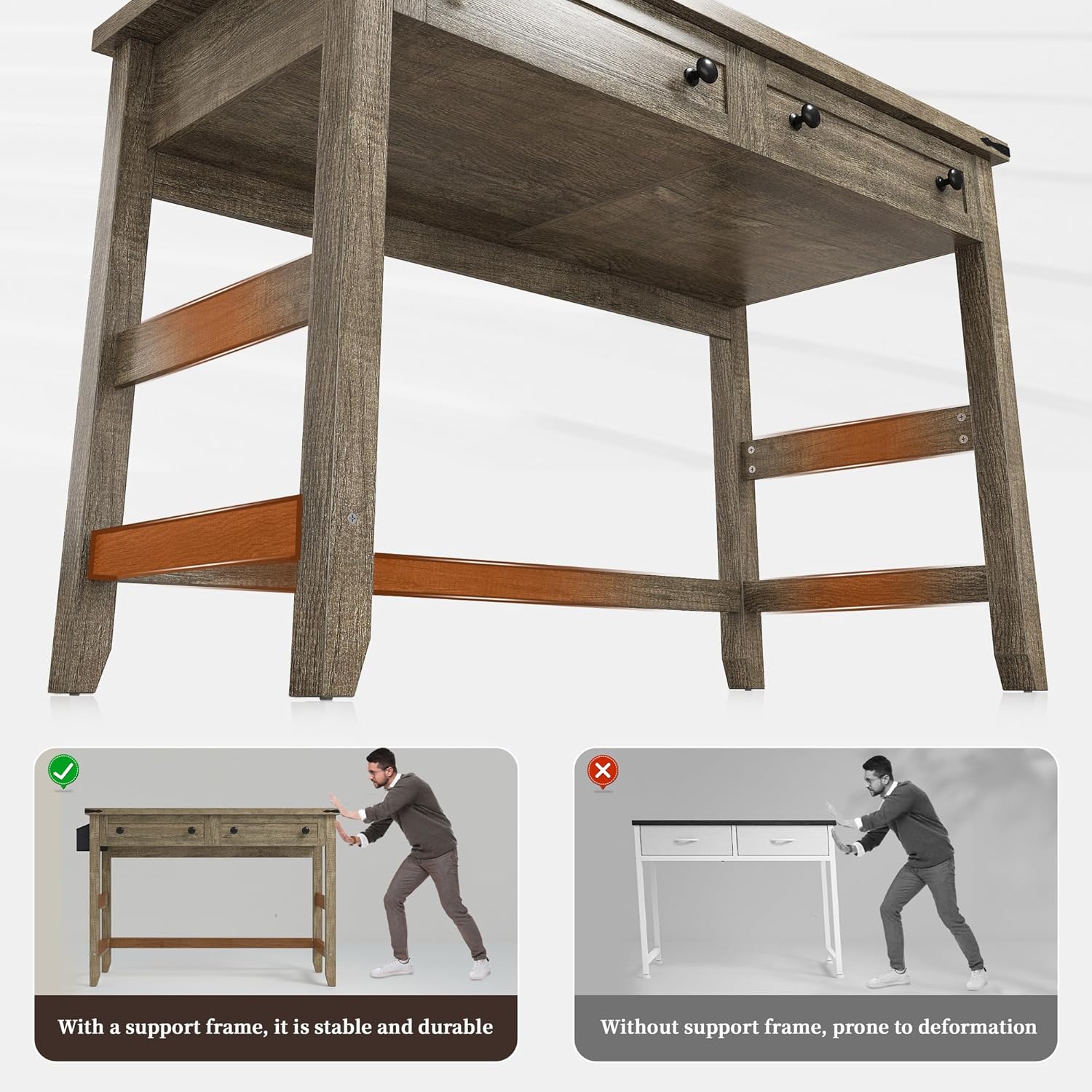
Figure 6: The desk's robust construction with thick wood legs and cross bars ensures stability and durability.
8. Πληροφορίες εγγύησης
This EnHomee product comes with a Περιορισμένη Εγγύηση. Please refer to the warranty card included with your purchase or contact EnHomee customer support for specific terms and conditions regarding coverage and duration.
9. Υποστήριξη πελατών
For any questions, concerns, or assistance with your EnHomee 40-Inch Computer Desk, please contact our customer support team. Refer to the contact information provided in your product packaging or visit the official EnHomee webτοποθεσία για επιλογές υποστήριξης.


