1. Εισαγωγή
Thank you for choosing the MESWAO 15.6 inch Android 14 Tablet Pro. This tablet is designed to provide a superior visual and performance experience with its large Full HD display, powerful octa-core processor, and extended battery life. This manual will guide you through the setup, operation, maintenance, and troubleshooting of your new device, ensuring you get the most out of its advanced features.
2. Τι υπάρχει στο κουτί
Ελέγξτε τα περιεχόμενα της συσκευασίας σας. Εάν λείπουν ή έχουν υποστεί ζημιά κάποια αντικείμενα, επικοινωνήστε με την υποστήριξη πελατών.
- 1 x MESWAO 15.6 inch Android Tablet
- 1 x Μετασχηματιστής ρεύματος
- 1 x καλώδιο τύπου C
- 1 x Εγχειρίδιο χρήστη
- 1 x Προσαρμογέας Type-C σε USB
- 1 x Stuck pin (SIM ejector tool)

Image: Visual representation of the MESWAO tablet and its included accessories.
3. Το προϊόν τελείωσεview
3.1 Βασικά χαρακτηριστικά
- 15.6-inch 1080P FHD IPS Display: Large screen with 1920x1080p resolution, 16:9 aspect ratio, 85% screen-to-body ratio, and 350 nits adjustable brightness for clear visuals.
- Android 14 OS: Latest Android version for faster app launches, intuitive user interface, split-screen multitasking, and GMS certification for Google Play access.
- MediaTek Helio G99 CPU: Octa-core processor (6nm, up to 2.2GHz) and ARM Mali-G57 GPU for smooth performance in multitasking, streaming, and gaming.
- 12,000mAh Mega Battery & 30W Fast Charging: Provides up to 15 hours of video playback and 12+ hours of daily use, with 90% charge in 3 hours.
- 6GB RAM + 128GB ROM (Expandable to 1TB): Ample storage for apps, photos, and videos, with expandable memory via microSD card (FAT32 format).
- Dual-band Wi-Fi & Bluetooth 5.0: High-speed 2.4G/5G Wi-Fi and efficient Bluetooth connectivity for peripherals.
- 5MP Front + 32MP Rear Cameras: Capture moments and conduct clear video calls.
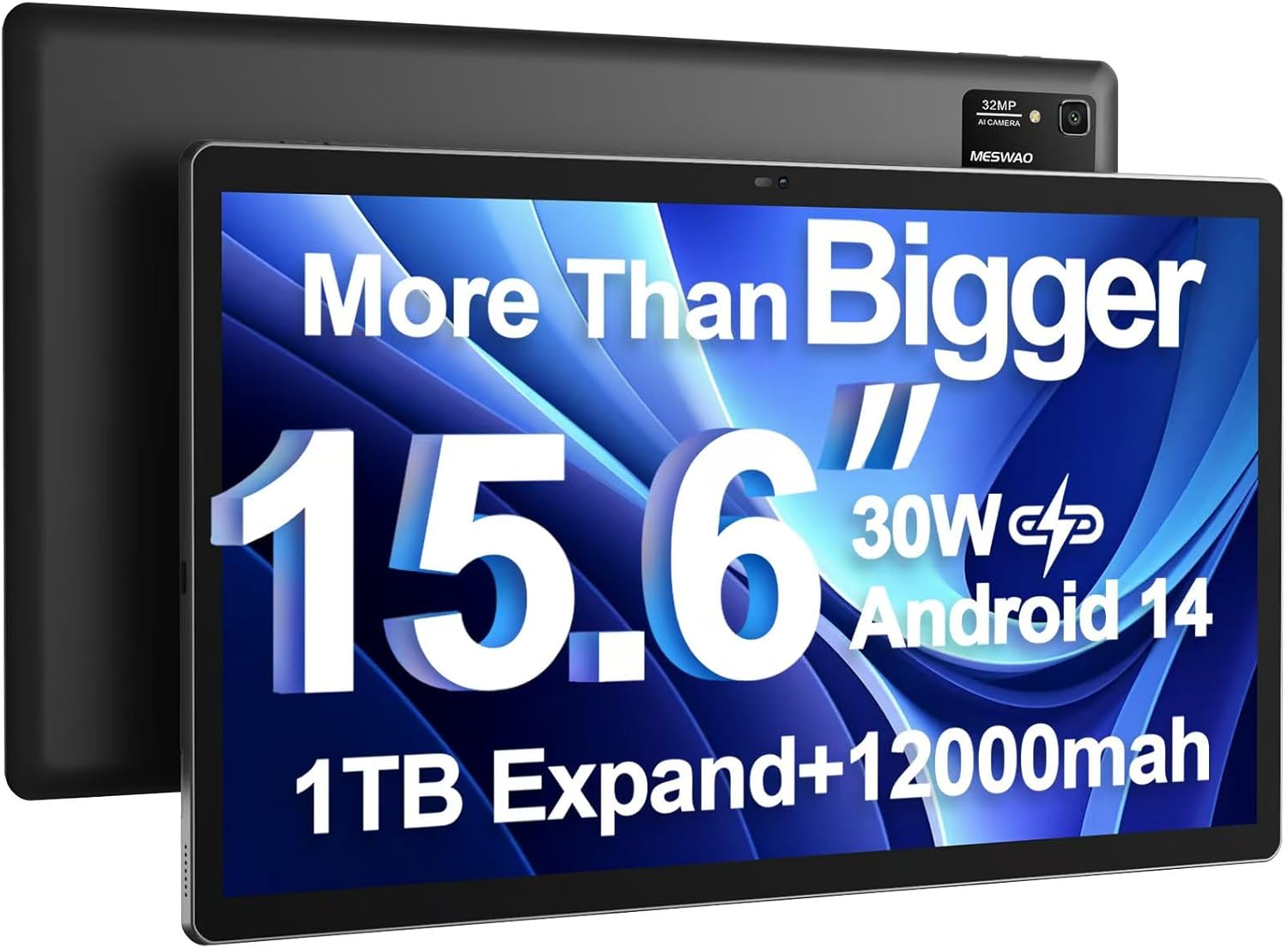
Image: The MESWAO 15.6 inch Android 14 Tablet Pro, showcasinτη μεγάλη οθόνη και τη μονάδα οπίσθιας κάμερας.

Image: Visual comparison highlighting the significantly larger screen area of the 15.6-inch tablet compared to a standard 10-inch tablet.

Image: Illustration of the tablet's 12,000mAh ultra-large capacity battery and 30W fast charging, indicating quick charge times and extended usage.
3.2 Στοιχεία Tablet
Familiarize yourself with the physical components of your MESWAO tablet:
- Κουμπί λειτουργίας: Βρίσκεται στο πλάι και χρησιμοποιείται για την ενεργοποίηση/απενεργοποίηση του tablet ή την αφύπνιση/αδράνεια της οθόνης.
- Κουμπιά έντασης ήχου: Adjust audio output levels.
- Μπροστινή κάμερα: Κάμερα 5MP για βιντεοκλήσεις και selfies.
- Πίσω κάμερα: 32MP camera with flash for high-resolution photos and videos.
- Θύρα τύπου C: Για φόρτιση και μεταφορά δεδομένων.
- Υποδοχή κάρτας TF: Για επέκταση του αποθηκευτικού χώρου με κάρτα microSD.
- Στερεοφωνικά ηχεία: Quad speakers for enhanced audio experience.
- Υποδοχή ακουστικών 3.5 mm: For wired audio connection (requires included Type-C to 3.5mm adapter).
4. Ρύθμιση
4.1 Αρχική ενεργοποίηση
- Πατήστε και κρατήστε πατημένο το Κουμπί λειτουργίας until the MESWAO logo appears on the screen.
- Ακολουθήστε τις οδηγίες στην οθόνη για να επιλέξετε τη γλώσσα, την περιοχή σας και να συνδεθείτε σε ένα δίκτυο Wi-Fi.
- Sign in with your Google account or create a new one to access Google Play Store and other services.
4.2 Φόρτιση του Tablet
Before first use, fully charge the tablet. Use the provided power adapter and Type-C cable.
- Connect the Type-C cable to the tablet's Type-C port.
- Συνδέστε το τροφοδοτικό σε μια πρίζα τοίχου.
- The charging indicator will appear on the screen. A full charge takes approximately 3 hours with the 30W fast charger.
4.3 Τοποθέτηση κάρτας MicroSD
To expand storage, insert a microSD card (FAT32 format, up to 1TB, sold separately).
- Εντοπίστε την υποδοχή κάρτας TF στο πλάι του tablet.
- Use the provided stuck pin to gently press into the small hole next to the slot to eject the tray.
- Τοποθετήστε την κάρτα microSD στη θήκη με τις χρυσές επαφές στραμμένες προς τα κάτω.
- Επανατοποθετήστε προσεκτικά το δίσκο στην υποδοχή μέχρι να ασφαλίσει στη θέση του.
5. Οδηγίες λειτουργίας
5.1 Βασική πλοήγηση
- Αρχική οθόνη: Σύρετε το δάχτυλό σας προς τα αριστερά ή προς τα δεξιά για να πλοηγηθείτε μεταξύ των αρχικών οθονών.
- Συρτάρι εφαρμογών: Access all installed applications (if using a launcher with an app drawer, otherwise apps are on home screens).
- Ειδοποιήσεις και Γρήγορες Ρυθμίσεις: Σύρετε το δάχτυλό σας προς τα κάτω από το επάνω μέρος της οθόνης για να αποκτήσετε πρόσβαση στις ειδοποιήσεις και στις γρήγορες ρυθμίσεις (Wi-Fi, Bluetooth, Φωτεινότητα κ.λπ.).
- Πρόσφατες εφαρμογές: Πατήστε το τετράγωνο εικονίδιο (ή σύρετε προς τα πάνω και κρατήστε πατημένο από το κάτω μέρος εάν χρησιμοποιείτε πλοήγηση με κινήσεις) για να view και εναλλαγή μεταξύ εφαρμογών που χρησιμοποιήθηκαν πρόσφατα.
5.2 Πολυδιεργασία με Διαιρεμένη Οθόνη
The Android 14 OS supports split-screen functionality for enhanced productivity.
- Ανοίξτε την πρώτη εφαρμογή που θέλετε να χρησιμοποιήσετε.
- Go to the Recent Apps view.
- Πατήστε το εικονίδιο της εφαρμογής στο επάνω μέρος της κάρτας της πρώτης εφαρμογής και επιλέξτε «Διαχωρισμός οθόνης».
- Choose the second app from your recent apps or app drawer to open it in the other half of the screen.
- Προσαρμόστε το μέγεθος κάθε εφαρμογής σύροντας το διαχωριστικό στη μέση.

Εικόνα: Πάνωview of key features of the Android 14 operating system on the tablet, including multitasking capabilities.
5.3 Συνδεσιμότητα
- Wi-Fi: Μεταβείτε στο Ρυθμίσεις > Δίκτυο και διαδίκτυο > Wi-Fi to connect to available networks. Supports 2.4Ghz and 5Ghz bands.
- Bluetooth: Μεταβείτε στο Ρυθμίσεις > Συνδεδεμένες συσκευές > Προτιμήσεις σύνδεσης > Bluetooth to pair with Bluetooth headphones, keyboards, or other devices.
- Μετάδοση οθόνης: The tablet supports wireless screen casting to compatible displays. Access this feature from Quick Settings or Settings > Connected devices > Connection preferences > Cast.

Image: Depiction of the tablet's stable dual-band Wi-Fi and Bluetooth 5.0 capabilities, enabling seamless wireless connections.
6. Συντήρηση
6.1 Φροντίδα μπαταρίας
- Αποφύγετε ακραίες θερμοκρασίες (υψηλή ή χαμηλή), καθώς μπορούν να μειώσουν τη διάρκεια ζωής της μπαταρίας.
- Μην αφήνετε την μπαταρία να αδειάζει εντελώς συχνά. Φορτίστε την πριν φτάσει στο 0%.
- Use only the provided charger or a certified 30W PD fast charger.
6.2 Καθαρισμός
- Χρησιμοποιήστε ένα μαλακό πανί που δεν αφήνει χνούδι για να καθαρίσετε την οθόνη και το σώμα.
- Για επίμονους λεκέδες, τρίψτε ελαφράampΣκουπίστε το πανί με νερό ή καθαριστικό οθόνης. Αποφύγετε τις σκληρές χημικές ουσίες.
- Μην ψεκάζετε υγρά απευθείας πάνω στο δισκίο.
6.3 Ενημερώσεις λογισμικού
Ελέγχετε και εγκαθιστάτε τακτικά ενημερώσεις συστήματος για να διασφαλίζετε βέλτιστη απόδοση και ασφάλεια.
- Connect your tablet to a stable Wi-Fi network.
- Μεταβείτε στο Ρυθμίσεις > Σύστημα > Ενημέρωση συστήματος.
- Ακολουθήστε τις οδηγίες στην οθόνη για να κατεβάσετε και να εγκαταστήσετε τυχόν διαθέσιμες ενημερώσεις.
7. Αντιμετώπιση Προβλημάτων
Εάν αντιμετωπίσετε προβλήματα με το tablet σας, ανατρέξτε στις ακόλουθες συνήθεις λύσεις:
| Πρόβλημα | Πιθανή αιτία | Διάλυμα |
|---|---|---|
| Το tablet δεν ενεργοποιείται | Χαμηλή μπαταρία. Σφάλμα συστήματος. | Φορτίστε το tablet για τουλάχιστον 30 λεπτά. Πατήστε παρατεταμένα το κουμπί λειτουργίας για 10-15 δευτερόλεπτα για να κάνετε επανεκκίνηση. |
| Αργή απόδοση/καθυστέρηση | Πάρα πολλές εφαρμογές σε λειτουργία. Λίγος αποθηκευτικός χώρος. Παλιό λογισμικό. | Close background apps. Clear cache. Free up storage. Check for system updates. |
| Ζητήματα σύνδεσης Wi-Fi | Incorrect password; Router issue; Tablet Wi-Fi off | Ensure Wi-Fi is on. Re-enter password. Restart router. Forget and reconnect to network. |
| Η μπαταρία αδειάζει γρήγορα | High screen brightness; Background apps; Heavy usage | Reduce screen brightness. Close unused apps. Limit background data. Check battery usage in settings. |
| Touchscreen unresponsive/Phantom touches | Temporary software glitch; Defective unit | Restart the tablet. If the issue persists, contact MESWAO customer support for assistance. |
If the problem persists after trying these solutions, please contact MESWAO customer support for further assistance.
8. Προδιαγραφές
| Χαρακτηριστικό | Λεπτομέρεια |
|---|---|
| Όνομα μοντέλου | MES-B3 Pro |
| Λειτουργικό σύστημα | Android 14 |
| Μέγεθος οθόνης | 15.6 ίντσες |
| Ανάλυση οθόνης | 1920 x 1080 pixel (Full HD IPS) |
| Επεξεργαστής | MediaTek Helio G99 Οκταπύρηνος (έως 2.2GHz) |
| Συνεπεξεργαστής γραφικών | ARM Mali-G57 |
| ΕΜΒΟΛΟ | 6 GB |
| Εσωτερική αποθήκευση (ROM) | 128 GB |
| Επεκτάσιμος χώρος αποθήκευσης | Up to 1TB via MicroSD card (FAT32 format) |
| Χωρητικότητα μπαταρίας | 12,000 mAh |
| Διάρκεια ζωής μπαταρίας (μέση) | 13 Hours (up to 15 hours video playback) |
| Φόρτιση | Γρήγορη φόρτιση PD 30W |
| Ασύρματη Συνδεσιμότητα | 802.11a/b/ac/ax (2.4G/5G Dual-band Wi-Fi), Bluetooth 5.0 |
| Μπροστινή κάμερα | 5MP |
| Πίσω κάμερα | 32MP |
| Βάρος αντικειμένου | 4.42 λίβρες (περίπου 2 κιλά) |
| Διαστάσεις προϊόντος | 14.49 x 8.66 x 0.39 ίντσες (36.8 x 22 x 1 cm) |
9. Εγγύηση και υποστήριξη
MESWAO products come with a standard manufacturer's warranty. Please refer to the warranty card included in your package for specific terms and conditions. For technical support, troubleshooting assistance, or warranty claims, please contact MESWAO customer service through the contact information provided on the official MESWAO webιστότοπο ή την πλατφόρμα αγορών σας.
Στοιχεία επικοινωνίας: Please visit the official MESWAO website or refer to the support card included in your product packaging for the most up-to-date contact details.


