1. Εισαγωγή
The APC Smart-UPS SMT750C is an Uninterruptible Power Supply (UPS) designed to provide reliable power and surge protection for critical electronic equipment. This unit offers 750VA/500W of line-interactive pure sine wave power, making it suitable for servers, storage systems, network closets, business VoIP setups, desktop computers, and retail POS systems. It features Automatic VoltagΚανονισμός (AVR) για τη διόρθωση του όγκουtage fluctuations and a SmartConnect Ethernet Port for cloud-based remote monitoring. This manual provides essential information for the safe and efficient installation, operation, and maintenance of your SMT750C UPS.
2. Πληροφορίες Ασφάλειας
WARNING: Risk of electric shock. Refer to bottom of unit for warnings.
- Διαβάστε προσεκτικά όλες τις οδηγίες πριν την εγκατάσταση και τη λειτουργία.
- This UPS contains internal batteries and may present a shock hazard even when disconnected from the AC power source.
- Μην ανοίγετε ή αποσυναρμολογείτε το UPS. Δεν υπάρχουν εξαρτήματα που να μπορούν να επισκευαστούν από τον χρήστη στο εσωτερικό, εκτός από την μπαταρία.
- Συνδέστε το UPS μόνο σε γειωμένη πρίζα.
- Do not use the UPS in direct sunlight, near heat sources, or in areas with excessive humidity.
- Ensure proper ventilation around the UPS. Do not block any ventilation openings.
3. Περιεχόμενα συσκευασίας
Βεβαιωθείτε ότι όλα τα αντικείμενα υπάρχουν κατά την αποσυσκευασία:
- APC Smart-UPS SMT750C Unit
- 16GB USB 3.0 Drive
- Εγχειρίδιο χρήστη (αυτό το έγγραφο)
- Καλώδιο επικοινωνίας USB
- Καλώδιο ρεύματος

Image: Included 16GB USB 3.0 Drive. This USB drive provides additional storage or file δυνατότητες μεταφοράς.
4. Το προϊόν τελείωσεview
Μπροστινό Πάνελ
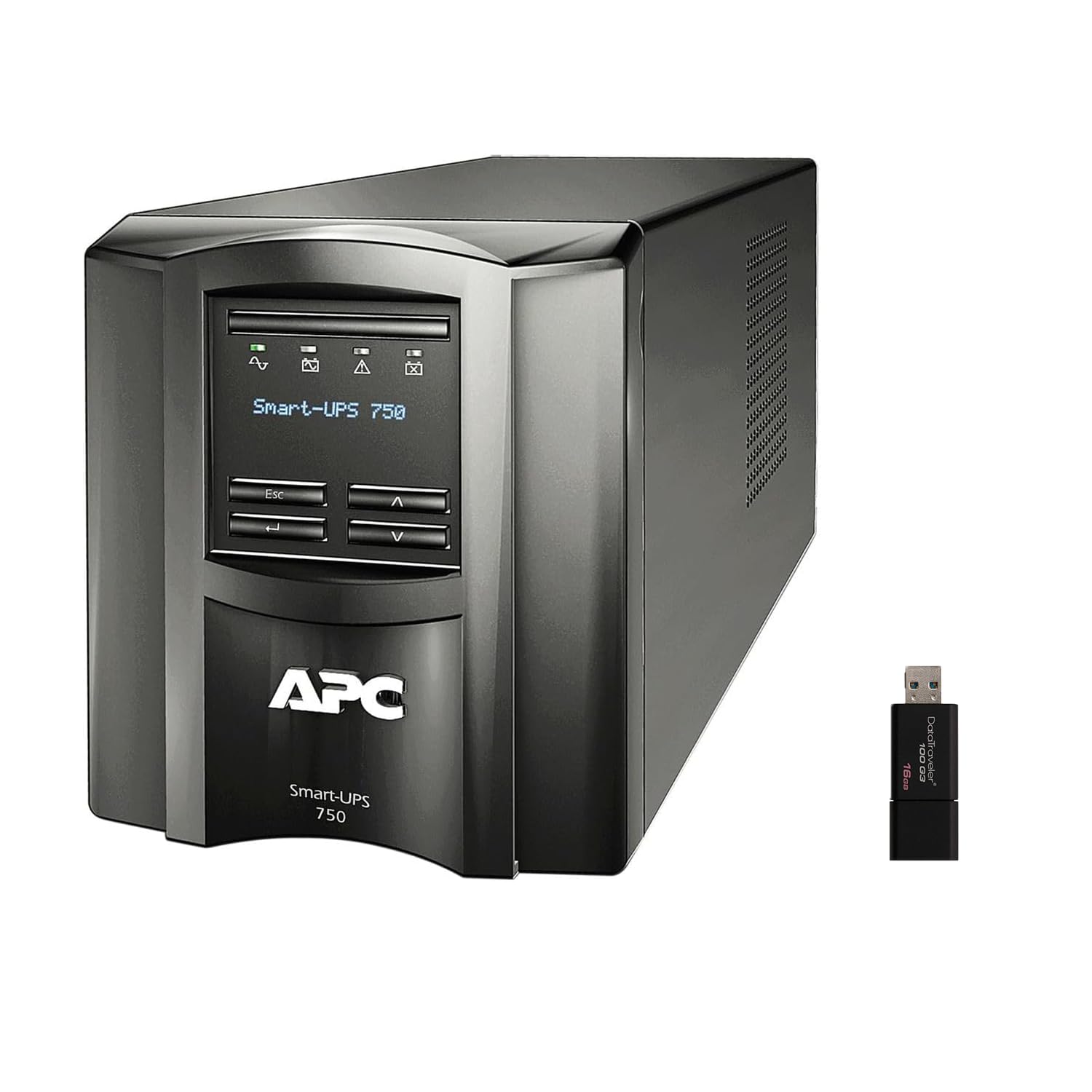
Εικόνα: Μπροστά και πλάι view of the APC Smart-UPS SMT750C. This image displays the compact tower design of the UPS unit.
- Κουμπί λειτουργίας: Ελέγχει την κύρια τροφοδοσία του UPS.
- Οθόνη LCD: Provides real-time status information, load levels, battery charge, and estimated runtime.
- Κουμπιά πλοήγησης: Used to scroll through display menus and adjust settings.
Πίσω πίνακας
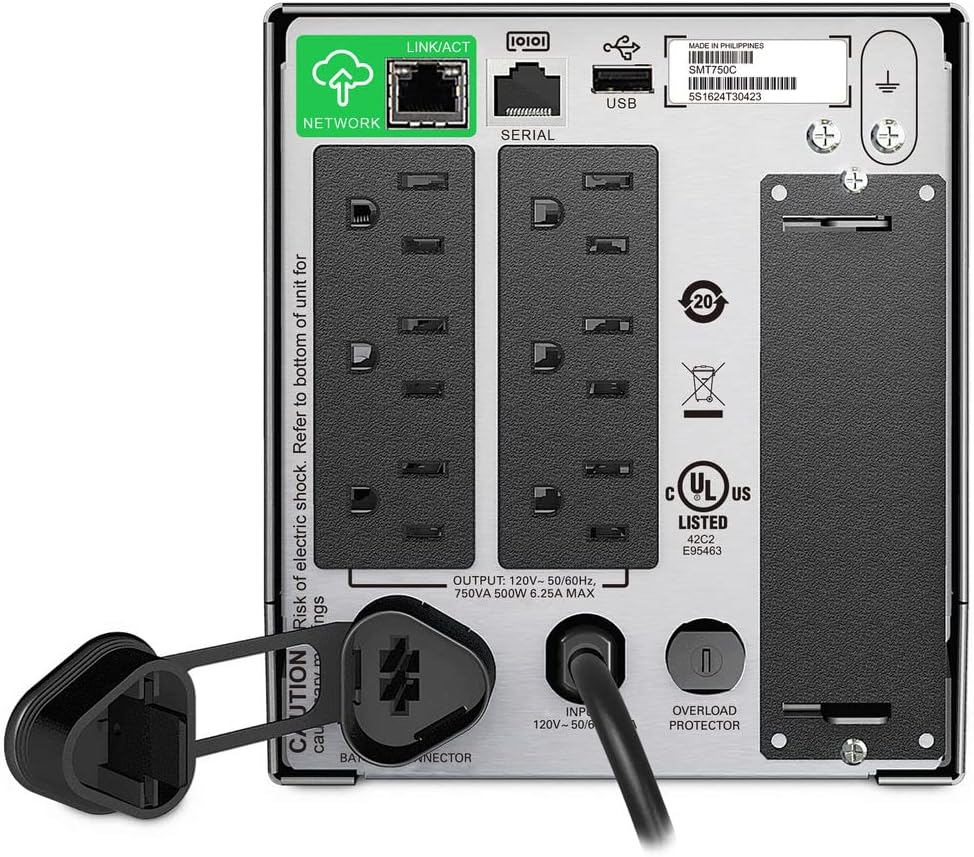
Image: Rear panel of the APC Smart-UPS SMT750C. This view highlights the various input/output ports, including NEMA 5-15R outlets, SmartConnect port, USB, and serial ports.
- NEMA 5-15R Outlets: Six outlets for connecting protected equipment.
- SmartConnect Ethernet Port: For cloud-based remote monitoring and management.
- Θύρα USB: For communication with a computer for graceful shutdown via PowerChute Serial Shutdown software.
- Σειριακή θύρα: Alternative communication port for graceful shutdown.
- SmartSlot: For optional Network Management Card (sold separately).
- Καλώδιο τροφοδοσίας εισόδου: Συνδέει το UPS στην παροχή ρεύματος.
- Προστατευτικό υπερφόρτωσης: Resettable circuit breaker.
5. Ρύθμιση
5.1 Αρχική σύνδεση μπαταρίας
Before initial use, the internal battery must be connected. The unit is shipped with the battery disconnected for safety during transit.
- Τοποθετήστε το UPS σε μια σταθερή επιφάνεια.
- Εντοπίστε το κάλυμμα της θήκης της μπαταρίας, συνήθως στο κάτω ή στο πίσω μέρος της μονάδας.
- Remove the cover to access the battery.
- Connect the red battery cable to the positive (+) terminal and the black battery cable to the negative (-) terminal. Ensure a secure connection.
- Επανατοποθετήστε το κάλυμμα της θήκης μπαταριών.
5.2 Σύνδεση με την παροχή ρεύματος
- Plug the UPS power cord into a grounded 3-prong AC outlet.
- Αφήστε το UPS να φορτίσει για τουλάχιστον 24 ώρες πριν συνδέσετε κρίσιμο εξοπλισμό, για να διασφαλίσετε την πλήρη χωρητικότητα της μπαταρίας.
5.3 Εξοπλισμός σύνδεσης
- Connect your critical equipment (e.g., computer, monitor, network devices) to the NEMA 5-15R outlets on the rear panel.
- For graceful shutdown capabilities, connect the provided USB cable from the UPS to your computer and install the PowerChute Serial Shutdown software (available for download from APC's webιστοσελίδα).
- For remote monitoring, connect an Ethernet cable to the SmartConnect port and follow the instructions for cloud-based setup.
6. Λειτουργία
6.1 Ενεργοποίηση/Απενεργοποίηση
- To power on the UPS, press and hold the power button on the front panel until the unit beeps and the display illuminates.
- To power off the UPS, press and hold the power button until the unit beeps and the display turns off.
6.2 Automatic Voltagε Κανονισμός (AVR)
The SMT750C features AVR, which automatically corrects minor voltage fluctuations (sags and surges) without switching to battery power. This protects connected equipment from voltage irregularities and extends battery life.
6.3 Λειτουργία εφεδρικής μπαταρίας
Κατά τη διάρκεια μιας εξουσίας ουtage, the UPS will automatically switch to battery power, providing continuous power to connected equipment. The LCD display will show the estimated remaining runtime. When utility power returns, the UPS will automatically switch back to utility power and recharge its battery.
6.4 Remote Monitoring (SmartConnect)
The SmartConnect port allows for cloud-based remote monitoring of your UPS. This feature enables IT professionals and network administrators to:
- Monitor UPS status and performance.
- Εκτελέστε αναβαθμίσεις υλικολογισμικού.
- Conduct remote diagnostics.
- Receive proactive email notifications with recommended actions.
7. Συντήρηση
7.1 Αντικατάσταση μπαταρίας
The internal battery is a user-replaceable component. When the battery reaches the end of its service life, the UPS will indicate a battery fault. To replace the battery:
- Ensure the UPS is powered off and disconnected from utility power.
- Αφαιρέστε το κάλυμμα της θήκης μπαταριών.
- Disconnect the battery cables (red and black).
- Carefully slide out the old battery.
- Insert a genuine APC replacement battery (model RBC154, sold separately).
- Connect the battery cables, ensuring correct polarity (red to positive, black to negative).
- Επανατοποθετήστε το κάλυμμα της θήκης μπαταριών.
- Recycle the old battery responsibly.
7.2 Καθαρισμός
Καθαρίζετε περιοδικά το εξωτερικό του UPS με ένα μαλακό, στεγνό πανί. Μην χρησιμοποιείτε υγρά καθαριστικά ή καθαριστικά σε μορφή αεροζόλ. Βεβαιωθείτε ότι τα ανοίγματα εξαερισμού είναι απαλλαγμένα από σκόνη και υπολείμματα.
8. Αντιμετώπιση Προβλημάτων
| Πρόβλημα | Πιθανή αιτία | Διάλυμα |
|---|---|---|
| Το UPS δεν ενεργοποιείται | Η μπαταρία δεν είναι συνδεδεμένη ή η φόρτιση είναι χαμηλή | Ensure battery cables are connected. Plug UPS into AC outlet and allow to charge. |
| Το UPS ηχεί συνεχώς | Overload or on battery power | Reduce connected load. Check utility power. |
| Battery symbol blinking | Battery needs to be flipped (initial setup) or is failing | For new units, ensure battery is correctly oriented and connected. For older units, consider battery replacement. |
| Χωρίς ρεύμα στις πρίζες | UPS is off, circuit breaker tripped, or utility power lost | Turn on UPS. Reset circuit breaker. Check utility power. |
9. Προδιαγραφές
- Μοντέλο: SMT750C
- Ισχύς εξόδου: 500 Watt / 750 VA
- Συνδέσεις εξόδου: 6 x NEMA 5-15R
- Συνδέσεις εισόδου: NEMA 5-15P
- Ονομαστική Είσοδος Τόμοςtage: 120V
- Ονομαστική Έξοδος Τόμοςtage: 120V
- Τύπος μπαταρίας: Μόλυβδος Οξύ
- Παράγοντας μορφής: Πύργος
- Διαστάσεις (Υ x Π x Β): 6.34 ίντσες (16.1 εκ.) x 5.43 ίντσες (13.8 εκ.) x 14.53 ίντσες (36.9 εκ.)
- Καθαρό βάρος: 27.56 λίβρες (12.5 κιλά)
- Χρώμα: Μαύρος
- Υλικό: Μέταλλο
- Συμπεριλαμβανόμενα αξεσουάρ: 16GB USB 3.0 Drive
10. Εγγύηση και υποστήριξη
Η APC παρέχει μια τυπική εγγύηση για αυτό το προϊόν. Για τους συγκεκριμένους όρους και προϋποθέσεις εγγύησης, ανατρέξτε στην κάρτα εγγύησης που συνοδεύει το προϊόν σας ή επισκεφθείτε την επίσημη ιστοσελίδα της APC. website. For technical support, product registration, or to purchase replacement parts, please visit www.apc.com ή επικοινωνήστε με την εξυπηρέτηση πελατών της APC.
Protection plans are available for extended coverage. For example, a 3-Year Protection Plan is available.