Καλωσόρισμα
Thank you for choosing the BYTECH BICONIC True Wireless Earbuds. This manual provides essential information on how to set up, operate, maintain, and troubleshoot your new earbuds. Please read this manual thoroughly before use to ensure optimal performance and longevity of your device.
Σημαντικές οδηγίες ασφαλείας
- Μην εκθέτετε τα ακουστικά ή τη θήκη φόρτισης σε ακραίες θερμοκρασίες, υγρασία ή υγρά.
- Αποφύγετε την πτώση, την πρόσκρουση ή την αποσυναρμολόγηση της συσκευής.
- Do not use abrasive cleaners or harsh chemicals to clean the earbuds or case.
- Listen at moderate volume levels to prevent hearing damage. Prolonged exposure to loud sounds can cause irreversible hearing loss.
- Να φυλάσσεται μακριά από παιδιά και κατοικίδια.
- Dispose of the device responsibly according to local regulations. Do not dispose of with household waste.
Τι Περιλαμβάνεται
Ελέγξτε τα περιεχόμενα της συσκευασίας για να βεβαιωθείτε ότι υπάρχουν όλα τα είδη:
- BYTECH BICONIC True Wireless Earbuds (Left and Right)
- Θήκη φόρτισης
- Καλώδιο φόρτισης
- Εγχειρίδιο χρήστη
Προϊόν Πάνωview
Familiarize yourself with the components of your BYTECH BICONIC True Wireless Earbuds.

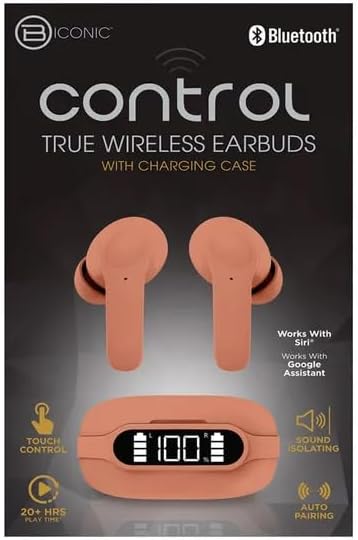
Ξεκινώντας
Φόρτιση των ακουστικών και της θήκης
The BYTECH BICONIC earbuds come with a rechargeable battery in both the earbuds and the charging case. Ensure both are fully charged before first use.
- Τοποθετήστε τα ακουστικά στη θήκη φόρτισης, βεβαιώνοντας ότι έχουν τοποθετηθεί σωστά στις αντίστοιχες υποδοχές τους (L για αριστερά, R για δεξιά).
- Connect the provided charging cable to the charging port on the case and the other end to a USB power source (e.g., computer USB port, wall adapter).
- The digital display on the charging case will show the battery level. Allow sufficient time for a full charge.
- Μόλις φορτιστεί πλήρως, αποσυνδέστε το καλώδιο φόρτισης.
Σύνδεση μέσω Bluetooth
Ακολουθήστε αυτά τα βήματα για να αντιστοιχίσετε τα ακουστικά σας με τη συσκευή σας με δυνατότητα Bluetooth:
- Βεβαιωθείτε ότι τα ακουστικά είναι φορτισμένα και βρίσκονται μέσα στη θήκη φόρτισης.
- Ανοίξτε τη θήκη φόρτισης. Τα ακουστικά θα εισέλθουν αυτόματα σε λειτουργία σύζευξης και μια ενδεικτική λυχνία στα ακουστικά θα αναβοσβήνει.
- Στη συσκευή σας (smartphone, tablet κ.λπ.), μεταβείτε στις ρυθμίσεις Bluetooth και ενεργοποιήστε το Bluetooth.
- Αναζήτηση για available devices. You should see "BYTECH BICONIC" or a similar name appear in the list.
- Select "BYTECH BICONIC" to connect. Once connected, a voice prompt will confirm the successful pairing, and the indicator lights on the earbuds will stop flashing.
- Τα ακουστικά θα επανασυνδεθούν αυτόματα με την τελευταία συζευγμένη συσκευή όταν αφαιρεθούν από τη θήκη, εφόσον το Bluetooth είναι ενεργοποιημένο στη συσκευή.
Οδηγίες Λειτουργίας
Αγγίξτε Στοιχεία ελέγχου
The BYTECH BICONIC earbuds feature intuitive touch controls for easy management of your audio and calls.
| Δράση | Λειτουργία |
|---|---|
| Μονό άγγιγμα (Αριστερό/Δεξί ακουστικό) | Αναπαραγωγή/Παύση μουσικής, Απάντηση/Τερματισμός κλήσης |
| Διπλό πάτημα (δεξί ακουστικό) | Επόμενο κομμάτι |
| Διπλό πάτημα (Αριστερό ακουστικό) | Προηγούμενο κομμάτι |
| Τριπλό άγγιγμα (Αριστερό/Δεξί ακουστικό) | Ενεργοποίηση φωνητικού βοηθού (Siri/Βοηθός Google) |
| Παρατεταμένο πάτημα (αριστερό/δεξί ακουστικό) | Απόρριψη κλήσης |
Ενεργοποίηση και απενεργοποίηση
- Ενεργοποίηση: Τα ακουστικά θα ενεργοποιηθούν αυτόματα όταν αφαιρεθούν από τη θήκη φόρτισης.
- Απενεργοποιώ: Τοποθετήστε τα ακουστικά πίσω στη θήκη φόρτισης και κλείστε το καπάκι. Θα απενεργοποιηθούν αυτόματα και θα ξεκινήσει η φόρτιση.
Συντήρηση και Φροντίδα
Proper care will extend the life of your BYTECH BICONIC True Wireless Earbuds.
- Καθάρισμα: Use a soft, dry, lint-free cloth to clean the earbuds and charging case. Do not use liquids or aerosol cleaners.
- Αποθήκευση: Όταν δεν τα χρησιμοποιείτε, να αποθηκεύετε πάντα τα ακουστικά στη θήκη φόρτισής τους για να τα προστατεύετε και να τα διατηρείτε φορτισμένα.
- Αποφύγετε ακραίες συνθήκες: Do not expose the device to extreme heat, cold, or direct sunlight.
- Αντοχή στο νερό: These earbuds are not waterproof. Avoid contact with water or excessive moisture.
Αντιμετώπιση προβλημάτων
If you encounter any issues with your earbuds, refer to the following common solutions:
| Πρόβλημα | Διάλυμα |
|---|---|
| Τα ακουστικά δεν αντιστοιχίζονται | Βεβαιωθείτε ότι τα ακουστικά είναι φορτισμένα. Απενεργοποιήστε και ενεργοποιήστε το Bluetooth στη συσκευή σας. Ξεχάστε τη συσκευή στις ρυθμίσεις Bluetooth και επαναλάβετε τη σύζευξη. |
| Μόνο ένα ακουστικό λειτουργεί | Τοποθετήστε και τα δύο ακουστικά πίσω στη θήκη φόρτισης, κλείστε το καπάκι, περιμένετε λίγα δευτερόλεπτα και μετά βγάλτε τα ξανά. Βεβαιωθείτε ότι και τα δύο είναι φορτισμένα. |
| Κανένας ήχος | Check volume levels on both your device and the earbuds. Ensure earbuds are properly connected. Try playing different audio. |
| Η θήκη φόρτισης δεν φορτίζεται | Βεβαιωθείτε ότι το καλώδιο φόρτισης είναι συνδεδεμένο σταθερά τόσο στη θήκη όσο και στην πηγή τροφοδοσίας. Δοκιμάστε μια διαφορετική θύρα USB ή τροφοδοτικό. |
Τεχνικές Προδιαγραφές
Detailed specifications for your BYTECH BICONIC True Wireless Earbuds:
| Χαρακτηριστικό | Λεπτομέρεια |
|---|---|
| Αριθμός μοντέλου | BC-AU-BE-144-TN |
| Τεχνολογία Συνδεσιμότητας | Ασύρματο (Bluetooth) |
| Form Factor | Ενδοωτιαία (Intraurales) |
| Χρώμα | Καφενείο |
| Ειδικά Χαρακτηριστικά | Rechargeable Battery, Touch Control, Sound Isolating, Auto Pairing |
| Συμπεριλαμβανόμενα εξαρτήματα | Καλώδιο |
| Estimated Play Time | 20+ ώρες (με θήκη φόρτισης) |
Πληροφορίες εγγύησης και υποστήριξη πελατών
BYTECH products are designed and manufactured to the highest quality standards. For information regarding warranty coverage, please refer to the warranty card included with your purchase or visit the official BYTECH webτοποθεσία.
If you require further assistance or have questions not covered in this manual, please contact BYTECH customer support through their official channels. Please have your model number (BC-AU-BE-144-TN) and purchase details ready when contacting support.


