1. Εισαγωγή
Thank you for choosing the WIOONI WLAN Indoor Motion Detector. This device is designed to enhance your home security and smart automation experience by detecting motion and sending real-time notifications to your smartphone. It integrates seamlessly with Smart Life and Tuya Smart applications, allowing for intelligent linkages with other smart devices.
This manual provides detailed instructions on how to set up, operate, and maintain your motion detector. Please read it thoroughly before use to ensure proper functionality and safety.

Image 1.1: WIOONI WLAN Indoor Motion Detector and its corresponding mobile application interface.
2. Πληροφορίες Ασφάλειας
- Αυτή η συσκευή προορίζεται για χρήση μόνο σε εσωτερικούς χώρουςΜην το εκθέτετε σε νερό, υγρασία ή ακραίες θερμοκρασίες.
- Κρατήστε τη συσκευή μακριά από άμεσο ηλιακό φως, πηγές θερμότητας και ισχυρά ηλεκτρομαγνητικά πεδία.
- Χρησιμοποιήστε μόνο τον καθορισμένο τύπο μπαταρίας (AAA) και βεβαιωθείτε για τη σωστή πολικότητα κατά την εγκατάσταση.
- Μην επιχειρήσετε να αποσυναρμολογήσετε ή να επισκευάσετε τη συσκευή μόνοι σας. Επικοινωνήστε με την υποστήριξη πελατών για βοήθεια.
- Να φυλάσσεται μακριά από παιδιά και κατοικίδια.
3. Περιεχόμενα συσκευασίας
Το πακέτο περιλαμβάνει τα ακόλουθα είδη:
- 2 x WIOONI WLAN Indoor Motion Sensor
- 4 μπαταρίες AAA (2 ανά αισθητήρα)
- Mounting Accessories (e.g., double-sided adhesive tapes, hanging ropes)
- Εγχειρίδιο χρήστη
4. Το προϊόν τελείωσεview
The WIOONI motion detector features a compact design with an infrared PIR sensor for detecting human movement. It includes a small LED indicator for status and a button for pairing. The device is powered by AAA batteries for wireless operation.
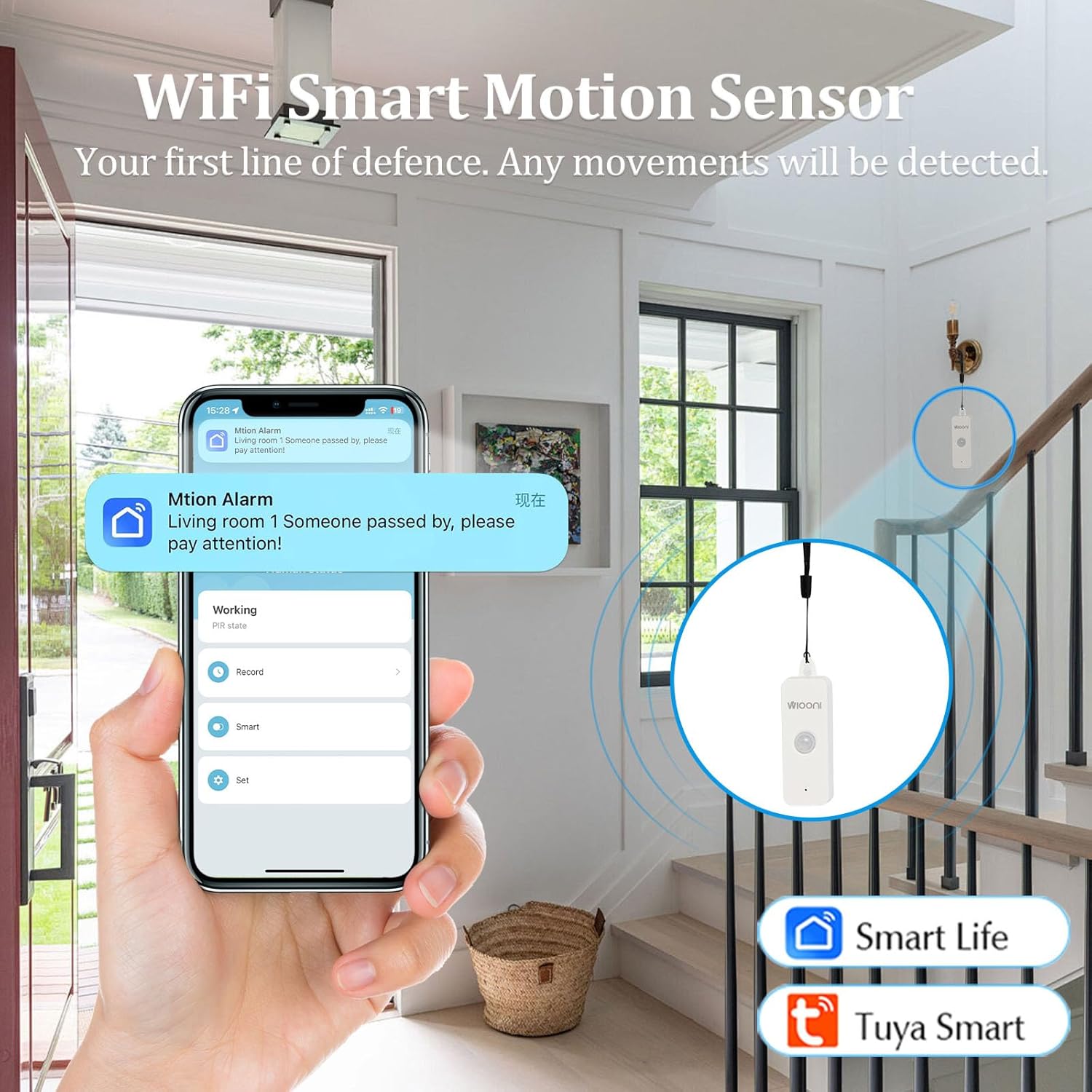
Image 4.1: The WIOONI motion sensor discreetly installed in a home environment, demonstrating its role as a security device.
5. Ρύθμιση
5.1. Τοποθέτηση μπαταρίας
- Gently open the back cover of the motion detector.
- Τοποθετήστε τις δύο μπαταρίες AAA, φροντίζοντας για τη σωστή πολικότητα (+/-).
- Remove the battery insulation strip (if present) to activate the device.
- Κλείστε καλά το πίσω κάλυμμα.

Image 5.1: Step-by-step guide for initial setup, including battery activation and app pairing.
5.2. Λήψη και εγκατάσταση εφαρμογής
The WIOONI motion detector is compatible with the Smart Life and Tuya Smart applications. Choose one to manage your device.
- Scan the QR code provided in Image 5.1 or search for "Smart Life" or "Tuya Smart" in your mobile app store (App Store for iOS, Google Play Store for Android).
- Κατεβάστε και εγκαταστήστε την εφαρμογή.
- Δημιουργήστε έναν νέο λογαριασμό ή συνδεθείτε εάν έχετε ήδη έναν.
You can also download the Smart Life app directly from: https://smartapp.tuya.com/smartlife
5.3. Device Pairing/Connection
- Βεβαιωθείτε ότι το smartphone σας είναι συνδεδεμένο σε δίκτυο Wi-Fi 2.4 GHz. (Δεν υποστηρίζονται δίκτυα 5 GHz).
- Ανοίξτε την εφαρμογή Smart Life ή Tuya Smart.
- Ενεργοποιήστε το Bluetooth και το Wi-Fi στο τηλέφωνό σας.
- In the app, tap "Add Device" or the "+" icon in the top right corner.
- The app may automatically discover the device. If not, select "Security & Sensor" > "Motion Sensor (Wi-Fi)" or similar.
- Follow the on-screen instructions to connect the device. This usually involves pressing the pairing button on the sensor until the LED indicator flashes, then confirming in the app.
- Once successfully added, you can rename the device and assign it to a specific room.
6. Λειτουργία
6.1. Basic Motion Detection
The WIOONI motion detector uses Passive Infrared (PIR) technology to detect changes in infrared radiation caused by moving objects, such as people. When motion is detected within its range, the device will trigger an alert.

Image 6.1: Illustration of PIR motion detection and instant notification to your smartphone.
6.2. Χαρακτηριστικά εφαρμογής
- Παρακολούθηση σε πραγματικό χρόνο: View the current status of the motion detector (e.g., "No motion detected," "Motion detected") directly from the app, no matter where you are.
- Άμεσες ειδοποιήσεις: Receive push notifications on your smartphone immediately when motion is detected, keeping you informed of any activity.
- Αρχείο καταγραφής δραστηριοτήτων: Review a history of detected movements with timestamps.
- Έξυπνος αυτοματισμός: Create intelligent scenarios (routines) to link the motion detector with other Smart Life/Tuya Smart devices. For example, you can set up a rule to turn on lights automatically when motion is detected in a room.
6.3. Sharing Functions
You can share control of the motion detector with family members or trusted individuals through the Smart Life/Tuya Smart app. This allows multiple users to receive notifications and manage the device.

Image 6.2: Sharing device control with family members for collaborative home security management.
7. Εγκατάσταση / τοποθέτηση
The WIOONI motion detector offers flexible mounting options:
- Κρέμασμα: The top of the detector has a hanging hole. You can use the provided rope to hang it in a suitable location.
- Τοποθέτηση με κόλλα: Use the included double-sided adhesive tapes to securely attach the sensor to any flat surface, such as a wall or furniture.
- Τοποθέτηση: Simply place the sensor on a shelf, table, or any elevated surface within the desired detection area.
Consider the detection angle and distance when choosing a mounting location to ensure optimal coverage.

Εικόνα 7.1: Πρώηνamples of suitable installation locations for the motion sensor.
8. Αντιμετώπιση Προβλημάτων
| Πρόβλημα | Πιθανή αιτία | Διάλυμα |
|---|---|---|
| Η συσκευή δεν συνδέεται στο Wi-Fi | Incorrect Wi-Fi band (5GHz not supported); Weak Wi-Fi signal; Incorrect password; Device not in pairing mode. | Ensure your router is set to 2.4GHz. Move the device closer to the router. Re-enter Wi-Fi password carefully. Press the pairing button on the sensor to enter pairing mode (LED flashing). |
| No motion detected / False alarms | Incorrect placement; Obstructions; Environmental factors (e.g., drafts, direct sunlight, pets). | Ensure the sensor has a clear line of sight to the detection area. Avoid placing near vents, windows, or areas with rapid temperature changes. Adjust placement to avoid pets. |
| Δεν ελήφθησαν ειδοποιήσεις | App notification settings disabled; Phone's notification settings disabled; App not running in background. | Check notification settings within the Smart Life/Tuya Smart app. Verify your phone's system notification settings for the app. Ensure the app is allowed to run in the background. |
| Μικρή διάρκεια μπαταρίας | Frequent detections; Low-quality batteries. | Reduce the number of unnecessary detections by optimizing placement. Use high-quality alkaline AAA batteries. |
9. Προδιαγραφές
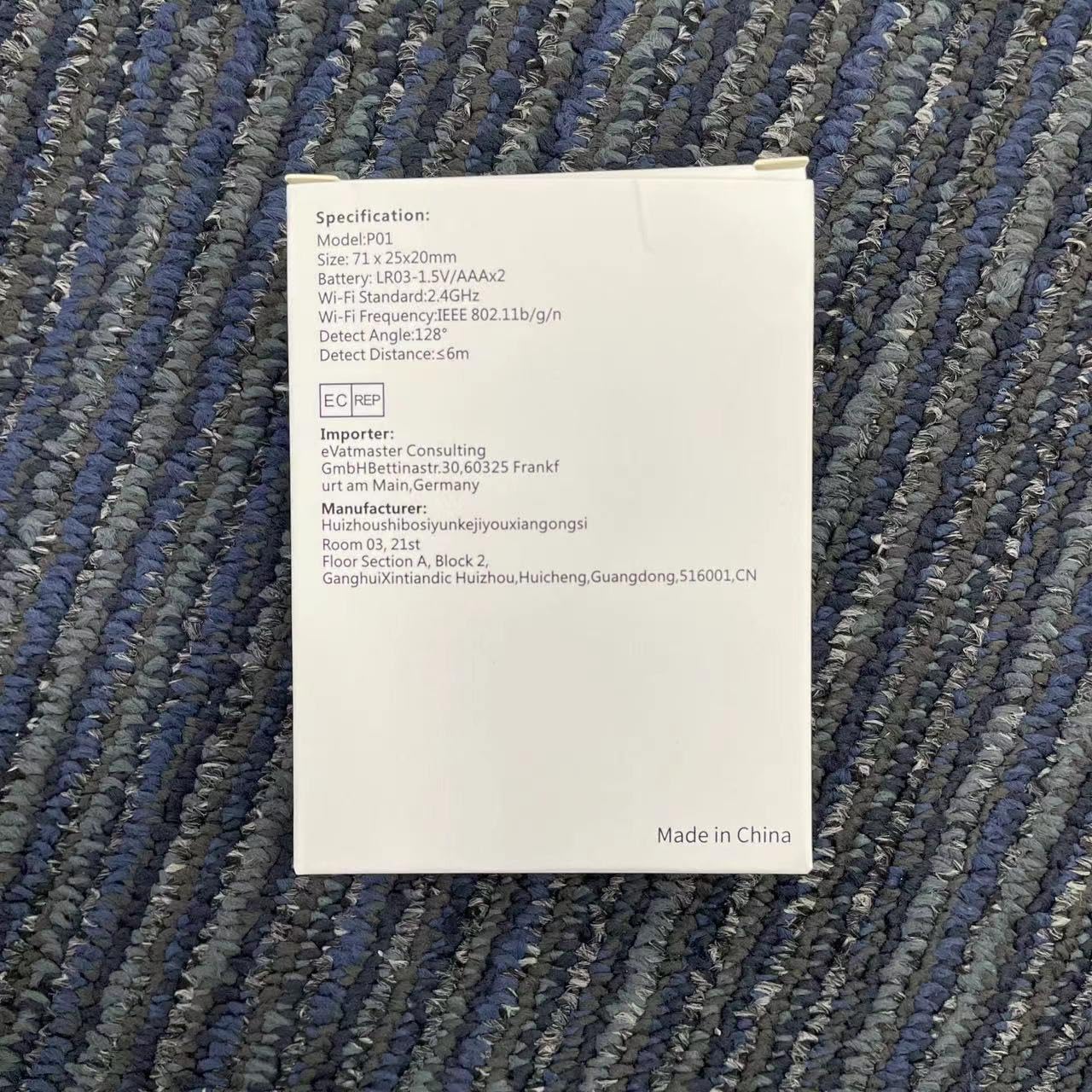
Image 9.1: Detailed specifications as listed on the product packaging.
| Χαρακτηριστικό | Λεπτομέρεια |
|---|---|
| Αριθμός μοντέλου | HWTCQ0627 |
| Διαστάσεις | 8.99 x 6.68 x 2.59 εκ |
| Βάρος | 68 γρ |
| Πηγή ισχύος | 4 x μπαταρίες AAA (περιλαμβάνονται) |
| Τεχνολογία Ανίχνευσης | Υπέρυθρο PIR |
| Γωνία ανίχνευσης | 130° |
| Απόσταση ανίχνευσης | 2~12 meters (Note: Detection angle and distance values may vary by location.) |
| Ασύρματη Συνδεσιμότητα | Wi-Fi 802.11b/g/n (2.4GHz only) |
| Αρμονία | Smart Life App, Tuya Smart App |
| Τύπος τοποθέτησης | Wall Mount / Hanging / Placement |
10. Εγγύηση και υποστήριξη
WIOONI products are designed for reliability and performance. For any technical support, troubleshooting, or warranty inquiries, please contact your retailer or the WIOONI customer service team.
Παρακαλούμε φυλάξτε την απόδειξη αγοράς για λόγους εγγύησης.
Manufacturer: WIOONI
Address: Huizhouhbosiyunkeijiyouxiangongsi, Room 03, 21st Floor, Section A, Block 2, GanghuiXintiandic Huizhou, Huicheng, Guangdong, 516001, CN