1. Εισαγωγή
This manual provides detailed instructions for the MESWAO 15.6 Inch Android 14 Tablet, model MES-B3. It covers essential information regarding product features, setup, operation, maintenance, and troubleshooting to ensure optimal performance and user experience. Please read this manual thoroughly before using your device.
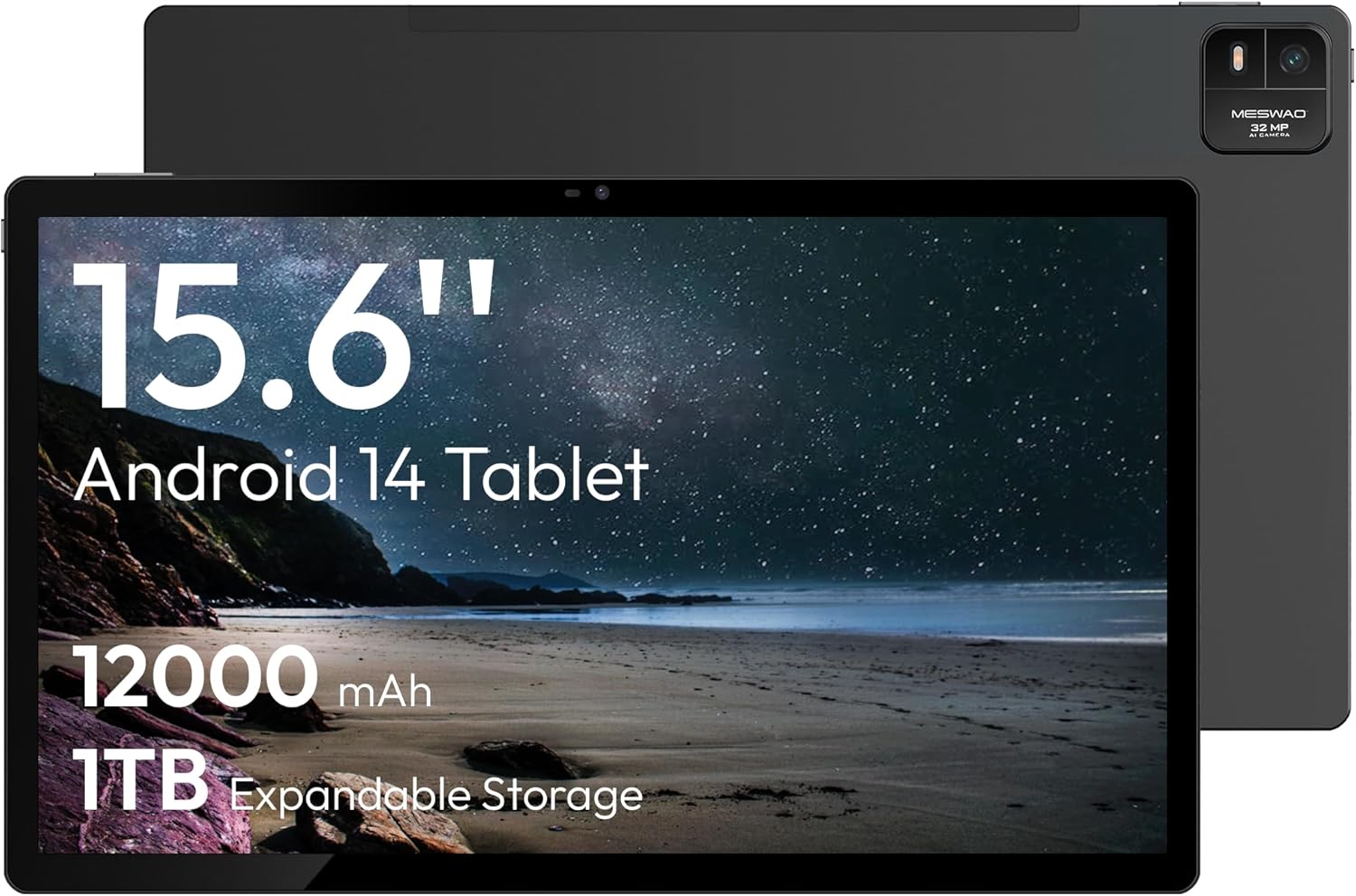
Figure 1.1: MESWAO 15.6 Inch Android 14 Tablet. This image displays the front and back view of the tablet, highlighting its large screen and rear camera module.
2. Πληροφορίες Ασφάλειας
To prevent damage to your device or injury to yourself or others, please observe the following precautions:
- Μην εκθέτετε το tablet σε ακραίες θερμοκρασίες, άμεσο ηλιακό φως ή υψηλή υγρασία.
- Αποφύγετε την πτώση ή την έκθεση του δισκίου σε ισχυρά χτυπήματα.
- Χρησιμοποιείτε μόνο εγκεκριμένους φορτιστές και αξεσουάρ.
- Do not attempt to disassemble or repair the tablet yourself.
- Κρατήστε το δισκίο μακριά από νερό και άλλα υγρά.
- Observe all local regulations regarding the use of electronic devices.
3. Περιεχόμενα συσκευασίας
Βεβαιωθείτε ότι όλα τα στοιχεία υπάρχουν στη συσκευασία:
- 15.6-inch Tablet x1
- 15W Charger x1
- Type-C to 3.5mm Adapter x1
- USB-A to Type-C Adapter x1
- Stuck Pin x1 (for SIM/TF card tray)
4. Η συσκευή τελείωσεview
Familiarize yourself with the physical components of your MESWAO tablet.
4.1. Φυσικά χαρακτηριστικά
- Μπροστινή κάμερα: Located at the top center of the screen when held horizontally.
- Πίσω κάμερα με φλας: Located on the back, typically in a corner.
- Κουμπί λειτουργίας: Usually on the side, used to power on/off or wake/sleep the device.
- Κουμπιά έντασης ήχου: Προσαρμόστε τα επίπεδα ήχου.
- Θύρα USB-C: Για φόρτιση και μεταφορά δεδομένων.
- Υποδοχή κάρτας TF: Για επεκτάσιμο αποθηκευτικό χώρο.
- Ομιλητές: Quad speakers with 8 sound chambers for audio output.

Εικόνα 4.1: Τέλοςview of MESWAO Tablet's physical features. This image illustrates the location of stereo speakers, power and volume buttons, front camera, rear camera with flashlight, Type-C port, and TF card slot.
5. Ρύθμιση
5.1. Αρχική φόρτιση
Before first use, fully charge the tablet using the provided 15W charger and USB-C cable. Connect the charger to the USB-C port on the tablet and plug it into a power outlet. The battery indicator on the screen will show charging progress.

Figure 5.1: Tablet charging illustration. This image shows the tablet connected to a charger, displaying a charging icon and indicating 100% charge in 3.5 hours.
5.2. Ενεργοποίηση/Απενεργοποίηση
- Για ενεργοποίηση: Press and hold the Power button until the MESWAO logo appears.
- Για απενεργοποίηση: Πατήστε παρατεταμένα το κουμπί λειτουργίας μέχρι να εμφανιστεί το μενού επιλογών λειτουργίας και, στη συνέχεια, επιλέξτε "Απενεργοποίηση".
- Για ύπνο/αφύπνιση: Πατήστε στιγμιαία το κουμπί λειτουργίας.
5.3. Αρχική διαμόρφωση
Upon first power-on, follow the on-screen prompts to set up your tablet:
- Επιλέξτε τη γλώσσα που προτιμάτε.
- Συνδεθείτε σε δίκτυο Wi-Fi.
- Συνδεθείτε με τον Λογαριασμό σας Google ή δημιουργήστε έναν νέο.
- Review και αποδέχεστε τους όρους και τις προϋποθέσεις.
- Ρύθμιση κλειδώματος οθόνης (PIN, μοτίβο ή κωδικός πρόσβασης).
5.4. Τοποθέτηση κάρτας TF
To expand storage, insert a TF (microSD) card:
- Εντοπίστε την υποδοχή κάρτας TF στο πλάι του tablet.
- Use the provided stuck pin to gently eject the card tray.
- Place the TF card into the tray with the gold contacts facing down.
- Επανατοποθετήστε προσεκτικά τη θήκη στο tablet.

Figure 5.2: Tablet storage capabilities. This image highlights the 128GB ROM and support for up to 1TB expandable storage via TF card.
6. Οδηγίες λειτουργίας
6.1. Βασική πλοήγηση
The MESWAO tablet uses Android 14, offering intuitive touch-based navigation:
- Παρακέντηση: Επιλέξτε ένα στοιχείο ή ανοίξτε μια εφαρμογή.
- Σουφρώνω: Κάντε κύλιση σε οθόνες ή λίστες.
- Τσιμπήστε για ζουμ: Μεγέθυνση ή σμίκρυνση περιεχομένου στην οθόνη.
- Παρατεταμένο πάτημα: Αποκτήστε πρόσβαση σε μενού περιβάλλοντος ή μετακινήστε εικονίδια.

Figure 6.1: Android 14 operating system interface. This image displays various application icons and highlights features like smooth multitasking, parental control, and enhanced privacy.
6.2. Σύνδεση σε Wi-Fi
- Μεταβείτε στο Ρυθμίσεις > Δίκτυο & Διαδίκτυο > Wi-Fi.
- Εναλλαγή Wi-Fi On.
- Επιλέξτε το δίκτυο που επιθυμείτε από τη λίστα.
- Εισαγάγετε τον κωδικό πρόσβασης εάν σας ζητηθεί και, στη συνέχεια, πατήστε Συνδέω.
6.3. Διαχείριση Εφαρμογών
- Εγκατάσταση εφαρμογών: Λήψη από το Google Play Store.
- Απεγκατάσταση εφαρμογών: Long-press an app icon, then drag it to "Uninstall" or go to Ρυθμίσεις > Εφαρμογές.
- Κλείσιμο εφαρμογών: Swipe up from the bottom of the screen and swipe away the app card.
6.4. Χρήση κάμερας
The tablet features a 32MP rear camera with flash and a 5MP front camera.
- Ανοίξτε το Κάμερα εφαρμογή.
- Πατήστε το κουμπί κλείστρου για να τραβήξετε μια φωτογραφία.
- Εναλλαγή μεταξύ μπροστινής και πίσω κάμερας χρησιμοποιώντας το εικονίδιο διακόπτη κάμερας.
- Access settings for flash, modes, and other options.
6.5. Διαχείριση μπαταρίας
Η μπαταρία 12000mAh παρέχει εκτεταμένη χρήση. Για να βελτιστοποιήσετε τη διάρκεια ζωής της μπαταρίας:
- Προσαρμόστε τη φωτεινότητα της οθόνης.
- Κλείστε τις εφαρμογές που δεν χρησιμοποιούνται.
- Ενεργοποίηση λειτουργίας εξοικονόμησης μπαταρίας σε Ρυθμίσεις > Μπαταρία.
6.6. Συνδεσιμότητα
- Bluetooth: Pair with wireless headphones, speakers, or other devices via Ρυθμίσεις > Συνδεδεμένες συσκευές > Bluetooth.
- USB-C: Συνδεθείτε σε έναν υπολογιστή για file transfer or use with compatible USB-C accessories.
- Ασύρματη μετάδοση οθόνης: Share your tablet's screen to a compatible smart TV or monitor. Access this feature from the Quick Settings panel or Ρυθμίσεις > Συνδεδεμένες συσκευές > Εκμαγείο.
6.7. Ρυθμίσεις ήχου
Adjust volume and audio output options:
- Use the physical volume buttons on the side of the tablet.
- Access detailed settings in Ρυθμίσεις > Ήχος & δόνηση.
- The tablet supports multiple audio options, including USB-C audio and 3.5mm via the provided adapter.
7. Συντήρηση
7.1. Καθαρισμός του tablet σας
Για να καθαρίσετε το tablet, χρησιμοποιήστε ένα μαλακό πανί που δεν αφήνει χνούδι. Για επίμονους λεκέδες, τρίψτε ελαφρά.ampΞεπλύνετε το πανί με νερό ή με ένα καθαριστικό οθόνης σχεδιασμένο για ηλεκτρονικά είδη. Αποφύγετε σκληρές χημικές ουσίες ή λειαντικά υλικά.
7.2. Ενημερώσεις λογισμικού
Ελέγχετε και εγκαθιστάτε τακτικά ενημερώσεις λογισμικού για να διασφαλίσετε βέλτιστη απόδοση, ασφάλεια και πρόσβαση σε νέες λειτουργίες. Μεταβείτε στη διεύθυνση Ρυθμίσεις > Σύστημα > Ενημέρωση συστήματος.
7.3. Διαχείριση αποθήκευσης
Για να διατηρήσετε την απόδοση, διαχειρίζεστε περιοδικά τον αποθηκευτικό χώρο του tablet σας:
- Διαγράψτε τις περιττές εφαρμογές και files.
- Μετακίνηση μεγάλης κλίμακας files to the TF card or cloud storage.
- Εκκαθάριση δεδομένων προσωρινής μνήμης για εφαρμογές σε Ρυθμίσεις > Εφαρμογές > [Όνομα εφαρμογής] > Αποθηκευτικός χώρος και προσωρινή μνήμη.
8. Αντιμετώπιση Προβλημάτων
Ανατρέξτε στα ακόλουθα συνηθισμένα προβλήματα και λύσεις:
| Πρόβλημα | Διάλυμα |
|---|---|
| Το tablet δεν ενεργοποιείται. | Βεβαιωθείτε ότι η μπαταρία είναι φορτισμένη. Συνδέστε τον φορτιστή και περιμένετε λίγα λεπτά πριν επιχειρήσετε να την ενεργοποιήσετε ξανά. |
| Δεν είναι δυνατή η σύνδεση σε Wi-Fi. | Check if Wi-Fi is enabled. Verify the Wi-Fi password. Restart your router and the tablet. |
| Οι εφαρμογές παρουσιάζουν σφάλματα ή παγώνουν. | Close background apps. Clear the app's cache. Restart the tablet. Ensure the app is updated. |
| Αργή απόδοση. | Free up storage space. Close unused apps. Restart the tablet. |
| Η μπαταρία αδειάζει γρήγορα. | Reduce screen brightness. Disable unused features like Bluetooth or GPS. Close background apps. Check battery usage in settings. |
9. Προδιαγραφές
Key technical specifications for the MESWAO 15.6 Inch Android 14 Tablet (MES-B3):
| Χαρακτηριστικό | Λεπτομέρεια |
|---|---|
| Μάρκα | MESWAO |
| Όνομα μοντέλου | MES-B3 |
| Λειτουργικό σύστημα | Android 14 |
| Μέγεθος οθόνης | 15.6 ίντσες |
| Ανάλυση οθόνης | 1920 x 1080 Pixels (IPS HD) |
| Επεξεργαστής | Octa-Core (MediaTek Helio G99, up to 2.2 GHz) |
| Συνεπεξεργαστής γραφικών | Mali-G57 |
| RAM (Memory Storage Capacity) | 6GB (DDR3 SDRAM) |
| Internal Storage (Flash Memory Size) | 128 GB |
| Επεκτάσιμος χώρος αποθήκευσης | Έως 1TB μέσω κάρτας TF |
| Ανάλυση πίσω κάμερας | 32 MP |
| Ανάλυση μπροστινής κάμερας | 5 MP |
| Χωρητικότητα μπαταρίας | 12000 mAh |
| Μέση διάρκεια ζωής μπαταρίας | 12 Ώρες |
| Ασύρματος τύπος | 802.11a/b/g/n/ac (Wi-Fi 5) |
| Χρώμα | Γκρί |
| Βάρος αντικειμένου | 2.35 λίρες |
| Διαστάσεις προϊόντος (ΜxΠxΥ) | 14.53 x 8.78 x 0.43 ίντσες |

Figure 9.1: Processor and performance details. This image highlights the Helio G99 Octa-Core chipset, 6nm process, 950MHz GPU, and smooth gaming/streaming capabilities.
10. Εγγύηση και υποστήριξη
10.1. Πληροφορίες εγγύησης
The MESWAO 15.6 Inch Android 14 Tablet comes with a 12 μήνες εγγύηση καλύπτοντας κατασκευαστικά ελαττώματα. Παρακαλούμε φυλάξτε την απόδειξη αγοράς για τυχόν αξιώσεις εγγύησης.
10.2. Υποστήριξη πελατών
For technical assistance, troubleshooting, or warranty inquiries, please contact MESWAO customer support. They offer 24ωρη υποστήριξη πελατών και έχουν local service centers in the US, EU, and Japan.
- Μέθοδος επικοινωνίας: Refer to the contact information provided with your product packaging or visit the official MESWAO webτοποθεσία.
- Επίλυση προβλήματος: Issues reported are typically responded to within 24 hours, with problems resolved or replaced according to policy.

Figure 10.1: MESWAO customer support and warranty details. This image highlights the 12-month warranty, 24-hour customer support, local after-sales centers, and quick response flow.


