Εισαγωγή
Αυτό το εγχειρίδιο παρέχει λεπτομερείς οδηγίες για την πλευρική οθόνη BSD VEKOOTO AHD 10.36 ιντσών. View Vertical Monitor and Right Car Camera System. This system is designed to enhance vehicle safety by offering a clear, wide-angle view of the right side of your truck or bus, featuring a touch screen display, loop recording capabilities, and a Blind Spot Detection (BSD) voice alarm. Please read this manual thoroughly before installation and operation to ensure proper use and optimal performance.
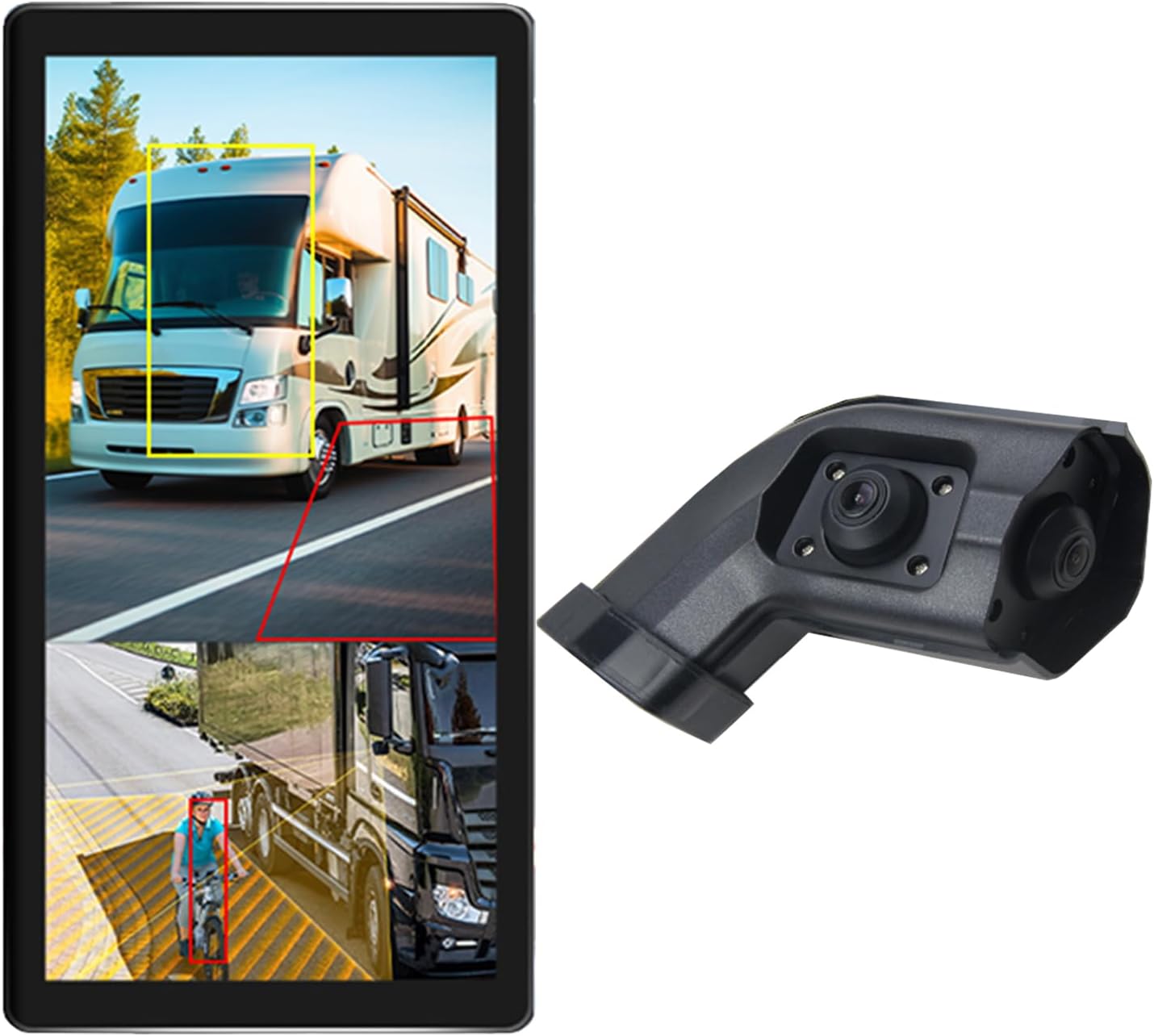
Image: The VEKOOTO 10.36-inch vertical monitor and the right side camera unit, illustrating the primary components of the system.
Τι υπάρχει στο κουτί
Βεβαιωθείτε ότι όλα τα εξαρτήματα υπάρχουν και είναι σε καλή κατάσταση κατά το άνοιγμα της συσκευασίας:
- 10.36-inch Touch Screen Monitor
- Integrated dual camera (for right side view)
- Καλώδιο τροφοδοσίας
- Καλώδιο κάμερας
- Υποστήριγμα
Βασικά Χαρακτηριστικά
- Επίδειξη: 10.36-inch IPS touch screen with 2-channel split screen display capability.
- Υποστήριξη κάμερας: Compatible with AHD720P cameras, offering enhanced image clarity, advanced bright color separation, signal filtering, and 3D noise reduction technology.
- Blind Spot Detection (BSD): Features a voice alarm system. The alarm area, volume, and sensitivity are adjustable.
- Έλεγχος εικόνας: Supports camera image screen mirroring function for flexible viewing.
- Προσαρμογή εμφάνισης: Allows adjustment of display time, date, brightness, and screen color.
- Συμβατότητα ισχύος: Υποστηρίζει ευρύ τόμοtagεύρος 9V-36V.
- Υποστήριξη πολλών γλωσσών: Available in English, Korean, Japanese, and Chinese.
- Εγκατάσταση: Designed for installation on the right side rearview καθρέφτης του οχήματος.

Image: The monitor interface highlighting features such as image adjustment, BSD voice alarm, and customizable detection areas, shown with various driving scenarios including night, rain, and blind spots.
Ρύθμιση και εγκατάσταση
Proper installation is crucial for the system's performance. It is recommended to have this system installed by a qualified professional.
1. Τοποθέτηση Στοιχείων
- Mount the 10.36-inch vertical monitor securely inside the vehicle, ensuring it does not obstruct the driver's view.
- Install the integrated dual camera unit on the right side rearview mirror of your vehicle. Ensure the camera has a clear, unobstructed view.

Image: The vertical monitor installed inside a vehicle, providing a clear view of the right side, simulating a truck's perspective.
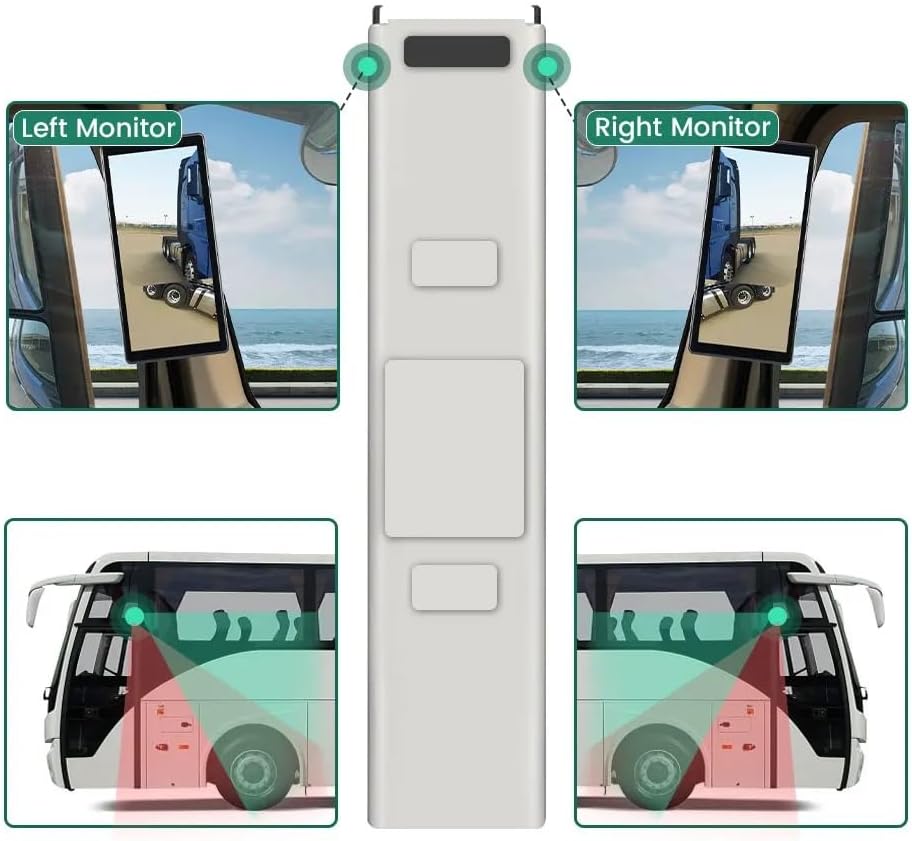
Image: A diagram illustrating the recommended placement of the right monitor and the camera's field of view for comprehensive side coverage on a bus.
2. Συνδέσεις καλωδίωσης
Refer to the wiring diagram below for correct connections. The system supports 9V-36V wide voltagε εισαγωγή.

Image: Detailed wiring diagram showing connections for the monitor, integrated dual camera, ACC power supply (+), Ground (-), and Battery Power (+3A). Channel 1 (CH1) and Channel 2 (CH2) inputs are indicated for the camera cables.
- Συνδέστε το ACC Power Supply (+) wire (red) to a switched ignition source.
- Συνδέστε το Γήπεδο (-) wire (black) to a suitable chassis ground point.
- Συνδέστε το Battery Power (+) (3A) wire (yellow) to a constant 12V/24V power source.
- Connect the camera cable(s) to the corresponding CH1 and CH2 inputs on the monitor.
- Βεβαιωθείτε ότι όλες οι συνδέσεις είναι ασφαλείς και σωστά μονωμένες για να αποτρέψετε βραχυκυκλώματα.
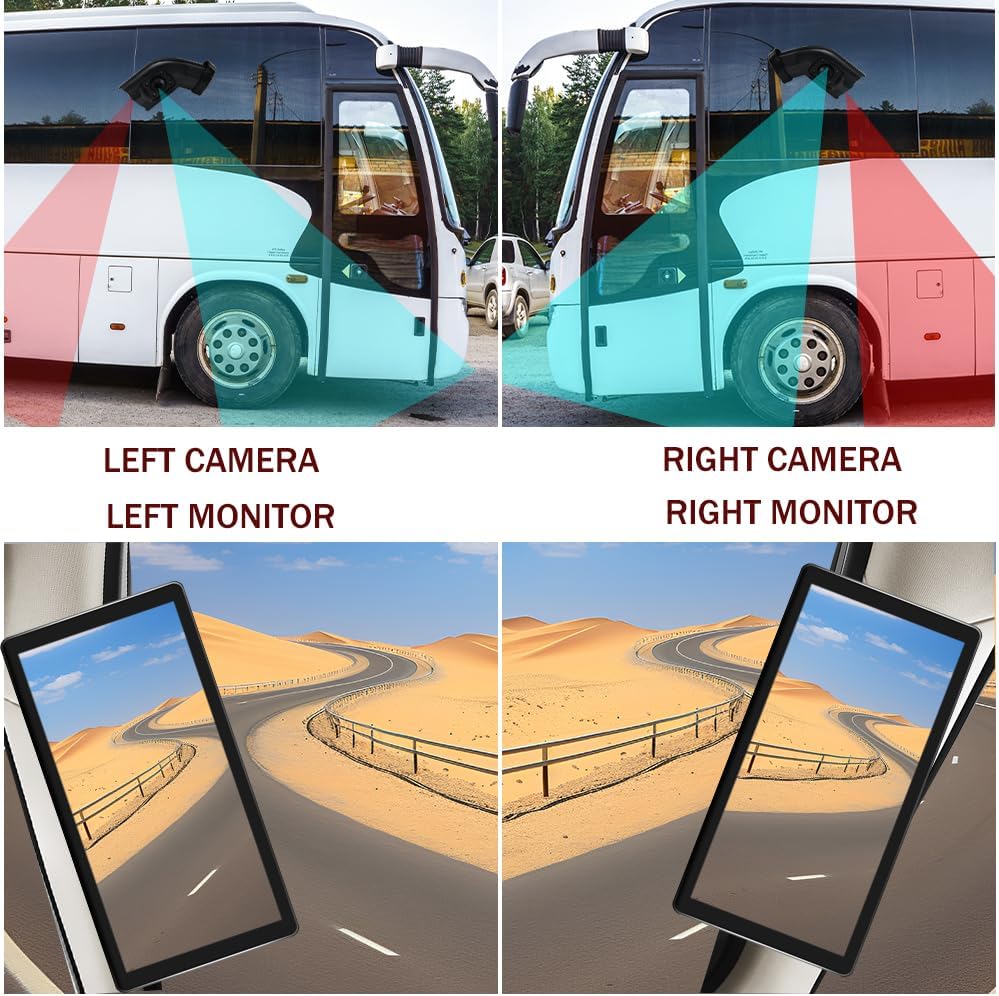
Image: A visual comparison demonstrating the coverage areas for left and right camera installations, along with the corresponding monitor views. This system is for the Right Camera/Monitor.
Οδηγίες Λειτουργίας
1. Ενεργοποίηση/Απενεργοποίηση
The monitor will power on automatically when the vehicle's ignition is turned on (if connected to ACC power) and power off when the ignition is turned off.
2. Πλοήγηση με οθόνη αφής
Navigate through the monitor's menus and settings using the touch screen interface. Tap icons or options to select them.
3. Split Screen Display
The monitor supports a 2-channel split screen display. Access the display settings to configure how the camera feeds are shown on the screen.
4. BSD Voice Alarm
- Access the BSD settings menu on the touch screen.
- Adjust Alarm Area: Define the specific zones where the BSD system will detect objects and trigger an alarm.
- Control Alarm Volume: Set the desired volume level for the voice alerts.
- Set Sensitivity: Adjust the sensitivity of the detection system to suit your driving conditions and preferences.
5. Image Mirroring
If needed, enable the camera image mirroring function through the display settings to flip the camera view οριζόντια.
6. Ρυθμίσεις οθόνης
Customize the display by adjusting brightness, screen color, and setting the current time and date through the monitor's settings menu.
7. Εγγραφή βρόχου
The system supports loop recording. Ensure a compatible memory card is inserted (if required, check product specifications for card type and capacity). The system will continuously record video, overwriting the oldest files όταν η κάρτα μνήμης είναι γεμάτη.

Image: The monitor screen showing a video playback interface, indicating support for video recording with a timeline illustrating different recording times throughout the day.
Συντήρηση
- Καθαρισμός της οθόνης: Χρησιμοποιήστε ένα μαλακό, στεγνό πανί για να καθαρίσετε την οθόνη. Για επίμονους λεκέδες, τρίψτε ελαφράampΣκουπίστε το πανί με νερό ή με ένα καθαριστικό κατάλληλο για την οθόνη. Αποφύγετε τις σκληρές χημικές ουσίες.
- Καθαρισμός της κάμερας: Periodically check and clean the camera lens to ensure a clear view. Use a soft cloth and lens cleaner if necessary.
- Έλεγχος συνδέσεων: Ελέγχετε τακτικά όλες τις συνδέσεις καλωδίων για να βεβαιωθείτε ότι είναι ασφαλείς και απαλλαγμένες από διάβρωση ή ζημιές.
- Ενημερώσεις λογισμικού: Ελέγξτε τον κατασκευαστή website for any available firmware or software updates for your system.
Αντιμετώπιση προβλημάτων
| Πρόβλημα | Πιθανή αιτία | Διάλυμα |
|---|---|---|
| Δεν υπάρχει εικόνα στην οθόνη |
|
|
| Distorted or unclear image |
|
|
| BSD alarm not working |
|
|
| Loop recording not functioning |
|
|
Προδιαγραφές
| Χαρακτηριστικό | Λεπτομέρεια |
|---|---|
| Διαστάσεις προϊόντος | 10.3"L x 2"W x 8"H (Monitor) |
| Βάρος αντικειμένου | 4.4 λίρες |
| Αριθμός μοντέλου | Δικαίωμα |
| Τεχνολογία εμφάνισης | οθόνη υγρού κρυστάλλου |
| Άλλα χαρακτηριστικά εμφάνισης | Ασύρματος |
| Κατασκευαστής | VEKOOTO |
| Μάρκα | VEKOOTO |
| Μέγεθος οθόνης | 10.36 ίντσες |
| Συμβατές Συσκευές | Ελεγκτής εκπομπών |
| Τύπος εγκατάστασης | Επιφανειακή βάση |
| Τομtage | 9-36 Volts (Wide Voltage Support) |
| Τεχνολογία οπτικού αισθητήρα | CMOS |
| Τύπος φακού | Ευρυγώνια |
| Τύπος σύνδεσης | Ασύρματος |
| Μέγεθος οπτικού αισθητήρα | 1/3 ίντσας |

Image: Diagram illustrating the physical dimensions of the 10.36-inch vertical monitor (27cm/10.63inch height, 13cm/5.12inch width) and the camera unit (14.6cm/5.75inch height, 7.8cm/3.07inch width, 6.4cm/2.52inch depth).
Εγγύηση και υποστήριξη
For warranty information, please refer to the documentation included with your purchase or contact VEKOOTO customer support directly. Support contact details can typically be found on the manufacturer's official webστον ιστότοπο ή μέσω του σημείου αγοράς σας.
Always ensure you are using genuine VEKOOTO parts and accessories for optimal performance and to maintain warranty validity.


