1. Εισαγωγή
Ευχαριστώ για την αγοράasing the Edifier R990BT Bluetooth Computer Speakers. These 2.0 active bookshelf speakers are designed to provide high-quality audio for your PC, smartphone, tablet, and other compatible devices. Featuring Bluetooth V5.4 connectivity and dual RCA inputs, the R990BT offers versatile audio options in a classic MDF enclosure. Please read this manual thoroughly to ensure proper setup and optimal performance of your speakers.
2. Περιεχόμενα συσκευασίας
Βεβαιωθείτε ότι όλα τα είδη υπάρχουν στη συσκευασία:
- Edifier R990BT Active Bookshelf Speakers (1 Pair)
- Καλώδιο σύνδεσης ηχείων
- Καλώδιο ήχου RCA σε RCA
- Καλώδιο ήχου 3.5 mm σε RCA
- Καλώδιο τροφοδοσίας
- Οδηγός γρήγορης εκκίνησης
3. Ρύθμιση
3.1 Τοποθέτηση ηχείου
Place the speakers on a stable, flat surface such as a desk or shelf. For optimal stereo imaging, position the speakers equidistant from your listening position, forming an equilateral triangle. Ensure there is adequate space behind the speakers for cable connections and ventilation.

Image: Edifier R990BT speakers positioned on a desk, demonstrating typical placement for computer use.
3.2 Σύνδεση των ηχείων
- Connect the Passive Speaker: Use the included speaker connection cable to link the active speaker (with controls) to the passive speaker. Ensure the correct polarity (+ to + and - to -) for proper sound reproduction.
- Σύνδεση στο Power: Plug the power cable into the active speaker's power input and then into a wall outlet.
3.3 Σύνδεση πηγών ήχου
The R990BT speakers support both wired (RCA) and wireless (Bluetooth) connections.
Wired Connection (RCA)
The speakers feature two sets of RCA input ports (Line In 1 and Line In 2) for connecting two different wired audio devices simultaneously.
- Use the RCA to RCA cable to connect devices with RCA outputs (e.g., CD player, turntable with pre-amp).
- Use the 3.5mm to RCA cable to connect devices with a 3.5mm audio jack (e.g., computer, smartphone, tablet).

Image: Close-up of the rear panel of the active speaker, highlighting the dual RCA input ports (Line In 1 and Line In 2) and the power input.
Σύνδεση Bluetooth
The R990BT features Bluetooth V5.4 for wireless audio streaming.
- Turn on the speakers.
- Press the volume/input knob on the rear panel to select the Bluetooth input. The indicator light will flash blue.
- Στη συσκευή ήχου σας (smartphone, tablet, υπολογιστή), ενεργοποιήστε το Bluetooth και αναζητήστε διαθέσιμες συσκευές.
- Select "EDIFIER R990BT" from the list to pair. The indicator light will turn solid blue once connected.

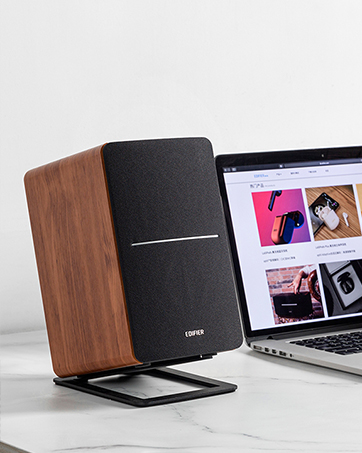
Image: A single Edifier R990BT speaker on a desk next to a laptop, symbolizing the ease of Bluetooth connectivity.
4. Οδηγίες λειτουργίας
4.1 Ενεργοποίηση/Απενεργοποίηση
The power switch is located on the rear panel of the active speaker. Flip the switch to the 'ON' position to power on the speakers. Flip to 'OFF' to power off.
4.2 Έλεγχος έντασης ήχου
The large knob on the rear panel of the active speaker controls the master volume. Rotate clockwise to increase volume and counter-clockwise to decrease volume.
Εικόνα: Λεπτομερής view of the multi-function control knob on the rear of the speaker, used for volume adjustment and input selection.
4.3 Επιλογή εισόδου
Press the volume/input knob on the rear panel to cycle through the available audio inputs: Line In 1, Line In 2, and Bluetooth. The indicator light will change color or flash to indicate the selected input mode.
- Line In 1 / Line In 2: Solid green or red indicator (depending on model/firmware).
- Bluetooth: Flashing blue (pairing mode) or solid blue (connected).
4.4 Using the Edifier ConneX App
For enhanced control and customization, download the Edifier ConneX mobile application. The app allows you to adjust equalization settings and access additional features for your R990BT speakers.
- Download the Edifier ConneX app from your device's app store.
- Ensure your speakers are powered on and connected via Bluetooth to your mobile device.
- Open the app and follow the on-screen instructions to connect to your R990BT speakers.

Image: The official logo for the Edifier ConneX mobile application.
5. Συντήρηση
5.1 Καθαρισμός
Για να διατηρήσετε την εμφάνιση και την απόδοση των ηχείων σας:
- Σκουπίστε τα περιβλήματα των ηχείων με ένα μαλακό, στεγνό πανί.
- Μην χρησιμοποιείτε υγρά καθαριστικά, αεροζόλ ή λειαντικά χημικά, καθώς αυτά μπορεί να προκαλέσουν ζημιά στο φινίρισμα ή στα εσωτερικά εξαρτήματα.
- Gently brush dust from the speaker grilles using a soft brush or vacuum cleaner with a brush attachment.
5.2 Αποθήκευση
If storing the speakers for an extended period, ensure they are powered off and disconnected from the power source. Store them in a cool, dry place away from direct sunlight and extreme temperatures.
6. Αντιμετώπιση Προβλημάτων
If you encounter any issues with your Edifier R990BT speakers, please refer to the following common problems and solutions:
| Πρόβλημα | Πιθανή αιτία | Διάλυμα |
|---|---|---|
| Κανένας ήχος |
|
|
| Παραμορφωμένος ήχος |
|
|
| Bluetooth not connecting/disconnecting |
|
|
| Difficulty switching inputs |
|
|
7. Προδιαγραφές
Detailed technical specifications for the Edifier R990BT speakers:
- Όνομα μοντέλου: R990BT
- Τύπος ηχείου: Ράφι
- Τύπος τοποθέτησης: Shelf Mount/Tabletop Mount
- Υλικό: MDF (ινοσανίδες μεσαίας πυκνότητας)
- Τεχνολογία συνδεσιμότητας: Bluetooth V5.4, Wired (Dual RCA)
- Λειτουργία εξόδου ήχου: Στερεοφωνικό (2.0)
- Μέγιστη ισχύς εξόδου ηχείου: 24 Watt (RMS)
- Διάμετρος Woofer: 4 ίντσες
- Διάμετρος Tweeter: 1 ίντσες
- Απόκριση συχνότητας: 18 KHz (Upper limit, typical for compact speakers)
- Αναλογία σήματος προς θόρυβο: 85 dB
- Μέθοδος ελέγχου: Touch (via rear knob)
- Πηγή ενέργειας: Corded Electric (100-240V ~ 50/60Hz)
- Διαστάσεις προϊόντος: 11.5"Β x 7.5"Π x 17"Υ (ανά ηχείο, κατά προσέγγιση)
- Βάρος αντικειμένου: 7.94 Pounds (per speaker, approximate)
- Χρώμα: Μαύρος
- Συμβατές συσκευές: Devices with Bluetooth technology, devices with RCA or 3.5mm audio output.
8. Εγγύηση και υποστήριξη
8.1 Πληροφορίες εγγύησης
The Edifier R990BT speakers come with a Limited Warranty. Please refer to the warranty card included in your package or visit the official Edifier website for detailed terms and conditions regarding your product's warranty coverage.
8.2 Υποστήριξη πελατών
For technical assistance, troubleshooting, or general inquiries, please contact Edifier customer support. Contact details can typically be found on the official Edifier webστον ιστότοπο ή στον Οδηγό Γρήγορης Έναρξης του προϊόντος σας.
Διαδικτυακή υποστήριξη: Επίσκεψη www.edifier.com για συχνές ερωτήσεις, πόρους υποστήριξης και στοιχεία επικοινωνίας.


