1. Εισαγωγή
This manual provides detailed instructions for the installation, operation, and maintenance of your Alarm.com ADC-VC728PF Pro Series 4MP Bullet PoE Camera. This camera is designed for both indoor and outdoor surveillance, offering advanced features such as a motorized varifocal lens, 4MP video resolution, and intelligent analytics for enhanced security monitoring.
Διαβάστε προσεκτικά αυτό το εγχειρίδιο πριν επιχειρήσετε να εγκαταστήσετε ή να χειριστείτε τη συσκευή για να διασφαλίσετε την ορθή λειτουργία και ασφάλεια.
2. Περιεχόμενα συσκευασίας
Βεβαιωθείτε ότι όλα τα αντικείμενα υπάρχουν στη συσκευασία σας:
- Alarm.com ADC-VC728PF Camera
- Υλικό τοποθέτησης
- Weather Resistant RJ45 Cap
- Οδηγός εγκατάστασης
- Γαλλικό κλειδί Torx
3. Το προϊόν τελείωσεview
The Alarm.com ADC-VC728PF is a robust Power over Ethernet (PoE) bullet camera featuring a 4MP sensor and a motorized varifocal lens. This design allows for flexible installation and remote adjustment of the camera's field of view without compromising image quality. It supports 24/7 recording to an optional onboard microSD card or a Commercial-Grade Stream Video Recorder (CSVR126), and integrates advanced analytics for object detection and business activity tracking.
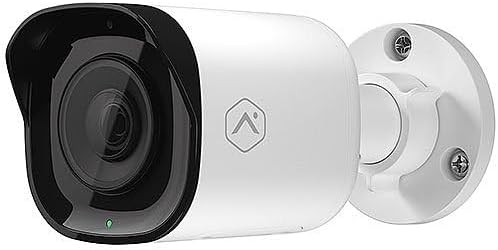
Εμπρός view of the Alarm.com ADC-VC728PF Pro Series 4MP Bullet PoE Camera, showing the lens, LED indicator, and the adjustable mounting base.
Βασικά Χαρακτηριστικά:
- 4MP WDR and HDR Video: Delivers high-resolution video with Wide Dynamic Range and High Dynamic Range capabilities (4MP recording supported on Commercial SVR).
- Motorized Varifocal Lens: Allows remote adjustment of the camera's field of view (3.2-9.8mm).
- Ισχύς μέσω Ethernet (PoE): Απλοποιεί την εγκατάσταση παρέχοντας τροφοδοσία και δεδομένα μέσω ενός μόνο καλωδίου Ethernet.
- SD Card Local Storage: Supports optional onboard microSD card for 24/7 continuous recording.
- Νυχτερινή όραση IR: Provides clear video surveillance in low-light or no-light conditions.
- Perimeter Guard: Supports LED and Audio Alert features (requires firmware version 0.6.3.601+).
- Business Activity Analytics: Enables intelligent object detection and tracking for commercial applications.
- Εσωτερική/Εξωτερική χρήση: Designed for versatile deployment in various environments.
4. Ρύθμιση και εγκατάσταση
Follow these steps for proper installation of your camera.
4.1 Τοποθέτηση της κάμερας
- Επιλέξτε μια τοποθεσία: Choose a suitable indoor or outdoor location for wall mounting. Ensure the area provides a clear field of view and is within reach of your network infrastructure.
- Προετοιμάστε την επιφάνεια: Use the included mounting hardware to secure the camera base to the chosen surface. Drill pilot holes if necessary.
- Συνδέστε την κάμερα: Securely attach the camera to the mounting base. The adjustable ball joint allows for flexible positioning.
4.2 Καλωδίωση και Συνδεσιμότητα
- Σύνδεση καλωδίου Ethernet: Connect a standard Ethernet cable from your PoE-enabled network switch or injector to the camera's RJ45 port.
- Apply Weather Resistant Cap: For outdoor installations, use the included weather-resistant RJ45 cap to protect the Ethernet connection from environmental elements.
- Ενεργοποίηση: Once connected to a PoE source, the camera will power on automatically. The status LED on the camera will indicate its operational status.
- Διαμόρφωση δικτύου: Access the Alarm.com platform or your network management interface to discover and configure the camera. Refer to the Alarm.com documentation for specific network setup procedures.
5. Λειτουργία
After successful installation and network configuration, you can begin operating your ADC-VC728PF camera.
5.1 Varifocal Lens Adjustment
- The motorized varifocal lens can be adjusted remotely through the Alarm.com app or web διεπαφή.
- Navigate to the camera settings to widen or narrow the field of view to optimize surveillance coverage.
5.2 Εγγραφή σε κάρτα SD
- If an optional microSD card is installed, the camera supports 24/7 continuous recording.
- Πρόσβαση σε καταγεγραμμένο footage via the Alarm.com platform. Ensure the microSD card is properly formatted as per Alarm.com guidelines.
5.3 Έξυπνες αναλύσεις
- Configure object detection and business activity tracking settings within the Alarm.com platform.
- Utilize the Perimeter Guard feature for LED and audio alerts, if supported by your camera's firmware version.
6. Συντήρηση
Η τακτική συντήρηση διασφαλίζει τη βέλτιστη απόδοση και τη μακροζωία της κάμεράς σας.
- Καθάρισμα: Καθαρίζετε περιοδικά τον φακό και το περίβλημα της κάμερας με ένα μαλακό,amp πανί. Αποφύγετε τα λειαντικά καθαριστικά.
- Ενημερώσεις υλικολογισμικού: Ensure your camera's firmware is up to date. Firmware updates are typically managed through the Alarm.com platform and provide performance enhancements and new features.
- Επιθεώρηση καλωδίου: Regularly inspect all cables and connections for wear or damage, especially in outdoor environments.
7. Αντιμετώπιση Προβλημάτων
Ανατρέξτε στον παρακάτω πίνακα για συνηθισμένα προβλήματα και τις λύσεις τους.
| Ζήτημα | Πιθανή αιτία | Διάλυμα |
|---|---|---|
| Δεν υπάρχει τροφοδοσία / Η κάμερα δεν ενεργοποιείται | No PoE connection; Faulty Ethernet cable; PoE switch issue. | Verify Ethernet cable connection; Ensure PoE source is active; Try a different cable or PoE port. |
| Δεν υπάρχει ροή βίντεο | Network connectivity issue; Incorrect camera configuration; Firewall blocking. | Check network connection; Verify camera settings in Alarm.com; Ensure network allows camera traffic. |
| Κακή ποιότητα εικόνας | Dirty lens; Incorrect focus (varifocal); Low light conditions; Network bandwidth. | Clean the lens; Adjust varifocal lens remotely; Ensure adequate lighting or check IR functionality; Verify network bandwidth. |
| SD Card Recording Not Working | SD card not installed; SD card full or corrupted; Incorrect recording settings. | Install a compatible microSD card; Format or replace SD card; Check recording settings in Alarm.com. |
8. Προδιαγραφές
Detailed technical specifications for the Alarm.com ADC-VC728PF camera.
| Χαρακτηριστικό | Προσδιορισμός |
|---|---|
| Όνομα μοντέλου | Alarm.com VC728PF |
| Αποτελεσματική σταθερή ανάλυση | 4 MP |
| Ανάλυση λήψης βίντεο | 1080p, 1920p |
| Τύπος φακού | Motorized Varifocal (3.2-9.8mm) |
| Τεχνολογία Συνδεσιμότητας | Ενσύρματο (Ethernet) |
| Πηγή ισχύος | PoE (Power over Ethernet) |
| Εσωτερική/Εξωτερική χρήση | Εσωτερική, Εξωτερική |
| Τύπος τοποθέτησης | Βάση τοίχου |
| Form Factor | Σφαίρα |
| Διαστάσεις (Μ x Π x Υ) | 6.8 x 3 x 3 ίντσες |
| Βάρος αντικειμένου | 1.86 λίρες |
| UPC | 850010773322 |
| Ειδικά Χαρακτηριστικά | PoE, 4MP, WDR, HDR, IR Night Vision, Business Activity Analytics, Perimeter Guard |
9. Εγγύηση και υποστήριξη
For warranty information, technical support, or service inquiries, please contact Alarm.com directly or refer to their official webτοποθεσία. Κρατήστε την απόδειξη αγοράς σας για την επικύρωση της εγγύησης.
- Διαδικτυακή υποστήριξη: Visit the official Alarm.com support portal for FAQs, troubleshooting guides, and software downloads.
- Επικοινωνήστε με την Εξυπηρέτηση Πελατών: Refer to your Alarm.com service provider for direct customer support.