1. Εισαγωγή
The NIIMBOT D11H is a compact, portable, and inkless thermal label printer designed for various labeling needs. It connects wirelessly via Bluetooth to your smartphone, allowing for easy creation and printing of high-resolution labels. This manual provides essential information for setting up, operating, and maintaining your device.
2. Περιεχόμενα συσκευασίας
Βεβαιωθείτε ότι όλα τα είδη που αναφέρονται παρακάτω περιλαμβάνονται στη συσκευασία σας:
- 1x NIIMBOT D11H Label Printer
- 1x Label Roll (pre-installed or included)
- 1x Καλώδιο φόρτισης USB Type-C
- 1x User Manual (Japanese)

3. Ρύθμιση
3.1. Τοποθέτηση χαρτιού ετικετών
- Slide the cover button on the side of the printer to open the paper compartment.
- Insert the label roll into the compartment with the labels facing upwards, ensuring it is correctly aligned.
- Pull a small portion of the label paper out through the printer's exit slot.
- Κλείστε καλά το κάλυμμα.

3.2. Ενεργοποίηση
Press and hold the power button located on the front of the printer for 3 seconds until the indicator light turns green, indicating the device is powered on.
3.3. Λήψη εφαρμογής και σύνδεση Bluetooth
- Download the "NIIMBOT" app from the App Store (iOS) or Google Play Store (Android).
- Ενεργοποιήστε το Bluetooth στο smartphone σας.
- Open the NIIMBOT app and tap on the "Connect" or "Printer Connection" option. The app will automatically scan for nearby devices.
- Select your NIIMBOT D11H printer from the list of available devices to establish a Bluetooth connection.

4. Οδηγίες λειτουργίας
4.1. Δημιουργία ετικετών
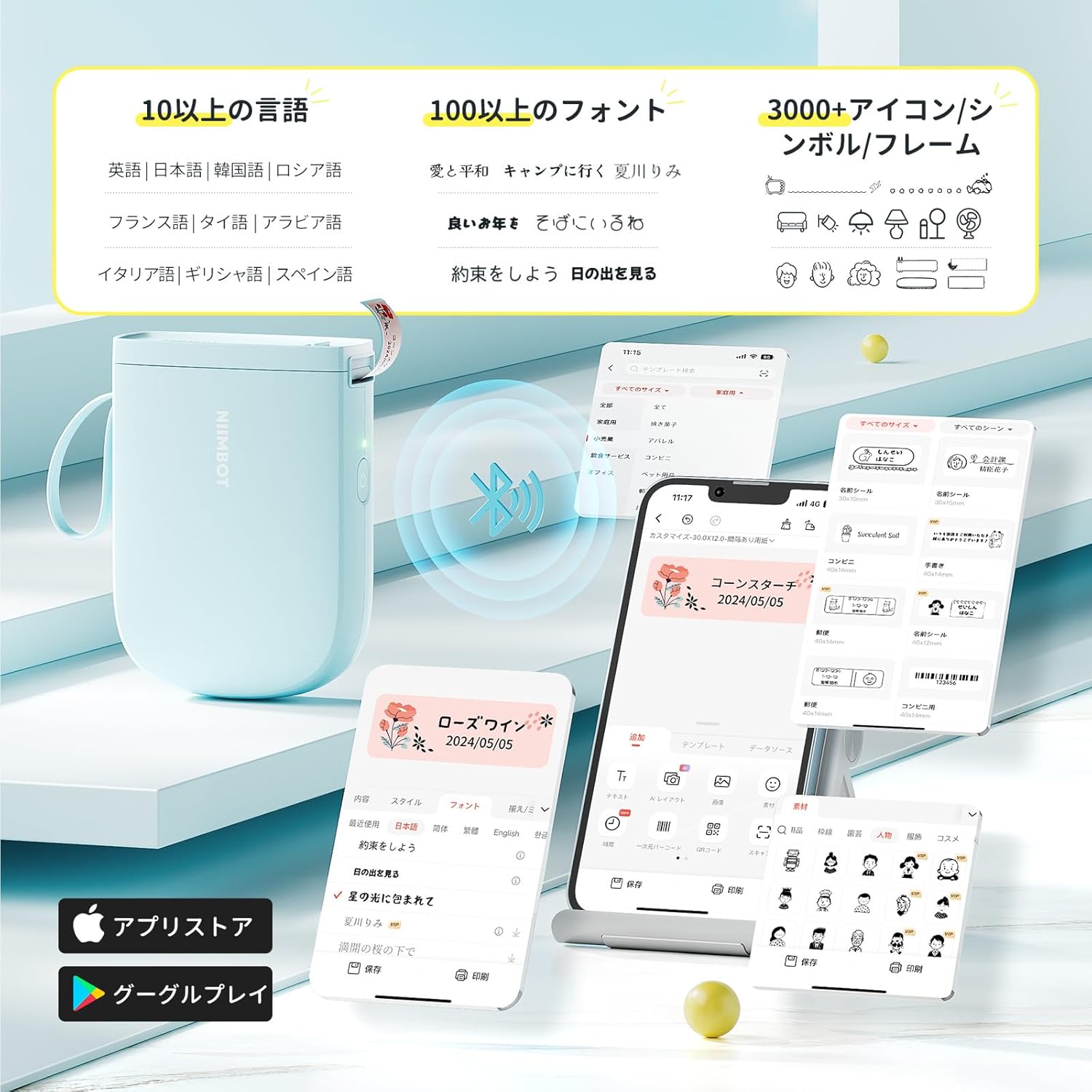
The NIIMBOT app offers a wide range of features for label creation:
- Εισαγωγή κειμένου: Easily type and customize text with over 20 fonts and various styles.
- Πρότυπα: Utilize automatic template matching and thousands of image elements for quick design.
- Αναγνώριση εικόνας: Import images for printing.
- Γραμμωτός κώδικας/Κωδικός QR: Generate and print barcodes and QR codes.
- Μαζική εκτύπωση: Print multiple labels efficiently.

4.2. Εκτύπωση ετικετών
Once your label design is complete in the app, tap the "Print" button. You can adjust the number of copies and print density before confirming. The printer will automatically feed and cut the labels.
4.3. Ευέλικτες εφαρμογές
The NIIMBOT D11H is suitable for a wide range of uses, including organizing documents, creating name tags, price tags, date reminders for food, and labeling items in the kitchen, office, or warehouse.


5. Συντήρηση
To ensure optimal performance and longevity of your NIIMBOT D11H label printer, follow these maintenance guidelines:
- Καθάρισμα: Regularly clean the print head with a soft, lint-free cloth moistened with alcohol. Ensure the printer is off before cleaning.
- Αποθήκευση: Αποθηκεύστε τον εκτυπωτή σε δροσερό και ξηρό μέρος, μακριά από το άμεσο ηλιακό φως και ακραίες θερμοκρασίες.
- Μπαταρία: Φορτίζετε τον εκτυπωτή τακτικά, ακόμα και αν δεν τον χρησιμοποιείτε συχνά, για να διατηρήσετε την καλή λειτουργία της μπαταρίας.
6. Αντιμετώπιση Προβλημάτων
If you encounter issues with your NIIMBOT D11H, refer to the following common troubleshooting steps:
- Ο εκτυπωτής δεν συνδέεται: Ensure Bluetooth is enabled on your smartphone and the printer is powered on. Try restarting both devices and reconnecting through the app.
- Κακή ποιότητα εκτύπωσης: Check if the label paper is loaded correctly and is a genuine NIIMBOT thermal label. Clean the print head if necessary. Adjust print density in the app settings.
- Εμπλοκή χαρτιού: Open the paper compartment, carefully remove any jammed paper, and reload the label roll correctly.
- Ο εκτυπωτής δεν αποκρίνεται: Ensure the battery is charged. If the device is unresponsive, try resetting it by holding the power button for an extended period (e.g., 10-15 seconds).
7. Προδιαγραφές
| Χαρακτηριστικό | Προσδιορισμός |
|---|---|
| Μάρκα | NIIMBOT |
| Όνομα μοντέλου | D11H |
| Τεχνολογία Συνδεσιμότητας | Bluetooth |
| Τεχνολογία Εκτύπωσης | Θερμικός |
| Μέγιστη ανάλυση εκτύπωσης (μονόχρωμη) | 300 DPI |
| Μέγιστη ταχύτητα εκτύπωσης (μονόχρωμη) | 40.0 mm/s |
| Μέγιστο μέγεθος μέσου (χαρτιού) | 15 mm (πλάτος) |
| Διαστάσεις προϊόντος | 11 x 3 x 7 εκ |
| Βάρος αντικειμένου | 360 γρ |
| Συμβατές Συσκευές | Smartphones (Android & iOS) |
| Χρώμα | Μπλε |
8. Εγγύηση και υποστήριξη
For warranty information or technical support, please refer to the official NIIMBOT webιστότοπο ή επικοινωνήστε με τον πωλητή σας. Κρατήστε την απόδειξη αγοράς σας ως απόδειξη αγοράς.


