1. Εισαγωγή
The Phomemo M950 Label Maker is a versatile, portable thermal label printer designed for both home and office use. It offers dual printing modes: direct input via its integrated keyboard and wireless printing via Bluetooth connection to a mobile application. This device utilizes thermal printing technology, eliminating the need for ink cartridges, and supports various label tape types for diverse labeling needs.
2. Πληροφορίες Ασφάλειας
- Keep the device away from water and high humidity to prevent electric shock or damage.
- Μην αποσυναρμολογείτε και μην επιχειρήσετε να επισκευάσετε τη συσκευή μόνοι σας. Επικοινωνήστε με την υποστήριξη πελατών για βοήθεια.
- Use only Phomemo-approved label tapes to ensure optimal performance and prevent damage to the print head.
- Να φυλάσσεται μακριά από παιδιά.
- Αποφύγετε την έκθεση της συσκευής σε άμεσο ηλιακό φως ή ακραίες θερμοκρασίες.
- Charge the device using a compatible Type-C USB power adapter.
3. Περιεχόμενα συσκευασίας
Please check the package contents upon unboxing. If any items are missing or damaged, contact your retailer or Phomemo customer support.
- Ετικετογράφος Phomemo M950
- 12mm Label Tape Roll (pre-installed or included separately)
- Καλώδιο φόρτισης USB Type-C
- Εγχειρίδιο χρήστη (αυτό το έγγραφο)
4. Το προϊόν τελείωσεview
Familiarize yourself with the components of your Phomemo M950 Label Maker.

Image: Phomemo M950 Label Maker showing its main features including no ink, one-touch key, keyboard editing, app editing, 203 DPI resolution, backlight support, Type-C recharge, and built-in cutter.
Βασικά Χαρακτηριστικά:
- Είσοδος πληκτρολογίου: Integrated QWERTY keyboard for direct label creation.
- Συνδεσιμότητα Bluetooth: Connects to smartphones for advanced label design via the Phomemo app.
- Θερμική εκτύπωση: No ink required, uses thermal label tapes.
- Backlight Screen: Εξασφαλίζει ορατότητα σε συνθήκες χαμηλού φωτισμού.
- Ενσωματωμένος κόφτης: For clean and precise label cutting.
- Επαναφορτιζόμενη μπαταρία: Integrated 1200mAh battery, rechargeable via Type-C port.
5. Ρύθμιση
5.1. Φόρτιση της Συσκευής
Before first use, fully charge the label maker.
- Connect the provided USB Type-C cable to the charging port on the side of the label maker.
- Συνδέστε το άλλο άκρο του καλωδίου σε έναν συμβατό προσαρμογέα τροφοδοσίας USB (δεν περιλαμβάνεται) ή σε μια θύρα USB υπολογιστή.
- The charging indicator light will show the charging status. Once fully charged, the indicator will change or turn off.

Image: Phomemo M950 Label Maker highlighting the Type-C charging port and its compact dimensions.
5.2. Τοποθέτηση ταινίας ετικετών
Ensure the device is powered off before loading or replacing tape.
- Open the tape compartment cover located on the top or back of the device.
- Insert the label tape roll with the label side facing up, ensuring it sits securely in the compartment.
- Feed the end of the label tape through the tape guide until it protrudes slightly from the output slot.
- Κλείστε καλά το κάλυμμα του διαμερίσματος της ταινίας.
5.3. Ενεργοποίηση/Απενεργοποίηση
Press and hold the Power button (usually marked with a power symbol) for a few seconds to turn the device on or off.
6. Οδηγίες λειτουργίας
The Phomemo M950 offers two primary methods for creating labels.

Image: Phomemo M950 Label Maker illustrating the two usage modes: direct printing from the keyboard and printing via a mobile device using the 'Print Master' app.
6.1. Keyboard Printing
This mode allows you to create labels directly on the device without needing a smartphone.
- Ενεργοποίηση: Turn on the label maker. The screen will illuminate.
- Type Text: Use the QWERTY keyboard to type your desired label text. The text will appear on the display.
- Προσαρμογή: Use the function keys (e.g., 'Fn', 'Shift', 'Symbol', 'Caps', 'Accent') to access various customization options such as font styles, sizes, symbols, and borders. The device supports multiple languages, borders, and symbols.
- Προview: Use the 'Preview' button to see how your label will look before printing.
- Αποτύπωμα: Press the 'Print' button to print the label. The built-in cutter will automatically cut the label after printing.

Image: Phomemo M950 Label Maker showcasing its extensive features including support for 23+ languages, 103+ borders, and 790+ symbols and icons for label customization.
6.2. Bluetooth App Printing
For more advanced design options, connect your label maker to the 'Print Master' mobile app.
- Λήψη εφαρμογής: Download the 'Print Master' app from your mobile device's app store (App Store for iOS, Google Play for Android).
- Ενεργοποίηση Bluetooth: Ensure Bluetooth is enabled on your mobile device and the Phomemo M950.
- Συνδέω: Open the 'Print Master' app and follow the on-screen instructions to connect to your M950 label maker via Bluetooth.
- Ετικέτα Σχεδίασης: Use the app's interface to design your label. The app offers massive templates, additional fonts, borders, and icons.
- Αποτύπωμα: Once your design is complete, tap the print icon in the app to send the label to the M950 for printing.

Image: Phomemo M950 Label Maker demonstrating the use of the 'Print Master' app with numerous templates, 270+ borders, 110+ fonts, 1500 icons, and 14+ languages for creative label design.
6.3. Adjusting Print Density
For optimal print quality, especially with ribbon tapes, adjust the print density.
- Press the 'Fn' key, then select 'Pinter Densities' (Printer Densities).
- Choose 'High' for clearer prints, particularly when using ribbon tapes.

Image: Step-by-step guide on how to set the print density to 'High' on the Phomemo M950 Label Maker for clear prints, especially for ribbon tapes.
7. Συντήρηση
7.1. Καθαρισμός της κεφαλής εκτύπωσης
Regular cleaning ensures consistent print quality.
- Turn off the label maker and open the tape compartment.
- Gently wipe the print head with a soft, lint-free cloth dampμε ισοπροπυλική αλκοόλη.
- Αφήστε την κεφαλή εκτύπωσης να στεγνώσει εντελώς πριν κλείσετε το διαμέρισμα και ενεργοποιήσετε τη συσκευή.
7.2. Tape Storage
Store label tapes in a cool, dry place away from direct sunlight to preserve their quality and adhesive properties.
8. Αντιμετώπιση Προβλημάτων
If you encounter issues with your Phomemo M950, refer to the following common problems and solutions.
| Πρόβλημα | Πιθανή αιτία | Διάλυμα |
|---|---|---|
| Καμία δύναμη | Low battery; Device off | Charge the device; Press and hold power button to turn on. |
| Κακή ποιότητα εκτύπωσης | Print head dirty; Incorrect print density; Low battery | Clean print head; Adjust print density to 'High'; Charge device. |
| Label not feeding | Tape incorrectly loaded; Tape jammed; Out of tape | Re-load tape correctly; Clear any jams; Replace tape roll. |
| Αποτυχία σύνδεσης Bluetooth | Bluetooth off; Device not paired; App issue | Ensure Bluetooth is on for both devices; Re-pair in app; Restart app/device. |
| Ο κόφτης δεν λειτουργεί | Tape jammed; Cutter mechanism obstructed | Clear any tape jams; Ensure no debris is blocking the cutter. |
9. Προδιαγραφές
| Χαρακτηριστικό | Λεπτομέρεια |
|---|---|
| Όνομα μοντέλου | M950 |
| Μάρκα | Phomemo |
| Τεχνολογία Εκτύπωσης | Θερμικός |
| Τεχνολογία Συνδεσιμότητας | Bluetooth, Keyboard |
| Έξοδος εκτυπωτή | Μονόχρωμος |
| Μέγιστη ανάλυση εκτύπωσης | 203 dpi |
| Μέγιστο μέγεθος πολυμέσων | 12mm * 4000mm |
| Συμβατές Συσκευές | Smartphones |
| Εξουσία | 10 Watt |
| Τύπος μπαταρίας | Ενσωματωμένο ιόν λιθίου 1200 mAh |
| Θύρα φόρτισης | USB Type-C |
| Διαστάσεις προϊόντος | 15.2 x 5.4 x 11.2 εκ |
| Βάρος αντικειμένου | 490 γρ |
| Χρώμα | Λευκό |
| Ειδικό χαρακτηριστικό | Portable, Backlight Screen, Built-in Cutter |
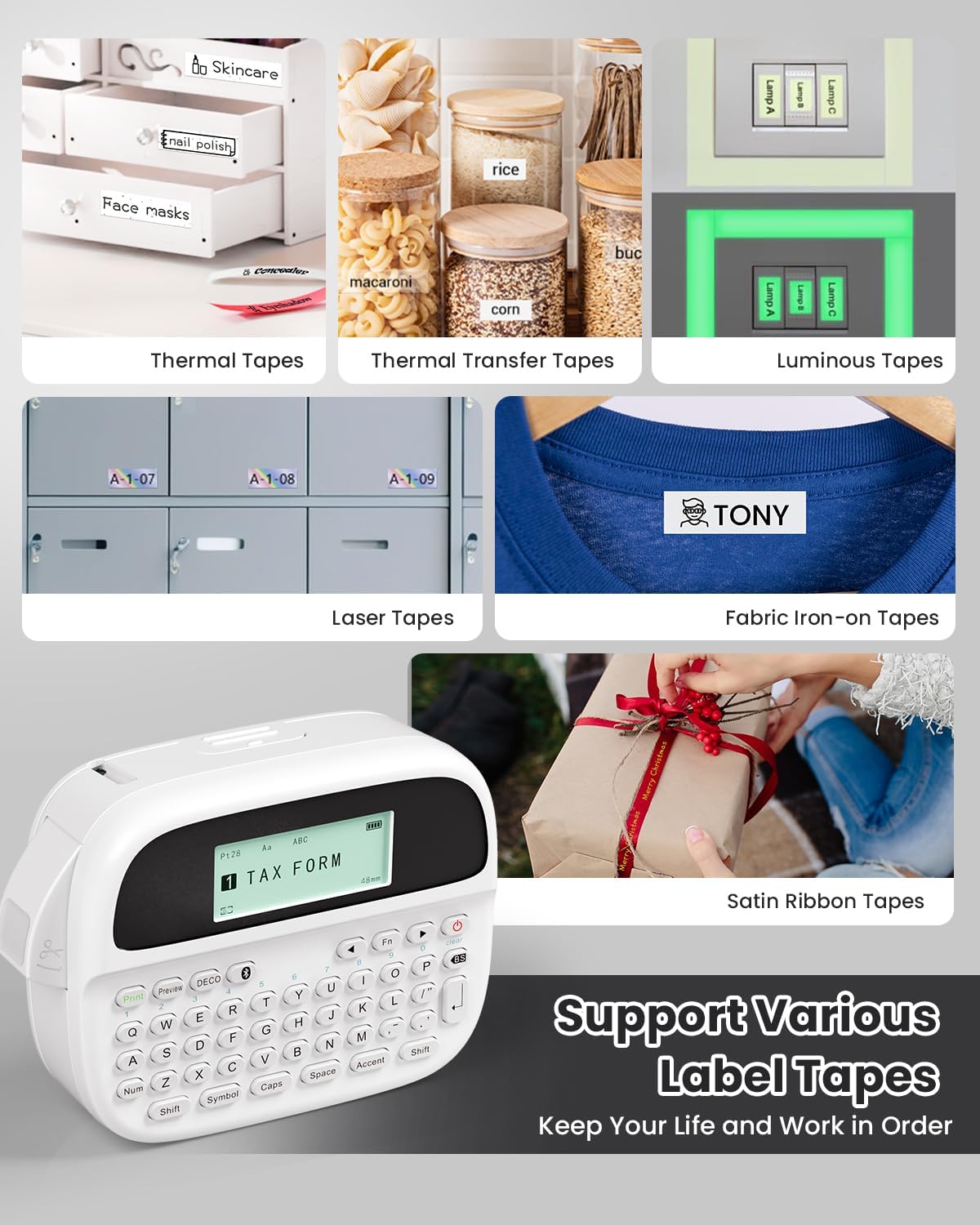
Image: Phomemo M950 Label Maker supporting various label tape types including Thermal, Thermal Transfer, Luminous, Laser, Fabric Iron-on, and Satin Ribbon tapes.

Image: Phomemo M950 Label Maker demonstrating its backlight screen feature, allowing for comfortable use even at night.
10. Εγγύηση και υποστήριξη
For warranty information, technical support, or service inquiries, please refer to the official Phomemo webστον ιστότοπο ή επικοινωνήστε απευθείας με την εξυπηρέτηση πελατών. Κρατήστε την απόδειξη αγοράς σας ως απόδειξη αγοράς για αξιώσεις εγγύησης.
Επίσημο Φόμεμο Webτοποθεσία: Visit Phomemo Store


