Εισαγωγή
Thank you for choosing the HyperGear Halo Waterproof LED Wireless Speaker. This manual provides essential information for setting up, operating, and maintaining your speaker to ensure optimal performance and longevity. The Halo speaker combines powerful HD sound with a vibrant 360° multicolor LED light show, designed for both indoor and outdoor use. Its IPX6 waterproof rating makes it suitable for various environments, from poolside parties to everyday listening.
Τι υπάρχει στο κουτί
- HyperGear Halo Waterproof LED Wireless Speaker
- Καλώδιο φόρτισης USB-C
- 3.5mm Aux Cord
Οδηγός εγκατάστασης
1. Φόρτιση του ηχείου
Before first use, fully charge your Halo speaker. Connect the included USB-C charging cable to the speaker's charging port and the other end to a USB power adapter (not included). The LED indicator will show charging status and turn off when fully charged.
2. Ενεργοποίηση/Απενεργοποίηση
Press and hold the Power button on the speaker's top panel to turn it on or off. A sound prompt will indicate the power status.
3. Σύζευξη Bluetooth
- Βεβαιωθείτε ότι το ηχείο είναι ενεργοποιημένο και σε λειτουργία σύζευξης Bluetooth (υποδεικνύεται από μια λυχνία LED που αναβοσβήνει).
- Στη συσκευή σας (smartphone, tablet, υπολογιστή), ενεργοποιήστε το Bluetooth και αναζητήστε διαθέσιμες συσκευές.
- Select "HyperGear Halo" from the list.
- Μόλις ολοκληρωθεί η σύζευξη, το ηχείο θα εκπέμψει έναν ήχο επιβεβαίωσης και η λυχνία LED θα σταματήσει να αναβοσβήνει.
Το ηχείο θα επανασυνδεθεί αυτόματα με την τελευταία συζευγμένη συσκευή όταν ενεργοποιηθεί, εάν βρίσκεται εντός εμβέλειας.

The top panel of the HyperGear Halo speaker, showing controls and its connection to a smartphone via Bluetooth.
Οδηγίες Λειτουργίας
Βασικοί έλεγχοι
| Κουμπί/Λειτουργία | Δράση |
|---|---|
| Κουμπί λειτουργίας | Press and hold to Power On/Off |
| Αναπαραγωγή/Παύση | Press once to Play/Pause music |
| Αύξηση έντασης ήχου (+) | Πατήστε μία φορά για να αυξήσετε την ένταση |
| Χαμήλωσε το (-) | Πατήστε μία φορά για να μειώσετε την ένταση |
| Επόμενο κομμάτι | Press and hold Volume Up (+) |
| Προηγούμενο κομμάτι | Press and hold Volume Down (-) |
| Απάντηση/Τερματισμός κλήσης | Press Play/Pause button once |
| Απόρριψη κλήσης | Press and hold Play/Pause button |
| Κουμπί λειτουργίας φωτός | Πιέστε για εναλλαγή σε 6 λειτουργίες φωτός LED |
Party Mode (Stereo Pairing)
To achieve immersive stereo sound, you can pair two HyperGear Halo speakers together:
- Ensure both Halo speakers are powered on and not connected to any other Bluetooth device.
- On one speaker (this will be the primary speaker), double-press the Power button. It will enter pairing mode for Party Mode.
- Τα δύο ηχεία θα συνδεθούν αυτόματα μεταξύ τους. Ένας ήχος επιβεβαίωσης θα υποδείξει την επιτυχή σύζευξη.
- Now, connect your device to the primary speaker via Bluetooth as described in the 'Bluetooth Pairing' section. Both speakers will play synchronized audio and light shows.

Two HyperGear Halo speakers paired together for Party Mode, offering synchronized audio and light effects.
Alternative Playback Modes

The side panel of the HyperGear Halo speaker, revealing the AUX, microSD, and USB-C ports for versatile connectivity.
- Aux-In: Connect your device using the included 3.5mm Aux cord to the speaker's AUX port for a wired audio connection.
- Κάρτα microSD: Insert a microSD card loaded with audio files στην καθορισμένη υποδοχή. Το ηχείο θα αναπαράγει αυτόματα μουσική από την κάρτα.
Χαρακτηριστικά Overview
- Αδιάβροχη βαθμολογία IPX6: Designed to withstand splashes, rain, and spills, making it ideal for outdoor adventures and poolside use.
- Powerful 5W Front-Firing Sound: Equipped with a 52mm full-range driver for rich, dynamic audio with pulse-pounding bass. The front-firing design ensures clearer sound projection.
- 360° Multicolor LED Lights: Features a vibrant light ring that synchronizes with your music, offering 6 different lighting modes to enhance your listening experience.
- Ενσωματωμένο μικρόφωνο: Allows for convenient hands-free calling.
- Τεχνολογία Bluetooth 5.3: Provides a stable, stutter-free wireless connection with a range of up to 33 feet.
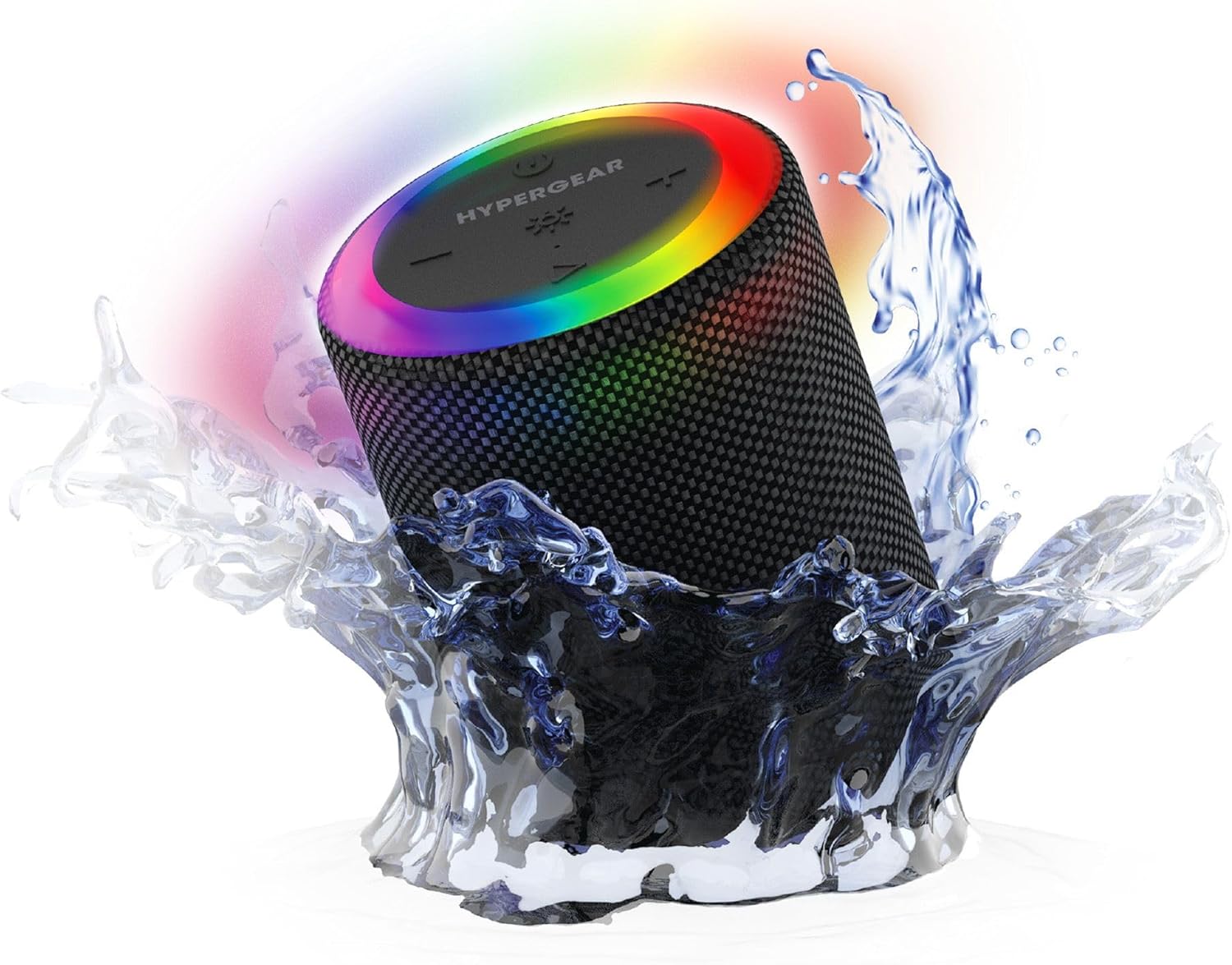
The HyperGear Halo speaker immersed in water, highlighting its robust waterproof design.

Visual representation of the HyperGear Halo speaker's powerful audio features, including its 5W output and 52mm driver.

The HyperGear Halo speaker showcasing its beat-synced 360° multicolor LED light ring with various lighting modes.
Προδιαγραφές
| Χαρακτηριστικό | Λεπτομέρεια |
|---|---|
| Όνομα μοντέλου | Halo Waterproof LED Wireless Speaker |
| Τύπος ηχείου | Πολυμέσα |
| Τεχνολογία Συνδεσιμότητας | Bluetooth 5.3 |
| Λειτουργία εξόδου ήχου | Mono (Stereo with Party Mode) |
| Μέγιστη ισχύς εξόδου ηχείου | 5 Watt |
| Μέγεθος προγράμματος οδήγησης ήχου | 52 χιλιοστά |
| Επίπεδο αντοχής στο νερό | IPX6 Αδιάβροχο |
| Διαστάσεις προϊόντος | 3.27" Β x 3.27" Π x 4.13" Υ |
| Βάρος αντικειμένου | 1.05 λίρες |
| Πηγή ισχύος | Τροφοδοτείται από μπαταρία |
| Συμπεριλαμβανόμενα εξαρτήματα | USB-C Charging Cable, 3.5mm Aux Cord |
| Μέθοδος Ελέγχου | Κουμπί |
| UPC | 633755158858 |
Συντήρηση
- Καθάρισμα: Σκουπίστε το ηχείο με ένα μαλακό, δamp πανί. Μην χρησιμοποιείτε σκληρά χημικά ή λειαντικά καθαριστικά.
- Αποθήκευση: Αποθηκεύστε το ηχείο σε δροσερό και ξηρό μέρος, μακριά από το άμεσο ηλιακό φως και ακραίες θερμοκρασίες.
- Φροντίδα μπαταρίας: Για να διατηρήσετε τη διάρκεια ζωής της μπαταρίας, αποφύγετε την πλήρη αποφόρτιση του ηχείου συχνά. Φορτίστε το τακτικά, ακόμα και αν δεν το χρησιμοποιείτε για μεγάλα χρονικά διαστήματα.
- Αδιάβροχη σφραγίδα: Ensure the silicone cover for the charging and AUX ports is securely closed when near water to maintain its IPX6 rating.
Αντιμετώπιση προβλημάτων
| Πρόβλημα | Πιθανή Λύση |
|---|---|
| Το ηχείο δεν ενεργοποιείται. | Βεβαιωθείτε ότι το ηχείο είναι φορτισμένο. Συνδέστε το σε μια πηγή τροφοδοσίας και δοκιμάστε ξανά. |
| Δεν είναι δυνατή η σύζευξη με συσκευή Bluetooth. | Make sure the speaker is in pairing mode (flashing LED). Turn off and on Bluetooth on your device. Ensure no other devices are connected to the speaker. Move speaker closer to your device. |
| Δεν ακούγεται ήχος από το ηχείο. | Check volume levels on both the speaker and your device. Ensure the correct input mode (Bluetooth, Aux, MicroSD) is selected. If using Aux, ensure the cable is fully inserted. |
| Party Mode not working. | Ensure both speakers are fully charged and not connected to any other Bluetooth devices. Try resetting both speakers by powering them off and on, then re-attempt Party Mode pairing. |
| Οι λυχνίες LED δεν λειτουργούν. | Press the Light Mode button to cycle through modes. Ensure the speaker is powered on. |
Εγγύηση και υποστήριξη
The HyperGear Halo Waterproof LED Wireless Speaker comes with a Περιορισμένη Εγγύηση. For specific details regarding warranty coverage, duration, and claims, please refer to the warranty card included with your product or visit the official HyperGear website. For technical support or further assistance, please contact HyperGear customer service through their official channels.


