1. Εισαγωγή
This manual provides detailed instructions for the installation, operation, and maintenance of your CHACON Wi-Fi Wired Video Intercom, Model 34895. Please read this manual thoroughly before installation and use to ensure proper functionality and safety.
2. Το προϊόν τελείωσεview
The CHACON Wi-Fi Wired Video Intercom system allows you to see and communicate with visitors at your entrance via an indoor monitor or your smartphone. It features high-quality video, remote call answering, and the ability to remotely open a gate or door lock.
Βασικά Χαρακτηριστικά:
- High-quality video display on indoor monitor and smartphone.
- Remote video call answering via smartphone.
- Remote gate/door lock release (requires wired installation with a 12V electric lock or dry contact).
- Visitor message recording capability when you are absent.
- Automatic photo recording of each visitor on the monitor's internal memory.
- Standalone system, not compatible with DiO 1.0 ecosystem.
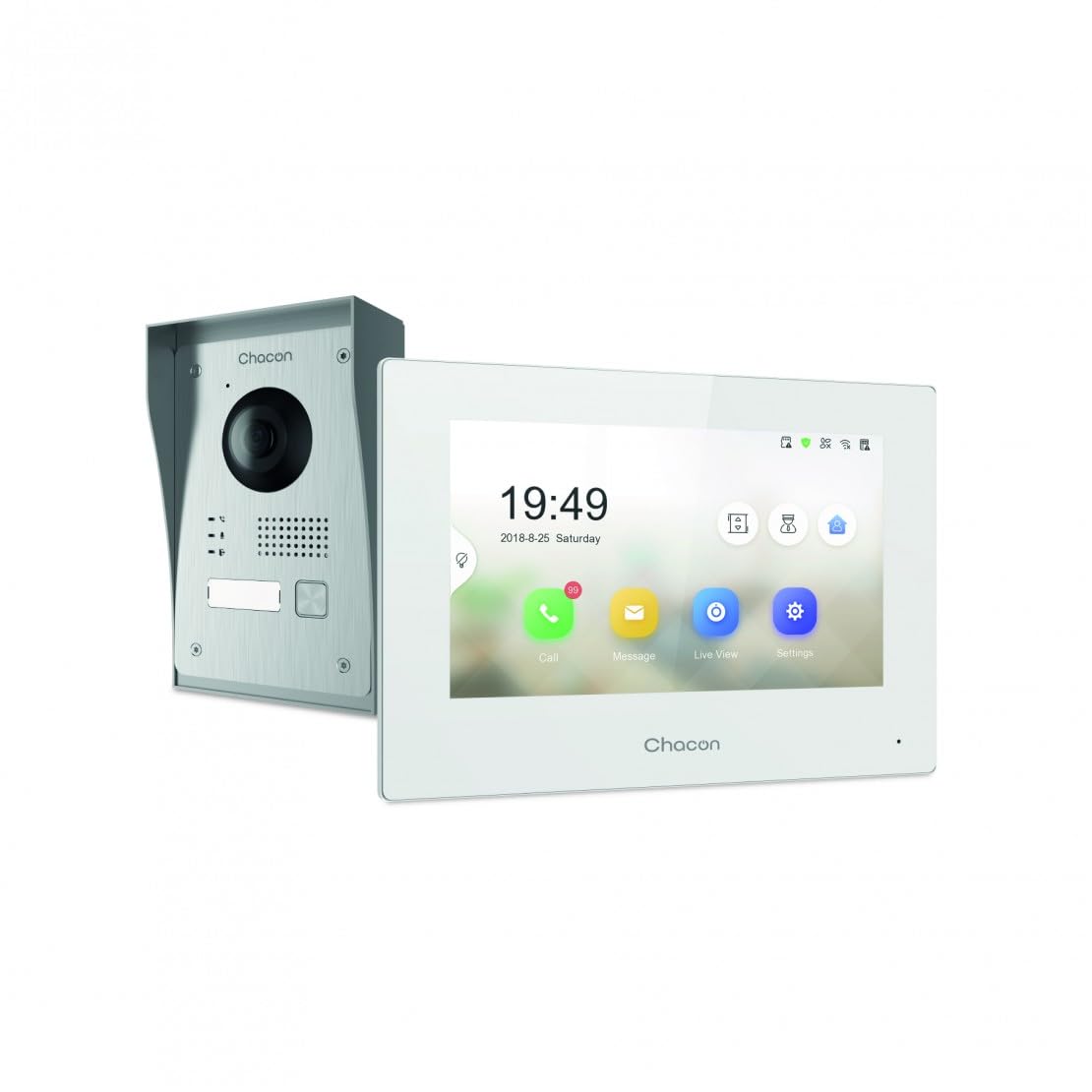
Figure 2.1: Indoor Monitor Unit. This image shows the indoor monitor with its user interface displaying time, date, and icons for call, message, live viewκαι ρυθμίσεις.
3. Περιεχόμενα συσκευασίας
Παρακαλούμε ελέγξτε τη συσκευασία για τα ακόλουθα στοιχεία:
- Εσωτερική μονάδα παρακολούθησης
- Εξωτερική μονάδα κουδουνιού
- Αξεσουάρ τοποθέτησης (βίδες, ούπα)
- Μετασχηματιστής ρεύματος
- Εγχειρίδιο χρήστη (αυτό το έγγραφο)
- Καλωδίωση καλωδίων

Figure 3.1: Outdoor Doorbell Unit. This image displays the outdoor unit, featuring a camera lens, microphone, speaker, and doorbell button, designed for external installation.
4. Πληροφορίες Ασφάλειας
Read all safety warnings and instructions carefully before installing and operating this device. Failure to follow these instructions may result in electric shock, fire, or serious injury.
- Ensure power is disconnected before any installation or wiring.
- Installation should be performed by a qualified electrician if you are unsure about wiring.
- Do not expose the outdoor unit to extreme temperatures, direct sunlight for prolonged periods, or heavy rain without proper protection.
- Χρησιμοποιείτε μόνο το παρεχόμενο τροφοδοτικό και τα καλώδια.
- Κρατήστε τη συσκευή μακριά από νερό και υγρασία.
5. Ρύθμιση
5.1. Installation of Outdoor Unit
The outdoor unit can be surface-mounted or flush-mounted. Ensure the unit is installed at a height that allows the camera to capture visitors clearly.
- Choose a suitable location near your entrance, protected from direct weather if possible.
- Mark drilling points using the mounting bracket as a template.
- Ανοίξτε τρύπες και τοποθετήστε τα βύσματα τοίχου.
- Στερεώστε το στήριγμα στερέωσης στον τοίχο.
- Connect the necessary wiring (power, indoor monitor, electric lock if applicable) to the outdoor unit. Refer to the wiring diagram in section 5.3.
- Συνδέστε την εξωτερική μονάδα στη βάση στήριξης.

Εικόνα 5.1: Πρample of Outdoor Unit Installation. This image shows the outdoor doorbell unit mounted on a wall next to a gate, demonstrating a typical installation scenario.
5.2. Installation of Indoor Monitor
The indoor monitor should be installed in a convenient location within your home, preferably near a power outlet.
- Choose a wall location for the indoor monitor.
- Mark drilling points.
- Ανοίξτε τρύπες και τοποθετήστε τα βύσματα τοίχου.
- Secure the monitor's mounting plate to the wall.
- Connect the wiring from the outdoor unit and the power adapter to the indoor monitor.
- Mount the indoor monitor onto its plate.

Figure 5.2: Indoor Monitor in a Home Environment. This image shows the indoor monitor installed on a wall in a modern kitchen setting, illustrating its discreet integration into a living space.
5.3. Διάγραμμα καλωδίωσης
Connect the outdoor unit to the indoor monitor using the provided 2-wire cable. If connecting an electric lock or gate opener, ensure it is a 12V electric lock or a dry contact system. Consult a professional if you are unsure about electrical wiring.
Σημείωμα:
- The system requires a wired connection for the outdoor unit to the indoor monitor.
- For remote gate/door opening, a separate wired connection from the indoor monitor to a 12V electric lock or dry contact is necessary.
5.4. Σύνδεση Wi-Fi και εγκατάσταση εφαρμογής
To enable smartphone connectivity, connect the indoor monitor to your home Wi-Fi network and set up the CHACON app.
- Ενεργοποιήστε την εσωτερική οθόνη.
- Navigate to the 'Settings' menu on the monitor.
- Select 'Wi-Fi' and choose your home network. Enter the password.
- Download the CHACON app from your smartphone's app store (iOS/Android).
- Register an account and follow the in-app instructions to add your video intercom device. This typically involves scanning a QR code displayed on the monitor or entering a device ID.
- Once connected, you can receive calls, view live feed, and control the lock remotely via the app.
6. Οδηγίες λειτουργίας
6.1. Απάντηση σε κλήση
Όταν ένας επισκέπτης πατήσει το κουμπί του κουδουνιού στην εξωτερική μονάδα:
- The indoor monitor will ring and display the visitor's video feed. Tap the 'Call' icon to answer.
- Your smartphone (if connected to Wi-Fi and the app is running) will receive a notification. Tap the notification to answer the video call.
6.2. Remote Lock Release
During an active call (either on the indoor monitor or smartphone app), you can unlock your gate or door:
- On the indoor monitor, tap the 'Unlock' icon.
- On the smartphone app, tap the corresponding 'Unlock' button.
Ensure your electric lock or gate opener is correctly wired to the system as described in Section 5.3.
6.3. Ζωντανά View
Μπορείς view η τροφοδοσία εξωτερικής κάμερας ανά πάσα στιγμή:
- On the indoor monitor, tap the 'Live View'εικονίδιο.
- On the smartphone app, select the device and choose the 'Live View' option.
6.4. Visitor Message Recording
If you are unavailable to answer a call, visitors can leave a message:
- After a set period of no answer, the outdoor unit will prompt the visitor to leave a message.
- These messages can be accessed and played back from the 'Message' menu on the indoor monitor or via the smartphone app.
6.5. Photo Recording
The system automatically captures a photo of each visitor when the doorbell is pressed. These photos are stored in the internal memory of the indoor monitor and can be reviewed via the 'Message' or 'History' menu.
7. Συντήρηση
- Καθάρισμα: Χρησιμοποιήστε ένα μαλακό, στεγνό πανί για να καθαρίσετε την εσωτερική οθόνη και την εξωτερική μονάδα. Μην χρησιμοποιείτε λειαντικά καθαριστικά ή διαλύτες.
- Προστασία εξωτερικής μονάδας: Regularly check the outdoor unit for any debris or obstructions around the camera lens, microphone, and speaker.
- Ενημερώσεις λογισμικού: Check the indoor monitor's settings or the smartphone app for available firmware updates to ensure optimal performance and security.
- Έλεγχος καλωδίωσης: Ελέγχετε περιοδικά όλες τις συνδέσεις καλωδίων για τυχόν σημάδια φθοράς ή ζημιάς.
8. Αντιμετώπιση Προβλημάτων
| Πρόβλημα | Πιθανή αιτία | Διάλυμα |
|---|---|---|
| Δεν υπάρχει εικόνα στην εσωτερική οθόνη. | Power issue, loose wiring, outdoor unit malfunction. | Check power supply to indoor monitor. Verify all wiring connections between outdoor and indoor units. Ensure outdoor unit is powered. |
| Δεν υπάρχει ήχος κατά τη διάρκεια των κλήσεων. | Microphone/speaker obstruction, volume too low, wiring issue. | Check for obstructions on outdoor unit's microphone/speaker. Adjust volume settings on indoor monitor. Inspect audio wiring. |
| Smartphone app not receiving calls/notifications. | No Wi-Fi connection, incorrect app settings, network issues. | Ensure indoor monitor is connected to Wi-Fi. Check smartphone's internet connection. Verify app notification settings. Restart app and monitor. |
| Remote lock release not working. | Incorrect wiring to lock, incompatible lock, power issue to lock. | Confirm electric lock/gate opener is a 12V system or dry contact. Check wiring between monitor and lock. Ensure lock has power. |
| Κακή ποιότητα βίντεο. | Dirty camera lens, poor lighting, network bandwidth. | Clean the camera lens on the outdoor unit. Ensure adequate lighting. Check Wi-Fi signal strength. |
9. Προδιαγραφές
| Μάρκα | ΧΑΚΟΝ |
| Αριθμός μοντέλου | 34895 |
| Χρώμα | Λευκό |
| Βάρος αντικειμένου | 1.3 κιλά |
| Διαστάσεις συσκευασίας | 38 x 24.5 x 17 εκ |
| Συνδεσιμότητα | Wired (2-wire), Wi-Fi |
| Συμβατότητα κλειδώματος | 12V Electric Lock or Dry Contact |
| Κατασκευαστής | Chacon |
| Χώρα προέλευσης | Κίνα |
10. Εγγύηση και υποστήριξη
For warranty information and technical support, please refer to the official CHACON webστον ιστότοπο ή επικοινωνήστε απευθείας με την εξυπηρέτηση πελατών. Κρατήστε την απόδειξη αγοράς σας ως απόδειξη αγοράς για αξιώσεις εγγύησης.
Διαδικτυακοί πόροι: Visit the CHACON official website for FAQs, updated manuals, and support contact information.
Εξυπηρέτηση πελατών: Τα στοιχεία επικοινωνίας συνήθως βρίσκονται στον ιστότοπο του κατασκευαστή. webστον ιστότοπο ή στη συσκευασία του προϊόντος.


