Εισαγωγή
The NOYAFA NF-859G is a versatile network cable tester designed for comprehensive network cable testing. It integrates multiple functions including wire detection, alignment testing, crimping testing, PoE detection, visual fault location (VFL), and an LED flashlight. This manual provides detailed instructions for the proper setup, operation, maintenance, and troubleshooting of your device.
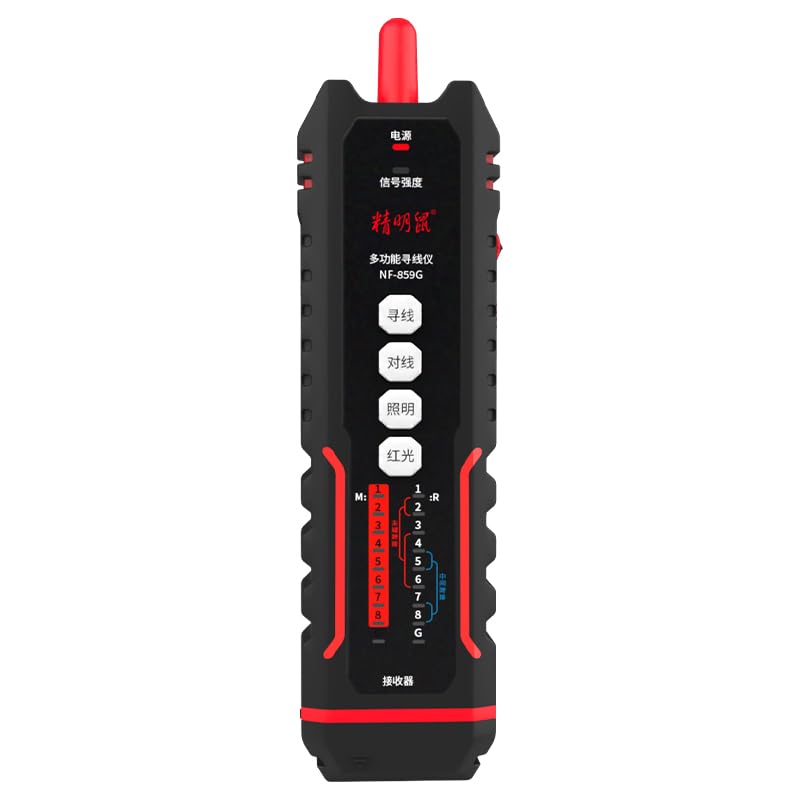
Image: The NOYAFA NF-859G Network Cable Tester, showing the main unit and the receiver.
Ρύθμιση
Αποσυσκευασία και αρχικός έλεγχος
Carefully unpack the NOYAFA NF-859G Network Cable Tester. Verify that all components are present and undamaged. The package should include:
- Κύρια μονάδα δοκιμής
- Receiver (auxiliary machine)
- Εγχειρίδιο χρήστη (αυτό το έγγραφο)
- Σημείωση: Οι μπαταρίες δεν περιλαμβάνονται και πρέπει να αγοραστούν ξεχωριστά.
Εγκατάσταση μπαταρίας
- Locate the battery compartment on the main tester unit and the receiver.
- Ανοίξτε το κάλυμμα της θήκης μπαταριών.
- Insert the required batteries, ensuring correct polarity (+/-). The device uses a 3.7V lithium polymer battery.
- Κλείστε καλά το κάλυμμα της θήκης μπαταριών.
Οδηγίες Λειτουργίας
The NOYAFA NF-859G offers various testing modes. Familiarize yourself with the device's interface before operation.
Λειτουργία ανίχνευσης καλωδίων
This function allows for tracing and locating cables. It supports both anti-interference mode and ordinary mode.
- Connect the cable to be traced to the main unit's appropriate port (RJ45/RJ11).
- Select the wire detection mode on the main unit.
- Use the receiver to trace the cable. The receiver will emit an audible signal when near the cable.
- Switch between anti-interference mode and ordinary mode as needed for optimal tracing in different environments.
Alignment Test (Cable Mapping)
Perform local and remote alignment tests to check for open circuits, short circuits, cross-overs, and split pairs in network cables.
- For local alignment test, connect both ends of the cable to the main unit.
- For remote alignment test, connect one end of the cable to the main unit and the other end to the receiver.
- Initiate the alignment test. The display will show the wiring status of the cable.
Δοκιμή πτύχωσης
Verify the proper crimping of RJ11 and RJ45 connectors.
- Insert the crimped RJ11 or RJ45 connector into the corresponding port on the main unit.
- Select the crimping test function. The device will indicate if the crimping is correct or if there are faults.
PoE (Power over Ethernet) Detection
Identify the power supply wire core and detect mid-span or end-span PoE configurations.
- Connect the network cable with PoE to the main unit.
- Activate the PoE detection function. The device will display information about the PoE type and power status.
Οπτικός εντοπιστής σφαλμάτων (VFL)
The integrated 20mw red light function helps locate breaks and bends in fiber optic cables.
- Συνδέστε το καλώδιο οπτικών ινών στη θύρα VFL.
- Activate the VFL. A red laser light will be emitted.
- Observe the cable for light leakage, which indicates a fault.
- Caution: Avoid direct eye exposure to the laser light.
Φακός LED
The built-in LED flashlight provides illumination in dark working environments.
- Press the dedicated flashlight button to turn it on or off.
Συντήρηση
Proper maintenance ensures the longevity and accuracy of your NOYAFA NF-859G Network Cable Tester.
- Καθάρισμα: Χρησιμοποιήστε ένα μαλακό, στεγνό πανί για να καθαρίσετε τη συσκευή. Μην χρησιμοποιείτε λειαντικά καθαριστικά ή διαλύτες.
- Αποθήκευση: Αποθηκεύστε τη συσκευή σε δροσερό και ξηρό μέρος, μακριά από το άμεσο ηλιακό φως και τις ακραίες θερμοκρασίες. Εάν την αποθηκεύετε για μεγάλο χρονικό διάστημα, αφαιρέστε τις μπαταρίες για να αποφύγετε διαρροές.
- Αντικατάσταση μπαταρίας: Replace batteries when the low battery indicator appears. Always use the specified battery type (3.7V lithium polymer).
- Χειριζόμενος: Αποφύγετε να ρίξετε τη συσκευή ή να την εκθέσετε σε ισχυρές κρούσεις.
Αντιμετώπιση προβλημάτων
This section addresses common issues you might encounter with your NOYAFA NF-859G.
| Πρόβλημα | Πιθανή αιτία | Διάλυμα |
|---|---|---|
| Η συσκευή δεν ανάβει. | Χαμηλή ή άδεια μπαταρία· λανθασμένη εγκατάσταση μπαταρίας. | Check battery indicator. Replace batteries or ensure they are installed with correct polarity. |
| Inaccurate cable test results. | Damaged test cable; incorrect test mode selected; dirty connectors. | Use a known good test cable. Ensure the correct test mode (e.g., alignment test) is selected. Clean connectors. |
| Wire tracing signal is weak or absent. | Cable is shielded; interference from other cables; low battery on receiver. | Switch to anti-interference mode. Ensure receiver batteries are charged. Try tracing in a less congested area. |
| VFL red light is dim or not working. | Low battery; VFL port obstruction; internal fault. | Check battery level. Ensure VFL port is clean and unobstructed. If problem persists, contact support. |
Προδιαγραφές
Key technical specifications for the NOYAFA NF-859G Network Cable Tester:
- Αριθμός μοντέλου: NF-859G
- Μάρκα: NOYAFA
- Γενικό Όνομα: Δοκιμαστής καλωδίων δικτύου
- Τεχνολογία συνδεσιμότητας: Ethernet
- Πηγή ενέργειας: Battery Powered (3.7V lithium polymer battery)
- Συμπεριλαμβανόμενα εξαρτήματα: Main Tester Unit, Receiver (auxiliary machine)
- VFL Output Power: 20mw (Red Light Function)
- Wire Detection Modes: Anti-interference mode, Ordinary mode
- Υποστηριζόμενες συνδέσεις: RJ45, RJ11
- Υποστηριζόμενοι τύποι καλωδίων: CAT5, CAT6, CAT5E, CAT6A
- Βάρος αντικειμένου: 420 γρ
- Διαστάσεις συσκευασίας: 28.8 x 16.6 x 5.3 εκ
- Χρώμα: Μαύρος
- Κατασκευαστής: NOYAFA
Εγγύηση και υποστήριξη
For warranty information or technical support, please refer to the official NOYAFA webή επικοινωνήστε με τον τοπικό σας διανομέα. Κρατήστε την απόδειξη αγοράς ως απόδειξη αγοράς για τυχόν αξιώσεις εγγύησης.
Κατασκευαστής: NOYAFA
Ημερομηνία πρώτης διαθεσιμότητας: 22 Σεπτεμβρίου 2024
Για περαιτέρω βοήθεια, επισκεφθείτε την ιστοσελίδα Κατάστημα μάρκας NOYAFA στο Amazon.


