1. Εισαγωγή
This manual provides essential information for the safe and efficient operation of your DOUGH Spectrum One 27-Inch Gaming Monitor. Please read this manual thoroughly before using the product and retain it for future reference.
2. Πληροφορίες Ασφάλειας
- Βεβαιωθείτε ότι η οθόνη είναι τοποθετημένη σε σταθερή, επίπεδη επιφάνεια για να αποτρέψετε τυχόν πτώσεις.
- Μην εκθέτετε την οθόνη σε βροχή, υγρασία ή ακραίες θερμοκρασίες.
- Χρησιμοποιήστε μόνο τον προσαρμογέα ρεύματος που παρέχεται με την οθόνη.
- Αποφύγετε το μπλοκάρισμα των ανοιγμάτων εξαερισμού για την αποφυγή υπερθέρμανσης.
- Μην επιχειρήσετε να κάνετε μόνοι σας σέρβις στην οθόνη. Αναθέστε όλες τις εργασίες σέρβις σε εξειδικευμένο προσωπικό.
- Αποσυνδέστε το καλώδιο τροφοδοσίας από την πρίζα κατά τη διάρκεια καταιγίδων με κεραυνούς ή όταν δεν χρησιμοποιείται για μεγάλα χρονικά διαστήματα.
3. Περιεχόμενα συσκευασίας
Βεβαιωθείτε ότι όλα τα εξαρτήματα υπάρχουν στη συσκευασία σας:
- DOUGH Spectrum One 27-Inch Gaming Monitor
- Μετασχηματιστής ρεύματος και καλώδιο
- Καλώδιο DisplayPort
- Καλώδιο USB-C
- Οδηγός γρήγορης εκκίνησης (δεν περιλαμβάνεται σε αυτό το εγχειρίδιο)

Εικόνα 3.1: Εμπρός view of the DOUGH Spectrum One monitor.
4. Ρύθμιση
4.1 Φυσική Ρύθμιση
The DOUGH Spectrum One monitor can be used with its optional stand (if purchased) or a VESA-compatible mount (100x100mm). This manual focuses on the monitor unit itself.
- Αποσυσκευασία: Αφαιρέστε προσεκτικά την οθόνη και όλα τα αξεσουάρ από τη συσκευασία.
- Τοποθέτηση: Position the monitor on a stable, flat surface. Ensure adequate space for ventilation around the monitor.
- Καλώδια σύνδεσης:
- Connect the power cable to the monitor and then to a power outlet.
- Connect your computer or gaming console to the monitor using either an HDMI 2.1 cable, DisplayPort 1.4 cable, or USB-C cable.
- For USB hub functionality, connect a USB-B to USB-A cable from your computer to the monitor's upstream USB-B port.
- For USB-C docking, connect a compatible laptop to the monitor's USB-C port. This single connection can provide video, data, and up to 100W of power delivery.
- Optional: Connect headphones to the 3.5mm audio jack.

Εικόνα 4.1: Πίσω view of the monitor showing available ports including HDMI 2.1, DisplayPort 1.4, USB Type-C (100W), USB Type-B, USB Type-A, and 3.5mm AUX.
4.2 Αρχική ενεργοποίηση
- Ensure all necessary cables are securely connected.
- Press the power button on the monitor. The power indicator light will illuminate.
- If no image appears, ensure your input source (computer/console) is powered on and correctly configured to output to the monitor.
5. Οδηγίες λειτουργίας
5.1 Πλοήγηση στην οθόνη (OSD)
The monitor features an On-Screen Display (OSD) menu for adjusting various settings. Use the physical buttons or joystick (if present) on the monitor to navigate the OSD. Typically, a central button or joystick allows for menu access and selection, while directional movements adjust values or navigate options.
5.2 Ρυθμίσεις εικόνας
The DOUGH Spectrum One monitor offers advanced picture settings for optimal visual experience:
- Ψήφισμα: Supports 4K UHD (3840 x 2160 pixels).
- Ρυθμός ανανέωσης: Έως 144Hz για ομαλή κίνηση.
- Ακρίβεια χρώματος: Factory calibrated for Delta E 0.6 average accuracy, covering 98% DCI-P3 and 100% sRGB color gamuts.
- HDR: HDR10 support with a 10 million:1 dynamic contrast ratio for enhanced highlights and deep shadows.
- Λάμψη: 450 nits (sustained), 750 nits (peak).

Εικόνα 5.1: Πάνωview of the monitor's core display technologies and features.
5.3 Χαρακτηριστικά Παιχνιδιού
Η οθόνη περιλαμβάνει πολλά χαρακτηριστικά που έχουν σχεδιαστεί για να βελτιώσουν την εμπειρία παιχνιδιού σας:
- Τεχνολογία Adaptive Sync: Supports AMD FreeSync Premium Pro, NVIDIA G-Sync, and VESA Adaptive-Sync compatibility to reduce screen tearing and stuttering by synchronizing the monitor's refresh rate with the graphics card's frame rate.
- Pixel-Perfect Upscaling: Uses integer-ratio pixel duplication for low-resolution input signals, preserving the look of pixel art and keeping retro games crisp.
- Crosshair Overlay: An on-screen crosshair can be enabled to assist aim in games.
- Frame Rate Counter: Displays the current frame rate on screen to monitor system performance.
- Blur Busters Presets: Pre-tuned settings for optimal motion clarity.

Image 5.2: The monitor displaying a high-performance gaming scene.
5.4 Συνδεσιμότητα
The monitor offers versatile connectivity options:
- HDMI 2.1 (x2): For high-bandwidth connections to compatible devices, supporting 4K 144Hz.
- DisplayPort 1.4 (x1): Another high-bandwidth option for video input.
- USB-C 3.2 Gen 2 (x1): Supports video, data transfer (up to 10 Gb/s), and up to 100W power delivery over a single cable for compatible laptops.
- USB-A (x2 side-facing, x1 rear): Για τη σύνδεση περιφερειακών συσκευών.
- Υποδοχή ήχου 3.5 mm: Για σύνδεση ακουστικών ή εξωτερικών ηχείων.
- Λειτουργία διαίρεσης οθόνης: The display can show video from two separate sources simultaneously.
6. Συντήρηση
6.1 Καθαρισμός της οθόνης
Για να καθαρίσετε την οθόνη της οθόνης:
- Απενεργοποιήστε την οθόνη και αποσυνδέστε το καλώδιο τροφοδοσίας.
- Σκουπίστε απαλά την οθόνη με ένα μαλακό πανί που δεν αφήνει χνούδι.
- Για επίμονα σημάδια, βάψτε ελαφράampen the cloth with water or a screen-cleaning solution specifically designed for monitors. Do not spray liquid directly onto the screen.
- Αποφύγετε τη χρήση λειαντικών καθαριστικών, οινοπνεύματος ή διαλυμάτων με βάση την αμμωνία, καθώς αυτά μπορεί να προκαλέσουν ζημιά στην επιφάνεια της οθόνης.
6.2 Καθαρισμός του Casing
Σκουπίστε την οθόνη casinμε ένα μαλακό, στεγνό πανί. Εάν είναι απαραίτητο, χρησιμοποιήστε ένα ελαφρώςamp πανί. Μην χρησιμοποιείτε σκληρά χημικά.
7. Αντιμετώπιση Προβλημάτων
This section addresses common issues you might encounter with your DOUGH Spectrum One monitor.
| Πρόβλημα | Πιθανή αιτία / Λύση |
|---|---|
| Δεν υπάρχει εικόνα στην οθόνη / Η λυχνία LED λειτουργίας είναι σβηστή | Ensure the power cable is securely connected to both the monitor and the power outlet. Check if the power outlet is functional. Press the monitor's power button. |
| Δεν υπάρχει εικόνα / Μήνυμα "Χωρίς σήμα" | Verify the video cable (HDMI, DisplayPort, USB-C) is securely connected to both the monitor and your computer/console. Ensure the correct input source is selected in the monitor's OSD. Check if the computer/console is powered on and outputting video. |
| Monitor takes long to wake from sleep / Occasional black screen when changing resolution | This can sometimes be resolved by updating the monitor's firmware. Firmware updates typically require a Windows machine. Refer to the manufacturer's support website for instructions and the latest firmware. |
| Θαμπή οθόνη | Adjust brightness and contrast settings in the OSD menu. Ensure HDR settings are correctly configured for your content and operating system. |
| Σχίσιμο ή τραυλισμός οθόνης | Ensure Adaptive Sync (FreeSync Premium Pro, G-Sync compatible) is enabled on both the monitor and your graphics card settings. Verify your graphics drivers are up to date. |
| Power supply not compatible with region | Ensure you have received the correct power supply for your region. Contact customer support if the provided power supply is incorrect. |
8. Προδιαγραφές
| Χαρακτηριστικό | Προσδιορισμός |
|---|---|
| Αριθμός μοντέλου | ES07D03 |
| Μέγεθος οθόνης | 27 ίντσες |
| Τύπος πίνακα | IPS |
| Ψήφισμα | 3840 x 2160 pixel (4K UHD) |
| Ρυθμός ανανέωσης | 144Hz |
| Χρόνος απόκρισης | 1 ms |
| Αναλογία διαστάσεων | 16:9 |
| Φωτεινότητα εικόνας | 450 nits (sustained), 750 Nits (Peak) Candela |
| Υποστήριξη HDR | HDR10 |
| Χρωματική γκάμα | 98% DCI-P3, 100% sRGB |
| Adaptive Sync | AMD FreeSync Premium Pro, NVIDIA G-Sync Compatible, VESA Adaptive-Sync |
| Συνδεσιμότητα | 2x HDMI 2.1, 1x DisplayPort 1.4, 1x USB-C 3.2 Gen 2 (100W PD), 1x USB-B, 2x USB-A (side), 1x USB-A (rear), 1x 3.5mm Audio Jack |
| Διαστάσεις προϊόντος | 6 x 27.5 x 17.5 ίντσες |
| Βάρος αντικειμένου | 17.76 λίρες |
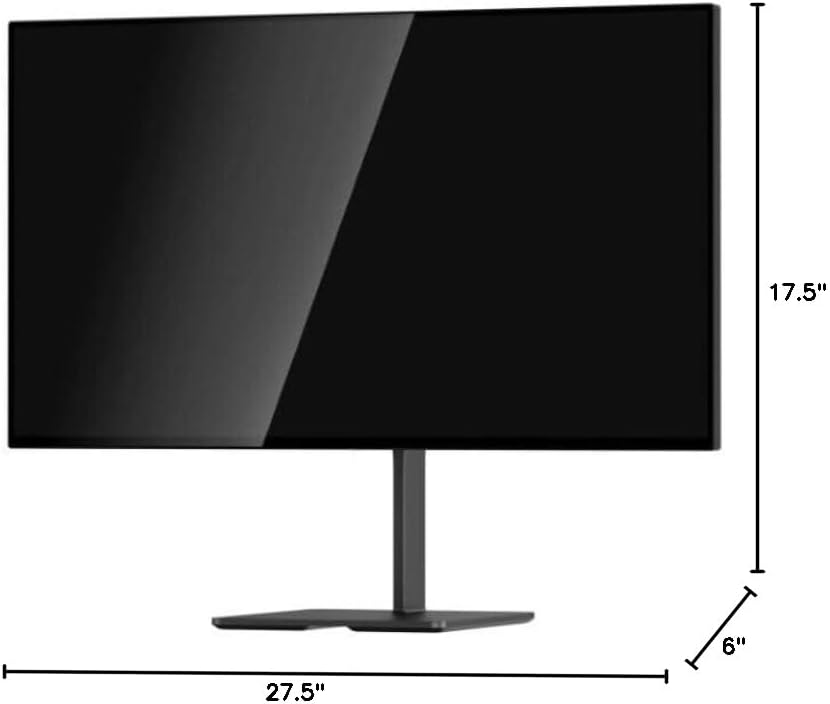
Image 8.1: Monitor dimensions.
9. Εγγύηση και υποστήριξη
For warranty information and technical support, please refer to the official DOUGH webιστότοπο ή επικοινωνήστε απευθείας με την εξυπηρέτηση πελατών. Κρατήστε την απόδειξη αγοράς σας ως απόδειξη αγοράς.
9.1 Coating Comparison
The DOUGH Spectrum One monitor is available in different screen finishes, including Matte, Glossy, and Gorilla Glass. Each finish offers distinct visual characteristics regarding reflections and clarity.
Video 9.1: This video demonstrates the visual differences between Matte, Glossy, and Gorilla Glass screen coatings on the Spectrum One monitor, particularly how they handle reflections from a light source.

Image 9.1: Visual comparison of Matte, Glossy, and Gorilla Glass screen coatings, illustrating how reflections appear on each surface.


