1. Εισαγωγή
Thank you for choosing the BOTSLAB 2.5K Front Dash Cam. This device is designed to provide superior video quality and enhanced safety features for your vehicle. With its 2.5K HD resolution, 170° ultra-wide angle lens, and advanced functionalities like 24/7 parking mode, built-in GPS, and driver alerts, it ensures comprehensive coverage and peace of mind on the road. This manual will guide you through the setup, operation, and maintenance of your dash cam.
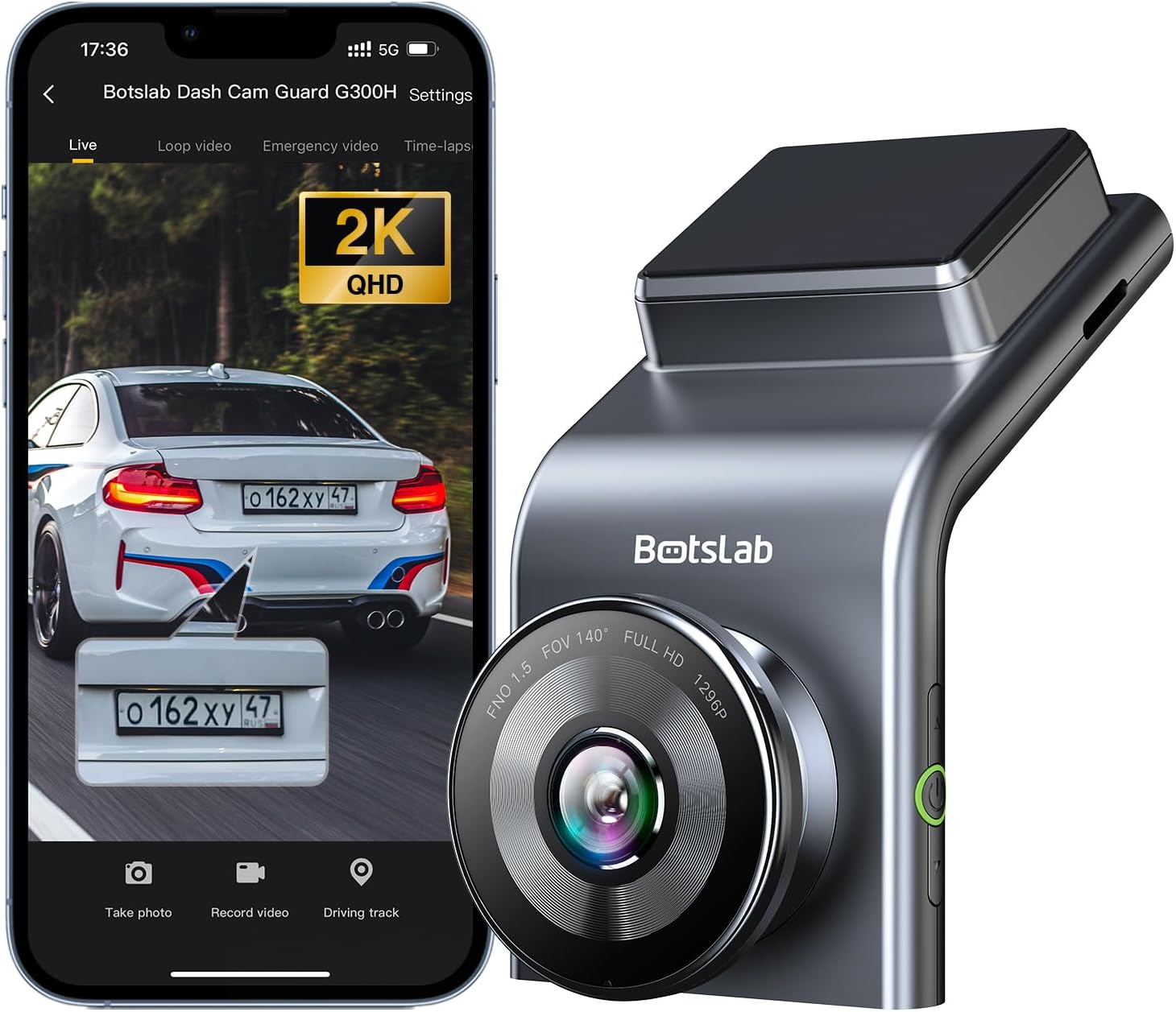
Figure 1: BOTSLAB 2.5K Front Dash Cam Overview
2. Τι υπάρχει στο κουτί
Ελέγξτε τα περιεχόμενα της συσκευασίας για να βεβαιωθείτε ότι υπάρχουν όλα τα είδη:
- Front Camera (x1)
- Φορτιστής αυτοκινήτου (x1)
- USB Power Cord (x1)
- Installation Pry Bar (x1)
- Εγχειρίδιο χρήστη (x1)
- Electrostatic Film (x1)

Εικόνα 2: Περιεχόμενα πακέτου
3. Ρύθμιση και εγκατάσταση
The BOTSLAB Dash Cam is designed for easy installation with invisible wiring, ensuring a clean and integrated look in your vehicle. Follow these steps for proper setup:
- Επιλέξτε Θέση τοποθέτησης: Επιλέξτε μια θέση στο παρμπρίζ σας που δεν εμποδίζει την view του δρόμου. Συνήθως, αυτό βρίσκεται πίσω από το πίσω μέροςview καθρέπτης.
- Καθαρισμός παρμπρίζ: Ensure the chosen area on the windshield is clean and dry.
- Apply Electrostatic Film: Peel off the protective layer from the electrostatic film and apply it to the cleaned area on your windshield. Smooth out any air bubbles. This film allows for easy removal of the dash cam mount without leaving residue.
- Attach Dash Cam Mount: Secure the dash cam mount to the electrostatic film. Ensure it is firmly attached.
- Βάση κάμερας ταμπλό: Slide the dash cam onto its mount until it clicks into place.
- Σύνδεση τροφοδοσίας: Connect the USB power cord to the dash cam and route the cable along the edge of the windshield and dashboard to the car charger. Use the installation pry bar to tuck the cable neatly into the gaps for an invisible wiring setup.
- Plug into Car Charger: Τοποθετήστε τον φορτιστή αυτοκινήτου στην υποδοχή του αναπτήρα του οχήματός σας.
- Ρύθμιση γωνίας: Power on the dash cam and adjust its angle to ensure the camera captures the road ahead clearly, covering the desired field of view (170° ultra-wide angle).

Figure 3: Easy Installation and Cable Management
4. Οδηγίες λειτουργίας
4.1. Ενεργοποίηση/Απενεργοποίηση και Βασική Εγγραφή
The dash cam will automatically power on and begin recording when your vehicle starts. It will power off automatically when the vehicle is turned off. Ensure a microSD card (not included, supports up to 256GB) is inserted for recording.

Figure 4: MicroSD Card Slot for Storage
4.2. 2.5K HD Video Quality and Night Vision
Experience 2.5K superior HD video quality with a 170° ultra-wide view angle that fully covers all lanes without blind spots. Coupled with clear Night Vision, you'll have full-color, high-quality videos in any lighting condition.

Figure 5: Enhanced Clarity with 2.5K Resolution
4.3. Λειτουργία στάθμευσης 24/7
When used with the G300H dedicated hard-wired kit (ASIN: B0D3QK86TQ, sold separately), the G300H front dash cam can achieve 24/7 uninterrupted recording. Video is recorded any time there is a collision or accident. Benefit from Time-lapse Recording for uninterrupted 24-hour parking monitoring, utilizing minimal memory space. The Loop Recording feature ensures continuous recording, preserving vital clips while overwriting older videos.

Figure 6: 24/7 Parking Monitoring
4.4. Enhanced Awareness and Safety Features
Stay in sync with traffic through the Front Vehicle Start Reminder and enhance safety with Pedestrian Collision Alert. These features keep you alert to movement around you, automatically triggering notifications for a seamless and vigilant driving experience.
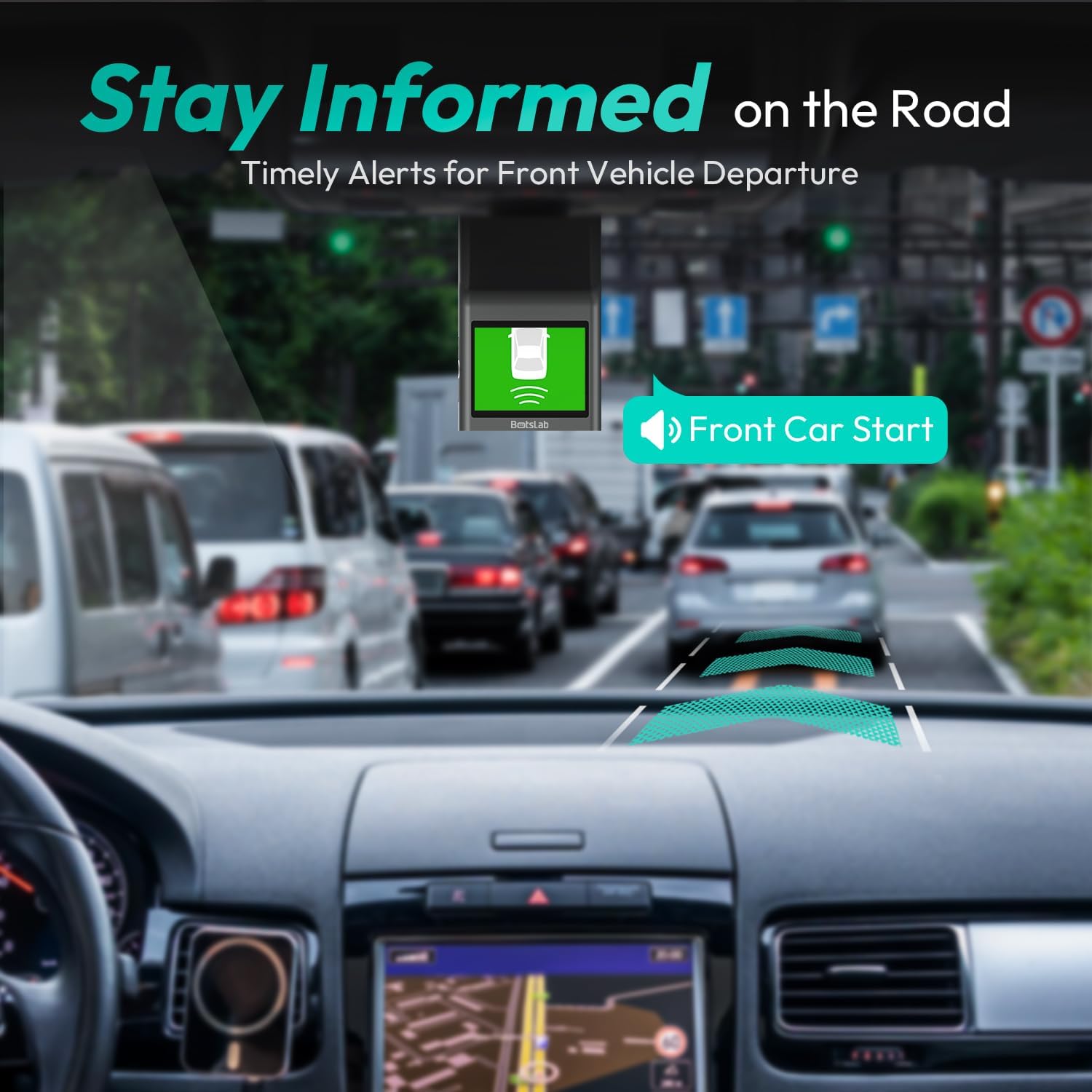
Figure 7: Front Vehicle Start Reminder

Figure 8: Pedestrian Collision Alert
4.5. GPS Integration
Built-in GPS functionality records every detail of your journey, from speed to location. View your personalized routes on Google Maps, right from your phone. It's not just about convenience; it's about keeping your travel data private and secure.

Figure 9: Precise Location Tracking with GPS
4.6. G-Sensor and Emergency Video Protection
In the event of a collision or sudden movement, the G-Sensor automatically locks videos, preventing overwriting. This feature provides the detailed evidence you need for insurance claims or traffic disputes.

Figure 10: Emergency Video Protection
5. Συντήρηση
To ensure the longevity and optimal performance of your BOTSLAB Dash Cam, follow these maintenance guidelines:
- Καθαρίστε τον φακό: Regularly wipe the camera lens with a soft, lint-free cloth to ensure clear recordings. Avoid using abrasive cleaners.
- Check MicroSD Card: Periodically check the microSD card for errors or corruption. Format the card monthly to maintain optimal performance and prevent data loss. Back up any important footagε πριν από τη μορφοποίηση.
- Ενημερώσεις υλικολογισμικού: Check the BOTSLAB app or website for available firmware updates. Keeping your dash cam's firmware up-to-date ensures you have the latest features and bug fixes.
- Έλεγχος θερμοκρασίας: Αποφύγετε την έκθεση του έκκεντρου του ταμπλό σε ακραίες θερμοκρασίες για παρατεταμένες περιόδους. Εάν το αυτοκίνητο είναι σταθμευμένο σε άμεσο ηλιακό φως, σκεφτείτε να αφαιρέσετε το έκκεντρο του ταμπλό ή να χρησιμοποιήσετε σκίαστρο.
- Ασφαλής τοποθέτηση: Ensure the dash cam remains securely mounted to prevent vibrations that could affect video quality or cause the device to fall.
6. Αντιμετώπιση Προβλημάτων
Εάν αντιμετωπίσετε προβλήματα με την κάμερα του αυτοκινήτου σας, ανατρέξτε στα ακόλουθα συνηθισμένα προβλήματα και λύσεις:
| Πρόβλημα | Πιθανή αιτία | Διάλυμα |
|---|---|---|
| Η κάμερα αυτοκινήτου δεν ενεργοποιείται. | No power supply; faulty car charger/cable. | Check car charger connection and vehicle's power outlet. Try a different USB cable or car charger. |
| Ηχογραφήσεις στάσεων ή φαγητούtage is corrupted. | MicroSD card full, corrupted, or incompatible. | Format the microSD card regularly. Use a high-quality Class 10 or U3 microSD card. Replace the card if issues persist. |
| Προβλήματα σύνδεσης Wi-Fi. | Interference; incorrect app settings. | Ensure you are within range. Restart the dash cam and your smartphone. Reinstall the BOTSLAB app. |
| GPS not tracking location. | Poor satellite signal; dash cam not receiving GPS data. | Βεβαιωθείτε ότι η κάμερα του ταμπλό έχει καθαρή view of the sky. Move away from tall buildings or tunnels. |
| Η ποιότητα του βίντεο είναι κακή. | Βρώμικος φακός· προστατευτική μεμβράνη ακόμα πάνω στον φακό· συνθήκες χαμηλού φωτισμού. | Clean the camera lens. Remove any protective film. Ensure proper lighting for optimal recording. |
Για περαιτέρω βοήθεια, ανατρέξτε στην ενότητα υποστήριξης ή επικοινωνήστε με την εξυπηρέτηση πελατών.
7. Προδιαγραφές
| Χαρακτηριστικό | Λεπτομέρεια |
|---|---|
| Διαστάσεις προϊόντος | 0.59 x 0.98 x 2.17 ίντσες |
| Βάρος αντικειμένου | 14.9 ουγγιές |
| Αριθμός μοντέλου | G300H |
| Τεχνολογία Συνδεσιμότητας | 2.4GHz WiFi |
| Ειδικά Χαρακτηριστικά | Pedestrian Collision Alert, Built-In GPS, 24/7 Parking Monitoring |
| Ανάλυση λήψης βίντεο | 2.5K |
| Χρώμα | γαλάζιο |
| Κατασκευαστής | 360 Smart Network |
| Ημερομηνία πρώτης διαθεσιμότητας | 23 Νοεμβρίου 2023 |
| Προσανατολισμός | Εμπρός |
| Τύπος υπηρεσίας οχήματος | Bus, Car, Truck |
| Τύπος τοποθέτησης | Βάση παρμπρίζ |
8. Εγγύηση και υποστήριξη
BOTSLAB is committed to providing high-quality AI-Vision security products and excellent customer service. Your dash cam comes with comprehensive support to ensure your satisfaction.
8.1. Πληροφορίες εγγύησης
The BOTSLAB Dash Cam G300H includes a 365-Day Quality Guarantee. For detailed terms and conditions, please refer to the official warranty documentation or contact customer support.
8.2. Τεχνική Υποστήριξη
προσφέρουμε Lifetime Technical Help for your product. If you encounter any issues or have questions, please utilize the following support channels:
- Ζωντανή συνομιλία: Download the Botslab APP, register and sign in, then navigate to 'Me' > 'Support' > 'Live Chat' for 24-hour assistance.
- Επίσημος ανώτερος υπάλληλος Webτοποθεσία: Επίσκεψη global.botslab.com για πληροφορίες προϊόντος, συχνές ερωτήσεις και πόρους υποστήριξης.
- Υποστήριξη ηλεκτρονικού ταχυδρομείου: Send your inquiries to Service@botslab.com. We aim for 48 Hours Fast Support.
- Κοινότητα χρηστών: Join the Botslab Users Group for peer support and discussions.


Figure 11: BOTSLAB Support and Care Information
For a complete digital version of this manual, you can access the Εγχειρίδιο χρήστη (PDF).


