1. Εισαγωγή
Thank you for choosing the Baseus AeQur G10 TWS Earphones. This manual provides detailed instructions on how to set up, operate, maintain, and troubleshoot your new earphones. Please read this manual thoroughly before using the product to ensure optimal performance and longevity.
2. Περιεχόμενα συσκευασίας
Αποσυσκευάστε προσεκτικά το κουτί και βεβαιωθείτε ότι όλα τα αντικείμενα που αναφέρονται παρακάτω υπάρχουν και είναι σε καλή κατάσταση. Εάν λείπουν ή έχουν υποστεί ζημιά κάποια αντικείμενα, επικοινωνήστε με τον αντιπρόσωπό σας.
- Baseus AeQur G10 TWS Earphones (Left and Right)
- Θήκη φόρτισης
- USB-A/USB-C Wireless Dongle
- Καλώδιο φόρτισης USB-C
- Πολλαπλά μεγέθη ακίδων αυτιών
- Εγχειρίδιο χρήστη (αυτό το έγγραφο)

Image 2.1: Complete package contents of the Baseus AeQur G10 TWS Earphones.
3. Το προϊόν τελείωσεview
Familiarize yourself with the components of your Baseus AeQur G10 TWS Earphones.
3.1 Ακουστικά
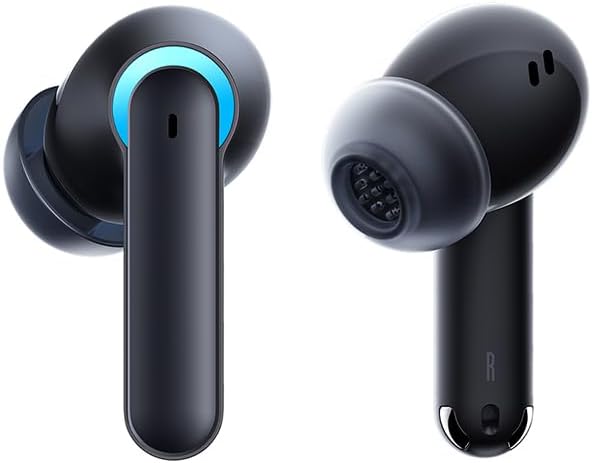
Image 3.1: Left and Right Baseus AeQur G10 Earphones. Each earphone features a touch control area, microphone, and charging contacts.
3.2 Θήκη φόρτισης

Image 3.2: Baseus AeQur G10 Earphones in their charging case with the lid open. The case has charging slots for each earphone and an LED indicator for battery status.
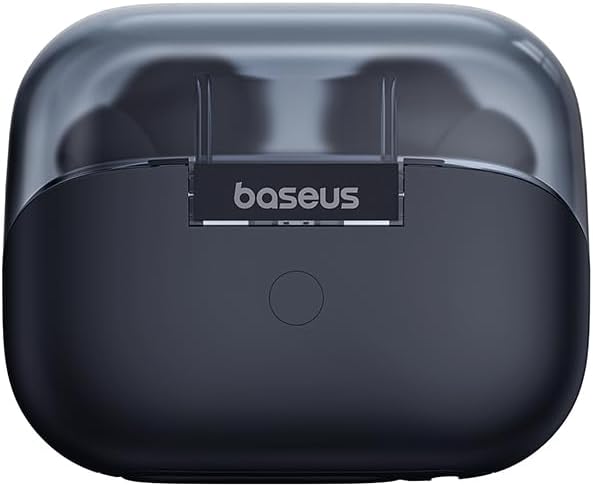
Εικόνα 3.3: Πίσω view of the Baseus AeQur G10 charging case, displaying the Baseus brand logo and a USB-C charging port (not explicitly visible but implied by common design).
3.3 USB-A/USB-C Wireless Dongle
The included wireless dongle allows for low-latency connection to various devices, including PCs, laptops, gaming consoles, and mobile devices.

Image 3.4: Compatibility diagram for the Baseus AeQur G10, illustrating connections to Type-C Androids & Tablets, Type-C/USB-A PCs & Laptops, PS5/PS4/Switch, Steam Deck, and VR devices.
4. Ρύθμιση
4.1 Αρχική φόρτιση
- Τοποθετήστε και τα δύο ακουστικά στη θήκη φόρτισης.
- Connect the USB-C charging cable to the charging port on the case and the other end to a USB power source (e.g., computer USB port, wall adapter).
- The LED indicator on the case will show charging status. A full charge typically takes approximately 1.5 hours for the earphones and 2 hours for the case.
4.2 Σύζευξη με συσκευές Bluetooth
- Ensure the earphones are in the charging case and the case has sufficient charge.
- Open the charging case lid. The earphones will automatically enter pairing mode (indicated by a flashing LED on the earphones or case).
- Στη συσκευή σας (smartphone, tablet, φορητό υπολογιστή), ενεργοποιήστε το Bluetooth και αναζητήστε νέες συσκευές.
- Select "Baseus AeQur G10" from the list of available devices.
- Once connected, the LED indicator will stop flashing, and you will hear a confirmation tone.
4.3 Connecting via USB Wireless Dongle
- Insert the USB-A or USB-C end of the wireless dongle into the corresponding port on your device (PC, laptop, gaming console).
- Ensure the earphones are in the charging case and the lid is open.
- The earphones will automatically attempt to connect to the dongle. The dongle's LED indicator will show connection status.
- Once connected, the LED on the dongle will become solid, and you will hear a confirmation tone from the earphones.
5. Οδηγίες λειτουργίας
5.1 Ενεργοποίηση/Απενεργοποίηση
- Ενεργοποίηση: Open the charging case lid, or take the earphones out of the case. They will power on automatically.
- Απενεργοποιώ: Τοποθετήστε τα ακουστικά πίσω στη θήκη φόρτισης και κλείστε το καπάκι. Θα απενεργοποιηθούν αυτόματα και θα ξεκινήσει η φόρτιση.
5.2 Χρήση ακουστικών
- Identify the 'L' (left) and 'R' (right) markings on each earphone.
- Gently insert the earphones into your ear canals.
- Rotate them slightly to find a comfortable and secure fit. Choose the appropriate ear tip size for optimal sound quality and comfort.
5.3 Αγγίξτε Στοιχεία ελέγχου
The Baseus AeQur G10 earphones feature touch-sensitive controls on each earbud. The specific functions may vary slightly depending on the device and application.
| Δράση | Λειτουργία |
|---|---|
| Μονό άγγιγμα (Α/Δ) | Αναπαραγωγή/Παύση μουσικής, Απάντηση/Τερματισμός κλήσης |
| Διπλό άγγιγμα (L) | Προηγούμενο κομμάτι |
| Διπλό άγγιγμα (R) | Επόμενο κομμάτι |
| Τριπλό άγγιγμα (Α/Δ) | Ενεργοποιήστε το Voice Assistant |
| Παρατεταμένο πάτημα (Α/Δ, 2 δευτ.) | Απόρριψη κλήσης |
| Παρατεταμένο πάτημα (Α/Δ, 3 δευτ.) | Εναλλαγή λειτουργίας παιχνιδιού/μουσικής (εάν υπάρχει) |
6. Συντήρηση
6.1 Καθαρισμός
- Χρησιμοποιήστε ένα μαλακό, στεγνό πανί που δεν αφήνει χνούδι για να καθαρίσετε τα ακουστικά και τη θήκη φόρτισης.
- For earwax or debris in the ear tips, gently remove the ear tips and clean them with a cotton swab lightly dampμε οινόπνευμα. Βεβαιωθείτε ότι είναι εντελώς στεγνά πριν τα επανατοποθετήσετε.
- Μην χρησιμοποιείτε λειαντικά καθαριστικά, διαλύτες ή σπρέι αεροζόλ.
6.2 Αποθήκευση
- Να φυλάσσετε πάντα τα ακουστικά στη θήκη φόρτισής τους όταν δεν τα χρησιμοποιείτε για να τα προστατεύετε και να τα διατηρείτε φορτισμένα.
- Φυλάσσετε σε δροσερό, ξηρό μέρος, μακριά από ακραίες θερμοκρασίες και άμεσο ηλιακό φως.
6.3 Φροντίδα μπαταρίας
- Φορτίζετε τα ακουστικά και τη θήκη τακτικά, ακόμα κι αν δεν τα χρησιμοποιείτε συχνά, για να διατηρήσετε την καλή λειτουργία της μπαταρίας.
- Αποφύγετε την πλήρη αποφόρτιση των μπαταριών για μεγάλα χρονικά διαστήματα.
7. Αντιμετώπιση Προβλημάτων
If you encounter issues with your Baseus AeQur G10 earphones, refer to the following common solutions:
7.1 Δεν υπάρχει ήχος ή διακοπτόμενη σύνδεση
- Ensure earphones are charged and properly connected to your device (Bluetooth or dongle).
- Ελέγξτε την ένταση ήχου τόσο στα ακουστικά όσο και στη συνδεδεμένη συσκευή σας.
- Πλησιάστε πιο κοντά στη συσκευή σας για να αποφύγετε παρεμβολές ή προβλήματα εμβέλειας.
- Try disconnecting and re-connecting the earphones.
- For Bluetooth, forget the device on your phone and re-pair.
- For dongle, unplug and re-plug the dongle.
7.2 Τα ακουστικά δεν φορτίζουν
- Βεβαιωθείτε ότι το καλώδιο φόρτισης είναι συνδεδεμένο σταθερά τόσο στη θήκη όσο και στην πηγή τροφοδοσίας.
- Βεβαιωθείτε ότι η πηγή τροφοδοσίας είναι ενεργή.
- Clean the charging contacts on both the earphones and inside the case with a dry cotton swab.
- Δοκιμάστε ένα διαφορετικό καλώδιο φόρτισης ή τροφοδοτικό.
7.3 Only One Earphone Working
- Τοποθετήστε και τα δύο ακουστικά πίσω στη θήκη φόρτισης, κλείστε το καπάκι, περιμένετε λίγα δευτερόλεπτα, στη συνέχεια ανοίξτε το καπάκι και βγάλτε τα ξανά.
- Βεβαιωθείτε ότι και τα δύο ακουστικά είναι φορτισμένα.
- Δοκιμάστε να επαναφέρετε τα ακουστικά στις εργοστασιακές ρυθμίσεις (ανατρέξτε στις οδηγίες του κατασκευαστή) webιστότοπο για συγκεκριμένες οδηγίες επαναφοράς, εάν χρειάζεται).
8. Προδιαγραφές
Key technical specifications for the Baseus AeQur G10 TWS Earphones:
| Χαρακτηριστικό | Προσδιορισμός |
|---|---|
| Όνομα μοντέλου | Α00055400111-00 |
| Μάρκα | Baseus |
| Χρώμα | Μαύρος |
| Τοποθέτηση αυτιού | Στο αυτί |
| Form Factor | Στο αυτί |
| Τεχνολογία Συνδεσιμότητας | Ασύρματο (Bluetooth) |
| Τεχνολογία ασύρματης επικοινωνίας | Bluetooth |
| Μπαταρίες | Απαιτούνται 1 μπαταρίες ιόντων λιθίου (περιλαμβάνονται) |
| Διαστάσεις προϊόντος | 10 x 5 x 1.27 εκ |
| Βάρος αντικειμένου | 220 γρ |
| Κατασκευαστής | Baseus |
| Ειδικές Χρήσεις | Ταξίδι |
9. Εγγύηση και υποστήριξη
Baseus products are designed and manufactured to the highest quality standards. For information regarding warranty coverage, technical support, or service, please refer to the warranty card included with your product or visit the official Baseus webτοποθεσία. Κρατήστε την απόδειξη αγοράς για τυχόν αξιώσεις εγγύησης.
Για περαιτέρω βοήθεια, μπορείτε να επικοινωνήσετε με την υποστήριξη πελατών της Baseus μέσω των επίσημων καναλιών τους.