1. Εισαγωγή
Thank you for choosing the Cherry KW 7100 Mini Multi-Device Compact Keyboard. This manual provides essential information for setting up, operating, and maintaining your new keyboard. Designed for versatility and portability, this keyboard offers seamless connectivity across multiple devices.
2. Τι υπάρχει στο κουτί
- Cherry KW 7100 Mini Multi-Device Compact Keyboard
- USB-C to USB-A Charging/Connection Cable
- 2x μπαταρίες AAA
- 2.4 GHz Wireless Nano Receiver (stored magnetically in the keyboard)
- Θήκη μεταφοράς
- Εγχειρίδιο οδηγιών

Σχήμα 1: Από πάνω προς τα κάτω view of the Cherry KW 7100 Mini Keyboard.
3. Ρύθμιση
3.1. Τοποθέτηση μπαταρίας
- Εντοπίστε τη θήκη της μπαταρίας στο κάτω μέρος του πληκτρολογίου.
- Ανοίξτε το κάλυμμα της θήκης μπαταριών.
- Τοποθετήστε τις δύο μπαταρίες AAA, φροντίζοντας για τη σωστή πολικότητα (+/-).
- Κλείστε καλά το κάλυμμα της θήκης μπαταριών.
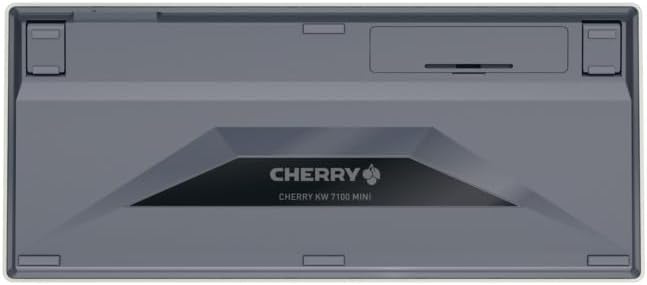
Figure 2: Underside of the keyboard with the battery compartment.
3.2. Σύνδεση του πληκτρολογίου
The Cherry KW 7100 Mini supports three connection methods: Bluetooth, 2.4 GHz Wireless, and Wired USB-C.
3.2.1. Σύνδεση Bluetooth (Έως 3 συσκευές)
- Ενεργοποιήστε το πληκτρολόγιο χρησιμοποιώντας το διακόπτη λειτουργίας που βρίσκεται στο πλάι.
- Press and hold one of the Bluetooth channel keys (F1, F2, or F3) for 3-5 seconds until the corresponding LED indicator blinks rapidly. This indicates pairing mode.
- On your device (laptop, smartphone, tablet), navigate to Bluetooth settings and search for available devices.
- Select "Cherry KW 7100" from the list to pair. The LED will stop blinking and remain solid for a few seconds upon successful connection.
- Repeat for up to two additional devices using the other Bluetooth channel keys (F1, F2, or F3).
3.2.2. Ασύρματη σύνδεση 2.4 GHz
- Locate the 2.4 GHz wireless nano receiver, typically stored magnetically in a slot on the underside of the keyboard.
- Insert the nano receiver into an available USB-A port on your computer.
- Turn on the keyboard using the power switch. The keyboard should automatically connect to the receiver.
3.2.3. Ενσύρματη σύνδεση USB-C
- Connect one end of the provided USB-C cable to the USB-C port on the keyboard.
- Συνδέστε το άλλο άκρο του καλωδίου USB-C σε μια διαθέσιμη θύρα USB-A στον υπολογιστή σας.
- The keyboard will function as a wired keyboard.
Video 1: Demonstrating the setup and typing experience of the Cherry KW 7100 Mini Keyboard.
4. Χειρισμός του πληκτρολογίου
4.1. Εναλλαγή μεταξύ συνδεδεμένων συσκευών
To switch between paired Bluetooth devices, simply press the corresponding Bluetooth channel key (F1, F2, or F3) that your device is paired to. The keyboard will automatically connect to the selected device.
4.2. Function Keys (FN)
The keyboard features a dedicated FN key, typically located near the right Shift key. This key, in combination with other keys, activates secondary functions such as media controls, screen brightness, and other system commands. Refer to the keycap legends for specific FN key combinations.
4.3. Δείκτες LED
LED indicators on the keyboard provide information about its status:
- Bluetooth Channel LEDs (F1, F2, F3): Indicate the currently active Bluetooth connection or pairing mode.
- LED Caps Lock: Ανάβει όταν είναι ενεργό το Caps Lock.
- LED κατάστασης μπαταρίας: Υποδεικνύει χαμηλό επίπεδο μπαταρίας.
4.4. Ρυθμιζόμενα πόδια
The keyboard is equipped with stable, fold-out feet on the underside. These allow you to adjust the typing angle for improved ergonomics and comfort.
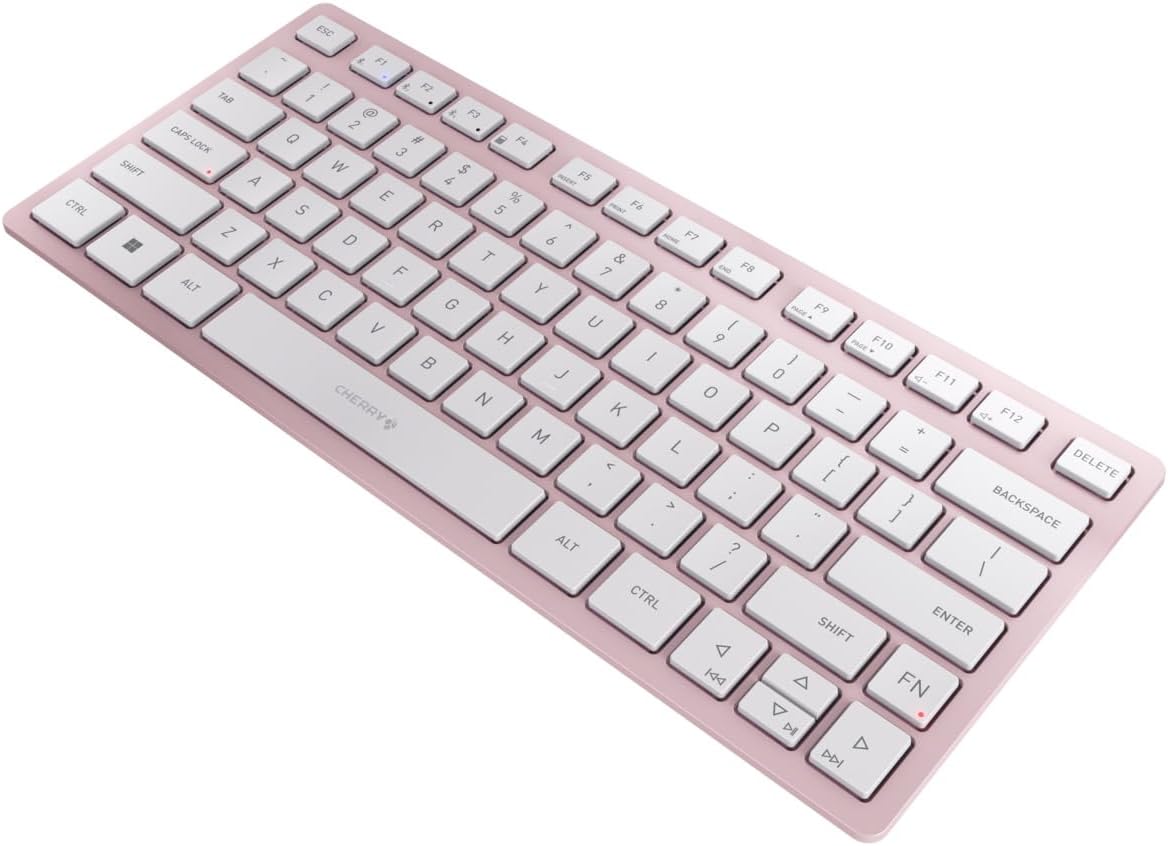
Σχήμα 3: Γωνιακό view of the keyboard, highlighting its slim profile.

Εικόνα 4: Πλευρά view showing the adjustable feet extended for an ergonomic typing angle.
5. Συντήρηση
5.1. Καθάρισμα
To clean your keyboard, gently wipe the keycaps and surface with a soft, lint-free cloth. For stubborn dirt, slightly dampΣκουπίστε το πανί με νερό ή με ένα ήπιο, μη λειαντικό διάλυμα καθαρισμού. Αποφύγετε την υπερβολική υγρασία και μην ψεκάζετε καθαριστικά απευθείας στο πληκτρολόγιο.
5.2. Αποθήκευση
When not in use, especially during travel, store the keyboard in its included carrying case to protect it from dust, scratches, and minor impacts.

Figure 5: The keyboard stored in its protective carrying case.
6. Αντιμετώπιση Προβλημάτων
6.1. Το πληκτρολόγιο δεν συνδέεται
- Βεβαιωθείτε ότι το πληκτρολόγιο είναι ενεργοποιημένο.
- Ελέγξτε τις μπαταρίες και αντικαταστήστε τις εάν χρειάζεται.
- For Bluetooth, ensure the correct channel (F1, F2, or F3) is selected and the keyboard is in pairing mode (blinking LED).
- For 2.4 GHz wireless, ensure the nano receiver is securely plugged into a USB-A port.
- Try connecting via the USB-C cable to rule out wireless issues.
- Επανεκκινήστε τη συσκευή σας και δοκιμάστε ξανά τη σύζευξη.
6.2. Τα πλήκτρα δεν ανταποκρίνονται
- Ελέγξτε τη σύνδεση όπως περιγράφεται παραπάνω.
- Βεβαιωθείτε ότι δεν έχουν σφηνωθεί υπολείμματα κάτω από τα κλειδιά.
- Εάν χρησιμοποιείτε ενσύρματη σύνδεση, δοκιμάστε μια διαφορετική θύρα USB ή καλώδιο.
6.3. Μικρή διάρκεια ζωής μπαταρίας
- Ensure you are using fresh, high-quality AAA batteries.
- Turn off the keyboard when not in use to conserve battery power.
7. Προδιαγραφές
| Χαρακτηριστικό | Προσδιορισμός |
|---|---|
| Όνομα μοντέλου | KW 7100 |
| Αριθμός μοντέλου είδους | JK-7100US-19 |
| Μάρκα | Κεράσι |
| Τεχνολογία Συνδεσιμότητας | Bluetooth 5.1 (3 channels), 2.4 GHz Wireless, USB-C Wired |
| Συμβατές Συσκευές | Φορητός υπολογιστής, smartphone, tablet |
| Περιγραφή πληκτρολογίου | Compact, Multi-Device |
| Βασικός Μηχανισμός | CHERRY SX Scissor Mechanism |
| Πηγή ισχύος | 2x μπαταρίες AAA |
| Κρυπτογράφηση | AES-128 |
| Διαστάσεις προϊόντος | 11.6 x 5.1 x 0.6 ίντσες |
| Βάρος αντικειμένου | 1.4 λίρες |
| Υλικό | Μέταλλο, Πλαστικό |
| Χρώμα | Cherry Blossom |
8. Εγγύηση και υποστήριξη
This product is covered by Cherry's standard manufacturer warranty. For detailed warranty information, technical support, or service inquiries, please visit the official Cherry webιστότοπο ή επικοινωνήστε απευθείας με την υποστήριξη πελατών τους.
Κατασκευαστής: Κεράσι
Webτοποθεσία: www.cherry.de


