Εισαγωγή
This manual provides essential information for setting up, operating, maintaining, and troubleshooting your Motorola Moto G84 5G smartphone. Please read this guide thoroughly to ensure proper use and to maximize your device's capabilities.
Ρύθμιση
1. Αποσυσκευασία και αρχική επιθεώρηση
Αφαιρέστε προσεκτικά όλα τα αντικείμενα από τη συσκευασία. Το κουτί θα πρέπει να περιέχει:
- Έξυπνο τηλέφωνο Motorola Moto G84 5G
- Καλώδιο USB
- Θήκη τηλεφώνου
- Εργαλείο εξαγωγής SIM
Ελέγξτε τη συσκευή για τυχόν φυσικές ζημιές πριν συνεχίσετε.
2. Εγκατάσταση κάρτας SIM
The Moto G84 5G supports Dual SIM functionality using Nano SIM cards.
- Εντοπίστε την υποδοχή της κάρτας SIM στο πλάι της συσκευής σας.
- Insert the SIM eject tool into the small hole on the SIM tray. Press firmly until the tray pops out.
- Τοποθετήστε την/τις κάρτα/ές Nano SIM στις καθορισμένες υποδοχές στο συρτάρι, φροντίζοντας οι χρυσές επαφές να είναι στραμμένες προς τα κάτω.
- Σπρώξτε προσεκτικά τη θήκη της κάρτας SIM πίσω στο τηλέφωνο μέχρι να ασφαλίσει στη θέση της.

Εικόνα 1: Πλευρά view of the Motorola Moto G84 5G, illustrating the location of the SIM card tray for installation.
3. Αρχική ενεργοποίηση
Press and hold the Power button located on the side of the device until the Motorola logo appears. Follow the on-screen prompts to complete the initial setup, including language selection, Wi-Fi connection, and Google account setup.

Εικόνα 2: Πλευρά view of the Motorola Moto G84 5G, highlighting the power and volume buttons for device control.
4. Φόρτιση της Συσκευής
Before first use, it is recommended to fully charge your device. The Moto G84 5G features a 5000 mAh battery and supports 30W TurboPower charging.
- Συνδέστε το καλώδιο USB στη θύρα USB-C στο κάτω μέρος του τηλεφώνου σας.
- Connect the other end of the USB cable to a compatible power adapter (sold separately) and plug it into a power outlet.
- Η ένδειξη φόρτισης θα εμφανιστεί στην οθόνη.
Οδηγίες Λειτουργίας
1. Επίδειξη
The Moto G84 5G features a 6.55-inch pOLED FHD+ display with a 120 Hz refresh rate, offering vibrant colors and smooth scrolling.
- Πλοήγηση με οθόνη αφής: Interact with the device using touch gestures such as tap, swipe, pinch-to-zoom.
- Ρύθμιση φωτεινότητας: Adjust screen brightness from the Quick Settings panel or Display settings.
- Ρυθμός ανανέωσης: The 120 Hz refresh rate provides a fluid visual experience. This can be adjusted in display settings to optimize battery life.
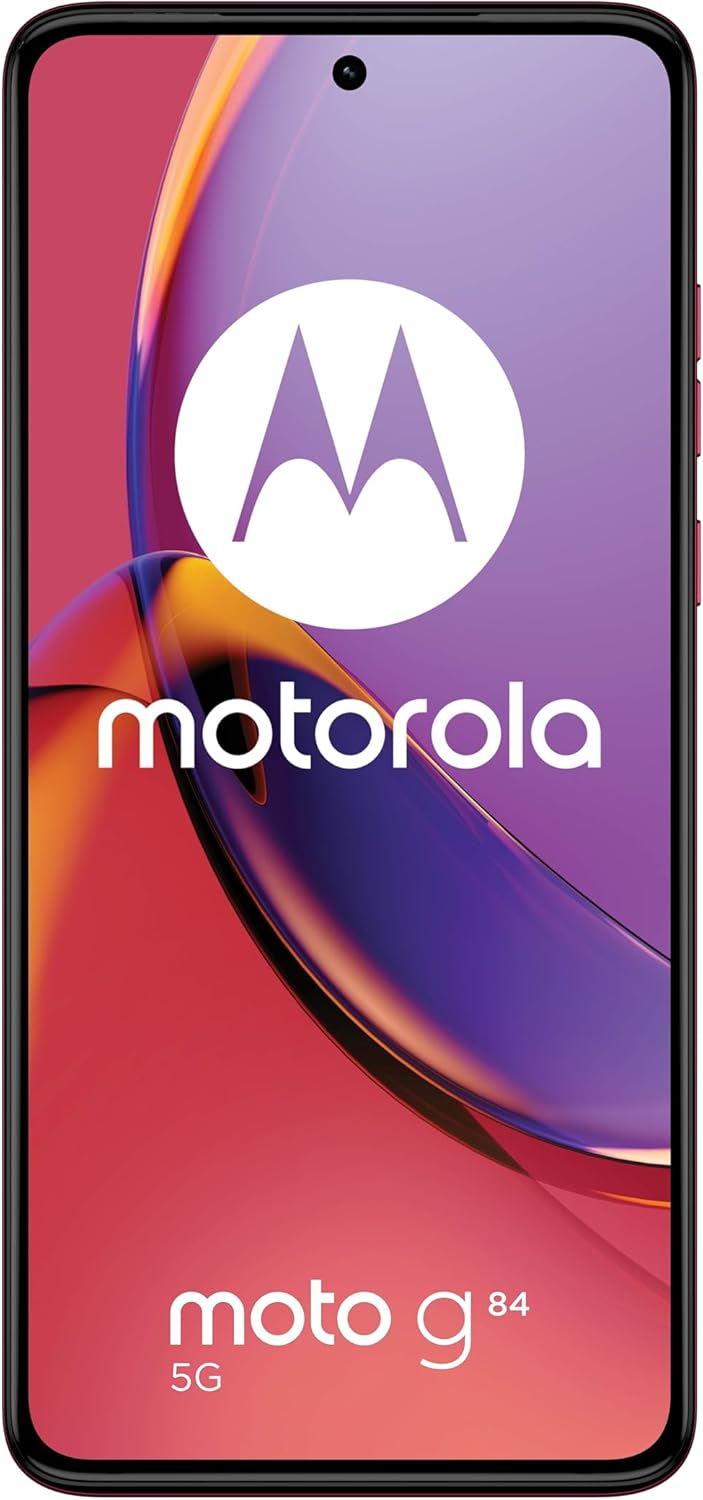
Εικόνα 3: Εμπρός view του Motorola Moto G84 5G, επίδειξηasing its vibrant pOLED display.
2. Κάμερα
The device is equipped with a 50 MP Ultra Pixel main camera with Optical Image Stabilization (OIS) and an 8 MP ultra-wide/macro lens on the rear, and a front-facing camera for selfies.
- Φωτογραφίζω: Ανοίξτε την εφαρμογή Κάμερα, καδράρετε τη λήψη σας και πατήστε το κουμπί λήψης.
- Εγγραφή βίντεο: Switch to video mode in the Camera app. The device supports 4K video recording at 30 fps.
- Λειτουργίες κάμερας: Explore various modes such as Portrait, Night Vision, Panorama, and Pro mode for advanced controls.

Εικόνα 4: Πίσω view of the Motorola Moto G84 5G, highlighting the 50MP Ultra Pixel camera system.
3. ήχου
Experience immersive audio with Dolby Atmos, Motorola Spatial Audio, and Hi-Res Audio support through stereo speakers.
- Έλεγχος έντασης ήχου: Use the volume buttons on the side of the device or the on-screen volume slider.
- Ρυθμίσεις ήχου: Προσαρμόστε τον επαγγελματία ήχουfiles and Dolby Atmos settings in the Sound & Vibration menu.
4. Συνδεσιμότητα
The Moto G84 5G offers comprehensive connectivity options.
- Δίκτυο 5G: Connect to 5G networks for faster data speeds (requires 5G service plan).
- Wi-Fi: Connect to wireless networks via Wi-Fi settings.
- Bluetooth: Σύζευξη με συσκευές Bluetooth, όπως ακουστικά ή ηχεία.
- NFC: Χρησιμοποιήστε την Επικοινωνία Εγγύς Πεδίου για ανέπαφες πληρωμές και γρήγορη αντιστοίχιση με συμβατές συσκευές.
5. Biometric Features
The device supports biometric identification for enhanced security.
- Αισθητήρας δακτυλικών αποτυπωμάτων: Καταχωρίστε τα δακτυλικά σας αποτυπώματα στις ρυθμίσεις ασφαλείας για γρήγορο και ασφαλές ξεκλείδωμα.
- Ξεκλείδωμα προσώπου: Ρυθμίστε την αναγνώριση προσώπου για βολικό ξεκλείδωμα.
6. Λογισμικό
The Moto G84 5G runs on Android 13, offering a clean user interface and access to a wide range of applications via the Google Play Store.
- Ενημερώσεις συστήματος: Ελέγχετε και εγκαθιστάτε τακτικά ενημερώσεις συστήματος για να διασφαλίζετε βέλτιστη απόδοση και ασφάλεια.
- Διαχείριση εφαρμογών: Install, uninstall, and manage applications through the Settings menu or Google Play Store.
Συντήρηση
1. Καθαρισμός της συσκευής σας
To keep your phone clean, gently wipe the screen and body with a soft, lint-free cloth. Avoid using harsh chemicals or abrasive materials.
2. Ανθεκτικότητα στο νερό
The Moto G84 5G has an IP52 rating, meaning it is resistant to dust and splashing water. It is not waterproof. Avoid submerging the device in water or exposing it to high-pressure water jets.
Αντιμετώπιση προβλημάτων
Κοινά Θέματα και Λύσεις
- Η συσκευή δεν ενεργοποιείται: Ensure the battery is charged. Connect the phone to a charger and wait a few minutes before attempting to power it on again.
- Ζητήματα φόρτισης: Check the USB cable and charger for damage. Try a different cable or power outlet. Ensure the charging port is clean and free of debris.
- Αδύναμο σήμα δικτύου: Move to an area with better network coverage. Check if your SIM card is properly inserted. Restart the device.
- Εφαρμογές που παρουσιάζουν σφάλματα ή παγώνουν: Close and reopen the app. Clear the app's cache and data in Settings > Apps. If the issue persists, uninstall and reinstall the app.
- Η οθόνη δεν ανταποκρίνεται: Perform a forced restart by holding the Power button for approximately 10-15 seconds.
Προδιαγραφές
| Χαρακτηριστικό | Προσδιορισμός |
|---|---|
| Όνομα μοντέλου | Moto G84 5G |
| Λειτουργικό σύστημα | Android 13 |
| Επεξεργαστής | Snapdragon 695 (up to 2.2 GHz) |
| ΕΜΒΟΛΟ | 12 GB |
| Εσωτερική αποθήκευση | 256 GB |
| Επίδειξη | 6.55-inch pOLED FHD+ (1080x2400), 120 Hz |
| Πίσω κάμερα | 50 MP Ultra Pixel (OIS) + 8 MP Ultra-wide/Macro |
| Μπροστινή κάμερα | 1 |
| Χωρητικότητα μπαταρίας | 5000 mAh |
| Φόρτιση | 30W TurboPower |
| Συνδεσιμότητα | 5G, Wi-Fi, Bluetooth, NFC |
| Τύπος κάρτας SIM | Διπλή Nano SIM |
| Αντοχή στο νερό | IP52 (ανθεκτικό στο πιτσίλισμα) |
| Διαστάσεις | 16 x 7.4 x 0.8 εκ |
| Βάρος | 160 γρ |
| Περιλαμβάνεται στο κουτί | USB Cable, Phone Case, SIM Eject Tool |
Εγγύηση και υποστήριξη
Πληροφορίες εγγύησης
Your Motorola Moto G84 5G comes with a 2-year manufacturer's warranty. Please retain your proof of purchase for warranty claims. The warranty covers manufacturing defects but typically excludes damage caused by misuse, accidents, or unauthorized repairs.
Υποστήριξη Πελατών
For further assistance, technical support, or warranty service, please visit the official Motorola support website or contact their customer service. Refer to the documentation included with your device for specific contact details in your region.
Σημαντικές πληροφορίες για την ασφάλεια
Always follow basic safety precautions when using your phone to reduce the risk of fire, electric shock, and injury. Do not disassemble the device. Use only approved accessories. Avoid extreme temperatures. Dispose of the device and battery responsibly according to local regulations.


