1. Εισαγωγή
This manual provides detailed instructions for the setup, operation, maintenance, and troubleshooting of your Xprinter XP-233B Thermal Barcode Printer. The XP-233B is designed for efficient thermal printing of barcodes and labels, utilizing heat-sensitive paper without the need for ink or ribbons.
2. Οδηγίες ασφαλείας
- Ensure the printer is connected to a power source with the correct voltagόπως καθορίζεται στον προσαρμογέα ρεύματος.
- Μην εκθέτετε τον εκτυπωτή σε νερό ή υπερβολική υγρασία.
- Αποφύγετε την τοποθέτηση του εκτυπωτή σε άμεσο ηλιακό φως ή κοντά σε πηγές θερμότητας.
- Keep the printer away from dust and debris to prevent damage to internal components.
- Do not attempt to disassemble or repair the printer yourself. Contact qualified service personnel for assistance.
- Use only recommended thermal label rolls to ensure optimal print quality and printer longevity.
3. Περιεχόμενα συσκευασίας
Βεβαιωθείτε ότι όλα τα στοιχεία υπάρχουν στη συσκευασία:
- Xprinter XP-233B Thermal Barcode Printer
- Μετασχηματιστής ρεύματος
- Καλώδιο USB
- Οδηγός γρήγορης εκκίνησης (εάν περιλαμβάνεται)
- Driver CD (if included, drivers can also be downloaded online)
4. Το προϊόν τελείωσεview
Familiarize yourself with the main components of the XP-233B printer.

Εικόνα 4.1: Μπροστινή πλευρά view of the Xprinter XP-233B, showing the power switch, control panel, and label output slot.

Εικόνα 4.2: Οπισθεν view of the Xprinter XP-233B, highlighting the USB, Ethernet, and power input ports.
Λειτουργίες του πίνακα ελέγχου:
- Κουμπί FEED: Press to feed a blank label. Hold to perform a self-test print.
- Κουμπί PAUSE: Pauses or resumes printing.
- Κουμπί ΑΚΥΡΩΣΗΣ: Ακυρώνει την τρέχουσα εργασία εκτύπωσης.
- Ενδείξεις LED: Display printer status (e.g., Power, Error, Paper Out). Refer to troubleshooting for specific light patterns.
5. Ρύθμιση
5.1 Σύνδεση του εκτυπωτή
- Connect the power adapter to the printer's power input port and then plug it into a wall outlet.
- Connect the USB cable from the printer to your computer. For Ethernet connectivity, connect an Ethernet cable from the printer to your network router or switch.
- Ενεργοποιήστε τον εκτυπωτή χρησιμοποιώντας τον διακόπτη λειτουργίας που βρίσκεται στο πλάι.
5.2 Φόρτωση ετικετών
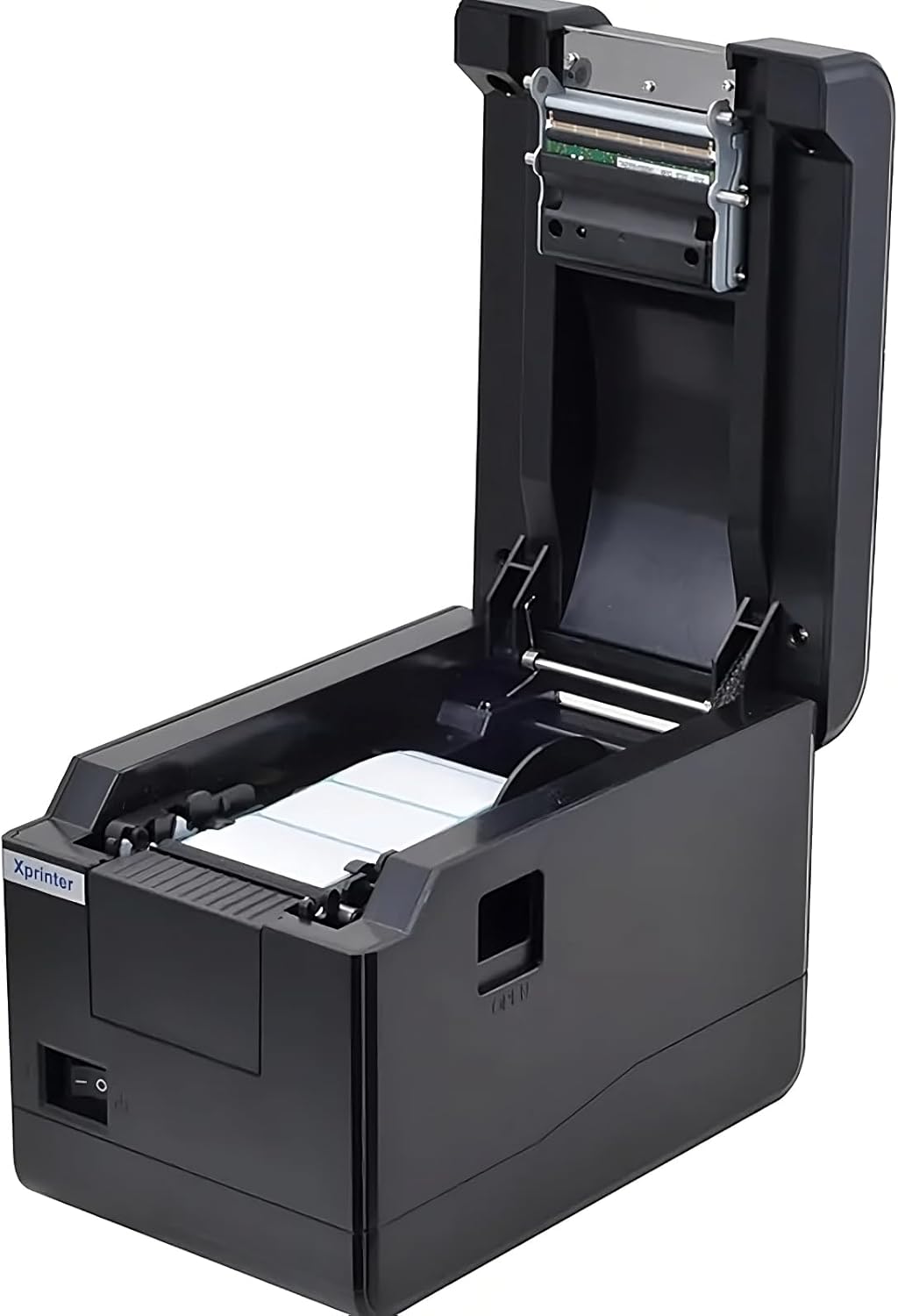
Εικόνα 5.1: Από πάνω προς τα κάτω view of the Xprinter XP-233B with the cover open, illustrating the label loading area.
- Press the 'OPEN' button on the side of the printer to open the top cover.
- Place the thermal label roll into the label compartment, ensuring the labels feed from the bottom of the roll and the printable side faces upwards.
- Adjust the movable label guides to fit the width of your label roll snugly, without pinching the labels.
- Pull a few labels past the print head and out through the front slot.
- Κλείστε καλά το πάνω κάλυμμα μέχρι να ασφαλίσει στη θέση του.
- The printer will automatically calibrate and feed a few labels to detect the label gap.
5.3 Εγκατάσταση προγράμματος οδήγησης
Install the printer drivers on your computer. Drivers can typically be found on the included CD or downloaded from the official Xprinter webΑκολουθήστε τις οδηγίες στην οθόνη για την εγκατάσταση.
6. Λειτουργία του εκτυπωτή
6.1 Βασική εκτύπωση
Once the printer is set up and drivers are installed, you can print labels from your application (e.g., label design software, shipping software). Ensure the correct printer model (Xprinter XP-233B) is selected in your application's print settings.
6.2 Αυτοδοκιμαστική εκτύπωση
To perform a self-test print:
- Ensure the printer is powered on and labels are loaded.
- Πατήστε και κρατήστε πατημένο το ΤΡΟΦΗ button for approximately 3-5 seconds until the printer starts printing.
- The self-test print will display printer information and a test pattern, confirming basic functionality.
7. Συντήρηση
7.1 Καθαρισμός της κεφαλής εκτύπωσης
Regular cleaning of the print head ensures optimal print quality and extends the printer's lifespan. Clean the print head when print quality degrades or after every few rolls of labels.
- Απενεργοποιήστε τον εκτυπωτή και αποσυνδέστε το καλώδιο τροφοδοσίας.
- Ανοίξτε το επάνω κάλυμμα.
- Gently wipe the print head surface with a cotton swab lightly dampened with isopropyl alcohol (70% or higher).
- Allow the print head to dry completely (approximately 2-3 minutes) before closing the cover and turning on the printer.
7.2 Καθαρισμός του εξωτερικού
Σκουπίστε το εξωτερικό του εκτυπωτή με ένα μαλακό,amp πανί. Μην χρησιμοποιείτε σκληρά χημικά ή λειαντικά καθαριστικά.
8. Αντιμετώπιση Προβλημάτων
| Πρόβλημα | Πιθανή αιτία | Διάλυμα |
|---|---|---|
| Ο εκτυπωτής δεν ενεργοποιείται | Power cord loose; power outlet faulty; power adapter damaged. | Check power connections; try a different outlet; replace power adapter if necessary. |
| No labels feeding | Labels incorrectly loaded; paper out; label guides too tight. | Reload labels correctly; replace label roll; adjust label guides. |
| Κακή ποιότητα εκτύπωσης (ξεθωριασμένες γραμμές, ξεθωριασμένες εκτυπώσεις) | Print head dirty; low-quality labels; print head damaged. | Clean print head (refer to Section 7.1); use recommended thermal labels; contact support if print head is damaged. |
| Printer not responding to print commands | Incorrect driver installed; USB/Ethernet cable loose; printer paused. | Reinstall drivers; check cable connections; press ΠΑΥΣΗ κουμπί για συνέχιση. |
| Παραλείπονται ή δεν ευθυγραμμίζονται σωστά οι ετικέτες | Incorrect label sensor calibration; label guides not set correctly. | Perform a self-test print to recalibrate; adjust label guides. |
9. Προδιαγραφές
| Χαρακτηριστικό | Προσδιορισμός |
|---|---|
| Όνομα μοντέλου | Xprinter - Thermal barcode printer |
| Αριθμός μοντέλου είδους | XP-233B |
| Τεχνολογία Εκτυπωτή | Θερμικός |
| Τεχνολογία Συνδεσιμότητας | Ethernet, USB |
| Έξοδος εκτυπωτή | Μονόχρωμος |
| Έντυπα Μέσα | Ετικέτες |
| Μέγιστη χωρητικότητα φύλλου | 100 (typical for roll capacity, actual sheet capacity depends on label size) |
| Διαστάσεις προϊόντος (Β x Π x Υ) | 26.8 x 18 x 17.2 εκ |
| Βάρος αντικειμένου | 1.2 κιλά |
| Χρώμα | Μαύρος |
10. Πληροφορίες εγγύησης
Xprinter products typically come with a limited manufacturer's warranty. Please refer to the warranty card included with your product or visit the official Xprinter website for specific warranty terms and conditions, including coverage duration and service procedures. Keep your purchase receipt as proof of purchase for warranty claims.
11. Υποστήριξη πελατών
For technical assistance, driver downloads, or further inquiries regarding your Xprinter XP-233B, please visit the official Xprinter support website or contact their customer service department. Contact information can usually be found on the Xprinter webιστότοπο ή στην τεκμηρίωση που παρέχεται με τον εκτυπωτή σας.


