1. Εισαγωγή
This manual provides detailed instructions for the assembly, installation, operation, and maintenance of your AMANSON H07 ATX Mid Tower PC Case. Please read this manual thoroughly before beginning installation to ensure proper setup and safe operation. Keep this manual for future reference.

Figure 1.1: AMANSON H07 ATX Mid Tower PC Case with illuminated internal components.
2. Πληροφορίες Ασφάλειας
- Αποσυνδέετε πάντα την παροχή ρεύματος από την πρίζα πριν από οποιαδήποτε εγκατάσταση ή συντήρηση στο εσωτερικό του κουτιού του υπολογιστή.
- Χειριστείτε όλα τα εξαρτήματα με προσοχή για να αποφύγετε ζημιές.
- Να φοράτε αντιστατικό λουράκι καρπού για να αποτρέψετε ζημιά από ηλεκτροστατική εκκένωση (ESD) σε ευαίσθητα ηλεκτρονικά εξαρτήματα.
- Κρατήστε τα μικρά μέρη και τα υλικά συσκευασίας μακριά από παιδιά.
- Βεβαιωθείτε ότι υπάρχει σωστός αερισμός γύρω από το περίβλημα του υπολογιστή για να αποτρέψετε την υπερθέρμανση.
3. Περιεχόμενα συσκευασίας
Βεβαιωθείτε ότι όλα τα στοιχεία υπάρχουν στη συσκευασία:
- AMANSON H07 ATX Mid Tower PC Case
- Κουτί αξεσουάρ (βίδες, στηρίγματα, δεματικά καλωδίων κ.λπ.)
- Εγχειρίδιο χρήστη (αυτό το έγγραφο)
4. Component Overview
The AMANSON H07 PC case features a panoramic design with tempered glass panels for full visibility of your internal components. It supports various motherboard sizes and extensive cooling configurations.

Figure 4.1: Top I/O Panel with power button, USB 3.0, USB 2.0, and audio ports.
The top I/O panel includes:
- Κουμπί λειτουργίας
- Κουμπί επαναφοράς
- 2 x θύρες USB 2.0
- 1 x θύρα USB 3.0
- Υποδοχές εισόδου/εξόδου ήχου
5. Ρύθμιση & Εγκατάσταση
5.1. Προετοιμασία της υπόθεσης
The AMANSON H07 features tool-less hinged tempered glass side panels for easy access. Gently open the side panel by pulling it from the rear edge. The panels can also be removed by lifting them off their hinges for full access during installation.

Figure 5.1: Hinged tempered glass side panel for easy access.
5.2. Εγκατάσταση μητρικής πλακέτας
The H07 supports E-ATX, ATX, Micro-ATX, and ITX motherboards. Install the necessary standoffs for your motherboard form factor. Carefully align your motherboard with the standoffs and I/O shield, then secure it with screws.
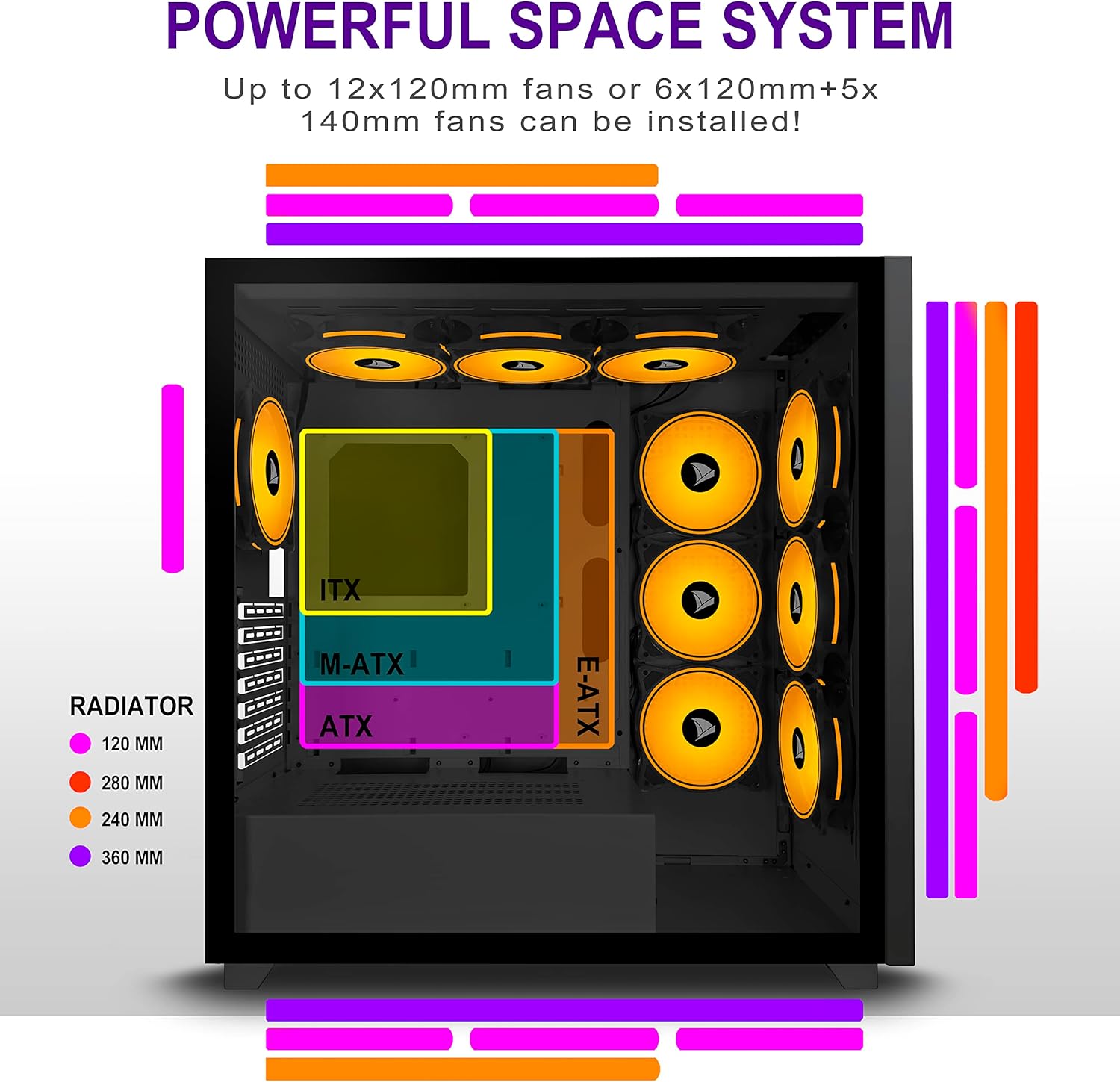
Figure 5.2: Motherboard and cooling component placement options.
5.3. Εγκατάσταση τροφοδοτικού
Install your power supply unit (PSU) into the dedicated compartment at the bottom rear of the case. Secure it with screws from the rear of the case.
5.4. Εγκατάσταση συσκευής αποθήκευσης
The case provides multiple mounting points for storage devices. Install your 3.5" HDDs and 2.5" SSDs into the designated trays and mounting locations. Refer to the case diagram for specific locations.

Figure 5.3: Storage drive mounting options for HDDs and SSDs.
5.5. Εγκατάσταση κάρτας επέκτασης (GPU)
Remove the necessary PCI-E slot covers from the rear of the case. Insert your graphics card or other expansion cards into the motherboard's PCI-E slots and secure them with screws.
5.6. Διαχείριση καλωδίων
Utilize the cable routing cutouts and tie-down points behind the motherboard tray to manage cables. This improves airflow and maintains a clean aesthetic.
6. Οδηγίες λειτουργίας
6.1. Ενεργοποίηση/Απενεργοποίηση
Press the power button located on the top I/O panel to turn on your PC. To shut down, use the operating system's shutdown function or press and hold the power button for several seconds.
6.2. Using Front I/O Ports
Connect USB devices to the USB 2.0 or USB 3.0 ports. Use the audio jacks for headphones, microphones, or speakers.
7. Συντήρηση
7.1. Καθάρισμα
Καθαρίζετε τακτικά το εξωτερικό της θήκης με ένα μαλακό,amp cloth. For internal cleaning, use compressed air to remove dust from fans and components. Ensure the PC is powered off and unplugged before cleaning.
7.2. Φίλτρα σκόνης
The AMANSON H07 may include removable dust filters. Clean these filters periodically to maintain optimal airflow and cooling performance.
8. Αντιμετώπιση Προβλημάτων
- Ο υπολογιστής δεν ενεργοποιείται: Check all power connections, including the PSU to the wall, the PSU to the motherboard, and the front panel power switch cable to the motherboard.
- Overheating issues: Ensure all fans are properly installed and functioning. Verify that dust filters are clean and not obstructing airflow. Check thermal paste application on CPU cooler.
- USB ports not working: Confirm that the front panel USB cables are correctly connected to the motherboard headers.
- Audio jacks not working: Verify that the front panel audio cable is correctly connected to the motherboard's audio header.
9. Προδιαγραφές
Below are the technical specifications for the AMANSON H07 PC Case:
| Χαρακτηριστικό | Λεπτομέρεια |
|---|---|
| Μοντέλο | H07 |
| Τύπος υπόθεσης | Mid Tower |
| Συμβατότητα μητρικής πλακέτας | E-ATX, ATX, Micro ATX, ITX |
| Υλικό | Tempered Glass |
| Διαστάσεις προϊόντος (ΜxΠxΥ) | 19.69 x 13.78 x 19.69 ίντσες (500 x 350 x 500 mm) |
| Βάρος αντικειμένου | 24.2 λίρες |
| Αριθμός θυρών USB 2.0 | 2 |
| Αριθμός θυρών USB 3.0 | 1 |
| Αριθμός υποδοχών επέκτασης | 8 |
| Μέθοδος Ψύξης | Αέρας |
| Τύπος τοποθέτησης τροφοδοτικού | Κάτω βάση |

Figure 9.1: AMANSON H07 PC Case dimensions (520mm height, 510mm length, 250mm width).
10. Πληροφορίες εγγύησης
Please refer to the product packaging or the official AMANSON webιστότοπος για συγκεκριμένους όρους και προϋποθέσεις εγγύησης. Κρατήστε την απόδειξη αγοράς για τυχόν αξιώσεις εγγύησης.
11. Υποστήριξη
For technical assistance or customer support, please visit the official AMANSON website or contact their customer service department. Contact details can typically be found on the product packaging or the brand's webτοποθεσία.


