1. Εισαγωγή
This user manual provides comprehensive instructions for the installation, operation, and maintenance of the Axis Communications AXIS Q6225-LE PTZ Camera. Please read this manual thoroughly before using the product to ensure proper functionality and safety. This camera is designed for robust outdoor surveillance in challenging conditions.
2. Πληροφορίες Ασφάλειας
Τηρείτε τις ακόλουθες προφυλάξεις ασφαλείας για να αποτρέψετε ζημιά στο προϊόν ή τραυματισμό προσωπικού:
- Εγκατάσταση: Installation must be performed by qualified personnel in accordance with all local and national electrical and building codes.
- Τροφοδοτικό: Use only the specified power supply (60 watts) for this device. Ensure the power source is stable and meets the camera's requirements.
- Περιβάλλο: The camera is designed for outdoor use. However, avoid exposing it to extreme conditions beyond its specified operating range.
- Καθάρισμα: Αποσυνδέστε την παροχή ρεύματος πριν από τον καθαρισμό. Χρησιμοποιήστε ένα μαλακό, στεγνό πανί. Μην χρησιμοποιείτε υγρά καθαριστικά ή καθαριστικά σε μορφή αεροζόλ.
- Τροποποιήσεις: Do not attempt to modify or disassemble the camera. This may void the warranty and pose safety risks.
3. Περιεχόμενα συσκευασίας
Βεβαιωθείτε ότι όλα τα στοιχεία υπάρχουν στη συσκευασία:
- Κάμερα AXIS Q6225-LE PTZ
- Οδηγός εγκατάστασης
- Βάση στήριξης και υλικό
- Network Cable Connector
- Documentation and Software CD (if applicable)
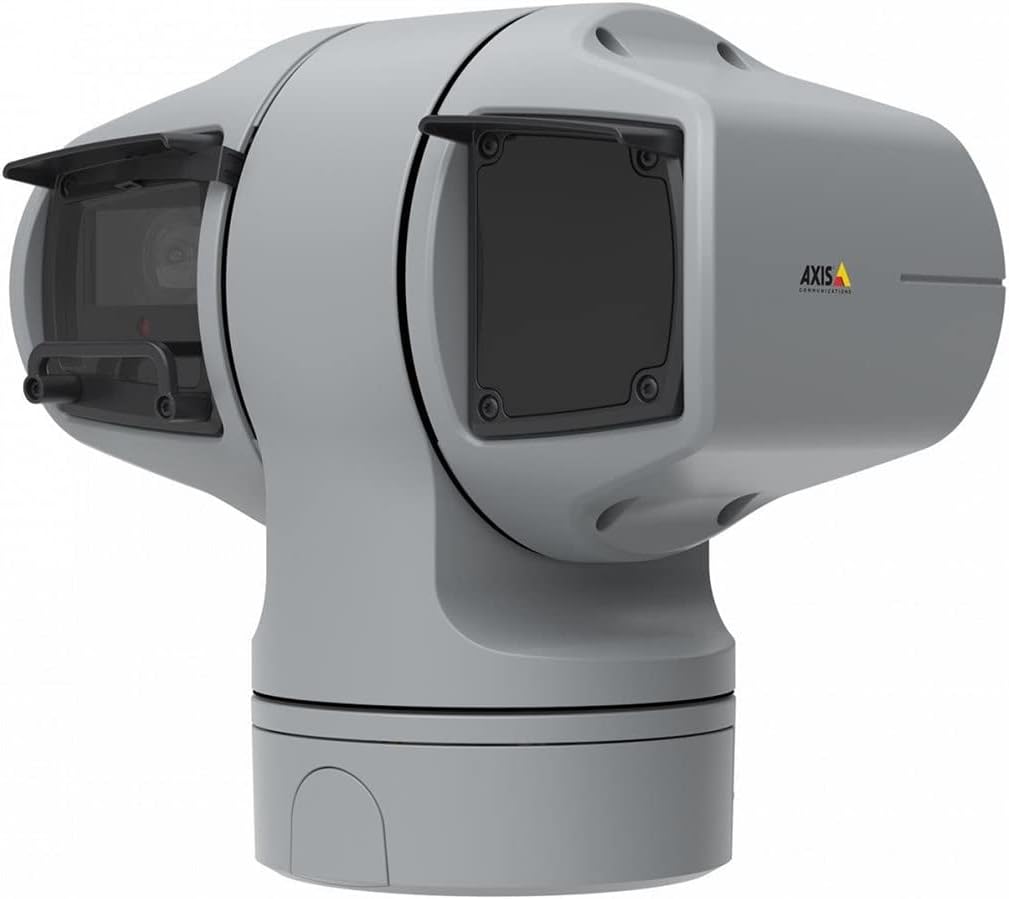
Εικόνα 1: AXIS Q6225-LE PTZ Camera. This image displays the grey-colored PTZ camera unit, highlighting its robust housing and integrated lens system, designed for outdoor surveillance.
4. Ρύθμιση και εγκατάσταση
4.1 Τοποθέτηση της κάμερας
The AXIS Q6225-LE is designed for wall mount installation. Ensure the mounting surface is strong enough to support the camera's weight and withstand environmental conditions.
- Επιλέξτε μια κατάλληλη θέση τοποθέτησης που παρέχει το επιθυμητό πεδίο view και βρίσκεται σε κοντινή απόσταση από συνδέσεις ρεύματος και δικτύου.
- Use the provided mounting template to mark drill holes on the wall.
- Drill pilot holes and secure the mounting bracket using appropriate screws and anchors.
- Συνδέστε την κάμερα στη βάση στήριξης, βεβαιώνοντας ότι είναι σταθερά ασφαλισμένη στη θέση της.
4.2 Σύνδεση ρεύματος και δικτύου
Connect the camera to power and network as follows:
- Εξουσία: Connect the power cable to a 60-watt power source. Ensure the connection is secure and weatherproof.
- Δίκτυο: Connect an Ethernet cable from your network switch or router to the camera's network port. The camera supports Wi-Fi for wireless communication. Refer to the network configuration section for wireless setup.
4.3 Αρχική διαμόρφωση
Μετά την εγκατάσταση και τη σύνδεση, αποκτήστε πρόσβαση στην κάμερα web interface for initial configuration:
- Ανοίξτε α web browser on a computer connected to the same network as the camera.
- Enter the camera's IP address in the browser's address bar. If the IP address is unknown, use the AXIS IP Utility tool to discover it.
- Follow the on-screen prompts to set up a new password for the administrator account.
- Configure basic network settings, date/time, and video stream settings.
5. Χειρισμός της κάμερας
5.1 Έλεγχος μετατόπισης, κλίσης και ζουμ (PTZ)
The AXIS Q6225-LE camera features full PTZ capabilities, allowing remote adjustment of its viewing angle and zoom level. Control is typically performed via the camera's web interface or compatible video management software (VMS).
- Τηγάνι: Rotate the camera horizontally to cover a wider area.
- Κλίση: Adjust the camera vertically to view objects at different heights.
- Οπτικό ζουμ: Use the optical zoom feature to magnify distant objects without loss of image quality.
5.2 Ανίχνευση κίνησης και ειδοποιήσεις
The camera supports motion-only alerts. Configure motion detection zones and sensitivity settings in the web interface to trigger recordings or notifications when movement is detected.
5.3 Υπέρυθρος (IR) φωτισμός
Equipped with infrared light sources, the camera provides clear video surveillance in low-light or complete darkness. IR illumination activates automatically or can be manually controlled.
6. Συντήρηση
6.1 Καθαρισμός
Regular cleaning of the camera lens and housing is recommended to ensure optimal performance, especially in dusty or harsh environments.
- Gently wipe the lens with a soft, lint-free cloth. For stubborn dirt, use a lens cleaning solution specifically designed for optical surfaces.
- Καθαρίστε το περίβλημα της κάμερας με σμάλτοamp πανί. Αποφύγετε τα λειαντικά καθαριστικά ή τους διαλύτες.
6.2 ενημερώσεις υλικολογισμικού
Ελέγχετε περιοδικά τις επικοινωνίες του Axis website for firmware updates. Keeping the camera's firmware up-to-date ensures access to the latest features, security enhancements, and bug fixes.
7. Αντιμετώπιση Προβλημάτων
This section addresses common issues you might encounter with your AXIS Q6225-LE camera.
| Πρόβλημα | Πιθανή αιτία | Διάλυμα |
|---|---|---|
| Δεν υπάρχει ροή βίντεο | Power disconnected, network issue, incorrect IP address. | Check power connection. Verify network cable or Wi-Fi connection. Confirm camera's IP address. |
| Κακή ποιότητα εικόνας | Dirty lens, improper focus, low light conditions. | Clean the lens. Adjust focus via web interface. Ensure adequate lighting or verify IR functionality. |
| PTZ controls unresponsive | Network latency, software glitch, motor issue. | Check network connection. Restart the camera. If problem persists, contact support. |
8. Προδιαγραφές
| Χαρακτηριστικό | Λεπτομέρεια |
|---|---|
| Αριθμός μοντέλου | 02316-002 |
| Μάρκα | Axis Communications |
| Τύπος τοποθέτησης | Βάση τοίχου |
| Χρώμα | Λευκό |
| Υλικό | Μέταλλο |
| Wattage | 60 watt |
| Τεχνολογία Συνδεσιμότητας | Ασύρματο, Wi-Fi |
| Εσωτερική/Εξωτερική χρήση | Υπαίθριος |
| Μέθοδος Ελέγχου | Μακρινός |
| Τεχνολογία αισθητήρα φωτογραφίας | CMOS |
| Μορφή λήψης βίντεο | MPEG-4 |
| Τύπος πηγής φωτός | Υπέρυθρες |
| Τύπος ειδοποίησης | Μόνο κίνηση |
| Τύπος ζουμ | Οπτικό ζουμ |
| Βάρος αντικειμένου | 0.01 κιλά (0.352 ουγκιές) |
| Συμπεριλαμβανόμενα εξαρτήματα | Κάμερα/Αξεσουάρ |
9. Εγγύηση και υποστήριξη
For warranty information and technical support, please refer to the official Axis Communications webιστότοπο ή επικοινωνήστε με τον εξουσιοδοτημένο αντιπρόσωπό σας. Κρατήστε την απόδειξη αγοράς σας ως απόδειξη αγοράς.
Διαδικτυακοί πόροι: www.axis.com


