1. Το προϊόν τελείωσεview
The ProtoArc K100-A is an ultra-slim wireless Bluetooth keyboard specifically designed for Mac devices. It features a full-size layout with a numeric keypad, responsive scissor-switch keys for quiet typing, and adjustable white LED backlighting. This keyboard supports connection to up to three devices simultaneously, allowing for seamless switching between your MacBook, iMac, iPad, or iPhone. Its built-in rechargeable battery ensures long-lasting use.

Image: The ProtoArc K100-A keyboard connected to a MacBook, iPad, and iPhone, showcasing την ικανότητά του για πολλαπλές συσκευές.
2. Περιεχόμενα συσκευασίας
- Πληκτρολόγιο Bluetooth ProtoArc K100-A με οπίσθιο φωτισμό
- Καλώδιο φόρτισης USB-C
- Εγχειρίδιο χρήστη (αυτό το έγγραφο)
3. Ξεκινώντας
3.1 Φόρτιση του πληκτρολογίου
Before first use, fully charge the keyboard. Connect the provided USB-C charging cable to the keyboard's Type-C port and the other end to a USB power source (e.g., computer USB port, USB wall adapter). A full charge takes approximately 4-5 hours. The built-in 1200mAh lithium-ion battery provides a standby time of 3-4 months.

Image: The keyboard's Type-C charging port with the charging cable inserted.
3.2 Ενεργοποίηση/Απενεργοποίηση
Locate the power switch on the side or back of the keyboard. Slide it to the "ON" position to power on the keyboard. Slide it to "OFF" when not in use to conserve battery.
4. Σύνδεση Bluetooth
The ProtoArc K100-A keyboard supports connection to three different devices via Bluetooth. Follow these steps to pair your devices:
- Βεβαιωθείτε ότι το πληκτρολόγιο είναι ενεργοποιημένο.
- Press and hold one of the Bluetooth channel keys (BT1, BT2, ή BT3) for 3-5 seconds until the corresponding indicator light flashes rapidly. This indicates the keyboard is in pairing mode.
- On your Mac device (MacBook, iMac, iPad, iPhone), go to Ρυθμίσεις συστήματος (ή Προτιμήσεις συστήματος) > Bluetooth.
- Ενεργοποιήστε το Bluetooth και αναζητήστε διαθέσιμες συσκευές.
- Επιλέξτε "ProtoArc K100-A" από τη λίστα συσκευών.
- Follow any on-screen prompts to complete the pairing process. The indicator light will stop flashing and remain solid for a few seconds, then turn off, indicating successful pairing.
- Repeat these steps for up to two additional devices using the other Bluetooth channel keys.

Image: The dedicated Bluetooth channel keys (BT1, BT2, BT3) on the keyboard.
4.1 Εναλλαγή μεταξύ συσκευών
To switch between paired devices, simply press the corresponding Bluetooth channel key (BT1, BT2, ή BT3) once. The keyboard will connect to the selected device within a few seconds.
5. Οδηγίες λειτουργίας
Έλεγχος οπίσθιου φωτισμού 5.1
The keyboard features soft white LED backlighting with three adjustable brightness levels (low, medium, high). To adjust the backlight brightness, press the backlight key (often indicated by a sun icon or similar) located on the top right of the keyboard. Pressing it repeatedly cycles through the brightness levels and turns the backlight off.

Image: The keyboard with its white adjustable backlight at different brightness levels.
5.2 Πλήκτρα συντόμευσης
The keyboard includes 12 shortcut keys for enhanced productivity on Mac devices. These keys provide quick access to functions such as brightness adjustment, mission control, media playback, volume control, and more. Refer to the key labels for specific functions.

Image: Detail of the keyboard's silent scissor-switch keys, designed for quiet and responsive typing.
6. Συντήρηση και Φροντίδα
- Keep the keyboard clean by wiping it with a soft, dry cloth. Avoid using harsh chemicals or abrasive materials.
- Μην εκθέτετε το πληκτρολόγιο σε ακραίες θερμοκρασίες, υγρασία ή άμεσο ηλιακό φως.
- Avoid spilling liquids on the keyboard. If a spill occurs, immediately power off the keyboard and allow it to dry completely before use.
- When not in use for extended periods, power off the keyboard to preserve battery life.
- The keyboard automatically enters sleep mode after 30 minutes of inactivity to save power. Press any key to wake it up.
7. Αντιμετώπιση Προβλημάτων
- Keyboard not connecting/disconnecting frequently:
- Βεβαιωθείτε ότι το πληκτρολόγιο είναι πλήρως φορτισμένο.
- Verify Bluetooth is enabled on your device and the keyboard is within range (up to 10 meters).
- Δοκιμάστε να επανασυνδέσετε το πληκτρολόγιο με τη συσκευή σας.
- Βεβαιωθείτε ότι δεν υπάρχουν άλλα ισχυρά ασύρματα σήματα που να παρεμβάλλονται.
- Keys not responding or delayed response:
- Ελέγξτε τη στάθμη της μπαταρίας και φορτίστε την εάν είναι απαραίτητο.
- Βεβαιωθείτε ότι το πληκτρολόγιο είναι σωστά συνδεδεμένο μέσω Bluetooth.
- If the keyboard has entered sleep mode, press any key and wait a few seconds for it to reconnect.
- Ο οπίσθιος φωτισμός δεν λειτουργεί:
- Βεβαιωθείτε ότι το πληκτρολόγιο είναι ενεργοποιημένο.
- Press the backlight key to cycle through brightness levels and turn it on.
- If the battery is very low, the backlight may not function to conserve power. Charge the keyboard.
8. Προδιαγραφές
| Αριθμός μοντέλου | Κ100-Α |
| Μάρκα | ProtoArc |
| Τεχνολογία Συνδεσιμότητας | Bluetooth |
| Συμβατές Συσκευές | Mac OS 12.2 or higher (MacBook, MacBook Pro, MacBook Air, iMac, iMac Pro, Mac Pro/Mini, iPad, iPhone) |
| Ειδικά Χαρακτηριστικά | Backlit, Rechargeable, Multi-Device Connection (3 devices) |
| Χωρητικότητα μπαταρίας | 1200mAh ιόντων λιθίου |
| Χρόνος Φόρτισης | 4-5 ώρες |
| Χρόνος αναμονής | 90-120 μέρες |
| Διαστάσεις προϊόντος | 16.79" Μ x 4.78" Π x 0.57" Υ |
| Βάρος αντικειμένου | 1.59 λίρες |
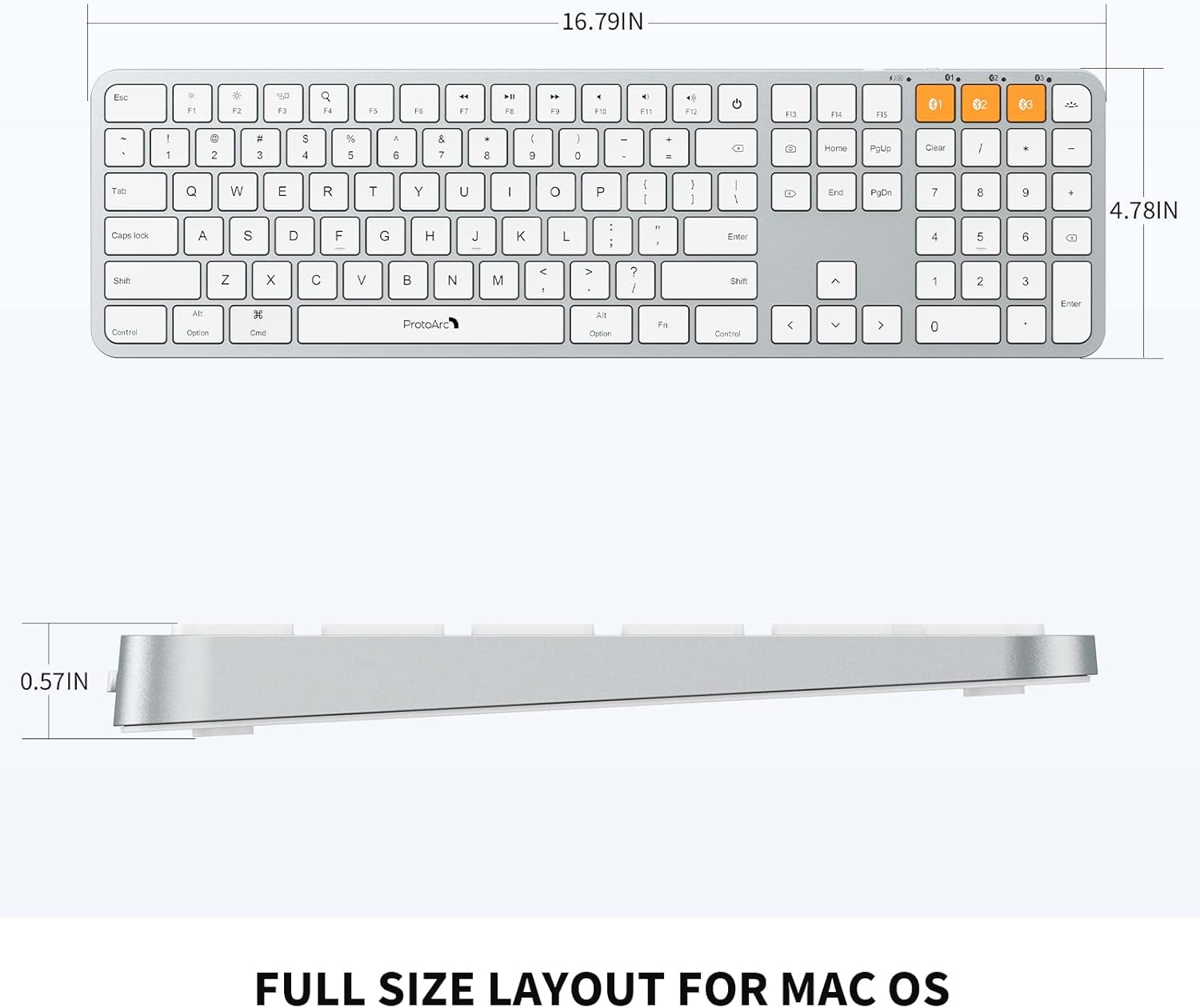
Image: Dimensional diagram of the ProtoArc K100-A keyboard.
9. Εγγύηση και υποστήριξη
For warranty information and technical support, please refer to the official ProtoArc webστον ιστότοπο ή επικοινωνήστε απευθείας με την εξυπηρέτηση πελατών. Κρατήστε την απόδειξη αγοράς σας για αξιώσεις εγγύησης.