1. Εισαγωγή
The SINOTIMER TM612 is a sophisticated two-channel, 7-day, 24-hour programmable electronic digital time switch designed for precise control of electrical circuits. It features two independent relay outputs, allowing for versatile application in various automation tasks. This manual provides essential information for the proper installation, operation, and maintenance of your TM612 timer switch.

Εικόνα 1: Εμπρός view of the SINOTIMER TM612 Digital Time Switch, showing the LCD display and control buttons.
2. Χαρακτηριστικά
- Τοποθέτηση ράγας DIN: 36mm DIN rail time switch for easy installation.
- Έξοδος διπλού καναλιού: Two independent volt-free relay outputs.
- Programmable Cycles: Supports 7-day and 24-hour programming.
- Extensive Program Memory: 44 ON/OFF programs for daily and weekly cycles, plus 44 memory pulse programs.
- Adjustable Pulse Duration: Pulse duration can be adjusted from 1 second to 59 seconds.
- Υψηλή Ακρίβεια: Accurate-to-the-minute control with a low average error of 1s/24h (at 25°C).
- Multi-Language Display: Supports English, Portuguese, Italian, Spanish, German, and French.
- Οθόνη LCD: High contrast LCD display showing year/month/day/hour/minute.
- Ένδειξη ισχύος: LED power ON/OFF indicator.
- Εφεδρική μπαταρία: Replaceable 3V CR2032 battery for power failure backup, providing up to 60 days of blackout memory.
- Χαμηλή κατανάλωση: Designed with low power consumption and a high-accuracy CMOS chip.
- Anti-Jamming: Strong anti-jamming capabilities.
- Πιστοποιήσεις: Conforms to IEC 60367 and CE certified.

Εικόνα 2: Visual representation highlighting key features of the TM612, including its dual-channel capability and LCD display.
3. Προδιαγραφές
| Παράμετρος | Αξία |
|---|---|
| Μάρκα | SINOTIMER |
| Μοντέλο | TM612 |
| Εύρος Θερμοκρασίας | -20°C έως +50°C |
| Τροφοδοτικό | 220V AC |
| Κατανάλωση ρεύματος | 4.5 VA (MAX) |
| Επίδειξη | οθόνη υγρού κρυστάλλου |
| Αλλαγή επαφής | 1 διακόπτης εναλλαγής |
| Προγράμματα | 44 ON/OFF each day or week |
| Υστέρηση | 2 δευτ./ημέρα (στους 25°C) |
| Ελάχιστο διάστημα | 1 λεπτό |
| Ικανότητα | 16Α 250V AC |
| Μνήμη Blackout | 60 μέρες |
| Εύρος χρονοδιακόπτη | 1 λεπτό έως 168 ώρες |
| Επαναφορτιζόμενη Μπαταρία | 3V CR2032 (replaceable) |
| Μέσο Σφάλμα | 1 δευτ./24 ώρες (στους 25°C) |
| Μέγεθος προϊόντος (L×W×H) | 87 × 36 × 67 mm |

Εικόνα 3: Diagram illustrating the physical dimensions of the TM612 timer switch.
4. Περιεχόμενα συσκευασίας
Μόλις ανοίξετε τη συσκευασία, βεβαιωθείτε ότι όλα τα αντικείμενα υπάρχουν και δεν έχουν υποστεί ζημιά:
- 1 x SINOTIMER TM612 Two Channel Timer Switch
- 1 x Εγχειρίδιο χρήστη (αυτό το έγγραφο)
5. Ρύθμιση και εγκατάσταση
The TM612 is designed for 36mm DIN rail mounting. Ensure that installation is performed by a qualified electrician in accordance with local electrical codes and regulations.
5.1 Τοποθέτηση
- Locate a suitable 36mm DIN rail within your electrical enclosure.
- Align the timer switch with the DIN rail and press firmly until it clicks into place.
- Ensure the device is securely fastened to prevent accidental dislodgement.
5.2 Καλωδίωση
Refer to the wiring diagram typically found on the device itself or in the included quick-start guide. The TM612 features two independent volt-free relay outputs. Connect the power supply (220V AC) to the designated input terminals (L and N). Connect your loads to the respective output terminals (C1, 1, 2 for Channel 1 and C2, 3, 4 for Channel 2, or similar markings depending on the specific unit). Always ensure power is disconnected before wiring.
5.3 Initial Power-Up and Battery Installation/Check
The device comes with a replaceable 3V CR2032 battery for backup. Upon initial power-up or after a prolonged power outage, the display may be blank or show incorrect time. The battery ensures that programmed settings are retained during power interruptions.
- If the display is blank, ensure the main power supply is connected and stable.
- The internal battery charges when the device is powered. Allow some time for the battery to charge if it's completely depleted.
- To replace the battery, carefully open the battery compartment (usually on the front or side) and insert a new CR2032 battery, observing polarity.
6. Οδηγίες λειτουργίας
The TM612 is controlled via the buttons located on the front panel below the LCD display. These typically include "Menu", "Res" (Reset), directional arrows (up/down or left/right), and "OK".
6.1 Ρύθμιση τρέχουσας ώρας και ημέρας
- Press the "Menu" button to enter the main menu.
- Navigate to the "Time Setting" or "Clock" option using the arrow buttons.
- Press "OK" to select.
- Adjust the year, month, day, hour, and minute using the arrow buttons.
- Press "OK" after each adjustment to confirm and move to the next setting.
- Press "Menu" again to exit the setting mode.
6.2 Προγραμματισμός κύκλων ON/OFF
The TM612 supports up to 44 ON/OFF programs. Each program can be set for specific days of the week or for daily repetition.
- Press the "Menu" button.
- Navigate to "Program Setting" or "PROG" and press "OK".
- The display will show "1 ON" (for the first ON program). Use arrow buttons to set the desired ON time (hour and minute).
- Press "OK". The display will then show the day selection. Use arrow buttons to select the day(s) for this program (e.g., Mon-Sun, Mon-Fri, Sat-Sun, individual days).
- Press "OK". The display will show "1 OFF" (for the first OFF program). Set the desired OFF time and day(s) similarly.
- Repeat steps 3-5 for additional ON/OFF programs (2 ON, 2 OFF, etc.).
- To exit programming, press "Menu" multiple times until you return to the main display.
6.3 Pulse Program (if applicable)
If your model supports pulse programming (44 memory pulse programs), you can set short duration outputs.
- Enter "Program Setting" as described above.
- Navigate to the "Pulse Program" option.
- Set the start time and duration (1s to 59s) for the pulse.
- Select the day(s) for the pulse.
- Confirm and exit.
6.4 Χειροκίνητη παράκαμψη
The TM612 typically includes a manual override function, allowing you to temporarily switch the output ON or OFF regardless of the programmed schedule. Look for a button labeled "Manual", "Mode", or similar. Pressing this button usually cycles through AUTO, ON, and OFF modes.
- ΑΥΤΟ: Ο χρονοδιακόπτης λειτουργεί σύμφωνα με το προγραμματισμένο πρόγραμμα.
- ΕΠΙ: Η έξοδος είναι συνεχώς ενεργοποιημένη.
- OFF: Η έξοδος είναι συνεχώς απενεργοποιημένη.

Εικόνα 4: The TM612 timer switch, emphasizing its programmable nature and dual-channel capability.
7. Συντήρηση
The SINOTIMER TM612 is designed for long-term, reliable operation with minimal maintenance. However, periodic checks can help ensure optimal performance.
- Καθάρισμα: Διατηρείτε τη συσκευή καθαρή και απαλλαγμένη από σκόνη. Χρησιμοποιήστε ένα μαλακό, στεγνό πανί για τον καθαρισμό. Μην χρησιμοποιείτε λειαντικά καθαριστικά ή διαλύτες.
- Συνδέσεις: Ελέγχετε περιοδικά όλες τις ηλεκτρικές συνδέσεις για να βεβαιωθείτε ότι είναι ασφαλείς και απαλλαγμένες από διάβρωση.
- Αντικατάσταση μπαταρίας: The internal CR2032 battery has a lifespan and will eventually need replacement. If the display becomes dim or settings are lost frequently during power outages, it may be time to replace the battery. Refer to Section 5.3 for battery replacement instructions.
- Περιβάλλο: Ensure the operating environment remains within the specified temperature range (-20°C to +50°C) and is free from excessive humidity or corrosive gases.
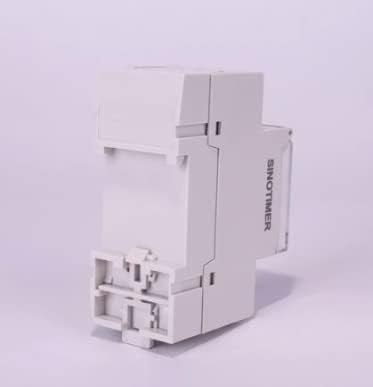
Εικόνα 5: Πλευρά view of the SINOTIMER TM612, showing its compact design suitable for DIN rail mounting.
8. Αντιμετώπιση Προβλημάτων
This section addresses common issues you might encounter with your TM612 timer switch.
| Πρόβλημα | Πιθανή αιτία | Διάλυμα |
|---|---|---|
| Η οθόνη είναι κενή. | No power supply; depleted internal battery. | Check main power connection. Allow time for internal battery to charge or replace it. |
| Ο χρονοδιακόπτης δεν ενεργοποιείται/απενεργοποιείται όπως έχει προγραμματιστεί. | Incorrect programming; manual override engaged; incorrect current time/day setting. | Verify program settings (ON/OFF times, days). Check if the device is in AUTO mode (not manual ON/OFF). Ensure current time and day are set correctly. |
| Οι ρυθμίσεις χάνονται μετά την διακοπή ρεύματοςtage. | Internal battery is weak or depleted. | Replace the 3V CR2032 backup battery. |
| Τα κουμπιά δεν ανταποκρίνονται. | Προσωρινή βλάβη λογισμικού· φυσική ζημιά. | Try pressing the "Res" (Reset) button if available (may require a pointed object). If issue persists, contact support. |
If you encounter issues not listed here or if the suggested solutions do not resolve the problem, please contact SINOTIMER customer support.
9. Εγγύηση και υποστήριξη
SINOTIMER products are manufactured to high quality standards. For information regarding warranty coverage, terms, and conditions, please refer to the warranty card included with your product or visit the official SINOTIMER webτοποθεσία.
For technical support, troubleshooting assistance, or spare parts, please contact SINOTIMER customer service through their official channels. When contacting support, please have your product model (TM612) and purchase details ready.
Επίσημος ανώτερος υπάλληλος Webτοποθεσία: www.sinotimer.com (Σημείωση: Αυτό είναι ένα σύμβολο κράτησης θέσης URL. Please refer to actual product documentation for correct contact information.)


