1. Εισαγωγή
Ευχαριστώ για την αγοράasing the MEIKEE Solar Light, Model AC-TYR032-2700K. This manual provides detailed instructions for the safe and efficient installation, operation, and maintenance of your solar light. Please read this manual thoroughly before use and retain it for future reference.
2. Το προϊόν τελείωσεview
The MEIKEE Solar Light is a versatile lighting solution designed for both outdoor and indoor use. It features a high-efficiency solar panel, a powerful 5000 mAh battery, 76 super bright LEDs, and multiple operating modes controlled by an intelligent remote. Its adjustable color temperature and motion sensor capabilities make it suitable for various applications.
Βασικά Χαρακτηριστικά:
- Μέθοδοι διπλής φόρτισης: Solar panel charging and USB-C charging for continuous power.
- Ρυθμιζόμενη θερμοκρασία χρώματος: Offers Warm White (2500K), Natural White (4000K), and Cool White (6500K) options.
- Πολλαπλές λειτουργίες ανίχνευσης: Three distinct motion detection modes for varied lighting needs.
- Light Control & Forced Lighting: Automatic dusk-to-dawn operation and timed lighting options.
- Έξυπνο τηλεχειριστήριο: Omnidirectional 360-degree remote with a 12m range for easy mode, brightness, and color temperature adjustments.
- Ευρεία γωνία δέσμης: 270° beam angle with 4 adjustable light sheets for broad illumination.
- Ανθεκτικό σχέδιο: IP54 protection class for outdoor resilience.
- Long Extension Cable: 5m cable for flexible solar panel placement.
Συστατικά προϊόντος:
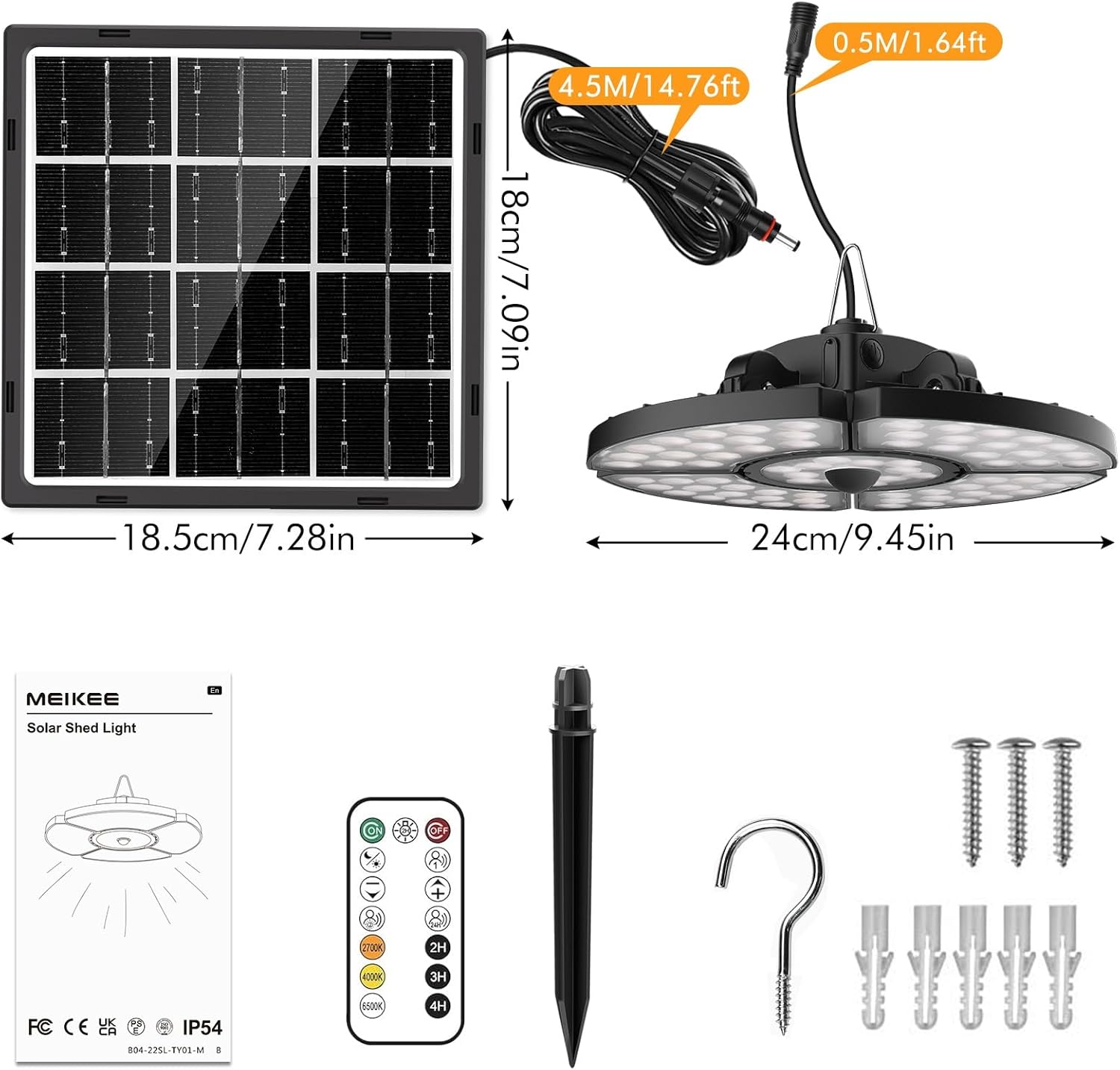
Εικών: Υπερview of the MEIKEE Solar Light components, including the solar panel, light fixture, remote control, and mounting accessories. Dimensions are also indicated.
- Solar Spotlight (Main Light Fixture)
- Solar Panel with 5m Extension Cable
- Τηλεχειριστήριο
- Accessory Pack (Screws, Wall Plugs, Ground Stake, Hook)
- Εγχειρίδιο χρήστη
3. Τεχνικές Προδιαγραφές
| Αριθμός μοντέλου | AC-TYR032-2700K |
| Ηλιακό πάνελ | 6 V / 4 W |
| Χωρητικότητα μπαταρίας | 5000 mAh |
| Χρόνος φόρτισης (ηλιακή ενέργεια) | 6-8 ώρες (πλήρες ηλιακό φως) |
| Discharge Time (Full Energy) | 6-12 ώρες |
| LED | 76 Super Bright LED |
| Γωνία δέσμης | 270° |
| Θερμοκρασία χρώματος | 2500K (Θερμό Λευκό), 4000K (Φυσικό Λευκό), 6500K (Ψυχρό Λευκό) |
| Κατηγορία Προστασίας | IP54 |
| Μήκος καλωδίου επέκτασης | 5 μέτρα |
| Θερμοκρασία λειτουργίας | -25°C έως +40°C |
| Product Dimensions (Light) | 24L x 24W x 8Η εκ |
| Βάρος προϊόντος | 1.24 κιλά |
| Υλικό | Aluminium, Polycarbonate |
4. Οδηγίες ασφαλείας
Παρακαλούμε τηρήστε τις ακόλουθες προφυλάξεις ασφαλείας για να αποφύγετε τραυματισμούς ή ζημιές στο προϊόν:
- Do not look directly into the LED light when it is illuminated, as this may cause eye strain or damage.
- Ensure the solar panel is installed in a location that receives direct sunlight for most of the day to maximize charging efficiency.
- Keep the product away from open flames or high temperatures to prevent battery damage or explosion.
- Do not attempt to disassemble, repair, or modify the product. Contact qualified personnel for service.
- Να φυλάσσεται μακριά από παιδιά.
- Απορρίψτε το προϊόν και την μπαταρία του υπεύθυνα σύμφωνα με τους τοπικούς κανονισμούς.
- Ensure all connections are secure and waterproof, especially for outdoor installations.
5. Οδηγός εγκατάστασης
The MEIKEE Solar Light is designed for easy installation. The 5-meter extension cable allows for flexible placement of the solar panel and the light fixture.
Επιλογή τοποθεσίας εγκατάστασης:
- Ηλιακό πάνελ: Select a location that receives at least 6-8 hours of direct sunlight daily. Avoid shaded areas from trees, buildings, or other obstructions.
- Φωτιστικό: The light can be hung in sheds, gazebos, porches, garages, barns, chicken coops, storage rooms, carports, basements, backyards, gardens, or any other desired location. Ensure it is protected from direct heavy rain if installed indoors or in a semi-enclosed space.
Βήματα τοποθέτησης:
- Προετοιμασία εργαλείων: You will need a drill, screwdriver, and pencil.
- Τοποθετήστε το ηλιακό πάνελ:
- Position the solar panel in your chosen sunny location.
- Mark the drilling points using the solar panel bracket as a template.
- Drill holes, insert wall plugs (if mounting on masonry), and secure the solar panel bracket with screws.
- Ρυθμίστε τη γωνία του ηλιακού πάνελ ώστε να είναι στραμμένο απευθείας στον ήλιο για βέλτιστη φόρτιση.
- Τοποθετήστε το φωτιστικό:
- Choose a suitable spot for the light fixture.
- Use the provided hook or screws to hang or mount the light.
- Ensure the light is securely fastened.
- Connect the Solar Panel to the Light:
- Connect the 5-meter extension cable from the solar panel to the input port on the light fixture.
- Ensure the connection is firm and the waterproof interface is properly sealed.

Εικών: Illustrates the separate design of the solar panel and light, highlighting solar charging and the USB charging port on the light fixture.
After installation, allow the solar panel to charge the light for at least 6-8 hours in direct sunlight before first use.
6. Λειτουργία
Your MEIKEE Solar Light can be operated and customized using the included remote control.
6.1 Φόρτιση του φωτιστικού
- Ηλιακή φόρτιση: The primary charging method. Ensure the solar panel is exposed to direct sunlight. The light will automatically charge during the day.
- Φόρτιση USB-C: In periods of low sunlight or extended indoor use, the light can be charged via a USB-C cable (not included). Connect a standard USB-C charger to the charging port on the light fixture.
6.2 Λειτουργίες τηλεχειριστηρίου

Εικών: Depicts the omnidirectional remote control and its effective range of up to 12 meters.
The remote control allows you to switch modes, adjust brightness, and change color temperature from a distance of up to 12 meters.
- Ενεργοποίηση/Απενεργοποίηση: Πατήστε το ON/OFF κουμπί.
- Επιλογή τρόπου λειτουργίας: Use the dedicated mode buttons (Mode 1, Mode 2, Mode 3, Light Control Mode, Forced Lighting 2H Mode) to cycle through lighting behaviors.
- Ρύθμιση φωτεινότητας: Χρησιμοποιήστε το + και - buttons to increase or decrease light intensity.
- Ρύθμιση θερμοκρασίας χρώματος: Χρησιμοποιήστε το 2500K (Warm White), 4000K (Natural White), and 6500K (Cool White) buttons to select your desired light color.
- Λειτουργία χρονοδιακόπτη: Set the light to turn off automatically after 2H, 3H, or 4H using the respective timer buttons.
6.3 Λειτουργίες Φωτισμού

Εικών: Visual representation of the five distinct operating modes, showing light behavior during day and night, with and without motion detection.
- Mode 1 (Motion Detection - Full Brightness): At night, the light turns on at 100% brightness for 30 seconds when motion is detected, then turns off when motion ceases.
- Mode 2 (Motion Detection - Dim to Bright): At night, the light stays at 30% brightness. When motion is detected, it brightens to 100% for 30 seconds, then returns to 30% brightness.
- Mode 3 (24-Hour Motion Detection): The light operates similarly to Mode 1 but detects motion and illuminates at 100% brightness for 30 seconds at any time of day or night.
- Λειτουργία ελέγχου φωτός: Automatically turns on at 50% brightness at dusk and turns off at dawn.
- Forced Lighting 2H Mode: The light stays on at 85% brightness for 2 hours, regardless of day or night.
6.4 Color Temperature Settings
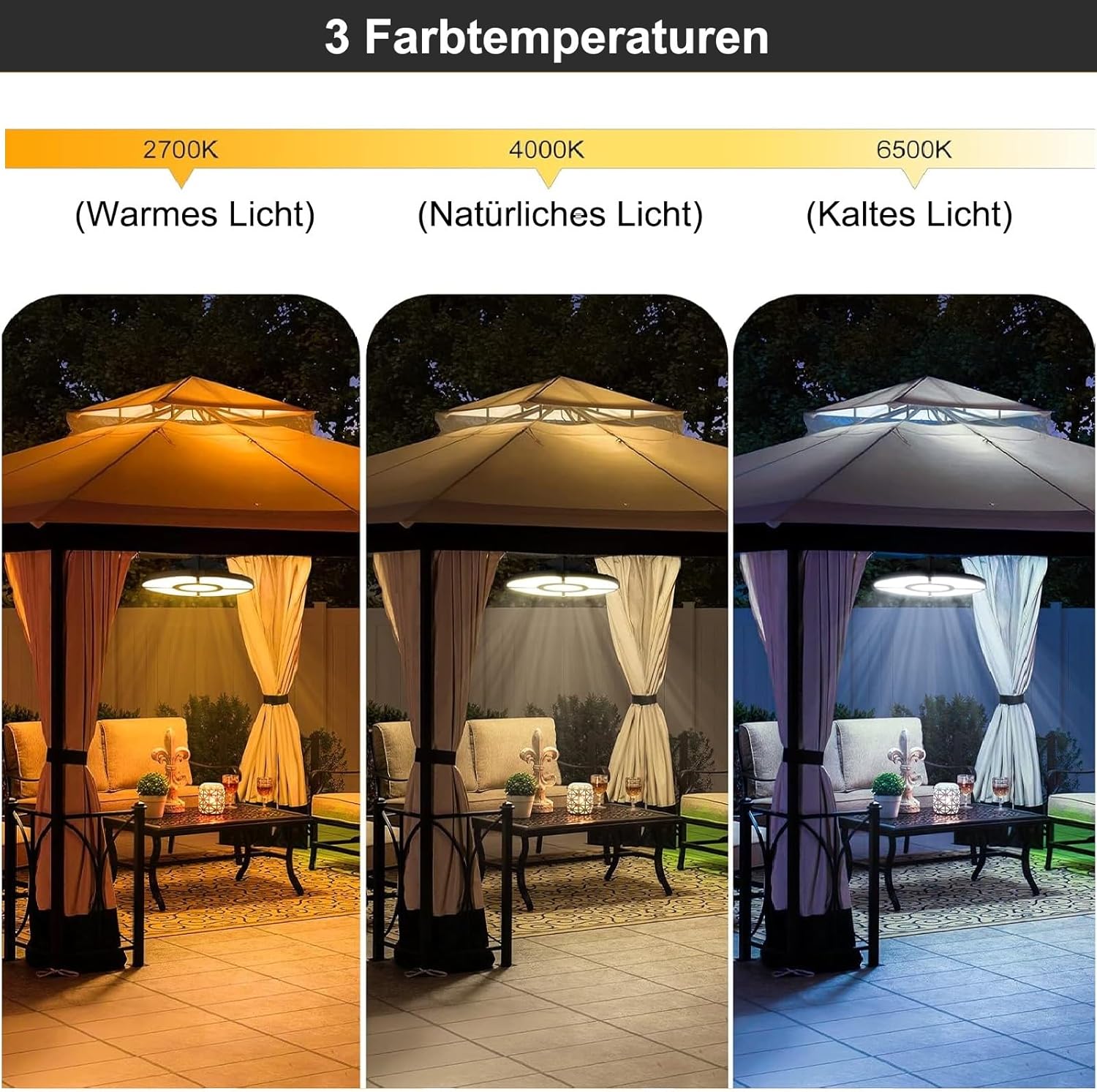
Εικών: Demonstrates the three available color temperatures: Warm Light (2700K), Natural Light (4000K), and Cold Light (6500K), as seen in a gazebo setting.
The MEIKEE Solar Light offers three distinct color temperatures to suit different preferences and environments:
- Ζεστό λευκό (2500K): Provides a cozy, inviting ambiance.
- Natural White (4000K): A balanced, neutral light suitable for general illumination.
- Cool White (6500K): Bright, crisp light ideal for task lighting or enhanced visibility.
Select the desired color temperature using the corresponding buttons on the remote control.
7. Συντήρηση
Regular maintenance ensures optimal performance and extends the lifespan of your MEIKEE Solar Light.
- Καθαρό ηλιακό πάνελ: Σκουπίζετε περιοδικά το ηλιακό πάνελ με ένα μαλακό,amp πανί για την αφαίρεση σκόνης, βρωμιάς, φύλλων ή χιονιού. Ένα καθαρό πάνελ εξασφαλίζει μέγιστη απορρόφηση ηλιακού φωτός και απόδοση φόρτισης.
- Ελέγξτε τις συνδέσεις: Ensure all cable connections, especially the waterproof interface between the solar panel and the light, remain secure and free from corrosion.
- Επιθεωρήστε για ζημιές: Regularly check the light fixture, solar panel, and cables for any signs of physical damage. If damage is found, discontinue use and contact customer support.
- Φροντίδα μπαταρίας: While the battery is designed for longevity, extreme temperatures can affect its performance. Avoid prolonged exposure to temperatures outside the recommended operating range (-25°C to +40°C).
8. Αντιμετώπιση Προβλημάτων
If you encounter issues with your MEIKEE Solar Light, refer to the following common problems and solutions:
| Πρόβλημα | Πιθανή αιτία | Διάλυμα |
|---|---|---|
| Το φως δεν ανάβει τη νύχτα. |
|
|
| Η διάρκεια του φωτισμού είναι μικρότερη από την αναμενόμενη. |
|
|
| Ο αισθητήρας κίνησης δεν λειτουργεί. |
|
|
| Το τηλεχειριστήριο δεν ανταποκρίνεται. |
|
|
9. Εγγύηση και Υποστήριξη Πελατών
MEIKEE products are manufactured to high-quality standards. For warranty information, please refer to the warranty card included with your product or contact MEIKEE customer support.
If you have any questions, require technical assistance, or experience issues not covered in this manual, please contact MEIKEE customer support through the retailer where you purchased the product or visit the official MEIKEE website για στοιχεία επικοινωνίας.
Please have your model number (AC-TYR032-2700K) and purchase date ready when contacting support.