Εισαγωγή
This manual provides detailed instructions for the setup, operation, and maintenance of your Gioteck SC3 Wireless Pro Controller. Designed for use with Nintendo Switch, PC, and mobile devices, this controller features programmable back buttons, customizable RGB lighting, and changeable magnetic thumb sticks for an enhanced gaming experience.
1. Ρύθμιση
1.1 Περιεχόμενα συσκευασίας
- Gioteck SC3 Wireless Pro Controller
- Καλώδιο φόρτισης USB
- Additional Magnetic Thumb Sticks (if included)
- Εγχειρίδιο χρήστη (αυτό το έγγραφο)
1.2 Φόρτιση του ελεγκτή
Before initial use, fully charge the controller. Connect the supplied USB charging cable to the controller's charging port and the other end to a USB power source (e.g., Nintendo Switch dock, PC USB port, or USB wall adapter).
- Η ένδειξη LED θα δείξει την κατάσταση φόρτισης.
- Μια πλήρης φόρτιση διαρκεί συνήθως περίπου 2-3 ώρες.
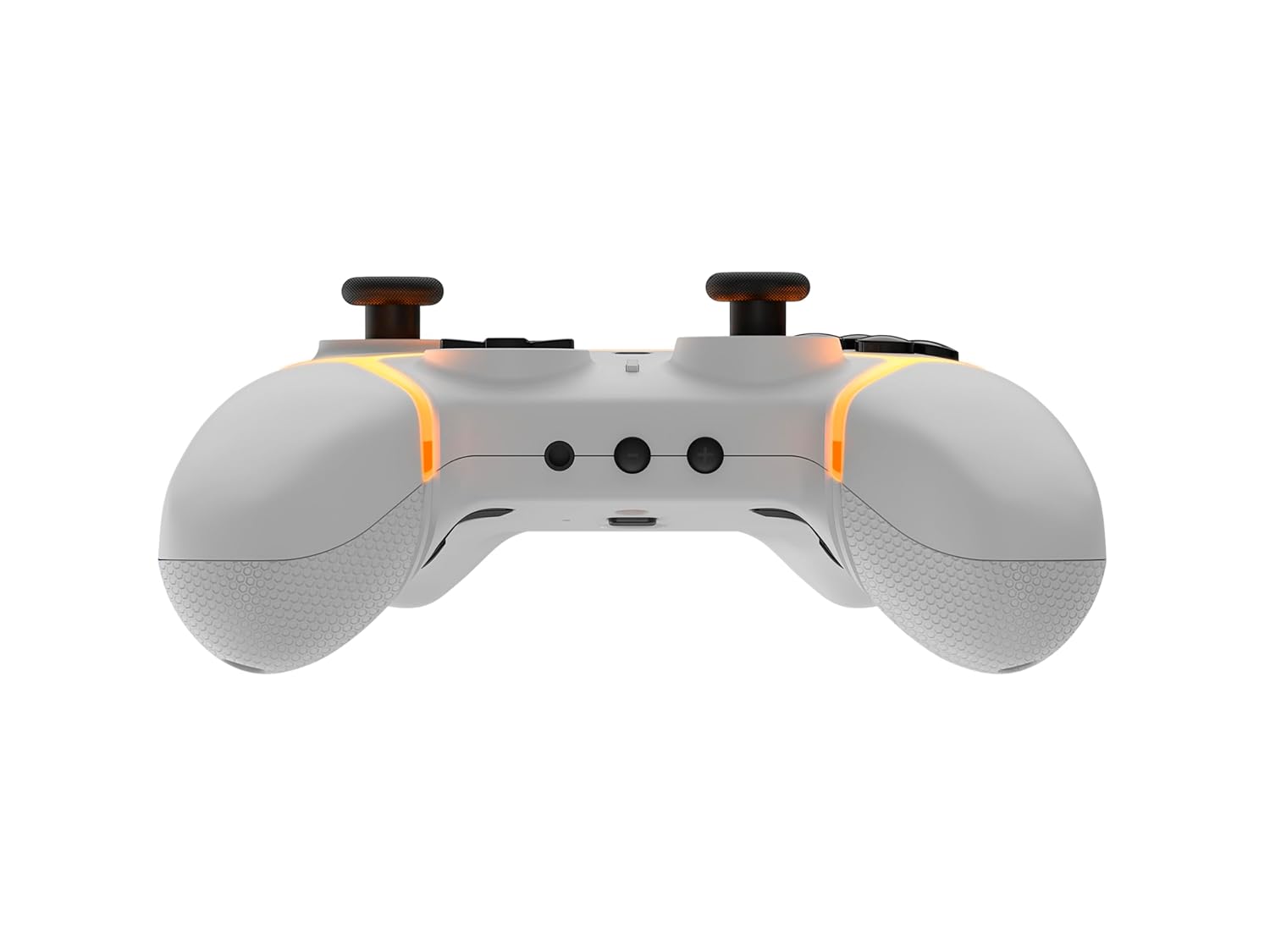
Εικόνα: Κάτω view of the Gioteck SC3 controller, highlighting the USB-C charging port located between the two textured grips.
1.3 Σύζευξη με Nintendo Switch
- Από το μενού HOME του Nintendo Switch, επιλέξτε Ελεγκτές, τότε Αλλαγή λαβής/παραγγελίας.
- On the SC3 controller, press and hold the Κουμπί ζεύξης (usually a small button on the top or back) for a few seconds until the LED indicators begin to flash rapidly.
- Once the controller is recognized by the Switch, the player LED(s) on the controller will illuminate solid, indicating successful pairing.
- Πατήστε το Ένα κουμπί για επιβεβαίωση.
Note: For subsequent uses, the controller should automatically reconnect to the last paired Switch console when powered on.
1.4 Connecting to PC/Mobile (Bluetooth)
- Ensure Bluetooth is enabled on your PC or mobile device.
- On the SC3 controller, press and hold the Κουμπί ζεύξης for a few seconds until the LED indicators flash rapidly.
- On your PC/mobile device, navigate to Bluetooth settings and search for new devices.
- Select "Gioteck SC3" or similar from the list of available devices to pair.
- The controller's LED will become solid upon successful connection.
1.5 Installing Magnetic Thumb Sticks
The SC3 controller features changeable magnetic thumb sticks. To replace them:
- Gently pull the existing thumb stick straight up to remove it.
- Align the desired magnetic thumb stick with the base and gently push it down until it snaps into place.

Εικόνα: Μπροστά view of the Gioteck SC3 controller, showcasing the magnetic thumb sticks and button layout.
2. Οδηγίες λειτουργίας
Διάταξη 2.1 κουμπιών
The SC3 controller features a traditional button layout. Refer to the image below for button identification.

Εικόνα: Γωνιακό μπροστινό μέρος view of the Gioteck SC3 controller, displaying the full button layout including face buttons, D-pad, analog sticks, and shoulder buttons.
- Αριστεροί/Δεξιοί Αναλογικοί Μοχλόι: Για κίνηση και έλεγχο κάμερας.
- D-Pad: Κατευθυντική είσοδος.
- Κουμπιά A/B/X/Y: Κουμπιά δράσης.
- Κουμπιά L/R/ZL/ZR: Κουμπιά ώμου και σκανδάλης.
- +/- Κουμπιά: Start/Select equivalents.
- Κουμπί αφετηρίας: Returns to the console's home menu.
- CaptureButton: Λαμβάνει στιγμιότυπα οθόνης.
2.2 Προγραμματιζόμενα κουμπιά πίσω
The SC3 controller includes programmable back buttons (M1, M2, M3, M4) for custom assignments.

Εικόνα: Πίσω view of the Gioteck SC3 controller, clearly showing the four programmable back buttons (M1, M2, M3, M4) and textured grips.
Βήματα προγραμματισμού:
- Πατήστε και κρατήστε πατημένο το Κουμπί προγράμματος (refer to diagram if available, usually a small button on the back) until the LED indicator flashes.
- Πατήστε το Κουμπί Πίσω (M1, M2, M3, or M4) you wish to program. The LED will flash slowly.
- Πατήστε το Κουμπί εισαγωγής (e.g., A, B, X, Y, L, R, ZL, ZR, D-pad direction) you want to assign to the back button.
- Πατήστε το Κουμπί προγράμματος again to save the assignment. The LED will stop flashing.
- Repeat for other back buttons as desired.
To clear a programmed button, follow steps 1-2, then press the Program Button again without pressing an input button.
2.3 Προσαρμογή φωτισμού RGB
The controller features customizable RGB lighting. Specific instructions for changing colors or effects are typically found in the product's quick start guide or by pressing a dedicated button combination (e.g., Function + R3).
Consult the quick start guide included with your controller for precise button combinations to adjust RGB lighting.
2.4 Χειριστήρια κίνησης
The SC3 controller supports motion controls, allowing for immersive gameplay in compatible Nintendo Switch titles. No special setup is usually required; motion controls activate automatically when supported by the game.
2.5 Audio Headset Jack
A 3.5mm audio headset jack is located on the controller for connecting compatible headsets. It includes dedicated mute and volume control buttons.
- Αύξηση/Μείωση έντασης: Ρύθμιση εξόδου ήχου.
- Κουμπί σίγασης: Mute/unmute microphone input.

Εικόνα: Κορυφή view of the Gioteck SC3 controller, highlighting the 3.5mm audio jack, volume controls, and mute button.
3. Συντήρηση
3.1 Καθαρισμός
Για να καθαρίσετε το χειριστήριο, χρησιμοποιήστε ένα μαλακό, στεγνό πανί. Για επίμονη βρωμιά,ampΞεπλύνετε το πανί με νερό. Αποφύγετε τη χρήση σκληρών χημικών ουσιών, λειαντικών καθαριστικών ή διαλυτών, καθώς αυτά μπορεί να προκαλέσουν ζημιά στο φινίρισμα και στα εσωτερικά εξαρτήματα του χειριστηρίου.
- Do not immerse the controller in water or any other liquid.
- Ensure all ports are dry before charging or connecting devices.
3.2 Αποθήκευση
Store the controller in a cool, dry place away from direct sunlight and extreme temperatures. Avoid placing heavy objects on the controller to prevent damage.
3.3 Φροντίδα μπαταρίας
The controller contains a rechargeable battery. To prolong battery life:
- Αποφύγετε την συχνή πλήρη αποφόρτιση της μπαταρίας.
- Charge the controller regularly, even if not in use for extended periods (e.g., once every 3-6 months).
- Μην εκθέτετε τον ελεγκτή σε θερμοκρασίες άνω των 60°C (140°F).
4. Αντιμετώπιση Προβλημάτων
4.1 Ο ελεγκτής δεν συνδέεται/δεν ζευγοποιείται
- Ελέγξτε την μπαταρία: Βεβαιωθείτε ότι το χειριστήριο είναι επαρκώς φορτισμένο.
- Επισκευή: Follow the pairing instructions in Section 1.3 or 1.4.
- Παρέμβαση: Move closer to the console/device and away from potential sources of wireless interference (e.g., Wi-Fi routers, other Bluetooth devices).
- Επαναφορά ελεγκτή: Locate a small reset button (often a pinhole) on the back of the controller. Use a paperclip to press and hold it for a few seconds. Then attempt to re-pair.
- Update Console/Device Software: Ensure your Nintendo Switch, PC, or mobile device's operating system is up to date.
4.2 Buttons/Sticks Not Responding
- Re-sync: Αποσυνδέστε και επανασυνδέστε τον ελεγκτή.
- Καθαρός: Βεβαιωθείτε ότι δεν έχουν συσσωρευτεί υπολείμματα γύρω από τα κουμπιά ή τους μοχλούς.
- Test in another game/menu: Determine if the issue is specific to a game or system-wide.
- Επαναφορά ελεγκτή: Perform a hard reset as described above.
4.3 Motion Controls Not Working
- Συμβατότητα παιχνιδιού: Verify that the game you are playing supports motion controls.
- Επαναβαθμονόμηση: On Nintendo Switch, you can recalibrate motion controls in the system settings.
- Επαναφορά ελεγκτή: Εκτελέστε μια σκληρή επαναφορά.
5. Προδιαγραφές
| Μοντέλο: | Gioteck SC3 Wireless Pro Controller |
| Αρμονία: | Nintendo Switch (Original, Lite, OLED), PC, Mobile Devices |
| Συνδεσιμότητα: | Ασύρματο Bluetooth |
| Διαστάσεις (περίπου): | 2.87 x 5.35 x 6.34 ίντσες (7.29 x 13.59 x 16.1 cm) |
| Βάρος (περίπου): | 10.6 ουγγιές (300 γραμμάρια) |
| Υποδοχή ήχου: | 3.5mm with mute and volume controls |
| Ειδικά χαρακτηριστικά: | Programmable back buttons, Magnetic thumb sticks, RGB lighting, Motion controls |
6. Πληροφορίες εγγύησης
The Gioteck SC3 Wireless Pro Controller comes with a manufacturer's warranty. For specific details regarding warranty coverage, duration, and claims process, please refer to the warranty card included with your product or visit the official Gioteck webτοποθεσία.
Παρακαλούμε φυλάξτε την απόδειξη αγοράς για λόγους εγγύησης.
7. Υποστήριξη πελατών
If you encounter any issues or have questions not covered in this manual, please contact Gioteck customer support. Contact information can typically be found on the product packaging or the official Gioteck webτοποθεσία.
Gioteck Official Webτοποθεσία: www.gioteck.com


