1. Εισαγωγή
Welcome to the user manual for your new Avtex W195TS Smart TV. This television is specifically designed for mobile living, offering versatile power options (12V, 24V, and 240V) and a range of smart features, including Wi-Fi, Bluetooth, and an integrated Freesat satellite decoder. This manual provides essential information for setting up, operating, maintaining, and troubleshooting your device to ensure optimal performance and enjoyment.
2. Πληροφορίες Ασφάλειας
Διαβάστε προσεκτικά όλες τις οδηγίες ασφαλείας πριν χρησιμοποιήσετε την τηλεόραση. Φυλάξτε αυτό το εγχειρίδιο για μελλοντική αναφορά.
- Τροφοδοτικό: Βεβαιωθείτε ότι ο σωστός τόμοςtage is used (12V, 24V DC or 240V AC). Do not overload power outlets.
- Αερισμός: Μην φράζετε τα ανοίγματα εξαερισμού. Αφήστε επαρκή χώρο γύρω από την τηλεόραση για σωστή ροή αέρα.
- Νερό και υγρασία: Μην εκθέτετε την τηλεόραση σε βροχή ή υγρασία. Μην τοποθετείτε αντικείμενα γεμάτα με υγρά πάνω στην τηλεόραση.
- Καθάρισμα: Αποσυνδέστε την τηλεόραση από την πρίζα πριν τον καθαρισμό. Χρησιμοποιήστε ένα μαλακό, στεγνό πανί. Μην χρησιμοποιείτε υγρά καθαριστικά ή καθαριστικά σε μορφή αεροζόλ.
- Τοποθέτηση: Place the TV on a stable, flat surface or mount securely to a wall/bracket. Avoid direct sunlight or heat sources.
- Εξυπηρέτηση: Μην επιχειρήσετε να επισκευάσετε αυτό το προϊόν μόνοι σας. Αναφέρετε όλα τα σέρβις σε εξειδικευμένο προσωπικό σέρβις.
3. Περιεχόμενα συσκευασίας
Before setup, please check that all items are present in the box:
- Smart TV Avtex W195TS
- Τηλεχειριστήριο με μπαταρίες
- Καλώδιο τροφοδοσίας 12V/24V DC
- 240V AC Power Adapter
- Επιτραπέζια βάση (εάν υπάρχει)
- Εγχειρίδιο χρήστη (αυτό το έγγραφο)
4. Το προϊόν τελείωσεview
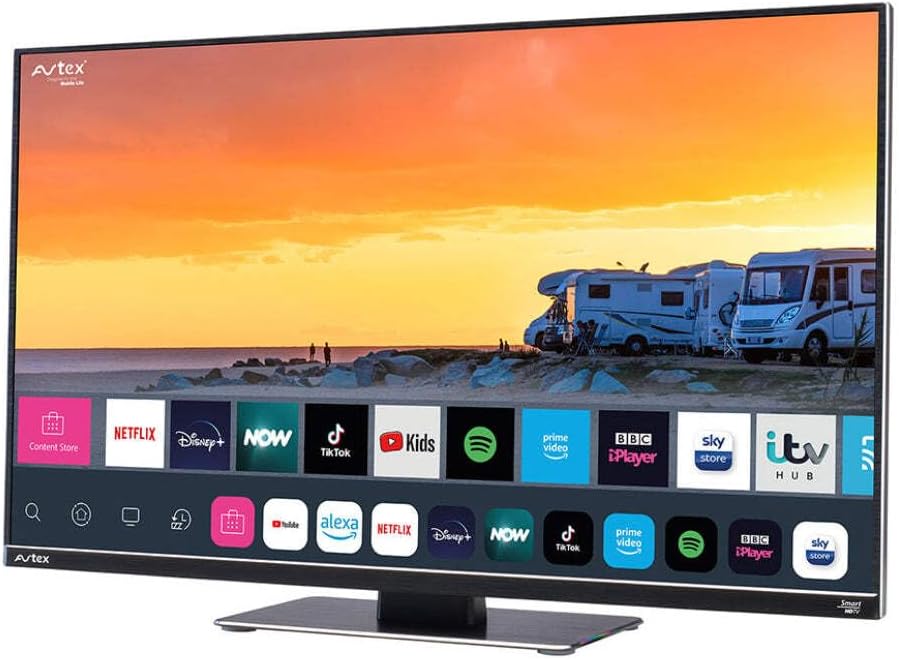
Figure 4.1: Avtex W195TS Smart TV Front View
This image shows the Avtex W195TS Smart TV from a slight angle, highlighting its slim design and the vibrant display. The screen shows a user interface with icons for popular streaming services like Netflix, Disney+, Now, TikTok, Kids, Spotify, Prime Video, BBC iPlayer, Sky Store, and ITV Hub. The background on the screen depicts a scenic view of motorhomes parked near a beach at sunset. The Avtex logo is visible on the top left and bottom left of the TV frame.
4.1. Θύρες και Συνδέσεις
- Θύρες HDMI: Για τη σύνδεση εξωτερικών συσκευών όπως συσκευές αναπαραγωγής Blu-ray, κονσόλες παιχνιδιών ή αποκωδικοποιητές.
- Θύρες USB (2): For media playback from USB drives or connecting USB accessories.
- Είσοδος κεραίας: For connecting a terrestrial TV antenna.
- Δορυφορική είσοδος: For connecting a satellite dish for Freesat or other satellite services.
- Είσοδος ισχύος DC: For 12V/24V DC power connection.
- Είσοδος ισχύος AC: For 240V AC power connection via adapter.
- Θύρα Ethernet: Για ενσύρματη σύνδεση δικτύου.
- Έξοδος ήχου: Για σύνδεση εξωτερικών συστημάτων ήχου ή ακουστικών.
5. Ρύθμιση
5.1. Εγκατάσταση της βάσης (Προαιρετικά)
- Τοποθετήστε προσεκτικά την τηλεόραση με την όψη προς τα κάτω σε μια μαλακή, καθαρή επιφάνεια για να αποφύγετε ζημιά στην οθόνη.
- Ευθυγραμμίστε τη βάση με τις οπές στερέωσης στο κάτω μέρος της τηλεόρασης.
- Στερεώστε τη βάση χρησιμοποιώντας τις παρεχόμενες βίδες.
5.2. Σύνδεση ρεύματος
The Avtex W195TS supports multiple power inputs:
- 12V/24V DC: Connect the supplied 12V/24V DC power cable to the DC input on the TV and to your vehicle's 12V or 24V power outlet.
- 240 V AC: Connect the supplied 240V AC power adapter to the AC input on the TV, then plug the adapter into a standard 240V AC wall socket.
Σημείωμα: Do not connect both DC and AC power simultaneously.
5.3. Antenna/Satellite Connection
- Terrestrial TV: Connect your aerial cable to the 'ANTENNA IN' port.
- Satellite TV (Freesat): Connect your satellite dish cable to the 'SATELLITE IN' port.
5.4. Αρχική ενεργοποίηση και πρώτη εγκατάσταση
- Connect the TV to power and press the power button on the remote control or TV.
- The First-Time Setup Wizard will appear. Follow the on-screen prompts to select your language, country, and time zone.
- Perform an automatic channel scan for both terrestrial and satellite channels.
- Συνδεθείτε στο δίκτυό σας Wi-Fi επιλέγοντας το όνομα του δικτύου σας και εισάγοντας τον κωδικό πρόσβασης.
6. Λειτουργία
6.1. Λειτουργίες τηλεχειριστηρίου
Familiarize yourself with the remote control buttons for easy navigation and control of your TV's features.
- Κουμπί λειτουργίας: Ενεργοποιεί/απενεργοποιεί την τηλεόραση.
- Κουμπί πηγής: Selects input sources (HDMI, USB, TV, Satellite).
- Όγκος +/-: Ρυθμίζει το επίπεδο έντασης.
- Κανάλι +/-: Αλλάζει τηλεοπτικά κανάλια.
- Κουμπιά πλοήγησης (Πάνω/Κάτω/Αριστερά/Δεξιά/OK): Για πλοήγηση και επιλογή μενού.
- Έξυπνος Διανομέας/Κουμπί Αρχικής Σελίδας: Πρόσβαση στη διεπαφή της Smart TV.
- Κουμπιά εφαρμογής: Dedicated buttons for popular streaming apps (if available).
6.2. Χαρακτηριστικά έξυπνης τηλεόρασης
Your Avtex W195TS is equipped with smart TV capabilities:
- App Store: Download and install various applications for streaming, news, and entertainment.
- Υπηρεσίες ροής: Access pre-installed or downloaded apps like Netflix, Disney+, Prime Video, BBC iPlayer, etc. (subscription may be required).
- Web Πρόγραμμα περιήγησης: Περιηγηθείτε στο διαδίκτυο απευθείας από την τηλεόρασή σας.
- Κατοπτρισμός οθόνης: Connect your smartphone or tablet to display content on the TV screen (compatibility may vary).
6.3. Συνδεσιμότητα Bluetooth
Pair Bluetooth devices such as headphones or external speakers for enhanced audio experience.
- Μεταβείτε στο μενού ρυθμίσεων της τηλεόρασης.
- Επιλέξτε «Bluetooth» ή «Συνδεδεμένες συσκευές».
- Enable Bluetooth and put your device into pairing mode.
- Επιλέξτε τη συσκευή σας από τη λίστα για σύζευξη.
6.4. Αναπαραγωγή πολυμέσων μέσω USB
Insert a USB drive into one of the USB ports to view φωτογραφίες, αναπαραγωγή βίντεο ή ακρόαση μουσικής.
- The TV will usually prompt you to open the media player.
- Πλοηγηθείτε στο δικό σας fileχρησιμοποιώντας το τηλεχειριστήριο.
7. Συντήρηση
7.1. Καθαρισμός της τηλεόρασης
- Οθόνη: Σκουπίστε απαλά την οθόνη με ένα μαλακό πανί που δεν αφήνει χνούδι. Για επίμονα σημάδια, τρίψτε ελαφράampΞεπλύνετε το πανί με νερό ή με ένα διάλυμα καθαρισμού ειδικό για την οθόνη (μην ψεκάζετε απευθείας στην οθόνη).
- Casing: Χρησιμοποιήστε ένα μαλακό, στεγνό πανί για να σκουπίσετε την τηλεόραση.asinζ. Αποφύγετε τα λειαντικά καθαριστικά ή τους διαλύτες.
7.2. Ενημερώσεις λογισμικού
Periodically check for software updates to ensure your TV has the latest features and bug fixes. Updates can usually be found in the TV's settings menu under 'System' or 'Software Update'.
8. Αντιμετώπιση Προβλημάτων
If you encounter issues with your Avtex W195TS, refer to the following common problems and solutions:
| Πρόβλημα | Πιθανή αιτία | Διάλυμα |
|---|---|---|
| Χωρίς Δύναμη | Το καλώδιο τροφοδοσίας δεν είναι συνδεδεμένο. Δεν υπάρχει ρεύμα από την πρίζα. | Check power cable connection; test outlet with another device; ensure correct voltage (12V/24V/240V). |
| Δεν υπάρχει εικόνα, αλλά υπάρχει ήχος | Επιλέχθηκε λανθασμένη πηγή εισόδου· ελαττωματικό καλώδιο. | Press the 'Source' button on the remote to select the correct input; check HDMI/antenna cables. |
| Δεν υπάρχει ήχος, αλλά υπάρχει εικόνα | Η ένταση ήχου είναι σε σίγαση ή είναι πολύ χαμηλή. Πρόβλημα με το εξωτερικό ηχοσύστημα. | Unmute volume or increase level; check connections to external audio devices. |
| Δεν είναι δυνατή η σύνδεση σε Wi-Fi | Λανθασμένος κωδικός πρόσβασης· πρόβλημα με τον δρομολογητή· η τηλεόραση είναι πολύ μακριά από τον δρομολογητή. | Re-enter Wi-Fi password; restart router; move TV closer to router or use an extender. |
| Το τηλεχειριστήριο δεν λειτουργεί | Άδειες μπαταρίες· απόφραξη· πρόβλημα σύζευξης. | Αντικαταστήστε τις μπαταρίες, αφαιρέστε τυχόν εμπόδια και επανασυνδέστε το τηλεχειριστήριο εάν είναι Bluetooth. |
9. Προδιαγραφές
| Χαρακτηριστικό | Προσδιορισμός |
|---|---|
| Μάρκα | Avtex |
| Αριθμός μοντέλου | AVTEX W195TS |
| Μέγεθος οθόνης | 19.5 ίντσες |
| Ψήφισμα | 1080p (Πλήρης HD) |
| Αναλογία διαστάσεων | 16:9 |
| Τεχνολογία Συνδεσιμότητας | Bluetooth, HDMI, Wi-Fi |
| Σύνολο θυρών USB | 2 |
| Τομtage | 12 Volts, 24 Volts, 240 Volts |
| Βάρος αντικειμένου | 2.5 κιλά |
| Έτος μοντέλου | 2018 |
10. Εγγύηση και υποστήριξη
Your Avtex W195TS Smart TV comes with a manufacturer's warranty. Please refer to the warranty card included in your product packaging for specific terms and conditions, including warranty period and coverage details. Keep your proof of purchase for warranty claims.
For technical support, troubleshooting assistance beyond this manual, or warranty inquiries, please contact Avtex customer service through their official website or the contact information provided with your product. When contacting support, please have your model number (AVTEX W195TS) and serial number ready.


