1. Εισαγωγή
This manual provides detailed instructions for the operation and maintenance of your CamGo 4K 30FPS WiFi HD Underwater Waterproof Action Camera. Please read this manual thoroughly before using the camera to ensure proper function and to maximize your experience. This camera is designed for capturing high-quality video and photos in various environments, including underwater up to 30 meters.
2. Πληροφορίες Ασφάλειας
- Ensure the waterproof case is properly sealed before submerging the camera in water. Failure to do so will result in water damage and void the warranty.
- Μην εκθέτετε την κάμερα σε ακραίες θερμοκρασίες ή σε άμεσο ηλιακό φως για μεγάλα χρονικά διαστήματα.
- Χρησιμοποιείτε μόνο εγκεκριμένους φορτιστές και αξεσουάρ.
- Κρατήστε την κάμερα και τα αξεσουάρ μακριά από παιδιά.
- Αποφύγετε την πτώση ή την έκθεση της κάμερας σε σοβαρές κρούσεις.
- After underwater use, rinse the waterproof case with fresh water and allow it to dry completely before opening.
3. Περιεχόμενα συσκευασίας
Βεβαιωθείτε ότι όλα τα αντικείμενα υπάρχουν στη συσκευασία σας:
- CamGo 4K Action Camera
- Αδιάβροχη θήκη
- Επαναφορτιζόμενη μπαταρία ιόντων λιθίου
- Καλώδιο USB
- Various Mounts and Accessories (e.g., helmet mount, bicycle mount, adhesive mounts, bandages, cleaning cloth)
- Εγχειρίδιο χρήστη

Εικόνα 3.1: Included accessories for the CamGo 4K Action Camera. This image displays the camera's waterproof housing, various mounting brackets, straps, a USB charging cable, and a cleaning cloth, illustrating the comprehensive set of tools provided for diverse usage scenarios.
4. Το προϊόν τελείωσεview
Εξοικειωθείτε με τα εξαρτήματα και τα χειριστήρια της κάμερας.
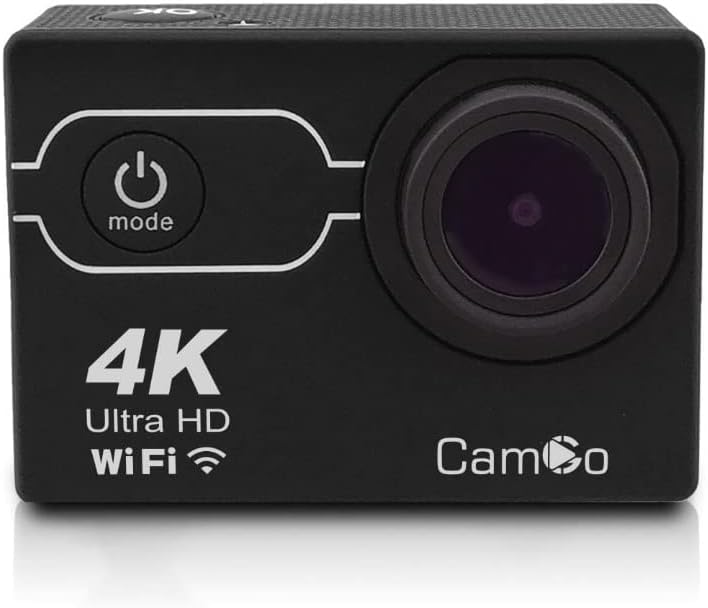
Εικόνα 4.1: Εμπρός view of the CamGo 4K Action Camera. This image shows the camera's lens, power/mode button, and the '4K Ultra HD WiFi' branding on the front panel, indicating its core features.
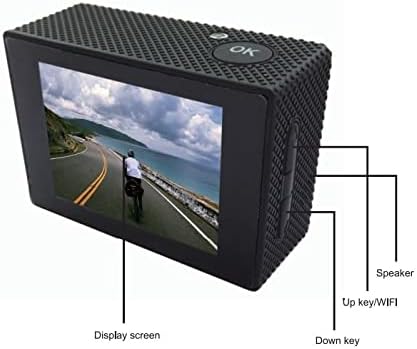
Εικόνα 4.2: Πίσω view of the CamGo 4K Action Camera. This image highlights the display screen, the 'OK' button, and labels for the 'Up key/WiFi' and 'Down key' on the side, along with the speaker, providing a clear guide to the camera's rear controls and display.

Εικόνα 4.3: Πλευρά view diagram of the CamGo 4K Action Camera. This technical drawing illustrates the placement of the Micro SD card slot, USB port, HD OUT port, and MIC input, along with the Up/WiFi and Down buttons and speaker, detailing the camera's connectivity and controls.
4.1. Κουμπιά και Θύρες
- Κουμπί λειτουργίας/λειτουργίας: Located on the front. Press to power on/off, short press to switch modes.
- OK κουμπί: Located on top. Press to confirm selections or start/stop recording.
- Up/WiFi Button: Located on the side. Used for navigation in menus and to activate WiFi.
- Κάτω κουμπί: Located on the side. Used for navigation in menus.
- Υποδοχή κάρτας Micro SD: Για την τοποθέτηση της κάρτας μνήμης.
- Θύρα USB: Για φόρτιση και μεταφορά δεδομένων.
- Θύρα HDMI: Για σύνδεση σε τηλεόραση ή οθόνη.
- Ομιλητής: Για αναπαραγωγή ήχου.
5. Ρύθμιση
5.1. Εγκατάσταση και φόρτιση μπαταρίας
- Ανοίξτε το κάλυμμα της θήκης μπαταριών στο κάτω μέρος της κάμερας.
- Insert the Lithium-Ion battery, ensuring correct polarity.
- Κλείστε καλά το κάλυμμα της θήκης μπαταριών.
- Connect the camera to a power source using the provided USB cable for charging. The charging indicator will illuminate during charging and turn off when fully charged.
5.2. Εγκατάσταση κάρτας MicroSD
A Class 10 or higher MicroSD card (up to 64GB) is required for recording. The card is not included.
- Εντοπίστε την υποδοχή κάρτας MicroSD στο πλάι της κάμερας.
- Τοποθετήστε την κάρτα MicroSD με τις χρυσές επαφές στραμμένες προς το πίσω μέρος της κάμερας μέχρι να ασφαλίσει στη θέση της.
- Για να την αφαιρέσετε, πιέστε απαλά την κάρτα μέχρι να πεταχτεί έξω.
5.3. Χρήση της αδιάβροχης θήκης
The waterproof case allows the camera to be submerged up to 30 meters.
- Βεβαιωθείτε ότι η κάμερα είναι καθαρή και στεγνή πριν την τοποθετήσετε μέσα στη θήκη.
- Carefully place the camera into the waterproof case.
- Close the latch securely. Ensure the rubber seal is clean and free of debris to prevent leaks.
- Before first use, or after any maintenance, it is recommended to test the waterproof case without the camera inside by submerging it in water for a short period to check for leaks.

Εικόνα 5.1: CamGo 4K Action Camera in its waterproof case. This image displays the camera securely housed within its transparent waterproof casing, ready for underwater use, highlighting the protective design.
6. Οδηγίες λειτουργίας
6.1. Ενεργοποίηση/Απενεργοποίηση
- Ενεργοποίηση: Press and hold the Power/Mode button for 3-5 seconds.
- Απενεργοποιώ: Press and hold the Power/Mode button for 3-5 seconds.
6.2. Επιλογή τρόπου
After powering on, short press the Power/Mode button to cycle through the main modes:
- Λειτουργία εγγραφής βίντεο
- Λειτουργία φωτογραφίας
- Λειτουργία αναπαραγωγής
- Μενού ρυθμίσεων
6.3. Εγγραφή βίντεο
- Switch to Video Recording Mode. The video icon will appear on the screen.
- Press the OK button to start recording. A red dot or timer will indicate recording is in progress.
- Πατήστε ξανά το κουμπί OK για να σταματήσετε την εγγραφή.
6.4. Λήψη φωτογραφιών
- Switch to Photo Mode. The camera icon will appear on the screen.
- Πατήστε το κουμπί OK για να τραβήξετε μια φωτογραφία.
6.5. WiFi Connectivity (XDV App)
The camera features built-in WiFi for remote control and file transfer via the XDV app.
- Download the 'XDV' app from your smartphone's app store (available for Android and iOS).
- On the camera, short press the Up/WiFi button to activate WiFi. The WiFi icon will appear on the screen.
- On your smartphone, go to WiFi settings and connect to the camera's WiFi network (e.g., 'CamGo_XXXX'). The default password is usually '1234567890'.
- Open the XDV app to control the camera, view ζήσε ρεtage, and download files.
6.6. Connecting to TV/PC
- Έξοδος HDMI: Connect the camera to a TV or monitor using an HDMI cable (not included) to view photos and videos on a larger screen.
- Σύνδεση USB: Connect the camera to a computer using the USB cable. The camera will appear as a removable disk, allowing you to transfer files.
6.7. Special Recording Modes
Access these modes via the Settings Menu:
- Εγγραφή βρόχου: Εγγράφει βίντεο σε τμήματα, αντικαθιστώντας το παλαιότερο files όταν η κάρτα μνήμης είναι γεμάτη.
- Time Lapse: Captures photos at set intervals to create a time-lapse video.
- Αργή κίνηση: Εγγράφει βίντεο με υψηλότερο ρυθμό καρέ για αναπαραγωγή σε αργή κίνηση.
- Λειτουργία κατάδυσης: Adjusts color balance for underwater shooting to compensate for blue/green hues.
- Λειτουργία αυτοκινήτου: Functions as a dashcam, starting recording automatically when powered on.
7. Συντήρηση
- Καθάρισμα: Χρησιμοποιήστε ένα μαλακό πανί που δεν αφήνει χνούδι για να καθαρίσετε τον φακό της κάμερας και την οθόνη. Για την αδιάβροχη θήκη, ξεπλύνετε με γλυκό νερό μετά τη χρήση με αλμυρό νερό και αφήστε την να στεγνώσει στον αέρα.
- Αποθήκευση: Αποθηκεύστε την κάμερα σε δροσερό, ξηρό μέρος, μακριά από το άμεσο ηλιακό φως. Αφαιρέστε την μπαταρία εάν την αποθηκεύετε για μεγάλο χρονικό διάστημα.
- Φροντίδα μπαταρίας: Fully charge the battery before first use. Avoid completely draining the battery frequently to prolong its lifespan.
8. Αντιμετώπιση Προβλημάτων
| Πρόβλημα | Πιθανή Λύση |
|---|---|
| Η κάμερα δεν ενεργοποιείται. | Ensure the battery is charged and correctly inserted. Try charging the camera. |
| Δεν είναι δυνατή η εγγραφή βίντεο/λήψη φωτογραφιών. | Check if a MicroSD card is inserted and has sufficient free space. Ensure the card is Class 10 or higher. Format the MicroSD card if necessary (this will erase all data). |
| Διαρροή νερού σε αδιάβροχη θήκη. | Ensure the rubber seal is clean and free of debris. Verify the latch is securely closed. Do not use the camera underwater if leaks persist. |
| Προβλήματα σύνδεσης WiFi. | Ensure WiFi is enabled on the camera. Check your smartphone's WiFi settings and reconnect. Verify the correct password. |
| Κακή ποιότητα εικόνας/βίντεο. | Clean the camera lens. Ensure adequate lighting. Check resolution settings in the camera menu. |
9. Προδιαγραφές
| Χαρακτηριστικό | Προσδιορισμός |
|---|---|
| Ανάλυση βίντεο | 4 χιλιάδες (30 καρέ ανά δευτερόλεπτο) |
| Ανάλυση φωτογραφίας | 16MP (Sony 179 CMOS) |
| Φακός | Ευρυγώνια 170° |
| Chipset | Allwinner V3 |
| Αδιάβροχο βάθος | Έως 30 μέτρα (με αδιάβροχη θήκη) |
| Οθόνη προβολής | LCD 2.0 ιντσών |
| Αποθήκευση | Micro SD Card, Class 10 or higher, up to 64GB |
| Συνδεσιμότητα | WiFi (Android & iOS App: XDV), HDMI, USB |
| Μπαταρία | 1 ιόν λιθίου (περιλαμβάνεται) |
| Ειδικά Χαρακτηριστικά | Loop Recording, Diving Mode, Slow Motion, Time-Lapse, Car Mode |
10. Εγγύηση και υποστήριξη
Your CamGo Action Camera is covered by a standard manufacturer's warranty against defects in materials and workmanship. Please refer to the warranty card included in your package for specific terms and conditions. For technical support or warranty claims, please contact your retailer or visit the official CamGo website για βοήθεια.
For further information or to download the XDV app, please visit the CamGo Store on Amazon.