Εισαγωγή
This manual provides detailed instructions for the safe installation, operation, and maintenance of your bimar Wi-Fi Ceiling Fan, Model 1 (Ø 132). Please read this manual thoroughly before using the product and retain it for future reference.
Προβλεπόμενη χρήση: This high-performance ceiling fan is designed for ventilation in indoor domestic environments. Any other use is considered improper and potentially hazardous. The manufacturer cannot be held responsible for any damages resulting from improper use or repairs performed by unqualified personnel.
Σημαντικές οδηγίες ασφαλείας
Για να μειώσετε τον κίνδυνο πυρκαγιάς, ηλεκτροπληξίας ή τραυματισμού ατόμων, τηρήστε τα ακόλουθα:
- Διαβάστε όλες τις οδηγίες πριν εγκαταστήσετε τον ανεμιστήρα.
- Η εγκατάσταση πρέπει να εκτελείται από εξειδικευμένο ηλεκτρολόγο σύμφωνα με όλους τους τοπικούς και εθνικούς ηλεκτρικούς κώδικες.
- Βεβαιωθείτε ότι το σημείο εγκατάστασης μπορεί να αντέξει το βάρος του ανεμιστήρα (περίπου 6.2 kg).
- Πάντα να αποσυνδέετε την παροχή ρεύματος από τον κύριο διακόπτη κυκλώματος πριν από την εγκατάσταση ή τη συντήρηση.
- Μην λειτουργείτε τον ανεμιστήρα με κατεστραμμένο καλώδιο ρεύματος ή φις.
- Keep hands, hair, and clothing away from moving blades.
- Μην εισάγετε αντικείμενα στα πτερύγια του ανεμιστήρα ενώ λειτουργεί.
- Αυτή η συσκευή δεν προορίζεται για χρήση από άτομα (συμπεριλαμβανομένων παιδιών) με μειωμένες σωματικές, αισθητηριακές ή διανοητικές ικανότητες ή έλλειψη εμπειρίας και γνώσης, εκτός εάν τους έχει δοθεί επίβλεψη ή οδηγίες σχετικά με τη χρήση της συσκευής από άτομο υπεύθυνο για την ασφάλειά τους.
- Τα παιδιά θα πρέπει να επιβλέπονται ώστε να διασφαλίζεται ότι δεν παίζουν με τη συσκευή.
Τι υπάρχει στο κουτί
Your bimar Wi-Fi Ceiling Fan package includes the following components:
- bimar Wi-Fi Ceiling Fan unit (with 3 blades)
- Τηλεχειριστήριο
- Εξαρτήματα στερέωσης (βίδες, στηρίγματα κ.λπ.)
- Εγχειρίδιο οδηγιών (αυτό το έγγραφο)

Image: The bimar Wi-Fi Ceiling Fan, featuring three light-colored wooden blades and a brushed metal motor housing and downrod.
Ρύθμιση και εγκατάσταση
1. Εγκατάσταση ανεμιστήρα
Συνιστάται ανεπιφύλακτα η επαγγελματική εγκατάσταση από εξειδικευμένο ηλεκτρολόγο. Ensure the ceiling structure can safely support the fan's weight and that all wiring complies with local electrical codes.
- Προετοιμάστε τη θέση τοποθέτησης: Απενεργοποιήστε την παροχή ρεύματος στον ασφαλειοδιακόπτη. Συνδέστε σταθερά τη βάση στήριξης σε μια δοκό οροφής ή σε ένα κουτί πρίζας με ανεμιστήρα.
- Συναρμολογήστε την ράβδο καθόδου και τον κινητήρα: Συνδέστε την κάτω ράβδο στο περίβλημα του κινητήρα του ανεμιστήρα.
- Κρεμάστε τον ανεμιστήρα: Σηκώστε προσεκτικά το συγκρότημα ανεμιστήρα και κρεμάστε το από τη βάση στήριξης.
- Συνδέστε τον ανεμιστήρα με καλώδιο: Connect the electrical wires (live, neutral, ground) from the ceiling to the fan's wiring, following the wiring diagram provided in the separate installation guide (if applicable).
- Συνδέστε τις λεπίδες: Securely fasten the three blades to the motor housing.
- Ασφαλίστε το κουβούκλιο: Raise the canopy to cover the wiring and mounting bracket, securing it in place.

Εικόνα: Πλευρά view of the bimar ceiling fan, illustrating the angle of the light wood blades and the connection to the downrod.
2. Σύνδεση Wi-Fi και εφαρμογών
The bimar Wi-Fi Ceiling Fan is compatible with the Bimar Live Smart app for advanced control and scheduling.
- Κατεβάστε την εφαρμογή: Αναζήτηση για "Bimar Live Smart" in your smartphone's app store (iOS or Android) and install it.
- Δημιουργία λογαριασμού: Ανοίξτε την εφαρμογή και ακολουθήστε τις οδηγίες στην οθόνη για να δημιουργήσετε έναν νέο λογαριασμό χρήστη ή συνδεθείτε εάν έχετε ήδη έναν.
- Προσθήκη συσκευής: Power on the ceiling fan. In the Bimar Live Smart app, tap "Add Device" or the "+" icon. Select "Ceiling Fan" or the appropriate device type.
- Σύνδεση σε Wi-Fi: Follow the app's instructions to put the fan into pairing mode (usually by pressing a button on the fan or remote for a few seconds). Connect the fan to your home 2.4GHz Wi-Fi network.
- Name the Device: Once connected, you can name your fan for easy identification within the app.

Image: A modern living room featuring the bimar ceiling fan installed, with a smartphone displaying the Bimar Live Smart app interface, indicating Wi-Fi and voice control capabilities.
Οδηγίες Λειτουργίας
Your bimar Wi-Fi Ceiling Fan offers multiple control options for convenience.
1. Λειτουργία τηλεχειριστηρίου
The included remote control allows direct access to all fan functions.
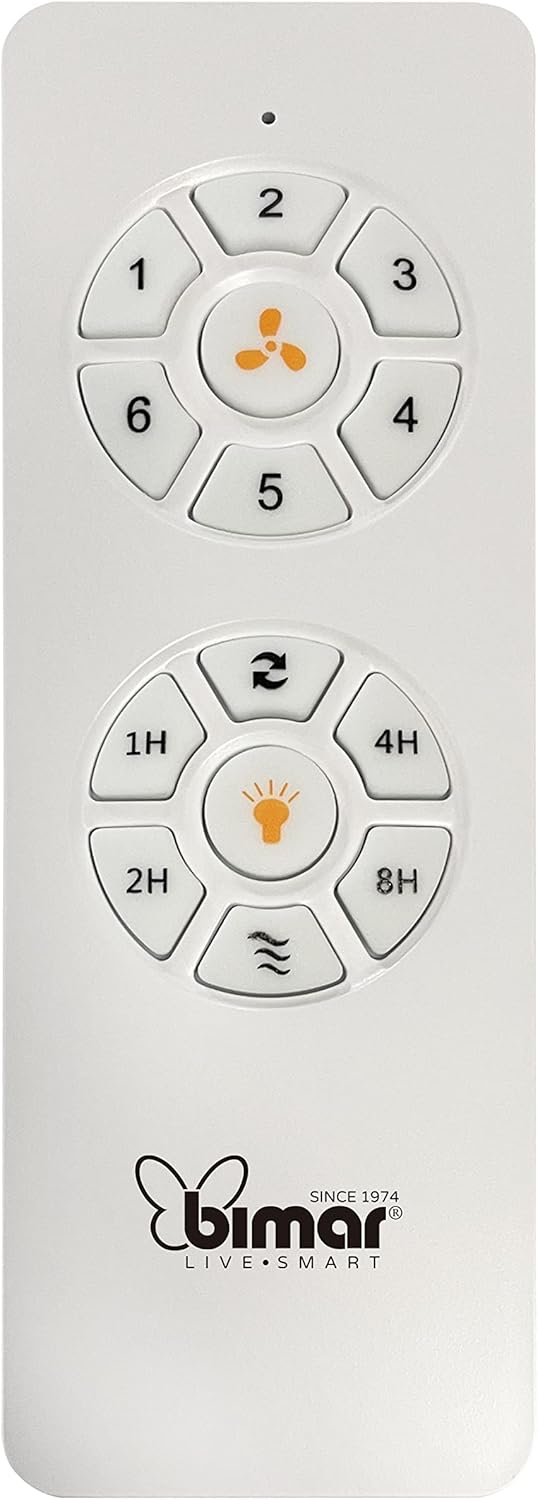
Image: The white remote control for the bimar ceiling fan, showing buttons for fan speed (1-6), fan on/off, timer (1H, 2H, 4H, 8H), mode selection, and reverse function.
- Ενεργοποίηση/Απενεργοποίηση: Πατήστε το κουμπί με το εικονίδιο του ανεμιστήρα για να ενεργοποιήσετε ή να απενεργοποιήσετε τον ανεμιστήρα.
- Ρύθμιση ταχύτητας: Use buttons 1-6 to select one of the six available fan speeds.
- Λειτουργία χρονοδιακόπτη: Press 1H, 2H, 4H, or 8H to set the fan to automatically turn off after the selected duration.
- Επιλογή τρόπου λειτουργίας: Use the mode button (often represented by waves or arrows) to cycle through Normal, Natural, Sleep, and Breeze modes.
- Θερινή/Χειμερινή λειτουργία: The reverse button (often two arrows forming a circle) changes the blade rotation direction.
2. App Control (Bimar Live Smart)
Once connected to the Bimar Live Smart app, you can access enhanced features:
- Απομακρυσμένη λειτουργία: Control all fan functions from anywhere with an internet connection.
- Χρονοδρομολόγηση: Program daily and weekly on/off times for automated operation.
- Μετρών την ώραν: Adjust the timer from 1 to 8 hours.
- Mode and Speed Selection: Easily switch between the 6 speeds and 4 operating modes.
3. Φωνητικός έλεγχος
The bimar Wi-Fi Ceiling Fan is compatible with popular voice assistants like Amazon Alexa and Google Assistant. After connecting the fan to the Bimar Live Smart app, link your Bimar account to your voice assistant app (e.g., Alexa app or Google Home app).
Example Φωνητικές εντολές:
- "Alexa, turn on the ceiling fan."
- "Hey Google, set ceiling fan speed to 3."
- "Alexa, turn off the ceiling fan in 1 hour."
4. Operating Modes and Speeds
- 6 Ventilation Speeds: Adjust the airflow intensity to your preference.
- Κανονική λειτουργία: Συνεπής ροή αέρα στην επιλεγμένη ταχύτητα.
- Φυσική λειτουργία: Προσομοιώνει το φυσικό αεράκι μεταβάλλοντας την ταχύτητα του ανεμιστήρα.
- Κατάσταση ύπνου: Λειτουργεί σε χαμηλότερη, πιο αθόρυβη ταχύτητα για ξεκούραση χωρίς ενοχλήσεις.
- Λειτουργία αερίου: Provides a gentle, intermittent airflow.
5. Summer/Winter Function
The reversible blade function allows for year-round use:
- Θερινή λειτουργία (περιστροφή αριστερόστροφα): Δημιουργεί μια ροή αέρα προς τα κάτω, δημιουργώντας ένα δροσερό αεράκι.
- Χειμερινή λειτουργία (περιστροφή δεξιόστροφα): Creates an upward airflow, circulating warm air trapped near the ceiling, improving heating efficiency.

Image: A diagram illustrating the airflow patterns for summer (indirect ventilation, pushing air upwards) and winter (direct ventilation, pulling air downwards) modes of a ceiling fan.
Συντήρηση
Η τακτική συντήρηση διασφαλίζει τη βέλτιστη απόδοση και τη μακροζωία του ανεμιστήρα οροφής σας.
- Καθάρισμα: Before cleaning, ensure the fan is turned off and power is disconnected at the circuit breaker. Use a soft, damp cloth to wipe down the blades and motor housing. Do not use abrasive cleaners or solvents.
- Επιθεώρηση λεπίδας: Periodically check the blades for any signs of damage or warping. Ensure all blade screws are tight.
- Λίπανση κινητήρα: The fan's DC motor is designed for maintenance-free operation and does not require lubrication.
- Σφίξτε τους συνδετήρες: Over time, some fasteners may become loose. Check and tighten all screws and connections annually.

Εικόνα: Κοντινό πλάνο view of the bimar ceiling fan's brushed metal motor housing and the attachment points for the light wood blades, highlighting areas for cleaning and inspection.
Αντιμετώπιση προβλημάτων
| Πρόβλημα | Πιθανή αιτία | Διάλυμα |
|---|---|---|
| Ο ανεμιστήρας δεν ξεκινά | No power supply; Remote control battery low; Incorrect wiring. | Check circuit breaker and wall switch. Replace remote batteries. Verify wiring connections (consult electrician). |
| Ο ανεμιστήρας ταλαντεύεται | Χαλαρές λεπίδες ή υλικό στήριξης· Μη ισορροπημένες λεπίδες. | Ensure all blade screws and mounting screws are tight. Use a balancing kit (not included) if necessary. |
| Το τηλεχειριστήριο δεν λειτουργεί | Low battery; Obstruction between remote and receiver; Remote not paired. | Replace remote batteries. Ensure clear line of sight. Refer to pairing instructions in the full manual. |
| Ζητήματα σύνδεσης Wi-Fi | Incorrect Wi-Fi password; Router too far; 5GHz network selected. | Verify Wi-Fi password. Move router closer or use a Wi-Fi extender. Ensure you are connecting to a 2.4GHz network. Reset fan and re-attempt pairing. |
| Ο ανεμιστήρας είναι θορυβώδης | Loose screws; Blades hitting an obstruction; Motor issue. | Check and tighten all screws. Ensure nothing is obstructing the blades. If noise persists, contact customer support. |
Προδιαγραφές
| Χαρακτηριστικό | Λεπτομέρεια |
|---|---|
| Μάρκα | bimar |
| Αριθμός μοντέλου | 1 |
| Διαστάσεις προϊόντος | 132 x 132 x 27.5 εκ. (Διάμετρος x Διάμετρος x Ύψος) |
| Βάρος | 6.2 κιλά |
| Αριθμός λεπίδων | 3 |
| Υλικό | Ξύλο |
| Χρώμα | Black (Note: Blades are light wood finish as shown in images) |
| Τύπος κινητήρα | DC (Brushless, energy-saving) |
| Κατανάλωση ρεύματος | 35W |
| Μέθοδοι Ελέγχου | Remote Control, Bimar Live Smart App, Voice Control (Amazon Alexa, Google Assistant) |
| Ταχύτητες ανεμιστήρα | 6 |
| Τρόποι λειτουργίας | Normal, Natural, Sleep, Breeze |
| Μετρών την ώραν | 1 έως 8 ώρες |
| Πρόσθετα χαρακτηριστικά | Silent operation, Summer/Winter mode (reversible blades) |
| Πηγή ισχύος | Ηλεκτρικός |
| Τύπος εγκατάστασης | Βάση οροφής |

Image: The three light wood fan blades, detached and laid flat, showcasinτο σχεδιασμό και την υφή τους.


Εικόνα: Δύο views of the bimar ceiling fan, illustrating different downrod lengths: one with a 25 cm downrod and another with a 13 cm downrod, affecting the overall height of the fan.
Εγγύηση και υποστήριξη
For warranty information, technical support, or service inquiries, please refer to the warranty card included with your product or visit the official bimar webτοποθεσία. Κρατήστε την απόδειξη αγοράς για τυχόν αξιώσεις εγγύησης.
Κατασκευαστής: Bimar S.r.l.
Επαφή: Παρακαλώ επισκεφθείτε the bimar store on Amazon or the official bimar webιστοσελίδα για στοιχεία επικοινωνίας.


