Προϊόν Πάνωview
The typecase Touch Keyboard Case is designed to enhance the functionality and protection of your iPad Air. It features a full-size keyboard with a multi-gesture trackpad, offering a laptop-like experience. The case boasts a 360° rotatable hinge, allowing for multiple viewing angles and usage modes. An adjustable 11-color RGB LED backlight provides comfortable typing in various lighting conditions. Integrated smart features like auto sleep/wake help conserve battery life, and a dedicated holder keeps your Apple Pencil secure.
Βασικά Χαρακτηριστικά:
- Αρμονία: Specifically designed for iPad Air 11-inch (M3 2025 / M2 2024), iPad Air 5th Gen (2022, 10.9"), and iPad Air 4th Gen (2020, 10.9").
- Ενσωματωμένο Trackpad: Supports multi-gesture controls for precise navigation.
- Πληκτρολόγιο με οπίσθιο φωτισμό: 11 adjustable RGB backlight colors with laser-etched keys and a full row of iPadOS shortcuts.
- Versatile Use Modes: 360° rotatable hinge for 7 different viewing modes (Laptop, Stand, Tent, Tablet, Corner, Share, Protect).
- Έξυπνη προστασία: Premium hardshell design protects all sides of your iPad, with auto sleep/wake function.
- Θήκη μολυβιού: Conveniently stores your Apple Pencil.
Περιεχόμενα συσκευασίας
Βεβαιωθείτε ότι όλα τα στοιχεία υπάρχουν στη συσκευασία:
- 1 x typecase Touch Keyboard Case for iPad Air 5th/4th Gen (10.9 inch)
- 1 x Καλώδιο φόρτισης USB-C
- 1 x Εγχειρίδιο χρήστη
Οδηγός εγκατάστασης
1. Charging the Keyboard Case
Before initial use, fully charge the keyboard case. Connect the provided USB-C charging cable to the charging port on the keyboard and to a USB power adapter (not included).
Charging indicator: The LED indicator will show charging status. Refer to the keyboard's specific LED behavior for full charge indication.
2. Inserting Your iPad into the Case
Carefully align your iPad with the protective shell of the keyboard case. Gently press the iPad into place, ensuring all corners are securely seated. The case is designed to protect all sides of your iPad.
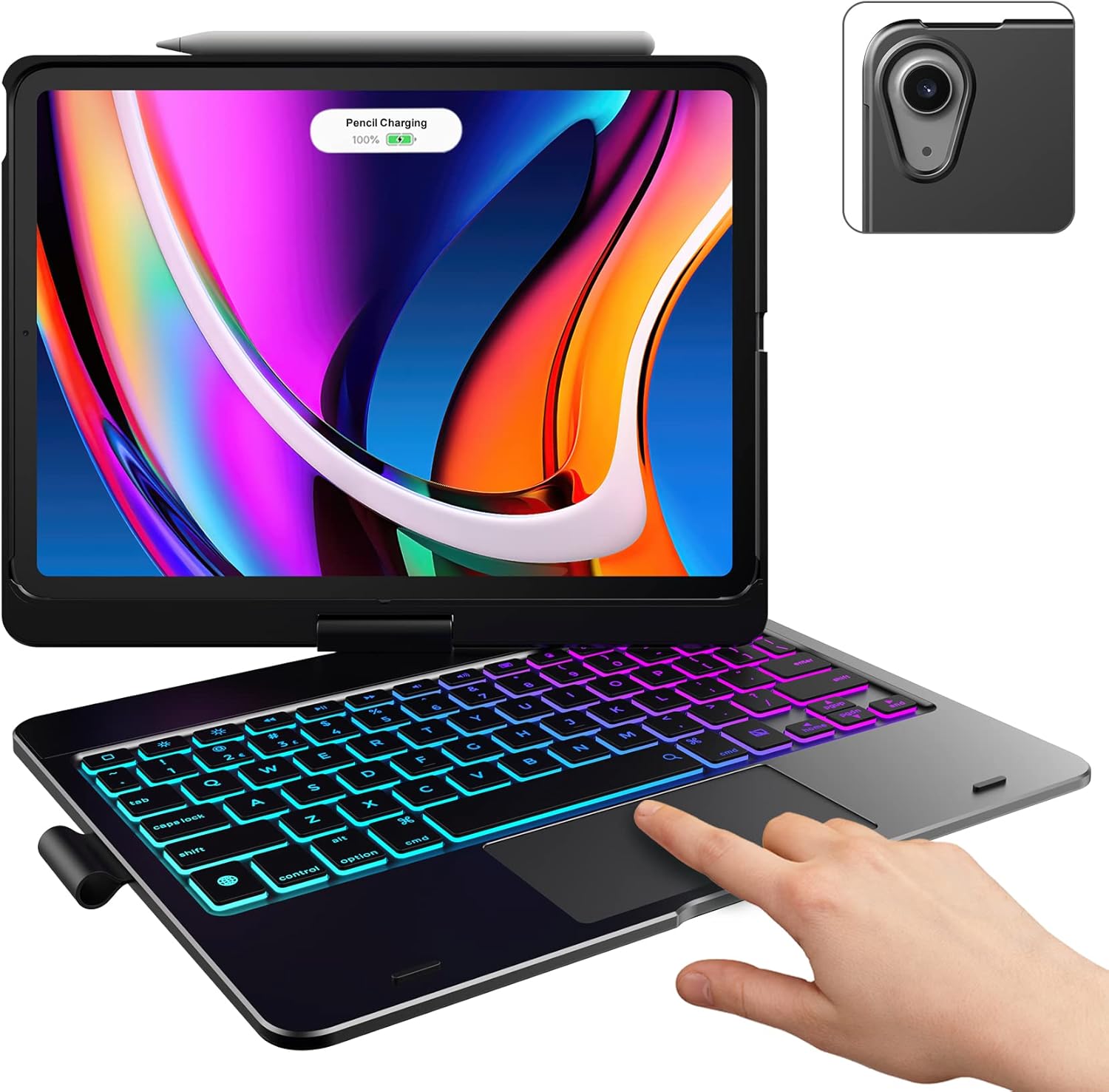
Image: The typecase keyboard case with an iPad securely inserted, ready for use. Note the integrated trackpad and backlit keys.

Image: Visual representation of the 7 versatile modes supported by the 360° rotatable hinge, including Laptop, Stand, and Tablet modes.
3. Pairing with Your iPad (Bluetooth)
- Ενεργοποιήστε το πληκτρολόγιο σύροντας τον διακόπτη λειτουργίας στη θέση ON.
- Πατήστε το Συνδέω button (or a similar Bluetooth pairing button, usually indicated by a Bluetooth icon) on the keyboard. The Bluetooth indicator light will start blinking.
- Στο iPad σας, μεταβείτε στο Ρυθμίσεις > Bluetooth.
- Βεβαιωθείτε ότι το Bluetooth είναι ενεργοποιημένο On.
- Locate "typecase Keyboard" or a similar name in the "Other Devices" list and tap on it to pair.
- Once paired, the Bluetooth indicator light on the keyboard will stop blinking and remain solid, or turn off.
Note: The keyboard will automatically enter sleep mode after a period of inactivity to conserve battery. Press any key to wake it up.
Οδηγίες Λειτουργίας
Λειτουργίες πληκτρολογίου
The keyboard features a standard layout with 78 comfortably spaced keys and a dedicated row of iPadOS shortcut keys.

Εικόνα: Λεπτομερής view of the backlit keyboard, highlighting the iPadOS shortcut keys and the vibrant 11-color RGB backlight.
Πλήκτρα συντόμευσης iPadOS:
| Εικονίδιο κλειδιού | Λειτουργία |
|---|---|
| Σπίτι | Επιστρέφει στην Αρχική οθόνη. |
| Μείωση φωτεινότητας | Μειώνει τη φωτεινότητα της οθόνης. |
| Φωτεινότητα επάνω | Αυξάνει τη φωτεινότητα της οθόνης. |
| Keyboard Hide/Show | Toggles the on-screen keyboard. |
| Αναζήτηση | Activates iPad search. |
| Προηγούμενο κομμάτι | Μετάβαση στο προηγούμενο κομμάτι πολυμέσων. |
| Αναπαραγωγή/Παύση | Αναπαράγει ή διακόπτει προσωρινά τα πολυμέσα. |
| Επόμενο κομμάτι | Μεταβαίνει στο επόμενο κομμάτι πολυμέσων. |
| Βουβός | Σίγαση ή επανενεργοποίηση του ήχου. |
| Μείωση έντασης | Μειώνει την ένταση του ήχου. |
| Ένταση έντασης | Αυξάνει την ένταση του ήχου. |
| Κλείδωμα οθόνης | Κλειδώνει την οθόνη του iPad. |
Χρήση trackpad
The integrated multi-gesture trackpad allows for precise control and navigation of your iPad. Ensure the trackpad is enabled in your iPad's settings if you experience issues.
Συνήθεις χειρονομίες στο trackpad:
- Πάτημα με ένα δάχτυλο: Click/Select.
- Κύλιση με δύο δάχτυλα: Κάντε κύλιση πάνω ή κάτω.
- Τσίμπημα για ζουμ: Μεγέθυνση ή σμίκρυνση περιεχομένου.
- Σάρωση με τρία δάχτυλα προς τα πάνω: Μεταβείτε στην Αρχική οθόνη.
- Σάρωση με τρία δάχτυλα αριστερά/δεξιά: Εναλλαγή μεταξύ ανοιχτών εφαρμογών.
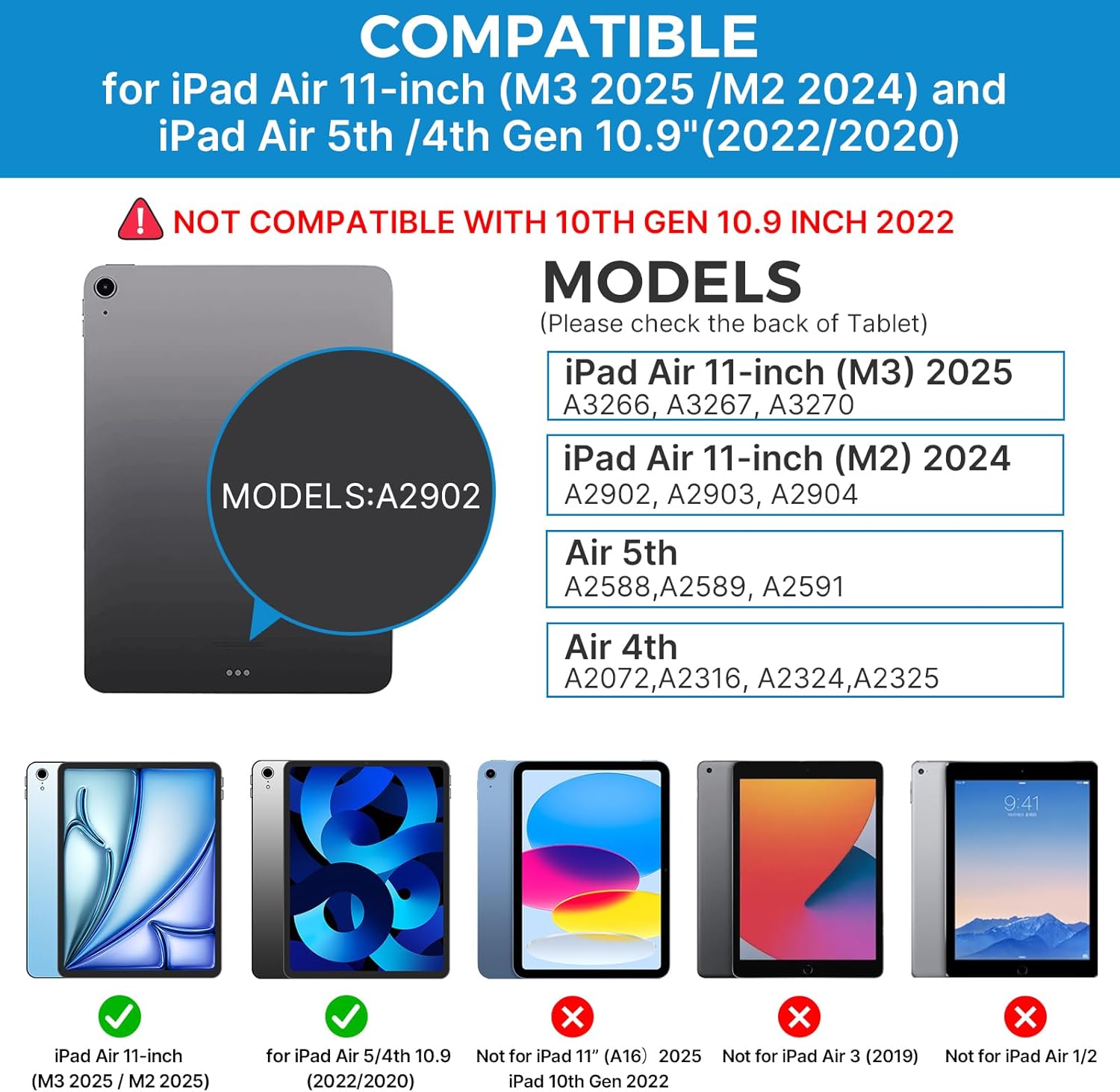
Image: A hand demonstrating the use of the multi-touch trackpad for precise cursor control on the iPad screen.
Ρύθμιση οπίσθιου φωτισμού
The keyboard features 11 adjustable RGB backlight colors and 3 levels of brightness. Use the dedicated backlight keys on the keyboard to cycle through colors and adjust brightness levels.
Video: This video demonstrates the 360-degree rotation feature of the typecase Touch Keyboard Case, showcasing its versatility in different viewτρόποι λειτουργίας.
Video: This video provides a step-by-step guide on how to properly install and remove your iPad from the typecase Touch Keyboard Case, ensuring a secure fit and preventing damage.
Συντήρηση και Φροντίδα
- Καθάρισμα: Χρησιμοποιήστε ένα μαλακό, δamp cloth to clean the exterior of the case and keyboard. Avoid harsh chemicals or abrasive materials.
- Αποθήκευση: When not in use for extended periods, store the keyboard case in a cool, dry place. Ensure the iPad is removed if storing for very long durations.
- Διάρκεια ζωής μπαταρίας: To maximize battery life, turn off the keyboard when not in use. The auto sleep/wake function helps conserve power.
- Αποφύγετε τα υγρά: Do not expose the keyboard case to excessive moisture or liquids.
- Χειριστείτε με προσοχή: While durable, avoid dropping the case or applying excessive force to the hinge or keyboard.
Αντιμετώπιση προβλημάτων
If you encounter any issues with your typecase Touch Keyboard Case, please refer to the following common solutions:
Keyboard Not Connecting/Typing:
- Βεβαιωθείτε ότι το πληκτρολόγιο είναι ενεργοποιημένο και πλήρως φορτισμένο.
- Check your iPad's Bluetooth settings to confirm the keyboard is paired and connected. If not, try re-pairing.
- Επανεκκινήστε τόσο το iPad όσο και το πληκτρολόγιο.
- Βεβαιωθείτε ότι δεν υπάρχουν άλλες συσκευές Bluetooth που να παρεμβαίνουν στη σύνδεση.
Το trackpad δεν αποκρίνεται:
- Βεβαιωθείτε ότι το πληκτρολόγιο είναι συνδεδεμένο μέσω Bluetooth.
- Ελέγξτε τις ρυθμίσεις του iPad: Ρυθμίσεις > Προσιτότητα > Επαφή > AssistiveTouch. Ensure "Mouse Keys" is off if it's causing interference.
- Καθαρίστε την επιφάνεια του trackpad για να αφαιρέσετε τυχόν υπολείμματα.
Ο οπίσθιος φωτισμός δεν λειτουργεί:
- Βεβαιωθείτε ότι το πληκτρολόγιο είναι επαρκώς φορτισμένο.
- Press the backlight adjustment keys to cycle through brightness levels and colors.
iPad Not Entering Sleep/Wake Mode:
- Βεβαιωθείτε ότι το iPad έχει τοποθετηθεί σωστά στη θήκη.
- Ελέγξτε τις ρυθμίσεις του iPad: Ρυθμίσεις > Οθόνη & Φωτεινότητα > Κλείδωμα/Ξεκλείδωμα. Ensure this feature is enabled.
If problems persist, please contact typecase customer support for further assistance.
Προδιαγραφές
| Χαρακτηριστικό | Λεπτομέρεια |
|---|---|
| Μοντέλο | B09WVRD5JD |
| Αρμονία | iPad Air 11-inch (M3 2025 / M2 2024), iPad Air 5th Gen (2022, 10.9"), iPad Air 4th Gen (2020, 10.9") |
| Συνδεσιμότητα | Bluetooth |
| Διάταξη πληκτρολογίου | 78-key standard with iPadOS shortcuts |
| Οπίσθιος φωτισμός | 11 χρώματα RGB, 3 επίπεδα φωτεινότητας |
| Trackpad | Multi-functional, multi-gesture |
| Hinge Rotation | 360° (20,000-cycle stress tested) |
| Πηγή ισχύος | Τροφοδοτείται από μπαταρία (περιλαμβάνεται 1 μπαταρία πολυμερούς λιθίου) |
| Βάρος αντικειμένου | 1.52 λίρες |
| Διαστάσεις προϊόντος (ΜxΠxΥ) | 11.02 x 8.66 x 0.79 ίντσες |
| Υλικό | Premium hardshell design |
Εγγύηση και υποστήριξη
typecase offers a comprehensive warranty and support for your product:
- Υπηρεσία αντικατάστασης 1 ετών: Enjoy worry-free after-sales support with a 1-year replacement service for manufacturing defects.
- Επιστροφή χρημάτων εντός 30 ημερών: Εάν δεν είστε ικανοποιημένοι με την αγορά σας, ενδέχεται να δικαιούστε επιστροφή χρημάτων εντός 30 ημερών από την αγορά.
- Υποστήριξη πελατών: For any questions, technical assistance, or warranty claims, please contact typecase customer service. Refer to the contact information provided in the product packaging or on the official typecase webτοποθεσία.

Εικόνα: Πάνωview of typecase's customer support and warranty policy, including 1-year replacement and 30-day refund.


