1. Εισαγωγή
The Dzees D3K Solar Security Camera is an advanced wireless outdoor surveillance solution designed for comprehensive home security. It features 2K resolution for clear imaging, 360° pan and 90° tilt capabilities for wide coverage, and is powered by an efficient solar panel for continuous operation. Equipped with intelligent AI detection, color night vision, and an IP66 weather-resistant design, the D3K provides reliable monitoring in various environmental conditions.
Βασικά Χαρακτηριστικά:
- 2K PTZ Camera: Supports 355° horizontal and 90° vertical rotation with 4X digital zoom for comprehensive coverage.
- Τροφοδοτούμενο με ηλιακή ενέργεια: High-efficiency solar panel ensures continuous power supply, reducing the need for manual charging.
- Έξυπνη ανίχνευση AI: Accurately distinguishes between individuals, packages, vehicles, and animals, minimizing false alarms.
- Λειτουργίες συναγερμού: Features a loud siren, spotlight, and sound alerts to deter intruders.
- Έγχρωμη νυχτερινή όραση: Παρέχει καθαρό, έγχρωμο βίντεο ακόμα και σε συνθήκες χαμηλού φωτισμού.
- IP66 Ανθεκτικό στις καιρικές συνθήκες: Designed to withstand various weather conditions, ensuring year-round protection.
- Ευέλικτη αποθήκευση: Supports up to 128GB memory card (not included) and offers 2 years of free 3-day loop cloud storage.
2. Περιεχόμενα συσκευασίας
Παρακαλούμε ελέγξτε τα περιεχόμενα της συσκευασίας κατά το άνοιγμα της συσκευασίας για να βεβαιωθείτε ότι υπάρχουν όλα τα εξαρτήματα:
- Dzees Solar Security Camera
- Ηλιακό πάνελ
- Στήριγμα τοποθέτησης
- Βίδες και άγκυρες στερέωσης
- Καλώδιο φόρτισης USB
- Εγχειρίδιο χρήστη (αυτό το έγγραφο)
3. Το προϊόν τελείωσεview
Familiarize yourself with the main components of your Dzees Solar Security Camera:

Figure 3.1: Dzees Solar Security Camera D3K and accompanying solar panel.
- Φακός κάμερας: Καταγράφει βίντεο ανάλυσης 2K.
- Προβολείς: Παρέχετε φωτισμό για έγχρωμη νυχτερινή όραση και αποτροπή.
- Αισθητήρας PIR: Detects motion based on infrared heat signatures.
- Μικρόφωνο: Καταγράφει ήχο για αμφίδρομη επικοινωνία.
- Ομιλητής: Outputs audio for two-way communication and siren.
- Solar Panel Port: Connects the solar panel for continuous charging.
- Κουμπί επαναφοράς: Χρησιμοποιείται για την επαναφορά της κάμερας στις εργοστασιακές ρυθμίσεις.
- Υποδοχή κάρτας Micro SD: Για τοπική αποθήκευση βίντεο (υποστηρίζει έως και 128GB, η κάρτα δεν περιλαμβάνεται).
- Κεραίες: For stable Wi-Fi connectivity.
4. Οδηγός εγκατάστασης
4.1 Αρχική φόρτιση
Before initial use, fully charge the camera using the provided USB cable. Connect the USB cable to the camera's charging port and a standard 5V/2A USB power adapter (not included). A full charge typically takes several hours.
4.2 Εγκατάσταση εφαρμογής
Download and install the "Dzees Home" app on your smartphone or tablet. The app is available on both the Apple App Store and Google Play Store.

Figure 4.1: The Dzees Home app interface, displaying multiple camera feeds and control options.
- Αναζήτηση για "Dzees Home" in your device's app store.
- Κατεβάστε και εγκαταστήστε την εφαρμογή.
- Δημιουργήστε έναν νέο λογαριασμό ή συνδεθείτε εάν έχετε ήδη έναν.
4.3 Σύζευξη κάμερας
Follow these steps to connect your camera to your Wi-Fi network and the Dzees Home app:
- Open the Dzees Home app and tap the "+" icon to add a new device.
- Επιλέξτε το μοντέλο της κάμεράς σας από τη λίστα.
- Power on the camera. The camera will emit a voice prompt indicating it's ready for pairing.
- Ακολουθήστε τις οδηγίες εντός της εφαρμογής για να συνδέσετε την κάμερα στο δίκτυο Wi-Fi 2.4 GHz. Note: This camera only supports 2.4GHz Wi-Fi.
- Σαρώστε τον κωδικό QR που εμφανίζεται στην οθόνη του τηλεφώνου σας με τον φακό της κάμερας.
- Μόλις συνδεθεί, η κάμερα θα επιβεβαιώσει την επιτυχή σύζευξη.

Figure 4.2: Illustration of the solar-powered, wire-free setup, emphasizing 2.4GHz WiFi connectivity and solar charging efficiency.
4.4 Τοποθέτηση της κάμερας
Choose a suitable location for mounting your camera, ensuring it has a clear view of the area you wish to monitor and that the solar panel receives adequate direct sunlight throughout the day.
- Mark the drilling spots using the mounting bracket as a template.
- Ανοίξτε τρύπες και τοποθετήστε αγκύρια τοίχου εάν τοποθετείτε σε τοιχοποιία ή γυψοσανίδα.
- Στερεώστε τη βάση στήριξης στον τοίχο χρησιμοποιώντας τις παρεχόμενες βίδες.
- Συνδέστε την κάμερα στο στήριγμα στήριξης.
- Connect the solar panel cable to the camera's solar panel port. Position the solar panel to maximize sun exposure.
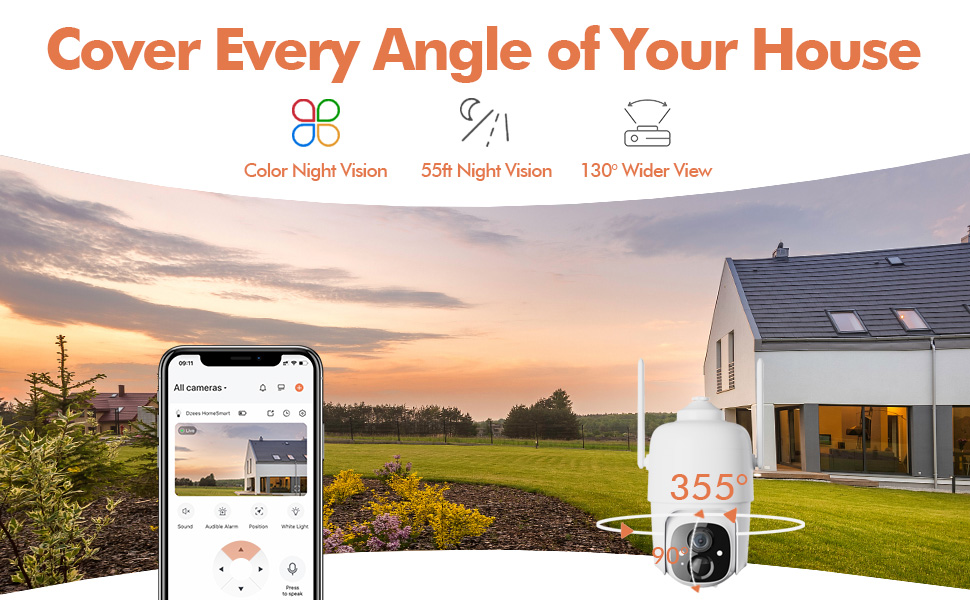
Figure 4.3: The Dzees camera mounted outdoors, showcasing its IP66 weather-resistant design, capable of operating in various weather conditions.

Figure 4.4: The camera's advanced PIR motion detection in action, highlighting its ability to detect movement within a specified zone.
5. Χειρισμός της κάμερας
5.1 Ζωντανά View και αναπαραγωγή
Αποκτήστε πρόσβαση στη ζωντανή ροή βίντεο καιview recorded events through the Dzees Home app.
- From the app's home screen, tap on the camera's thumbnail to enter the live view διεπαφή.
- Use the timeline or event list to navigate and play back recorded footage.

Figure 5.1: The Dzees Home app displaying live camera feed with controls for pan, tilt, digital zoom, and night vision settings.
5.2 Οριζόντια μετατόπιση, κλίση και ζουμ (PTZ)
Ελέγξτε την κάμερα viewing angle directly from the app:
- Σε live view, use the directional controls to pan (355° horizontal) and tilt (90° vertical) the camera.
- Pinch to zoom in or out for 4X digital zoom. Note: This is digital zoom, not optical zoom.
- Set up to 5 preset points for quick navigation to frequently monitored areas.

Figure 5.2: Illustration of setting up and utilizing up to 5 preset positions for rapid camera view προσαρμογή.
5.3 Ανίχνευση κίνησης και ειδοποιήσεις
Customize your detection settings to receive relevant alerts:
- Μεταβείτε στις ρυθμίσεις της κάμερας στην εφαρμογή.
- Enable AI detection to differentiate between people, packages, vehicles, and animals.
- Define custom activity zones to focus detection on specific areas and ignore others.
- Adjust detection sensitivity to reduce unwanted notifications.
- Λάβετε άμεσες ειδοποιήσεις push στο τηλέφωνό σας όταν ανιχνεύεται κίνηση.
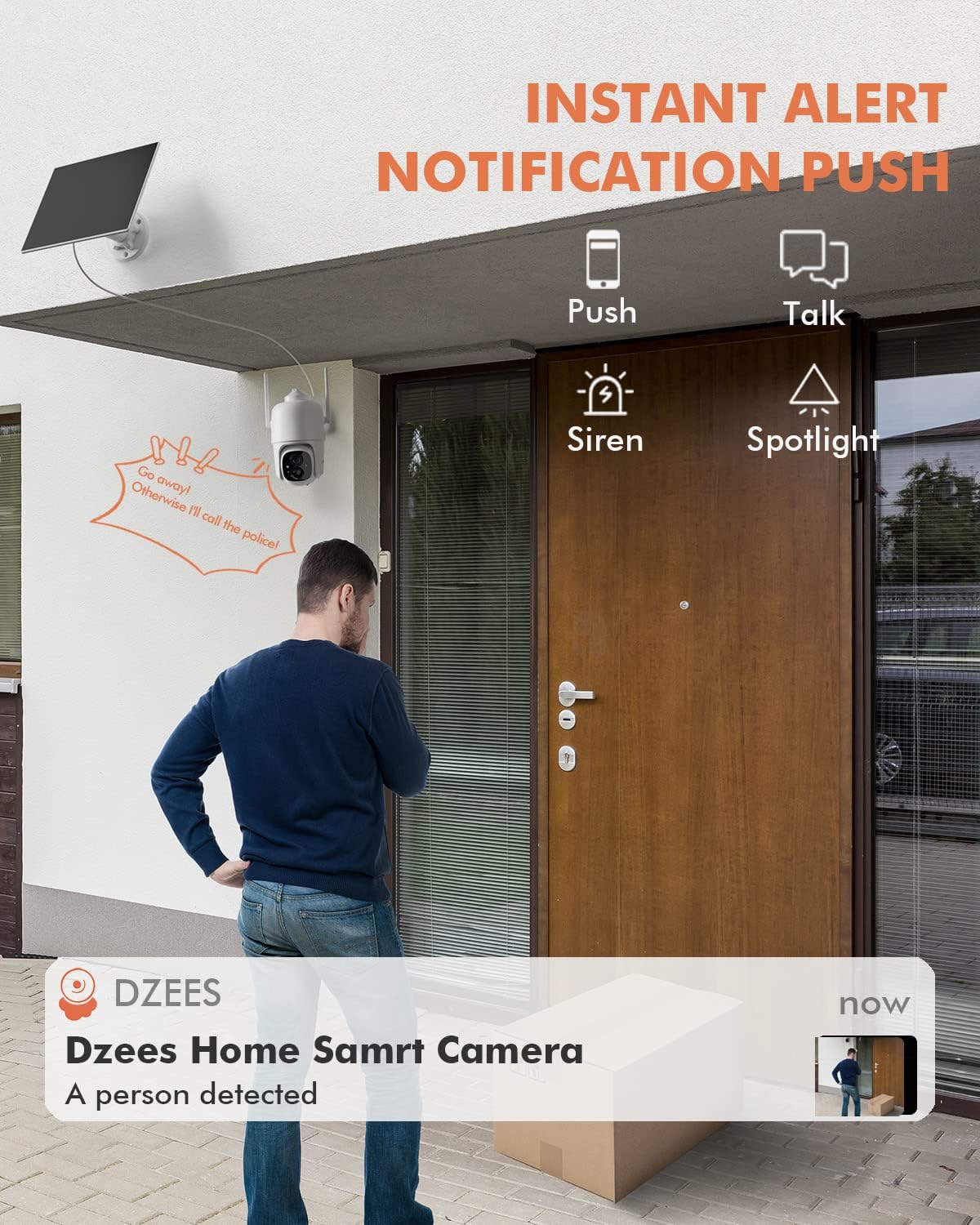
Εικόνα 5.3: Πρample of an instant push notification received on a smartphone when the camera detects a person.
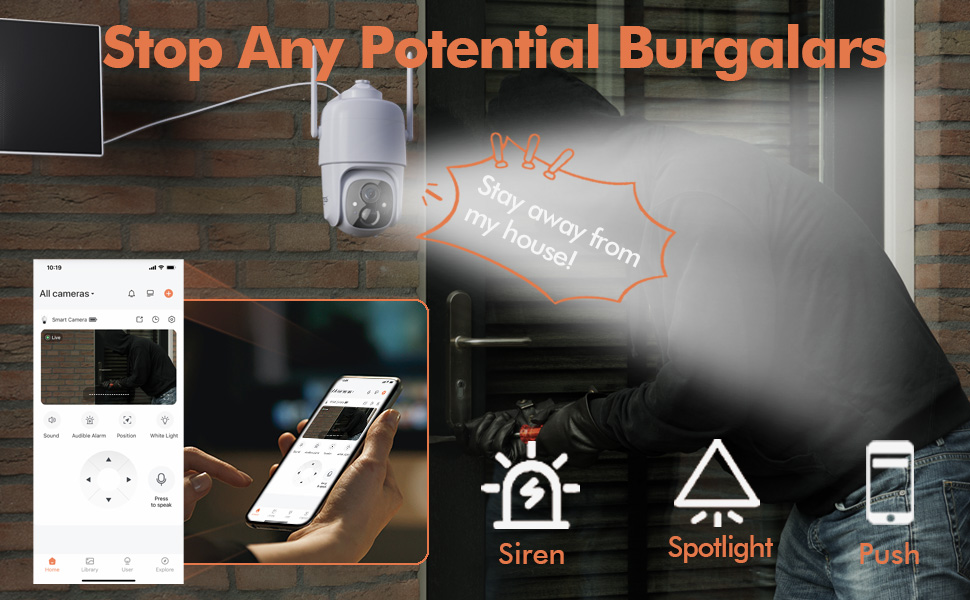
Figure 5.4: Detailed motion detection settings within the Dzees app, allowing for customization of detection zones and sensitivity.
5.4 Αμφίδρομος ήχος
Communicate with visitors or deter intruders using the camera's built-in microphone and speaker:
- Σε live view, πατήστε το εικονίδιο του μικροφώνου για να μιλήσετε μέσω της κάμερας.
- Πατήστε το εικονίδιο του ηχείου για να ακούσετε ήχο από την τοποθεσία της κάμερας.
5.5 Spotlight and Siren
Enhance security with active deterrence features:
- Manually activate the spotlight or siren from the live view interface in the app.
- Configure automatic activation of the spotlight or siren upon motion detection in the camera settings.
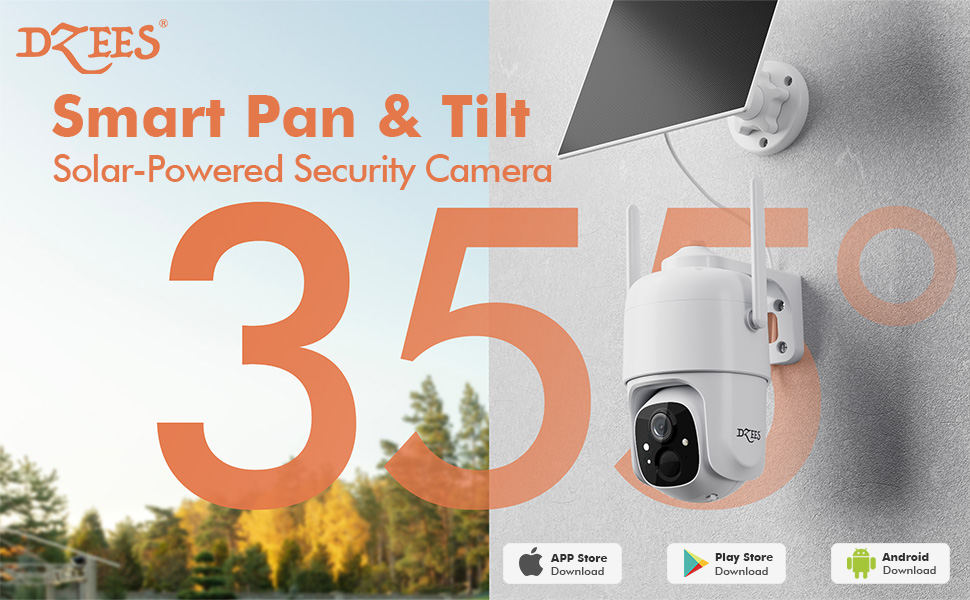
Figure 5.5: The camera's active deterrence features, including siren, spotlight, and instant push notifications, designed to deter potential intruders.
5.6 Επιλογές αποθήκευσης
Your Dzees camera offers flexible storage solutions for your recordings:
- Τοπική αποθήκευση: Insert a Micro SD card (up to 128GB, not included) into the camera's SD card slot for continuous or event-based recording.
- Cloud Storage: Enjoy 2 years of free 3-day loop cloud storage. A 30-day trial of the Plus Plan is available for new users, offering upgraded cloud storage and advanced AI features.

Figure 5.6: The camera's support for both local Micro SD card storage (up to 128GB) and free 3-day cloud storage.
6. Συντήρηση
Regular maintenance ensures the longevity and optimal performance of your Dzees Solar Security Camera:
- Cleaning the Lens and Solar Panel: Σκουπίζετε περιοδικά τον φακό της κάμερας και το ηλιακό πάνελ με ένα μαλακό,amp cloth to remove dust, dirt, or debris. This ensures clear video quality and efficient solar charging.
- Έλεγχος κατάστασης μπαταρίας: Monitor the battery level in the Dzees Home app. Ensure the solar panel is receiving sufficient direct sunlight to maintain charge.
- Ενημερώσεις υλικολογισμικού: The Dzees Home app will notify you of available firmware updates. It is recommended to update the camera's firmware to ensure you have the latest features and security enhancements. Follow the in-app instructions for updating.
7. Αντιμετώπιση Προβλημάτων
If you encounter issues with your Dzees Solar Security Camera, refer to the following common problems and solutions:
7.1 Η κάμερα δεν συνδέεται στο Wi-Fi
- Βεβαιωθείτε ότι το δίκτυο Wi-Fi σας είναι 2.4 GHz. Η κάμερα δεν υποστηρίζει Wi-Fi 5 GHz.
- Check the Wi-Fi signal strength at the camera's location. Move the camera closer to the router if the signal is weak.
- Βεβαιωθείτε ότι έχετε εισαγάγει τον σωστό κωδικό πρόσβασης Wi-Fi.
- Try resetting the camera by pressing and holding the reset button for 5 seconds until you hear a prompt. Then, attempt pairing again.
7.2 Η μπαταρία δεν φορτίζει ή δεν αποφορτίζεται γρήγορα
- Ensure the solar panel is connected securely to the camera.
- Verify that the solar panel is positioned to receive direct sunlight for several hours daily, without any obstructions (e.g., trees, eaves).
- Clean the surface of the solar panel regularly to remove dirt or dust that may hinder charging efficiency.
- In prolonged cloudy or rainy weather, the battery may drain. Consider temporarily charging the camera via USB if needed.
7.3 Υπερβολικοί ψευδείς συναγερμοί
- Adjust the motion detection sensitivity in the Dzees Home app to a lower setting.
- Utilize the activity zone feature to exclude areas with frequent irrelevant motion (e.g., busy streets, swaying trees).
- Enable AI detection to filter out non-human movements.
7.4 Κακή ποιότητα εικόνας
- Καθαρίστε το φακό της κάμερας με ένα μαλακό πανί που δεν αφήνει χνούδι.
- Ensure a strong Wi-Fi connection for optimal streaming quality.
- Check for any physical obstructions in front of the lens.
7.5 No Night Vision
- Verify that night vision mode is enabled in the Dzees Home app settings.
- Ensure the camera's spotlights are not obstructed.
If the issue persists after trying these solutions, please contact Dzees customer support for further assistance.
8. Τεχνικές Προδιαγραφές
| Χαρακτηριστικό | Προσδιορισμός |
|---|---|
| Αριθμός μοντέλου | D3K |
| Ανάλυση βίντεο | 2K / 3MP |
| Παν γωνία | 355° |
| Γωνία κλίσης | 90° |
| Digital Zoom | 4X |
| Εύρος νυχτερινής όρασης | Up to 55 feet (Color Night Vision supported) |
| Αντοχή στις καιρικές συνθήκες | IP66 |
| Πηγή ισχύος | Solar Powered (with built-in rechargeable battery) |
| Συνδεσιμότητα | Wi-Fi 2.4 GHz, Bluetooth |
| Τοπική αποθήκευση | Κάρτα Micro SD (έως 128GB, δεν περιλαμβάνεται) |
| Cloud Storage | Free 3-day loop storage (2 years included) |
| Διαστάσεις (Μ x Π x Υ) | 5.8 x 7 x 8 ίντσες |
| Βάρος | 1.06 λίβρες (480 γραμμάρια) |
| Υλικό | Ακρυλονιτρίλιο βουταδιένιο στυρένιο (ABS) |
9. Εγγύηση και υποστήριξη
Dzees is committed to providing high-quality products and excellent customer service.
- Εγγύηση: Your Dzees Solar Security Camera comes with 2 years of after-sales support, ensuring peace of mind.
- Τεχνική Υποστήριξη: An experienced technical team is available for 24/7 lifetime support. For any inquiries or assistance, please contact Dzees customer service.
- Διαδικτυακοί πόροι: Visit the official Dzees Store for more product information, FAQs, and support resources: Dzees Store on Amazon.


