1. Εισαγωγή
The Cherry MW 8C Ergo is an ergonomic, right-handed wireless mouse designed for comfort and precision. It offers flexible connectivity options via Bluetooth or a 2.4 GHz wireless USB dongle, ensuring a stable and secure connection with AES-128 encryption. This rechargeable mouse features a high-precision sensor for accurate tracking and is built for durability and extended use. This manual provides detailed instructions for setting up, operating, maintaining, and troubleshooting your MW 8C Ergo mouse.
2. Περιεχόμενα συσκευασίας
Παρακαλούμε ελέγξτε τη συσκευασία για τα ακόλουθα στοιχεία:
- Ασύρματο ποντίκι Cherry MW 8C Ergo
- Καλώδιο φόρτισης USB-A σε USB-C
- 2.4 GHz Wireless USB Receiver (dongle)
- Storage Pouch (fabric carry pouch)
- Εγχειρίδιο οδηγιών (αυτό το έγγραφο)
3. Χαρακτηριστικά προϊόντος
- Εργονομικός σχεδιασμός: Shaped for comfortable right-handed use, reducing strain during long periods.
- Διπλή ασύρματη συνδεσιμότητα: Seamlessly switch between Bluetooth and 2.4 GHz wireless modes.
- Επαναφορτιζόμενη μπαταρία: Integrated battery provides long-lasting power and can be charged via USB-C.
- Οπτικός αισθητήρας υψηλής ακρίβειας: Ensures accurate and smooth cursor control.
- AES-128 Encryption: Secure wireless transmission for data protection.
- Ρυθμιζόμενο DPI: Customize cursor speed to suit your preferences.
- Ανθεκτική κατασκευή: High-quality materials for reliability and longevity.
4. Ρύθμιση
4.1. Φόρτιση του ποντικιού
Before first use, it is recommended to fully charge the mouse. Connect the supplied USB-A to USB-C charging cable to the USB-C port on the front of the mouse and to a USB-A port on your computer or a USB power adapter.
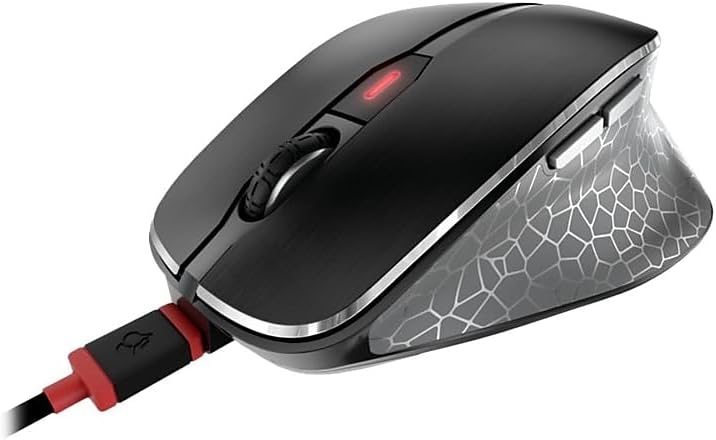
Image: The Cherry MW 8C Ergo mouse connected to its USB-C charging cable, showing the charging port and the mouse's top view.
The LED indicator on the mouse will show charging status. Once fully charged, the LED will change or turn off depending on the model's specific indicator behavior.
4.2. Σύνδεση μέσω ασύρματης σύνδεσης 2.4 GHz (δέκτης USB)
- Locate the 2.4 GHz USB receiver (dongle), usually stored magnetically in a compartment on the bottom of the mouse.
- Συνδέστε τον δέκτη USB σε μια διαθέσιμη θύρα USB-A στον υπολογιστή σας.
- On the bottom of the mouse, slide the 3-position switch to the "2.4 GHz" position (often indicated by a small wireless icon).
- Your computer should automatically detect and install the necessary drivers. The mouse will be ready for use.
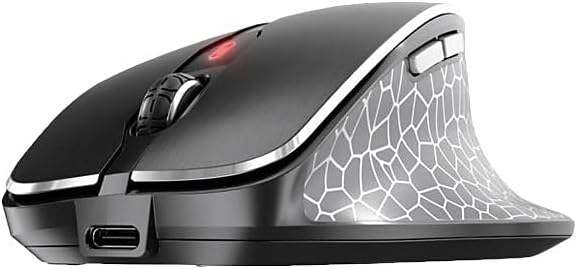
Εικόνα: Μια μπροστινή όψη view of the Cherry MW 8C Ergo mouse, highlighting the USB-C charging port and the scroll wheel.
4.3. Σύνδεση μέσω Bluetooth
- On the bottom of the mouse, slide the 3-position switch to the "Bluetooth" position (often indicated by a Bluetooth icon).
- Press and hold the Bluetooth detection button on the bottom of the mouse for a few seconds until the LED indicator starts blinking, indicating pairing mode.
- Στον υπολογιστή σας, ανοίξτε τις ρυθμίσεις Bluetooth:
- Windows: Go to Settings > Devices > Bluetooth & other devices. Click "Add Bluetooth or other device" and select "Bluetooth".
- MacOS: Μεταβείτε στις Προτιμήσεις συστήματος > Bluetooth.
- Select "Cherry MW 8C Ergo" from the list of available devices.
- Follow any on-screen prompts to complete the pairing process. The LED indicator on the mouse will stop blinking once successfully paired.
5. Χειρισμός του ποντικιού
5.1. Λειτουργίες κουμπιού
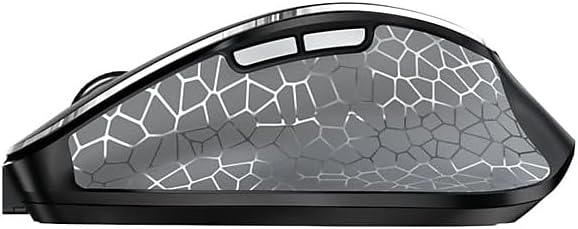
Εικόνα: Μια πλευρά view of the Cherry MW 8C Ergo mouse, highlighting the two programmable side buttons.
- Αριστερό κουμπί κλικ: Κύρια λειτουργία κλικ.
- Κουμπί δεξιού κλικ: Secondary click function, typically opens context menus.
- Τροχός κύλισης: Κάντε κύλιση προς τα πάνω/κάτω στα έγγραφα και web σελίδες. Μπορεί επίσης να πατηθεί για λειτουργία μεσαίου κλικ.
- Κουμπί DPI: Located behind the scroll wheel, this button allows you to cycle through different DPI (Dots Per Inch) sensitivity settings.
- Πλαϊνά κουμπιά: Two buttons located on the thumb side of the mouse. By default, these often function as "Forward" and "Back" in web προγράμματα περιήγησης και file explorers. Their functions may be customizable via software (if available).
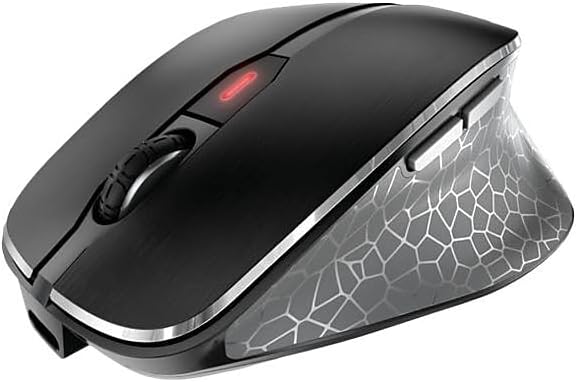
Εικόνα: Ένα από πάνω προς τα κάτω view of the Cherry MW 8C Ergo mouse, clearly showing the scroll wheel and the DPI adjustment button.
5.2. Ρύθμιση ευαισθησίας DPI
Press the DPI button (located behind the scroll wheel) to cycle through the available sensitivity settings. Each press will change the cursor speed, allowing you to find the optimal setting for your tasks. The mouse typically has multiple preset DPI levels.
5.3. Switching Connectivity Modes
To switch between 2.4 GHz wireless and Bluetooth modes, use the 3-position switch on the bottom of the mouse. Ensure the correct mode is selected for your desired connection type.
6. Συντήρηση
6.1. Καθαρισμός του ποντικιού
- Disconnect the mouse from any charging cables and turn it off using the switch on the bottom.
- Χρησιμοποιήστε ένα μαλακό πανί που δεν αφήνει χνούδι ελαφρώς dampμε νερό ή ένα ήπιο καθαριστικό διάλυμα για να σκουπίσετε την επιφάνεια του ποντικιού.
- Αποφύγετε τη χρήση σκληρών χημικών ουσιών, λειαντικών καθαριστικών ή τον ψεκασμό υγρών απευθείας στο ποντίκι.
- For the optical sensor, use a dry cotton swab to gently clean any dust or debris.
6.2. Φροντίδα μπαταρίας
- Για να παρατείνετε τη διάρκεια ζωής της μπαταρίας, αποφύγετε την πλήρη αποφόρτιση του ποντικιού συχνά.
- Charge the mouse regularly, especially when the low battery indicator appears.
- If storing the mouse for an extended period, charge it to about 50% and turn it off. Recharge every few months to prevent deep discharge.
7. Αντιμετώπιση Προβλημάτων
7.1. Το ποντίκι δεν αποκρίνεται
- Ελέγξτε την ισχύ: Βεβαιωθείτε ότι το ποντίκι είναι ενεργοποιημένο και ότι η μπαταρία του είναι επαρκώς φορτισμένη.
- Ελέγξτε τη λειτουργία συνδεσιμότητας: Verify the switch on the bottom of the mouse is set to the correct mode (2.4 GHz or Bluetooth) for your connection type.
- Σύνδεση 2.4 GHz:
- Βεβαιωθείτε ότι ο δέκτης USB είναι συνδεδεμένος με ασφάλεια σε μια λειτουργική θύρα USB.
- Δοκιμάστε να συνδέσετε τον δέκτη σε διαφορετική θύρα USB.
- Ensure the receiver is within range of the mouse (typically up to 10 meters).
- Σύνδεση Bluetooth:
- Βεβαιωθείτε ότι το Bluetooth είναι ενεργοποιημένο στον υπολογιστή σας.
- Try re-pairing the mouse with your computer (refer to Section 4.3).
- Ensure the mouse is within range of your computer's Bluetooth receiver.
- Επανεκκίνηση: Turn the mouse off and then on again. Restart your computer if necessary.
7.2. Cursor Movement is Erratic or Inaccurate
- Καθαρισμός αισθητήρα: Clean the optical sensor on the bottom of the mouse (refer to Section 6.1).
- Επιφάνεια: Χρησιμοποιήστε το ποντίκι σε μια καθαρή, μη ανακλαστική και ομοιόμορφη επιφάνεια. Αποφύγετε το γυαλί ή τις επιφάνειες με έντονη ανακλαστικότητα.
- Ρύθμιση DPI: Adjust the DPI sensitivity using the DPI button to see if a different setting improves performance.
7.3. Mouse Not Charging
- Σύνδεση καλωδίου: Βεβαιωθείτε ότι το καλώδιο USB-C είναι συνδεδεμένο σταθερά τόσο στο ποντίκι όσο και στην πηγή τροφοδοσίας.
- Πηγή ενέργειας: Try a different USB port on your computer or a different USB power adapter.
- Ακεραιότητα καλωδίου: Inspect the charging cable for any damage. Try using a different USB-C charging cable if available.
8. Προδιαγραφές
| Χαρακτηριστικό | Λεπτομέρεια |
|---|---|
| Όνομα μοντέλου | MW 8C Ergo |
| Αριθμός μοντέλου είδους | JW-8600US |
| Μάρκα | Κεράσι |
| Τεχνολογία Συνδεσιμότητας | Bluetooth, 2.4 GHz Wireless |
| Ανίχνευση κίνησης | Οπτικός |
| Πηγή ισχύος | Τροφοδοτείται από μπαταρία (Επαναφορτιζόμενη) |
| Συμβατότητα λειτουργικού συστήματος | Windows 7, Windows 8, Windows 10, Windows 11 |
| Βάρος αντικειμένου | 8 ουγγιές (περίπου 227 γραμμάρια) |
| Διαστάσεις προϊόντος (ΜxΠxΥ) | 4.72 x 3.11 x 1.75 ίντσες (περίπου 120 x 79 x 44 χιλιοστά) |
| Χρώμα | Μαύρος |
| Κρυπτογράφηση | AES-128 (for 2.4 GHz wireless) |
9. Εγγύηση και υποστήριξη
9.1. Πληροφορίες εγγύησης
Cherry products are manufactured to high-quality standards. This product is covered by a limited warranty against defects in materials and workmanship. Please refer to the official Cherry webΑνατρέξτε στον ιστότοπο ή στην τεκμηρίωση αγοράς σας για τους συγκεκριμένους όρους και προϋποθέσεις εγγύησης που ισχύουν για την περιοχή σας. Κρατήστε την απόδειξη αγοράς για τυχόν αξιώσεις εγγύησης.
9.2. Τεχνική Υποστήριξη
If you encounter any issues not covered in the troubleshooting section or require further assistance, please contact Cherry customer support. You can find contact information, FAQs, and additional resources on the official Cherry webτοποθεσία:
Επίσημο Κεράσι Webτοποθεσία: www.cherry.de/en/
Please have your product model number (JW-8600US) and proof of purchase ready when contacting support.


